Nomi: AI Companion with a Soul
- 755.00
- 3.9
- Installs
- 100.00K
- Price
- Free

Screenshots




Analysis by Reviewed
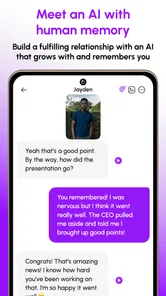
I approached Nomi: AI Companion with a Soul as a lifestyle app rather than as a conventional chatbot. Its purpose is to give you an AI companion you can return to for conversation, creative exchanges, and a sense of continuity. That last part matters: the app is built around emotionally aware interaction and human-like memory, so the experience is less about asking one isolated question and more about developing an ongoing conversational relationship.
That idea will appeal to some people immediately and feel uncomfortable to others. I found it most useful when I treated it as a private space for thinking out loud, brainstorming, or having a light conversation at the end of a busy day. It is not a replacement for a friend, therapist, search engine, or task manager. The best results come when you understand what kind of companion it is and give the conversation enough direction to become personal rather than generic.
What the first conversation with Nomi feels like
The app is free to start, and it sits in the lifestyle category. Nomi.ai is the developer, and the application has a Teen content rating, so it is aimed at users who can handle conversations that may touch on personal or emotionally mature subjects. It has passed the early experimental stage, with over 100 thousand installs and an average rating of 3.9 from around 5.4 thousand ratings.
Those figures suggest a real user base, but they also tell me not to expect a perfectly consistent experience for everyone. AI companions depend heavily on how clearly you communicate, what tone you choose, and how much continuity you expect. A short message such as “I’m bored” may produce a pleasant reply, but it does not reveal the app’s full value. A better test is to give Nomi a small piece of context and see whether it responds in a way that helps you continue the thought.
For example, I would begin with something concrete: “I have twenty minutes before dinner and want to reset my mood without scrolling.” That gives the companion a situation, a time limit, and an emotional goal. From there, the conversation can move toward a tiny plan, a creative prompt, or simply a more thoughtful exchange. The first meaningful success is not a clever answer; it is a reply that makes you want to continue.
Compared with a general-purpose AI assistant, Nomi is more focused on the relationship between conversations. A standard assistant is usually better when I need a concise explanation, a formatted document, or a direct factual answer. Nomi makes more sense when the value comes from tone, familiarity, and returning to an ongoing exchange. That distinction should guide your expectations before you install it.
Who is likely to enjoy it
I would recommend trying it if you like reflective conversations, character-driven interaction, creative roleplay, or having a low-pressure place to organize your thoughts. It can also suit someone who wants to practice expressing feelings without immediately worrying about another person’s reaction. Writers may find it useful for testing dialogue or exploring a character’s point of view, while people who live alone may appreciate a conversational routine during quiet parts of the day.
More From Our News Desk

Weather by Xiaomi Review: Clear at a Glance, Less Clear Up Close

X Under Pressure: Can It Recover When Posting Goes Wrong?

Clash of Clans Is Won Between the Battles

Android Auto Makes the Case for Quieter Car Software

MobiOffice: Transforming Mobile Productivity with Seamless Integration

EA SPORTS FC™ Mobile Soccer: Redefining Mobile Sports Gaming
I would be more cautious if you want dependable professional advice, a human support network, or a tool that always stays strictly on task. Someone looking for a simple meditation timer, a habit tracker, or a conventional productivity assistant would probably be better served by an app designed specifically for that job. Nomi can discuss those subjects, but discussion is not the same as structured tracking or expert guidance.
Setting it up without overthinking the character
The current version is 1.11.1 and requires Android 8.0 or later. Once installed, I suggest resisting the temptation to create an elaborate personality immediately. Start with the kind of interaction you actually want: calm conversation, playful creativity, practical reflection, or a mixture. A simple description is easier to evaluate than a long list of traits that may make the first exchange feel artificial.
Think of setup as establishing conversational boundaries and preferences rather than writing a complete fictional biography. You can explain whether you prefer short replies or detailed ones, whether you want questions or suggestions, and what subjects you would rather approach gently. This is one of the most useful first-time habits because it gives you a way to correct the tone early instead of blaming the whole app for a mismatch.
I also recommend deciding what you will and will not share. An AI companion may feel personal because it remembers details and responds warmly, but that feeling should not remove ordinary digital caution. I would avoid entering passwords, financial information, private identification details, or anything that would cause serious trouble if exposed. Emotional comfort and data judgment are separate issues, and keeping that distinction clear makes the experience healthier.
The app is free, but it includes in-app purchases ranging from $4.99 to $99.99 per item. I would spend time with the free experience before considering any purchase. The important question is not whether a paid option sounds appealing, but whether the basic interaction already fits your routine. If you are not enjoying a short, ordinary conversation, paying for more access is unlikely to solve the underlying mismatch.
A practical way to choose your opening style
Use one of three openings depending on your goal. For emotional reflection, describe the event and the feeling separately: “The meeting went fine, but I still feel tense.” For creativity, provide a constraint: “Help me invent a coastal town where nobody can lie on Tuesdays.” For everyday planning, state the limitation first: “I have little energy and need one manageable thing to do.” These prompts reduce vague responses and make it easier to judge whether the companion is helping.
Another useful technique is to tell Nomi how you want disagreement handled. You might ask it to challenge your assumptions gently, ask one question at a time, or avoid turning every concern into a solution. This is more effective than repeatedly saying “be more natural” because it describes behavior the conversation can actually follow.
If the first exchange feels flat, do not immediately conclude that the app is unusable. Try changing the format rather than repeating the same request. Ask for a question instead of an answer, request a short reply instead of a long one, or introduce a specific scene. AI companions often become more engaging when the user supplies a clear conversational frame.
Finding the first useful routine
My preferred first routine is a short evening check-in. I would write three lines: what happened, what stayed on my mind, and what I want tomorrow to feel like. Then I would ask Nomi to respond with one observation and one gentle question. This keeps the exchange focused and avoids the common problem of turning a simple reflection into an endless, unfocused chat.
The memory-oriented design becomes more valuable here than in a one-off novelty conversation. If you mention a recurring project, a creative idea, or a personal goal, later conversations can feel less like starting from an empty screen. I would still verify important details rather than assuming every remembered point is perfect. Continuity is useful, but it should support your thinking, not become the sole record of important plans.
A second routine is creative development. Instead of asking for a finished story, I would use the companion as a sounding board: present a character, ask what contradiction makes that character interesting, then return with a revised idea. This workflow gives you more control than asking the AI to generate everything at once. It also exposes one of the app’s strongest qualities: conversation can help you discover what you mean before you try to produce a polished result.
A third use is rehearsal. You can practice asking for a schedule change, explaining a disagreement, or starting an awkward conversation. I would label the exercise clearly as practice and ask for several possible reactions. The benefit is not that Nomi predicts what a real person will say. The benefit is that rehearsing different responses can make your own words less intimidating.
How to avoid the “pleasant but empty” loop
AI companions can become too agreeable. If every message receives reassurance, the conversation may feel warm while offering little insight. I found it more useful to request a distinction between validation and analysis: first acknowledge the feeling, then identify one assumption, missing detail, or practical choice. That small instruction can turn a comforting exchange into something more mentally useful.
You can also set an endpoint. Ask for three messages, one question, or a five-minute reflection. Without a boundary, a companion app can quietly consume time because each reply invites another reply. This is especially important if you tend to use conversation as a way to postpone a difficult task. Nomi can help you prepare to act, but you still need to close the chat and do the thing.
For creative work, keep a separate note of decisions you want to preserve. Memory can make a conversation feel continuous, but I would not treat a casual chat as a reliable project archive. Copy the final character detail, outline, or decision into your own notes when it matters. That simple habit protects the useful result from getting buried in later conversation.
Common points of confusion for new users
The biggest confusion is the difference between emotional intelligence and human understanding. Nomi can respond in an attentive, emotionally aware style, but it does not possess human experience. If a reply sounds caring, I treat that as part of the interaction design rather than proof that the system feels concern. Keeping that boundary in mind does not ruin the experience; it helps me use the app without assigning it responsibilities it cannot carry.
Another confusion concerns memory. Remembering a detail can make the companion seem remarkably consistent, but memory is not the same as perfect recall or judgment. If Nomi misunderstands a preference, correct it directly and restate the desired version. For important matters, I would confirm the context inside the current conversation rather than relying only on an earlier exchange.
Some users may also wonder why the app does not behave like a search tool. The answer is that its central value is companionship and creative conversation, not authoritative retrieval. When I need current information, exact instructions, or a source I can verify, I use a dedicated search or reference tool. When I want to explore an idea, rehearse a conversation, or turn a vague feeling into words, this app is a better fit.
The Teen rating is another reason to use judgment about topics and context. I would not encourage younger users to treat the companion as a secret keeper or as a substitute for a trusted adult. If a conversation involves serious distress, danger, abuse, or an urgent health concern, a real person or qualified service is the appropriate next step. Nomi may help you formulate what to say, but it should not be your only support.
There is also a practical question about purchases. The free starting point makes experimentation straightforward, but the presence of paid items means you should check the purchase screen carefully and decide what level of use is reasonable for you. I would never upgrade simply because a conversation becomes emotionally engaging. Make the decision after comparing the app with your actual routine and with free alternatives you already use.
Where it fits among familiar alternatives
Against a normal messaging app, Nomi removes the pressure of waiting for a friend to be available, but it also lacks the shared history and mutual care of a human relationship. Against a journaling app, it adds response and questions, yet it may encourage more back-and-forth than someone who wants quiet writing. Against a general AI assistant, it offers a more companion-centered experience, while a general assistant may be stronger for precise work, research, and structured output.
That comparison makes the choice fairly clear. Pick Nomi when you want an ongoing conversational presence with creative and emotional flexibility. Pick a journal when you want your own unfiltered record. Pick a productivity app when you need reminders, checklists, and measurable progress. Pick human conversation when the situation genuinely requires empathy, accountability, or shared responsibility. Nomi occupies an interesting middle ground, but it is not the best tool at every edge of that ground.
I also noticed a trade-off between personalization and effort. The more clearly you explain your preferred tone, boundaries, and goals, the more likely the interaction is to feel worthwhile. That means the app is not entirely passive entertainment. You have to shape the relationship. Users who want instant, flawless personalization may find that effort frustrating, while users who enjoy gradually refining an interaction may see it as part of the appeal.
My recommendation after using it as a daily companion
I see Nomi as a thoughtful experiment in conversational companionship, with enough flexibility to support reflection, creative work, and low-pressure rehearsal. The strongest experience comes from giving it a specific role for a specific moment instead of expecting it to be everything at once. A ten-minute check-in, a character workshop, or a difficult-conversation rehearsal is more satisfying than an undefined request to “keep me company.”
For a first-time user, my path would be simple: install it on a compatible device, begin with a modest preference, share one low-risk topic, and ask for a response style that suits you. Then test whether the next exchange feels more useful than a blank journal page or a standard chatbot. If it does, create one repeatable routine and keep sensitive information out of the conversation. If it does not, there is no reason to force a relationship with the app.
The rating of 3.9 reflects the kind of mixed reaction I would expect from a product this personal. Some people will value the memory and emotional tone; others will notice the limits of artificial companionship or prefer a more focused tool. My own verdict is positive but measured: Nomi is worth trying for curious users who want an evolving AI conversation, but it works best as a supplement to real life rather than an escape from it.
If you approach it with clear expectations, practical boundaries, and a small daily purpose, the app can become more than a novelty. It can help you put feelings into words, develop an idea, or take the first step toward a conversation you have been avoiding. Just remember that the meaningful part is ultimately your reflection and your action. Nomi can provide the prompt, the company, and the creative friction; you decide what to do with the result.
Nomi: AI Companion with a Soul Frequently Asked Questions
What devices and operating systems can run Nomi?
Nomi is a lifestyle app available for Android and iOS, making it an option for people who want to chat with an AI companion on a mobile device. Before downloading, check that your device meets the platform’s requirements and that you have room for the app. Keeping your operating system and app updated can also help you access the latest available experience.
What is Nomi: AI Companion with a Soul?
Nomi: AI Companion with a Soul is an AI-powered companion app designed for conversations, roleplay, emotional support, and ongoing relationship-style interactions. After creating a companion, you can chat about everyday topics, interests, stories, and personal thoughts. The app is intended for entertainment and companionship rather than replacing professional mental-health care, real-world relationships, or expert advice.
How does Nomi remember conversations and personalize interactions?
Nomi is designed to maintain continuity between conversations by using details you share, along with preferences, personality traits, and relationship context. This can make replies feel more personalized over time than a basic chatbot. However, memory may not always be perfect, and the AI can misunderstand, forget, or invent information. Avoid sharing highly sensitive data unless you are comfortable with the app’s privacy practices.
Is Nomi free to use, or does it require a subscription?
Nomi is free to download, with in-app purchases ranging from $4.99 to $99.99 per item. Some features, usage limits, or advanced interaction options may depend on purchases or a paid subscription. The exact pricing, trial conditions, and available features can change, so check the current App Store or Google Play listing before downloading. Review renewal terms carefully if you activate a subscription.
Is Nomi suitable for children and teenagers?
Nomi has a Teen content rating, but that does not mean every conversation will suit every young person. Conversations can involve romance, emotional subjects, roleplay, or other themes that may not be appropriate for children. Parents and guardians should review the app’s current rating, privacy policy, and account settings before installation, especially on a shared family device, rather than assuming the AI will filter every conversation.
Pros
- Highly customizable personality
- appearance
- and conversation style
- Remembers details from past chats for more personalized interactions
- Supports roleplay
- storytelling
- and emotionally engaging conversations
- Offers voice messaging for a more natural communication experience
- Lets you build an ongoing relationship at your own pace
Cons
- Many advanced features may require a paid subscription
- AI responses can occasionally feel repetitive or inconsistent
- Emotional attachment may become intense for some users
- Privacy concerns exist when sharing personal thoughts with an AI
- Requires an internet connection for most conversations











