

NJ TRANSIT Mobile App
- 8.07K
- 3.1
- Installs
- 1.00M
- Price
- Free

Screenshots
Analysis by Reviewed
My first question when choosing a transit app is simple: do I need help with one local network, or am I trying to coordinate a trip across several providers? That distinction matters with the NJ TRANSIT Mobile App. It is designed around NJ TRANSIT travel, with journey information and ticketing together, rather than serving as an all-purpose guide to every bus, train, and connection I might use.
Start with the trips you actually make
Before relying on any transit app, I think about the journeys I take most often: whether my usual station and destination are easy to find, whether I need to buy a ticket before boarding, and how much I depend on service updates. NJ TRANSIT’s app is most useful when your trip is within its network and you want travel information and ticketing in one place. It is free, intended for everyone, and developed by NJ TRANSIT, so it makes sense as a practical first choice for local riders rather than as a general-purpose travel planner.
A realistic use is a weekday change of plans: I’m heading toward my usual station, but a disruption could make my regular route less convenient. I can check journey options and service information on my phone, then decide whether to continue as planned or allow more time. I would still check the details before setting off instead of assuming that a route estimate guarantees a smooth trip; conditions can change, and a phone screen is only useful if I look at it before I’m already rushing.
Choose the right job for the app
For me, the key decision is whether I want an official tool for NJ TRANSIT or a broad trip planner that compares different ways to get around. The official app is a natural fit when the route, ticket, and service information I need all belong to NJ TRANSIT. If I’m linking a local ride with another operator, crossing into a different service area, or planning a longer journey with multiple providers, I’d use a broader map or journey planner to see the whole route, then consult NJ TRANSIT for the part it operates.
That split is more useful than trying to make one app do everything. A general map can help me understand the larger geography and compare options, while the operator’s own app is the focused place to check its trip information and handle its ticketing. For an unfamiliar itinerary, I’d plan the complete journey first, then verify the NJ TRANSIT segment and ticket separately. This gives me a clearer picture of where a connection happens and avoids mistaking a single-network itinerary for a door-to-door guarantee.
Getting Around with Ease
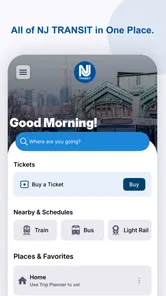
First off, let’s talk about navigation. The app has a pretty straightforward interface, which is great because no one wants to fumble around with a confusing app when they're in a hurry. Once you open it, you'll find everything neatly organized into tabs. The main screen gives you quick access to the most relevant information like schedules, trip planning, and ticket purchasing. It’s all very intuitive, and I was up and running without any hiccups.
Plan Your Journey Like a Pro
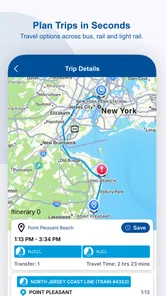
The trip planning feature is a real lifesaver. You just type in your start and end locations, and voila! The app spits out multiple route options along with their estimated travel times. It even syncs in real-time, so you get the latest updates on any delays or changes. It’s like having a GPS for public transit, which is frankly awesome.
More From Our News Desk

 Weather - By Xiaomi
Weather by Xiaomi Review: Clear at a Glance, Less Clear Up Close
Xiaomi’s weather app makes everyday forecasts quick to scan, but its calm surface can leave useful details and recovery paths harder to find than they should be.

 X
XX Under Pressure: Can It Recover When Posting Goes Wrong?
A resilience-focused review of X, examining setup, mistaken posts, interruptions, weak connections, and the gaps that matter when recovery needs to be dependable.

 Clash of Clans
Clash of Clans Is Won Between the Battles
Its raids are quick; its community is a long-term project of coordination, teaching, rivalry, and shared responsibility—with all the friction that entails.

 Android Auto
Android Auto Makes the Case for Quieter Car Software
The car interface is no longer judged by how much it can do, but by how quietly it helps. Android Auto shows what drivers now expect—and what still gets in the way.

 MobiOffice: Word, Sheets, PDF
MobiOffice: Transforming Mobile Productivity with Seamless Integration
MobiOffice: Word, Sheets, PDF is redefining mobile productivity with a surprising blend of functionality and innovation.

 EA SPORTS FC Soccer Mobile 26
EA SPORTS FC™ Mobile Soccer: Redefining Mobile Sports Gaming
Dive into EA SPORTS FC™ Mobile Soccer, where immersive gameplay and strategic depth transform mobile sports gaming.
Latest News



Use the plan as a check, not a promise
One practical habit I’d adopt is to check the proposed route before leaving and then look again if my plans change. I wouldn’t treat an estimated journey time as a guarantee, especially when a disruption could affect the choices I make. If I’m traveling to an appointment, I’d leave room for the unexpected rather than timing my departure to the last minute. The app can help me make a more informed choice, but I still need to judge how much flexibility the day calls for.
For a new rider, I’d also use the planner to become familiar with the route before arriving at the station. Knowing the likely sequence of the trip can make it easier to notice whether a suggested option fits what I intended. That is a small but useful distinction: a trip planner reduces the guesswork of getting started, while paying attention to the route and service information remains my responsibility once the trip is underway.
Tickets, Please!
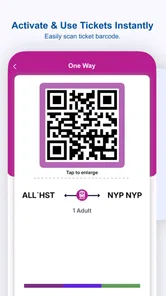
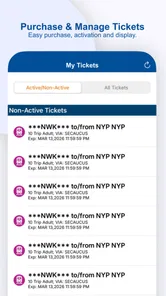
Buying tickets has never been easier. With just a few taps, you can purchase your ticket right in the app. There’s no need to stand in line at a kiosk or fumble with cash. Plus, the app stores your tickets, so you don't need to worry about losing them. Just show your phone to the conductor, and you’re good to go. It’s super convenient, especially when you're running late.
Make ticketing part of your routine
For a frequent rider, one useful habit is to handle the ticket before the station rush rather than waiting until boarding. That gives you a moment to confirm you have the right ticket for the journey and that your phone is ready to show it. I would also keep the app accessible and make sure the phone has enough battery for the trip; digital ticketing is convenient, but it depends on having the device with you and usable when it is needed. If you prefer buying a ticket in person or do not want to rely on your phone, the app does not remove the value of those alternatives.
There is also a useful trade-off in keeping ticketing on the same device as the trip information: fewer separate steps, but more dependence on the phone. I’d make a quick pre-departure check part of the routine, particularly if I’m traveling a long way from home or have a tight connection. The app is most helpful when I have already dealt with the small practical details—battery, access to the phone, and knowing where to find the ticket—instead of discovering them at the gate or onboard.
Stay in the Know
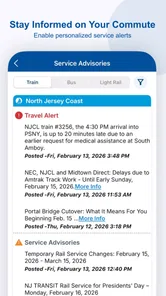
One of the standout features is the real-time alerts. You can set up notifications for your specific routes, so you’re always in the loop about any disruptions or changes. It’s like having a friend giving you a heads-up about what’s happening on your line. This feature alone makes the NJ TRANSIT Mobile App worth downloading.
For someone who rides the same route often, alerts can be more useful as a prompt to reassess than as a reason to stop checking altogether. If a notification arrives, I’d open the app and review the service information before deciding whether to leave earlier or change my plan. On an occasional trip, I’d first identify the route or service that matters to me so the information I check is relevant, rather than treating every general update as something that necessarily affects my journey.
In addition to alerts, the app provides detailed maps of the transit system that you can download for offline use. This is particularly useful if you’re new to the area or just visiting. You won’t have to worry about getting lost, even if you find yourself in a no-signal zone.
Offline help has a clear limit
I see the downloaded map as a backup for orientation, not a replacement for checking conditions. A map can help me understand the system when reception is poor, but it cannot tell me that a live service situation has stayed the same since I last checked. My practical sequence would be to review the route and current information while connected, keep the map available as a reference, and use the live details again when I can. That is especially helpful for visitors who may not recognize station names or know how the network fits together.
When another option makes more sense
I would not use this as my only planning tool for a trip that extends beyond NJ TRANSIT service. A broader map or journey-planning app can be more helpful for comparing different transport providers or coordinating a wider route, while station signs and staff remain useful when I need local guidance in person. The trade-off is focus: this app is built around NJ TRANSIT, so riders whose journeys are mostly elsewhere may get more value from an alternative that covers their whole trip.
That does not make the alternatives interchangeable. A general planner is often the better starting point when I need to compare a full itinerary, while the official app is the more direct choice when I need NJ TRANSIT information and ticketing. In a station, posted information or a staff member can be more practical than tapping through a phone if I need immediate, on-the-spot help. I would choose based on the question in front of me, rather than expecting a single app to replace every source.
Offline maps are handy for orientation, but I would not treat them as a substitute for current service information. A downloaded map can help me understand where I am when reception is poor; checking route updates while connected before leaving is a better way to prepare for possible changes. That distinction matters most for visitors, who may need the map for basic bearings but should still plan around the live journey information available before travel.
What the track record suggests
The app has been available since April 24, 2013, and its current version is 2025.1.1A. It has more than a million installs, with an average rating of 3.7 from around 17,000 ratings and about 7,500 written reviews. I read that as evidence of a widely used service with mixed experiences, not a promise that every trip will be effortless. If something feels awkward on your device, checking that it meets the minimum operating-system requirement of version 10 or later is a sensible first step.
The rating is a reminder to keep expectations practical. I would not judge the app solely by a smooth routine commute or assume that popularity means it will suit every phone and travel style. I’d try the features I actually need on a familiar route before depending on them for an unfamiliar or time-sensitive trip. Since the app is free, that trial is a straightforward way to decide whether its focused approach fits me without committing to a paid service.
What switching really involves
If I already use a general map app, I do not necessarily need to abandon it. I can keep it for broad navigation and use NJ TRANSIT’s app for the operator-specific parts of my journey. The main change is building a simple habit: check the local route and service information here, and use the ticketing option if I want to manage that part on my phone. Riders who prefer paper or in-person purchases can keep those habits instead; the app is an option, not a reason to rebuild every part of a commute.
For someone moving from occasional travel to regular commuting, the benefit becomes clearer when the same steps repeat. I can get used to where trip planning, updates, and ticket access sit, then check them in the same order each time. A visitor has a different learning curve: first understand which part of the journey belongs to NJ TRANSIT, then decide whether the official app or a wider planner is the better tool for the rest. Neither user needs to master every screen before getting value from the basics.
Wrapping It Up
All in all, the NJ TRANSIT Mobile App is an essential tool for anyone who uses public transit in New Jersey. It’s user-friendly, efficient, and packed with features that make commuting a breeze. If you’re tired of the usual transit hassles, this app is definitely worth a try. Whether you're a daily commuter or an occasional traveler, it’s bound to make your journeys smoother and less stressful. So, next time you’re planning a trip, why not give it a shot?
Who I’d recommend it to
I’d recommend it most to people who regularly ride NJ TRANSIT and want one place to plan, check updates, and buy tickets. It can also help an occasional visitor who wants an official source for local travel and a map to get oriented. I would skip it as a primary tool if I rarely use this network, need to compare several operators in one itinerary, or would rather avoid managing tickets on a phone.
My practical advice is to try it on a familiar journey first: look up the trip before leaving, explore the relevant route information, and get comfortable finding your ticket before you need it. That low-pressure test tells you whether its focused approach fits your routine. For NJ TRANSIT riders, the convenience is meaningful; for everyone else, a broader travel planner or an offline ticket option may be the better match.
NJ TRANSIT Mobile App Frequently Asked Questions
Does the NJ TRANSIT Mobile App support train, bus, and light rail travel?
Yes. The app’s ticketing features cover trains, buses, and light rail, and it also brings together trip planning, station information, schedules, and service updates. That makes it relevant for people using different NJ TRANSIT services, whether they are checking details before leaving or managing a ticket on their phone. Its focus is NJ TRANSIT travel rather than general-purpose navigation.
Can I buy tickets in the NJ TRANSIT Mobile App before I travel?
Yes. You can purchase tickets and passes in the app and display them on your mobile device. The app itself is free, but tickets and passes bought through it cost money. Having ticketing alongside transit information can be convenient when preparing for a trip, though you will need an internet connection for purchasing. Once a ticket has been purchased and downloaded, it can be displayed offline.
Does the app provide real-time travel information and service alerts?
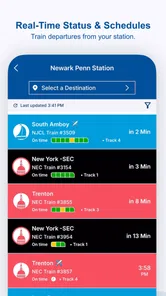
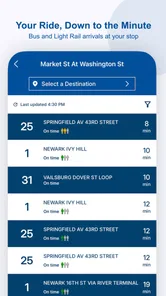
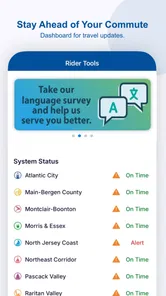
The app provides real-time arrival and departure information, service alerts, and schedule updates, along with trip planning tools and station information. These features can help you check travel details and stay aware of changes while using NJ TRANSIT. An internet connection is needed to access real-time updates, so it is sensible to check relevant information before traveling if you expect connectivity to be limited.
What is the NJ TRANSIT Mobile App, and who is it for?
The NJ TRANSIT Mobile App is a free Maps & Navigation app from NJ TRANSIT for people who want transit information and ticketing on their mobile devices. Its focus is on NJ TRANSIT travel, so it may be useful for passengers who want to handle trip details and tickets in one place. The app is rated for Everyone, and it is available for Android devices running version 10 or later.
What features does the NJ TRANSIT Mobile App offer?
The NJ TRANSIT Mobile App is equipped with a host of features designed to make commuting easier and more convenient. Users can purchase and display tickets and passes for trains, buses, and light rail, all from their mobile devices. The app provides real-time arrival and departure information, service alerts, and schedule updates. Additionally, it offers trip planning tools and station information, ensuring users have all they need for a smooth journey.
Pros
- Easy-to-use interface for quick navigation
- Real-time updates on train and bus schedules
- Mobile ticketing eliminates paper waste
- Customizable alerts for service changes
- Supports multiple payment options
Cons
- Occasional app crashes disrupt usage
- Some features need stable internet
- Limited offline functionality
- Complex refund process for tickets
- May consume significant battery power











