

NCIC Mobile Video Visitation
- 520.00
- 3.9
- Installs
- 100.00K
- Price
- Free

Screenshots
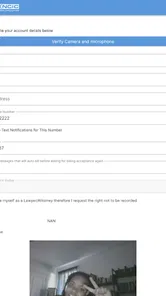

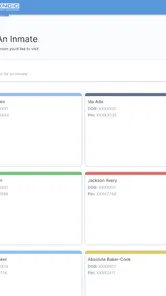
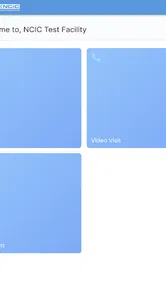
Analysis by Reviewed
Staying connected with someone in custody is rarely as simple as sending a quick message. Calls may need planning, visits can involve travel and fixed schedules, and ordinary chat apps usually are not designed for this kind of communication. I found NCIC Mobile Video Visitation most useful as a focused communication tool for arranging and taking part in video contact with an incarcerated loved one. It does not try to be a general social network, and that narrow purpose is actually its clearest strength.
The app is free, belongs to the Communication category, and is developed by Keeping Intouch. It has reached over 100 thousand installs, with an average rating of 3.9 from around 1.6 thousand ratings. Those figures suggest a service that many families are using, while also hinting that the experience may depend heavily on the user’s situation and expectations. In my view, this is an app to approach as part of a structured visitation process rather than as a replacement for everyday messaging.
How NCIC changes the rhythm of staying in touch
The biggest difference I noticed is the way the app changes communication from something spontaneous into something intentional. With a typical messaging app, I can send a thought whenever it occurs to me and expect the other person to answer when convenient. Video visitation works differently. I need to think ahead, be available at the right moment, and treat the conversation as a defined event.
That can feel restrictive, but it can also improve the quality of attention. When contact is planned, I am less likely to begin a conversation while distracted by errands, notifications, or several other chats. The person on the other side receives a clearer share of my time. For families who struggle to maintain a routine, that deliberate rhythm may be more valuable than the convenience of an open-ended chat thread.
The app’s store summary describes it as a convenient way to connect with an incarcerated loved one, and I think the useful word is “connect,” not “chat.” The purpose is not to fill every quiet moment with messages. It is to make a video visit possible within the arrangements surrounding a correctional facility. That distinction matters when deciding whether the app matches your needs.
Who will get the most from it
I would recommend trying it if your loved one’s facility uses NCIC for video visitation and you want a direct way to participate from a phone. It can be especially helpful for relatives who live too far away for regular in-person visits, people with demanding work schedules, or family members who cannot easily arrange transportation. A video option can make contact more realistic when a physical visit is difficult rather than merely inconvenient.
It may also suit families who want a predictable pattern. For example, a parent could reserve a quiet part of the weekend for a visit, prepare a few topics beforehand, and make the call feel like an appointment worth protecting. That routine can help children and relatives understand when they will see the incarcerated family member, even if the rest of the week remains uncertain.
More From Our News Desk

 Gmail
GmailGmail in a Busy Inbox: Who Benefits Most?
From first account to crowded workday, Gmail earns its place through dependable search and flexible sorting—but its best fit depends on how much inbox maintenance you can tolerate.

 Prime Video
Switching to Prime Video: What Changes in Your Viewing Routine
Prime Video can make a compelling second home for streaming, but switching means learning a different catalog, rental layer, and route from browsing to playback.

 Universal TV Remote Control
Universal TV Remote Control Works Best as a Reliable Backup
A phone remote earns its place through quick setup and reliable habits. Here is how to get more from Universal TV Remote Control—and where its limits show.

 Weather - By Xiaomi
Weather by Xiaomi Review: Clear at a Glance, Less Clear Up Close
Xiaomi’s weather app makes everyday forecasts quick to scan, but its calm surface can leave useful details and recovery paths harder to find than they should be.

 X
XX Under Pressure: Can It Recover When Posting Goes Wrong?
A resilience-focused review of X, examining setup, mistaken posts, interruptions, weak connections, and the gaps that matter when recovery needs to be dependable.

 Clash of Clans
Clash of Clans Is Won Between the Battles
Its raids are quick; its community is a long-term project of coordination, teaching, rivalry, and shared responsibility—with all the friction that entails.
Latest News



I would be more cautious if you expect instant access, unrestricted messaging, or the same flexibility offered by consumer apps such as ordinary video chat services. Those alternatives are better for spontaneous conversations between people who control both sides of the connection. NCIC Mobile Video Visitation exists within a supervised visitation context, so the experience is naturally more structured.
Preparing for a visit instead of improvising one
One practical lesson from using a specialized visitation app is that preparation matters more than it does with casual calls. Before opening the app, I would check the scheduled time, make sure the phone is charged, and choose a place where the conversation can happen without constant interruptions. This sounds basic, but a planned video visit has a higher attention cost than a short voice call, so small distractions become much more noticeable.
I also recommend making a short list of subjects before the visit. That does not mean turning the conversation into an interview. It simply prevents the first few minutes from disappearing into “How are you?” and “What have you been doing?” A few specific prompts about family news, a shared memory, a book, or a future plan can give the conversation somewhere to go when emotions make it difficult to think clearly.
A useful approach is to separate urgent information from emotional conversation. If there is an important practical matter, I would decide how to explain it plainly before the visit begins. Then I would leave room for ordinary talk. Mixing every family update, worry, and request into one conversation can make the visit feel like a briefing instead of time spent together.
What the conversation flow feels like
Video changes the balance of a conversation. Facial expressions, pauses, and small reactions become visible, which can make contact feel more personal than voice-only communication. At the same time, the screen can make every pause feel heavier. If the connection is not perfectly smooth or one person is unsure what to say, there is less room to hide behind silence.
I found that the best conversations are usually built around a few simple transitions. Start with familiar news, move into the main subject, and finish with something reassuring or concrete. That structure is not a feature of the app itself; it is a user habit that makes the scheduled format easier to handle. It also helps prevent the final moments from becoming rushed if the visit ends abruptly.
For families with children, the adult should prepare the child for the format. A child may expect a video call to work like a normal family conversation and become confused when the visit has a fixed boundary. Explaining that the call is special and that everyone should take turns speaking can make the experience calmer. Keeping a drawing, school project, or familiar object nearby can also give the child an easy way to participate.
For older relatives, the main challenge may be confidence rather than willingness. I would suggest having a family member nearby for the first session, not to take over the conversation but to help with the basic process. Once the person understands where to look and how to stay engaged, that support can be reduced. The goal should be independence, because the visit belongs to the relative and the incarcerated person, not to the helper.
The hidden cost of attention
The app makes a visit possible, but it cannot remove the emotional effort involved. A video conversation may require more concentration than a short phone call because both people are watching, listening, and reacting at once. I would avoid scheduling one immediately after a stressful meeting or during a noisy part of the day. The technology may be ready while the people using it are not.
This is where the app’s focused purpose becomes a trade-off. A general messenger is easier to open casually, but that ease can encourage fragmented attention. NCIC’s visitation model pushes me toward a clearer decision: either I am available for the visit or I am not. For a relationship that needs meaningful contact, that boundary can be healthy. For someone who values constant low-effort exchanges, it may feel limiting.
It is also worth considering the emotional after-effect. A scheduled visit can be comforting, but it may leave me thinking about the conversation for the rest of the day. I would avoid placing an important obligation immediately afterward when possible. Giving myself a few quiet minutes to process the call makes the whole experience feel less abrupt.
Another practical tip is to reduce competing screen activity. I would not keep another app open for entertainment during the visit, and I would silence nonessential alerts before starting. Even when the other person cannot see exactly what is happening, divided attention is easy to notice in a video conversation. The quality of the visit depends as much on presence as on the connection itself.
Boundaries that make the tool easier to live with
A specialized visitation app works best when everyone understands what it is for. I would not treat it as a place for rapid-fire updates throughout the day. Instead, I would use other appropriate channels for matters that do not require a video visit and reserve this app for the scheduled face-to-face time it is designed to support. That separation protects the value of the visit.
Families should also decide in advance who needs to be involved. If several relatives want to speak, taking turns can keep the conversation from becoming chaotic. A simple order—such as beginning with children, then moving to adults—can make the limited time feel more generous. Without a plan, the loudest or most confident speaker may unintentionally dominate.
Privacy deserves personal attention as well. I would choose a room where unrelated people cannot overhear the conversation and avoid discussing sensitive family matters in a public place. The app is intended for a particular communication setting, but users still need to make sensible choices about their surroundings. A quiet, private location improves both comfort and clarity.
Boundaries are especially important when conversations are emotionally difficult. If a visit turns tense, having a pre-agreed pause or subject change can prevent one difficult moment from defining the entire contact. This is not about avoiding honest discussion. It is about remembering that a scheduled video visit may be one of the few opportunities to connect, so protecting its basic respect matters.
How it compares with ordinary alternatives
Compared with standard video-calling apps, NCIC Mobile Video Visitation is less flexible but more relevant to families whose loved one is in a correctional setting. Consumer apps are excellent when both participants can freely create calls, exchange messages, and choose their own timing. They are not necessarily useful when visitation must fit an institutional process. In that situation, a general app may be familiar but simply not serve the required purpose.
Compared with a voice call, video adds visual closeness. I can share a reaction, show a child’s drawing, or let a relative see a familiar face rather than only hear a voice. The trade-off is that video needs more preparation and attention. If the main goal is to pass along a short practical message, voice communication may be more efficient. If the goal is to preserve a sense of presence, video has the stronger emotional effect.
Compared with an in-person visit, the app removes travel and some logistical pressure, but it cannot reproduce being in the same room. I would see it as a complement when distance or circumstances make physical visits difficult, not as a full substitute. The strongest use case is continuity: maintaining a visible, personal connection between larger or less frequent in-person meetings.
Small habits that improve the experience
One of the most useful habits is to test the environment before the scheduled conversation rather than waiting until the last moment. I would check the phone’s battery, place the device where the camera is stable, and make sure the room has enough light. These steps do not change the app’s functions, but they reduce avoidable friction and keep technical concerns from taking over the visit.
I would also keep the phone at eye level. Looking down at a device can make the conversation feel less direct, while holding it for a long period can become tiring. A stable position lets both people focus on one another instead of on keeping the screen steady. This is particularly helpful when a child or older adult is participating.
Another less obvious improvement is to end with a clear next point of contact whenever that is possible. Saying what family news will be shared next time or identifying a small thing to look forward to gives the visit a sense of continuation. It prevents the relationship from feeling reduced to a series of disconnected sessions.
If a visit is emotionally intense, I would write down important follow-up tasks afterward rather than trying to remember everything while saying goodbye. The app’s value is in enabling contact, but the relationship around it still requires organization. Separating the emotional conversation from later practical notes helps me stay present during the visit.
Device expectations and suitability
The current version is 1.454.15, and the app supports devices running Android 8.0 or newer. That makes it accessible to many Android users, although anyone relying on an older phone should check compatibility before planning an important visit. A compatible operating system does not guarantee a perfect experience on every device, so I would still prefer a phone with a dependable camera, microphone, and stable internet connection.
The content rating is Teen. That does not remove the need for adult judgment, especially when children are joining a family visit or when sensitive subjects may arise. The rating is best understood as a general age classification, not as a promise that every conversation will be suitable for every participant.
Because the app is free, the initial decision is easier for families who need to try it. Free access does not eliminate the value of checking the surrounding visitation arrangements, however. I would confirm the practical details connected to the facility before relying on the app for an important occasion. The application can support the communication process, but it cannot make an unavailable or unsuitable visit possible by itself.
Where the app falls short
The main limitation is not that the app lacks the personality of a social platform; it is that its usefulness depends on the visitation context around it. Someone looking for a complete family communication hub will probably find it too narrow. It is not the app I would choose for group chats, casual updates, photo sharing, or spontaneous daily conversation.
The structured format can also be frustrating when plans change. With a normal messenger, I can simply send a note explaining that I am delayed. A scheduled video visit may not offer the same freedom, and that can make missed timing feel more consequential. Families who have unpredictable work, caregiving, or transportation responsibilities should think carefully about whether they can protect the required time.
There is also a difference between technical convenience and emotional convenience. Opening an app may be easier than traveling to a facility, but the conversation itself can still be demanding. Users should not assume that video automatically makes difficult contact easy. Sometimes a shorter, simpler form of communication is the better choice for a particular day.
The rating of 3.9 across around 1.6 thousand ratings reflects that mixed reality: the app is useful for its intended audience, but usefulness does not mean every interaction will be effortless. I would judge it by whether it helps maintain meaningful contact within the user’s actual visitation circumstances, not by comparing it with entertainment or mainstream social apps.
My verdict for families deciding today
After looking at the app through everyday use rather than just its purpose, I see NCIC Mobile Video Visitation as a practical bridge between institutional restrictions and the human need to see someone’s face. Its greatest benefit is not unlimited communication. It is the way it gives families a defined opportunity to be present, listen carefully, and maintain a relationship across distance and custody.
I would recommend it to anyone whose incarcerated loved one is connected to the NCIC visitation system and who wants video contact without relying on a general-purpose calling app. I would especially recommend approaching it with a routine: prepare the device, protect the time, limit distractions, and decide what matters most before the visit begins.
I would skip it as a primary communication tool if you need instant messages, flexible group conversation, or a broad social platform. In those cases, an ordinary messenger may be a better companion where it is permitted and appropriate. But for its specific role, this free Communication app from Keeping Intouch makes a meaningful difference. Its real strength is helping a short, scheduled video visit receive the attention it deserves.
That is why my final opinion is positive but measured. The app cannot solve every difficulty surrounding communication with an incarcerated loved one, and it should not be mistaken for a complete substitute for visits, calls, or family support. What it can do is create a clearer rhythm for contact. When I use it with realistic expectations and firm boundaries, the conversation feels less like a rushed technical appointment and more like protected time with someone who matters.
NCIC Mobile Video Visitation Frequently Asked Questions
Can I use NCIC Mobile Video Visitation at any correctional facility?
The app is intended to connect users with incarcerated loved ones through NCIC video visitation, but access depends on whether a correctional facility uses the service. Before downloading, check with the facility to confirm that it supports NCIC and find out what local registration and visitation requirements apply. Facility rules determine which contacts can participate and how visits are arranged.
What is NCIC Mobile Video Visitation, and who is it intended for?
NCIC Mobile Video Visitation is a communication app designed to let approved users connect with incarcerated individuals through scheduled video visitation sessions. It is generally intended for family members, friends, and other authorized contacts. Availability, eligibility, and the exact features can depend on the correctional facility using the NCIC service, so users should confirm local requirements before downloading.
How do I create an account and schedule a video visit?
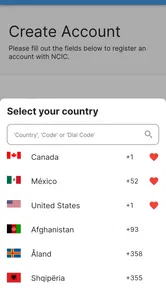
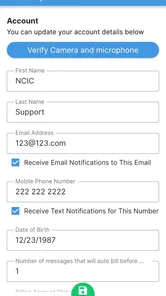
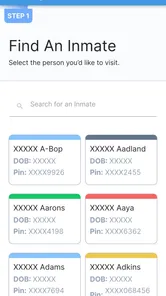
After installing the app, you typically need to register with personal information and provide details requested by the participating correctional facility. Depending on the facility, your account may require approval before visits can be booked. Once approved, you can select an available date and time, choose the inmate or contact, and follow the payment or confirmation instructions shown in the app.
What equipment and internet connection are required for a successful visit?
A compatible Android or iOS device with a working front-facing camera, microphone, speakers, and a stable internet connection is normally required. Wi-Fi is recommended because video calls can use significant mobile data. Before the scheduled visit, allow the app to access the camera and microphone, close unnecessary applications, and test your connection to reduce interruptions, frozen video, or dropped calls.
Are NCIC Mobile Video Visitation sessions free, or do they cost money?
The app is free to download, but that does not necessarily mean every video visit is free. Costs vary according to the correctional facility, visit type, duration, and local NCIC pricing rules. Some facilities may offer free video sessions, while others charge a fee for each appointment or require funds to be added to an account. The app or facility should display applicable charges before confirmation, but users should review cancellation, refund, and payment policies carefully.
Pros
- Lets families connect with inmates without traveling to the facility.
- Supports scheduled remote visits from a compatible smartphone or tablet.
- Can reduce transportation costs and time for frequent visitors.
- Useful for relatives who live far away or have limited mobility.
- Visit details and instructions are available within the service workflow.
Cons
- Availability depends on whether the correctional facility supports NCIC service.
- Visits may require advance scheduling and approval by facility staff.
- Video quality can vary with internet speed
- lighting
- and device performance.
- Users may need to pay fees for certain remote visitation sessions.
- Strict facility rules can limit visit length
- participants
- and conversation topics.











