

Navisphere Carrier
- 698.00
- 4.5
- Installs
- 100.00K
- Price
- Free

Screenshots
Analysis by Reviewed
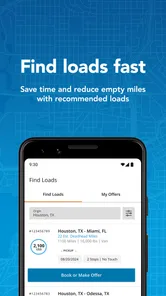
Finding freight quickly is only useful when the process stays dependable from the first search to the final status check. That is the space where Navisphere Carrier aims to help: it is a free Maps & Navigation app from C.H. Robinson Worldwide, Inc. that puts truckload discovery, booking, and tracking in one mobile workflow. I see it as a practical tool for carriers and drivers who already work with the Navisphere network, rather than as a general navigation app for everyday motorists.
My first impression is that its value depends less on flashy design and more on whether it fits the way you manage available capacity. The app has an average rating of 4.5 from around 1.6 thousand ratings, with more than 100 thousand installs, so it has found a real audience among transportation users. Still, those figures do not change the central question: will it make your specific load-search routine faster, or will it add another login and another screen to check?
Where the real friction usually begins
The most important thing to understand before installing it is that this is not a replacement for a full truck navigation system. Its purpose is tied to freight work: finding available truckloads, arranging a booking, and following shipment progress. If you expect turn-by-turn directions, broad public load-board coverage, fuel planning, or a general route planner, you may be looking in the wrong place.
That distinction explains some likely disappointment. A carrier can open the app expecting to browse every load in a region, only to discover that useful results depend on having the right account access and operating context. A driver may also expect every shipment detail to be editable from the phone, while the mobile experience may be better suited to checking opportunities and keeping up with an existing load than replacing every office task.
I would begin by deciding which job you want the app to perform. If your daily routine involves checking C.H. Robinson freight while away from a desk, the mobile format makes sense. If you mainly need directions to a receiver, a dedicated navigation app will be more appropriate. If you compare freight from several brokers, Navisphere Carrier may be one part of your toolkit, but it should not be treated as a universal load board.
Another point of friction is timing. Freight information is useful only while it is current, and mobile work often happens in weak-signal areas, at truck stops, or during a busy handoff. I would avoid making a booking decision while rushing through a poor connection. Let the screen finish loading, confirm the details again, and keep a separate record of the agreed pickup information before moving on.
The app is most valuable when it reduces a specific handoff: checking a load away from the office, deciding whether it fits your truck, and keeping the shipment visible after booking. It is less convincing when someone expects one application to handle dispatching, navigation, paperwork, and communication equally well.
More From Our News Desk

 Weather - By Xiaomi
Weather by Xiaomi Review: Clear at a Glance, Less Clear Up Close
Xiaomi’s weather app makes everyday forecasts quick to scan, but its calm surface can leave useful details and recovery paths harder to find than they should be.

 X
XX Under Pressure: Can It Recover When Posting Goes Wrong?
A resilience-focused review of X, examining setup, mistaken posts, interruptions, weak connections, and the gaps that matter when recovery needs to be dependable.

 Clash of Clans
Clash of Clans Is Won Between the Battles
Its raids are quick; its community is a long-term project of coordination, teaching, rivalry, and shared responsibility—with all the friction that entails.

 Android Auto
Android Auto Makes the Case for Quieter Car Software
The car interface is no longer judged by how much it can do, but by how quietly it helps. Android Auto shows what drivers now expect—and what still gets in the way.

 MobiOffice: Word, Sheets, PDF
MobiOffice: Transforming Mobile Productivity with Seamless Integration
MobiOffice: Word, Sheets, PDF is redefining mobile productivity with a surprising blend of functionality and innovation.

 EA SPORTS FC Soccer Mobile 26
EA SPORTS FC™ Mobile Soccer: Redefining Mobile Sports Gaming
Dive into EA SPORTS FC™ Mobile Soccer, where immersive gameplay and strategic depth transform mobile sports gaming.
Latest News



What to check before blaming the app
When a load does not appear, the first assumption is often that the application is broken. In practice, the issue may be the search setup. Check the pickup area, delivery area, equipment requirements, availability timing, and any filters you have left active from an earlier search. A narrow filter can quietly remove the result you were expecting.
I also recommend reading the complete load information rather than relying on the first line of a result. A route that looks attractive at a glance may not suit your current location, available hours, equipment, or preferred destination. The extra minute spent checking the details is cheaper than accepting work that creates a deadhead problem or a difficult appointment.
Account access is another basic check. If you are a driver using credentials managed by a carrier office, confirm that you are signing in with the account intended for mobile use. If several people share dispatch responsibilities, make sure everyone understands which account or workflow they should use. Repeatedly entering the wrong details can look like a technical failure even when the problem is simply access.
For a fresh installation, I would use a stable connection, update the app if an update is offered, and restart it after a failed sign-in rather than tapping the same button continuously. The current version is 2.30.1 and it supports Android 7.0 or later, so older devices should be checked before anyone plans a trip around it. Compatibility is not the same as performance, though: an aging phone with limited storage or a crowded background workload can still make any business app feel unreliable.
It is also worth checking the phone itself. Make sure automatic date and time are enabled, the device has enough free space for normal operation, and battery-saving settings are not aggressively stopping the app in the background. These are general mobile checks, but they matter when a tracking-related workflow appears to stop updating.
A sensible setup routine for a carrier team
I would not introduce the app to a whole fleet by simply telling everyone to download it. Start with one dispatcher and one driver, then walk through the same task from both sides. Search for a suitable load, review the details, complete the booking process if authorized, and check how the shipment appears afterward. This small trial exposes misunderstandings before they affect several active trucks.
Before a driver leaves, agree on who owns each responsibility. The driver may use the phone to review or track a shipment, while the office may handle broader dispatch decisions. If that division is unclear, people can duplicate calls, miss changes, or assume somebody else has confirmed a detail. The app cannot solve an internal process that has never been defined.
For solo operators, the setup is simpler but the same principle applies. Decide whether the phone is your primary source for shipment status or merely a convenient second screen. If it is primary, keep the login process familiar, avoid clearing app data immediately after a problem, and save important pickup and delivery details in the normal records you already trust.
One useful habit is to test the app before you need it urgently. Open it while parked, sign in, search using your normal operating area, and inspect an existing workflow if one is available. Doing this at a safe time tells you whether the account is ready and whether the interface feels clear on your particular phone. It also prevents a first-time setup from happening at a gate or during a tight appointment window.
Because the content rating is Everyone, the app is broadly suitable from an age-rating perspective. That does not mean every user is the intended customer. The practical audience is transportation professionals who have a reason to work with C.H. Robinson freight. A casual user, a passenger, or someone looking for a personal route planner will gain little from installing it.
Recovering a workflow when something goes wrong
When a search, booking step, or status view behaves unexpectedly, I prefer a short recovery sequence instead of deleting everything immediately. First, note what you were doing and what the screen showed. Then check the connection, return to the previous screen, and try the action once more. If the same issue appears, close and reopen the app while parked and repeat the task carefully.
If the problem affects only one load, compare it with another search. A single missing result may be related to availability, account eligibility, or the search criteria rather than the entire application. If every screen is slow or inaccessible, the focus should shift to the connection, account state, device condition, or service availability.
Do not repeatedly submit a booking request just because the first attempt appears slow. That can create uncertainty about whether the request was received. Instead, wait for a clear result, check the relevant status, and contact the appropriate dispatch or support channel through your normal business process if the outcome remains unclear. A duplicate action is harder to untangle than a delayed one.
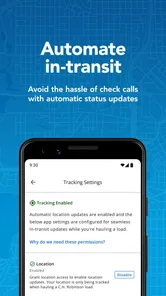
Tracking problems deserve a similar approach. Confirm that you are looking at the correct shipment and that the information has had time to refresh. If the phone has been offline, restarted, or heavily restricted in the background, reconnect it before deciding that the load itself is not updating. Keep the dispatcher informed when timing matters; a mobile screen should support communication, not replace it.
A practical recovery note can save time later. Record the device model, operating system, app version, approximate time, and the step that failed. The current version is 2.30.1, and including that detail when asking for help is more useful than saying only that “the app does not work.” Avoid sharing passwords or unnecessary shipment information in an open conversation, and use the company’s normal support route for account-specific questions.
When another part of the operation is responsible
Sometimes the application is only showing the result of a larger operational issue. A load may no longer be available, a booking may require office confirmation, or a status may not change until another party updates the shipment. In those situations, reinstalling the app will not create new freight or accelerate a confirmation.
There is also a difference between a display problem and a business decision. If a route, appointment, or equipment requirement does not work for you, that is not a technical defect. The correct response is to review the load with the dispatcher or broker and decide whether it fits. Treating every unsuitable result as an app failure leads to poor troubleshooting and rushed choices.
Connectivity can be especially deceptive on the road. A phone may show signal bars while data is still too weak for a complete transaction. Moving to a safe stopped location, switching to a more reliable connection, and waiting for the screen to finish are sensible steps. Never troubleshoot while driving, and do not use the phone as a reason to delay safe parking or required rest.
The same applies to battery and device limitations. A phone running several demanding apps, with low storage or an overloaded system, may freeze or close unexpectedly. Testing Navisphere Carrier after a restart can separate a device problem from an application problem. If other apps are failing too, the wider phone environment deserves attention first.
Compared with a general load-board service, this app’s advantage is specialization around the Navisphere Carrier workflow. That can be a strength if your freight already comes through C.H. Robinson and you want a direct mobile path. A broader marketplace may be better for comparing multiple sources, while a dedicated truck navigation tool will usually be the better choice for road guidance. I would use those alternatives alongside it when the job requires them, not force one app to cover all three roles.
Who should use it, and who should skip it
I would recommend trying it if you are an owner-operator, carrier employee, or driver who regularly needs mobile access to C.H. Robinson truckload work. It is particularly sensible for people who move between the cab and the office and want to check freight without returning to a desktop. The free price removes the financial barrier to testing it, although the real value still depends on account access and how much relevant freight you handle.
I would be more cautious if your work comes from many unrelated brokers, if you need a highly detailed route planner, or if you expect a complete document-management and dispatch suite. The app can complement those tools, but it should not be purchased mentally as an all-in-one transportation platform. Someone who rarely handles truckloads through this network may find that the extra installation is not worth the limited use.
My everyday scenario would look like this: I finish a delivery, park safely, and open the app to look for a next truckload that matches my location and equipment. I review the route and timing, compare it with my hours and preferred direction, and avoid accepting it just because it is nearby. After booking through the proper process, I use the app to keep the shipment accessible while the office and I stay aligned through our normal communication. That is a focused, believable use case, and it is where the app makes the most sense.
My final view is favorable but specific. Navisphere Carrier is a useful mobile companion for carriers already operating within its freight ecosystem, especially when the goal is to find, book, and follow truckloads away from a desk. Its 4.5 average and more than 100 thousand installs suggest that many users find the workflow worthwhile, but popularity should not hide the setup requirements or the need for sensible backup habits.
I would install it, test the account while parked, and use it as part of a defined dispatch routine. I would not rely on it as my only navigation tool, my only record of a booking, or my answer to every operational problem. Its best role is a focused freight-work app, not a universal trucking command center. If that matches your work, it is an easy free tool to try; if it does not, a general navigation or multi-source freight platform will likely serve you better.
Navisphere Carrier Frequently Asked Questions
Is Navisphere Carrier available for both Android and iOS?
Navisphere Carrier is a mobile app for freight-related tasks, so check your device’s app store to see whether it is available for your particular phone or tablet. On Android, the listed minimum operating-system requirement is Android 7.0. Before installing, make sure your device’s software is compatible and that you can access the store account needed to download apps.
What is Navisphere Carrier used for?
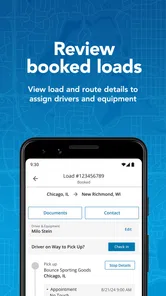
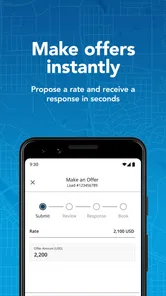
Navisphere Carrier is a mobile tool for carriers and drivers who manage freight booked through the C.H. Robinson transportation network. It can help users review available loads, accept or manage shipments, access pickup and delivery information, communicate with the relevant logistics contacts, and keep shipment details organized while on the road. The exact functions available may depend on the carrier’s account, region, and relationship with C.H. Robinson.
Who can use the Navisphere Carrier app?
The app is primarily intended for authorized carriers, transportation companies, dispatchers, and drivers working with C.H. Robinson. It is not designed as a general load-board application for every independent driver without an account. Before downloading, users should confirm that their company is registered with Navisphere Carrier and that they have valid login credentials. Some features may be restricted according to user permissions or company settings.
Does Navisphere Carrier help drivers manage loads and shipment updates?
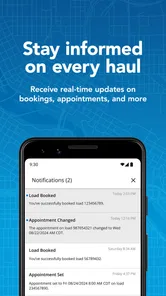
Yes, Navisphere Carrier is designed to support common freight-management tasks from a mobile device. Depending on the shipment and account configuration, users may be able to view load information, check appointment details, update status, submit documents, and communicate important progress updates. The app can reduce the need for phone calls or desktop access, although drivers should still follow their company’s procedures and contact support when a shipment issue requires immediate attention.
Is Navisphere Carrier free to download and use?
Navisphere Carrier is free to download, but access to its services generally depends on having an active carrier relationship and authorized account with C.H. Robinson. Normal mobile data charges may apply, especially when using the app away from Wi-Fi. Carriers should also check whether their company has internal policies, connectivity costs, or other operational requirements related to using the platform.
Pros
- Real-time shipment visibility helps carriers track loads and delivery progress.
- Mobile access lets drivers manage dispatch tasks while away from a computer.
- Electronic document handling can reduce paperwork and speed up billing workflows.
- Load details and status updates are centralized in one carrier-focused platform.
- Useful for carriers already working with C.H. Robinson shipments.
Cons
- Most useful features depend on an active relationship with C.H. Robinson.
- The interface may feel complex for occasional or first-time users.
- Requires reliable mobile data for timely updates and document uploads.
- Some actions may be limited by permissions set by the customer or dispatcher.
- Performance and usability can vary across different Android and iOS devices.











