Navigation Pro: Maps on Watch
- 1.47K
- 4.6
- Installs
- 1.00M
- Price
- $2.99

Screenshots
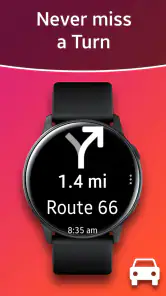
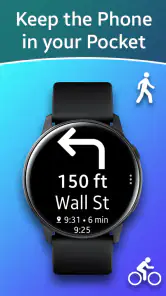

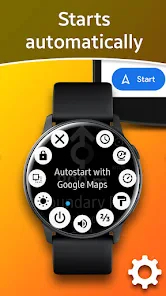
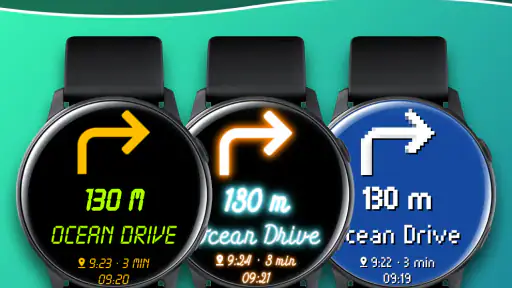
Analysis by Reviewed
I like the idea behind Navigation Pro: Maps on Watch most when I think about a very ordinary problem: I’m walking somewhere unfamiliar, my phone is in a pocket or bag, and stopping to check it every few minutes breaks my pace. A watch can make those quick course checks less awkward. This is a Maps & Navigation app from Smartwatch Studios, built around using a paired watch alongside Google Maps on a phone. Its average rating is 4.6 from around 12,000 ratings, and it has passed a million installs. Those figures suggest it has found an audience, but the real question is whether the watch-based handoff fits the way you travel.
Start with the trip you actually need
Before relying on it, I’d decide what I want the watch to do. This is not a replacement for a phone map that I can study, zoom, and use to compare routes. The appeal is having navigation cues available on my wrist while the phone remains the source of the map experience. That distinction matters: if I’m planning a complicated journey, I still want to look at the route on a larger screen before setting off. If I already know the destination and mainly need help staying on course, the watch becomes much more useful.
A practical example is walking from a station to an appointment in an unfamiliar neighborhood. I can get the route ready on the phone, put it away, and use the watch’s prompts to keep moving without repeatedly stopping on a busy pavement. That is a modest convenience, but it can make a stressful arrival feel calmer. It is also handy when carrying groceries, holding a coffee, or pushing a stroller, situations where taking out a phone is possible but irritating.
Prepare the phone-to-watch handoff
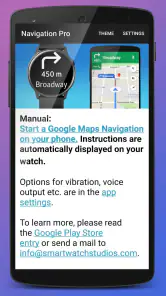
The workflow depends on the devices working together, so I would treat setup as something to check before leaving rather than something to troubleshoot at a street corner. Pair the smartwatch with the phone and make sure the navigation arrangement is ready while you have time and a stable connection. The app’s central promise is not that the watch independently replaces the phone; it is that you can keep the phone tucked away while following directions on the watch. Keeping that relationship in mind helps set realistic expectations.
For a first outing, I’d choose a familiar route with a few turns. That lets me learn how the watch presents guidance and how noticeable its alerts feel without making the first test depend on getting somewhere important on time. I’d also check that the watch is charged enough for the whole trip. A short test is useful not just for battery confidence, but for learning whether I can interpret the cues at a glance while walking naturally.
This is a useful trade-off compared with simply holding a phone: the wrist is quicker to consult, but it gives me less room to inspect the route. I would use the watch for “keep going, then turn” moments and the phone for “which of these streets is the better choice?” moments. Treating each screen as suited to a different task makes the combination feel more deliberate than trying to make the watch do everything.
From route setup to the street
The setup process
Setting up the app is a breeze. Just download it from the app store, pair it with your smartwatch, and you’re good to go. The interface is clean, intuitive, and extremely user-friendly. Even if you’re not tech-savvy, you’ll find the setup process as simple as ordering a pizza online. Trust me, if I can do it, so can you!
More From Our News Desk

Clash of Clans Is Won Between the Battles

Android Auto Makes the Case for Quieter Car Software

MobiOffice: Transforming Mobile Productivity with Seamless Integration

EA SPORTS FC™ Mobile Soccer: Redefining Mobile Sports Gaming

How Microsoft OneDrive Became a Mobile Productivity Giant

How Google Translate Breaks Language Barriers Effortlessly
Once the basics are in place, I’d make the first real trip a low-pressure one. Start navigation on the phone before setting off, then confirm that the watch is receiving the cues you expect. This small routine can prevent a common kind of friction: discovering only after leaving that the watch is not connected or that the phone is still the screen you need to consult. If something seems off, it is easier to sort it out at home than while crossing a road or searching for a building entrance.
Navigation habits also depend on the journey. For a route with frequent turns, I would glance at the watch before reaching a junction rather than wait until I am standing at it. That gives me time to choose a safe place to turn and avoid a hurried correction. On a straight stretch, I can leave the watch alone and enjoy the fact that I am not checking the phone constantly. The benefit is less about staring at another screen and more about making fewer interruptions.
Usability on the go
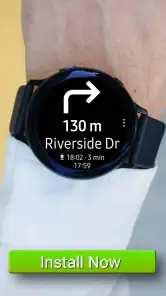
One of the standout features of this app is its seamless integration with Google Maps. You get real-time updates and turn-by-turn navigation directly on your watch. Whether you’re walking, cycling, or driving, the app provides clear and concise directions. It’s like having a personal navigator on your wrist, ensuring you never miss a turn.
The wrist format makes the most sense when my hands are occupied or when pulling out a phone would be distracting. On a walk, I can check a cue without breaking stride. While cycling, a glance at a watch may be less convenient or safe than stopping somewhere appropriate, so I would not treat wrist directions as permission to look down in traffic. When driving, I would keep my attention on the road and rely on safe, hands-free habits rather than handling a watch or phone. The same feature can be helpful in one setting and a poor fit in another.
Compared with using Google Maps on the phone alone, the watch is a compact prompt rather than a richer map. The phone is better when I need to see nearby streets, check the shape of an interchange, or reconsider a route. A watch is better for quick reassurance that I am still on the intended path. Compared with navigating entirely by memory, the app can reduce the mental load of remembering a sequence of turns, but it does not remove the need to pay attention to surroundings.
I took it for a spin during my daily jog, and it worked like a charm. No more pulling out my phone every few minutes to check if I’m on the right path. The vibrations and alerts on my wrist were enough to keep me on track. Plus, it’s a great conversation starter when people notice you talking to your wrist like a secret agent!
For a run, I’d use it most on a route where I want to explore without memorizing every turn. A helpful habit is to check the route before starting and keep the phone secure, then let the wrist cues handle ordinary turns. If the route becomes confusing or a path is blocked, I would stop in a safe place and consult the phone rather than trying to diagnose the map while moving. That division of labor is one of the most practical ways to use a watch companion: let it handle simple reminders, and keep the larger screen for decisions.
What changes during a real outing
Imagine leaving a train station for a café in a part of town you have not visited before. You set the destination on the phone while indoors, check the route, and begin walking. At the first turn, a wrist alert lets you respond without pulling the phone from your coat. A few blocks later, a busy crossing makes you pause; rather than stare at the watch while moving, you wait until you are safely across and check the next cue. If the street layout looks different from what you expected, you take out the phone and use the fuller map view to orient yourself.
That scenario shows both the payoff and the boundary. The app can reduce small interruptions, but a watch prompt is not a substitute for seeing the whole area. I would not depend on it as my only source of orientation in a complicated station, a large venue, or an unfamiliar road junction. In those moments, having the phone available is still sensible. The strongest setup is not “phone versus watch”; it is using the watch for quick guidance and the phone when context matters.
Another useful case is a familiar commute with one unfamiliar detour. You already know most of the route, so the watch can help with the changed section without requiring you to hold the phone for the entire journey. On the other hand, if you are navigating a long trip with several transport changes, timetables, or route choices, a full map app remains the better planning tool. The watch companion is most convincing when the route is already chosen and the main task is following it.
Battery life concerns
Now, I know what you’re thinking. Won’t this drain my smartwatch’s battery? Surprisingly, the app is designed to be battery efficient. I was able to use it for a couple of hours without seeing a significant drop in battery life. However, it’s always a good idea to keep an eye on your battery levels, especially if you’re planning a long trip.
Battery needs vary with the watch, its age, and what else is running, so I would not assume that every trip will match my experience. Before a full day out, I’d begin with a charged watch and avoid making navigation the first test of a nearly empty battery. If the watch is also being used for other demanding tasks, the remaining charge matters even more. This is a practical reason to keep the phone available: the watch can make directions convenient, but it should not be the only plan for getting home.
There is also a comfort trade-off. Some people like frequent prompts because they reduce uncertainty; others find wrist vibrations distracting, especially during work, exercise, or conversation. I would try the app on a short outing and see whether its alerts feel useful rather than intrusive. If I end up checking the watch more often than I used to check the phone, the convenience has not really helped.
Who should choose this wrist-based approach?
I’d recommend considering it if you already wear a compatible smartwatch, regularly use Google Maps on your phone, and often walk or run somewhere unfamiliar. It is particularly appealing when a quick turn reminder is enough and you want to keep your hands free. People who commute on foot, explore city streets, or jog on changing routes are more likely to notice the benefit than someone who mainly navigates from inside a car.
I would skip it if you expect a complete map on your wrist, want to plan every leg of a complex journey there, or do not want your navigation to depend on a phone-and-watch pairing. It is also a poor match if you rarely use a smartwatch: paying for an accessory-style navigation workflow makes little sense when checking your phone is already comfortable. Drivers who need a broad, easily readable route view should stick with a properly positioned phone display or another suitable in-car option, not rely on glancing at a watch.
The app costs $2.99, so I would weigh that against how often I expect to use the watch handoff. Navigation Pro is rated for Everyone and was released on April 13, 2017. Its long presence and sizable audience are reassuring context, but they do not tell me whether the workflow suits my own devices and habits. I would make that decision based on a short trial of the routine, not on popularity alone.
Final thoughts
In conclusion, Navigation Pro: Maps on Watch is a fantastic app for anyone looking to simplify their navigation experience. It’s perfect for those who are always on the move and need quick, reliable directions. The app is easy to use, efficient, and adds a touch of modernity to your daily routine.
If you’re tired of constantly checking your phone for directions, give this app a try. It might just become your new favorite travel companion. And hey, who doesn’t want to feel like they’re living in the future?
My own recommendation comes with one qualification: think of the watch as a companion display, not a replacement for the phone’s map. Set up before you leave, use wrist prompts for straightforward turns, and bring the phone into the decision when the route gets complicated. If that division feels natural, this small convenience can make everyday walking and running smoother. If you want navigation that works independently or shows all the context at once, a conventional phone map is the better choice.
Navigation Pro: Maps on Watch Frequently Asked Questions
Is Navigation Pro: Maps on Watch suitable for everyday travel?
Navigation Pro is aimed at people who want to follow directions from their smartwatch while keeping their phone in a pocket. That wrist-based approach can be convenient when walking or moving around and checking a phone is awkward. It is a Maps & Navigation app, so its main purpose is helping you navigate rather than serving as a general smartwatch utility.
What is Navigation Pro: Maps on Watch and how does it work?
Navigation Pro: Maps on Watch is a mobile application designed to provide users with navigation assistance directly on their smartwatch. It syncs with your smartphone to deliver real-time map data and turn-by-turn directions right on your wrist, ensuring a hands-free navigation experience. Ideal for those who want to keep their phone in their pocket while navigating, it leverages GPS and internet connectivity for accurate mapping.
Is Navigation Pro compatible with all smartwatches and smartphones?
Navigation Pro is designed to work with a variety of smartwatches, particularly those running on Wear OS. However, compatibility may vary based on the specific model and operating system of your watch and smartphone. It's important to check the app's compatibility with your devices before downloading to ensure seamless functionality and avoid unnecessary issues.
What features does Navigation Pro offer?
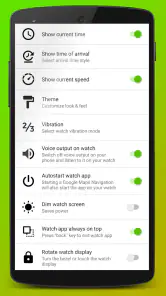
Navigation Pro offers a range of features, including real-time turn-by-turn navigation, map display on smartwatch, voice-guided directions, and route tracking. It also supports various map types and customization options to enhance the user experience. The app aims to provide a comprehensive navigation tool directly on your wrist, making it convenient for users on the go.
Does Navigation Pro require an internet connection to function properly?
Yes, Navigation Pro typically requires an internet connection to provide real-time navigation and map updates. While some features might work offline, such as pre-downloaded maps, the app's full functionality, including live traffic updates and route recalculations, relies on a stable internet connection. Users should ensure they have adequate data or Wi-Fi access for optimal performance.
Pros
- Maps viewable directly on smartwatch
- Real-time GPS tracking feature
- Offline maps available
- Highly customizable settings
- User-friendly interface
Cons
- Limited watch compatibility
- Battery drains quickly with GPS
- Occasional app crashes
- Offline maps require storage space
- Limited features in free version
- Category
- Maps & Navigation
- Version
- Varies with device











