

MyTransit NYC Subway & Bus MTA
- 8.90K
- 4.6
- Installs
- 1.00M
- Price
- Free
Screenshots
Analysis by Reviewed
For getting around New York, the hardest part is often not finding a train line but deciding whether the arrival time on your screen is useful enough to act on. MyTransit NYC Subway & Bus MTA brings subway and bus information together with regional rail times and maps, giving me one place to check before I leave. Its focus is practical: help me understand the trip I’m about to take, rather than turn transit into a bigger project.
A single view of several ways to travel
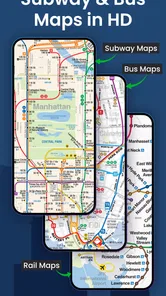
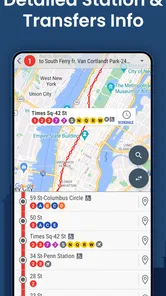
The useful idea here is the range of New York transit covered in one app. Alongside subway and bus information, it includes Long Island Rail Road and Metro-North times and maps. That matters when a journey crosses the boundary between city travel and a commuter-rail trip; I can start by checking the options in the same tool instead of switching immediately between separate transit references.
It is a free navigation app from MyTransit™, with a 4.6 average from around 36,000 ratings and more than a million installs. That gives a new user a reasonable sense that it has found an audience, though popularity alone cannot tell me whether a particular arrival estimate will match the conditions on my journey. I would still treat live information as guidance and leave a little slack when being on time matters.
Making a route check useful
I focus here on the step that makes a transit app genuinely useful: turning a route check into a choice you can act on. My approach is to look beyond the next departure and consider how the trip fits together, especially when a transfer or a change of travel mode is involved. That sets up a closer look at how I would use the maps and times in practice.
How I would use it on an ordinary trip
Before heading out, I would check the map and times for the part of the trip I know, then use the trip planner to compare a route with an alternative. A small but useful habit is to save a repeated commute or other regular journey, so I do not have to rebuild the same search every morning. For an unfamiliar destination, looking at the transfer points before setting off can make the route feel much less opaque, especially when I need to move between subway and bus.
Consider a weekday trip where I take a subway toward a meeting but may need a bus for the final stretch. I can check the overall route before leaving, then look again if service changes affect the plan. The value is not a promise that every leg will run exactly as expected; it is having the map and trip choices close at hand so I can make a decision without starting from scratch.
Where it helps, and where I would be cautious
The app’s coverage makes it especially appealing to visitors, occasional riders and New Yorkers whose trips vary between subway, bus and regional rail. A tourist can use a map to understand how a route fits together, while a regular commuter may get more from saving familiar trips and checking for service changes. If I were traveling mostly by car, walking, or transit outside the New York area, this city-focused tool would be a poor fit; a broader navigation app would make more sense.
More From Our News Desk

 Weather - By Xiaomi
Weather by Xiaomi Review: Clear at a Glance, Less Clear Up Close
Xiaomi’s weather app makes everyday forecasts quick to scan, but its calm surface can leave useful details and recovery paths harder to find than they should be.

 X
XX Under Pressure: Can It Recover When Posting Goes Wrong?
A resilience-focused review of X, examining setup, mistaken posts, interruptions, weak connections, and the gaps that matter when recovery needs to be dependable.

 Clash of Clans
Clash of Clans Is Won Between the Battles
Its raids are quick; its community is a long-term project of coordination, teaching, rivalry, and shared responsibility—with all the friction that entails.

 Android Auto
Android Auto Makes the Case for Quieter Car Software
The car interface is no longer judged by how much it can do, but by how quietly it helps. Android Auto shows what drivers now expect—and what still gets in the way.

 MobiOffice: Word, Sheets, PDF
MobiOffice: Transforming Mobile Productivity with Seamless Integration
MobiOffice: Word, Sheets, PDF is redefining mobile productivity with a surprising blend of functionality and innovation.

 EA SPORTS FC Soccer Mobile 26
EA SPORTS FC™ Mobile Soccer: Redefining Mobile Sports Gaming
Dive into EA SPORTS FC™ Mobile Soccer, where immersive gameplay and strategic depth transform mobile sports gaming.
Latest News



I would also avoid treating any single arrival estimate as a guarantee. Transit can change while I am already on the way, and a suggested alternative still needs a quick reality check against where I am and where I need to go. For a complicated trip, checking the transfer sequence before boarding is more useful than waiting until I reach a crowded platform and trying to work it out under pressure.
What it does better than a general map
Compared with a general-purpose maps app, MyTransit puts New York transit modes at the center rather than treating them as one choice among driving, walking and other directions. That narrower focus is useful when I want to inspect transit lines, compare a bus-and-subway journey, or look at commuter rail in the same setting. A general map can still be the better choice when I need door-to-door directions that include substantial walking or non-transit stops, so I would keep both approaches in mind rather than expect one app to handle every kind of navigation.
One practical tip is to use the map to understand the shape of the route, not just the next departure time. Seeing where a transfer sits can help me judge whether a route that looks quick on paper is comfortable for my actual journey. Saving a regular route is another small workflow improvement: it cuts repeated setup, while leaving me free to check the day’s service before I rely on it.
Everyday strengths and sensible limits
MyTransit is free to download and is rated for Everyone. Optional in-app purchases range from $0.99 to $8.99 per item, so I would check the app’s purchase screens before paying for anything and decide whether the free experience already covers my needs. It has been available since February 12, 2012, and version 3.15.8 requires Android 6.0 or later. Those details make it easier to judge fit, but the key question for me is still whether its New York-focused planning suits the trips I actually make.
The main trade-off is that a focused transit tool does not replace judgment or a flexible general map in every situation. I would use MyTransit when the decision is about New York subway, bus or regional rail, and switch tools when my journey depends more on walking directions or places beyond that network. That distinction keeps expectations realistic and makes its specialized coverage more valuable.
Planning around transfers, not just departures
There is a useful difference between asking “When does the next train arrive?” and asking “Will this whole route work for me?” A departure time answers only the first question. When I am comparing a subway route with one that includes a bus, I would inspect the transfer point and the sequence of legs before leaving. That is especially helpful if I have luggage, am meeting someone at a fixed time, or would rather avoid changing lines more than necessary. A route that looks efficient on a list may feel awkward once I consider where I need to change.
For a visitor, I would use the map before starting a day out rather than trying to learn the system while moving through a station. Pick a destination, trace the main line, and note the point where the trip changes mode or direction. That quick preparation does not eliminate uncertainty, but it gives me a mental outline. If a service issue forces a change, I can compare alternatives with a better sense of what the original plan was asking me to do.
How I would handle a changing commute
On a regular commute, the saved route is a starting point, not an instruction to follow blindly. I would open it before setting off and check whether the day’s service still supports the usual plan. If something has changed, the app’s route options are more useful when I already know my acceptable alternatives: perhaps I can tolerate an extra transfer, or perhaps I need to avoid a long walk because of weather or mobility needs. Deciding that in advance makes it easier to choose sensibly instead of tapping the first option that appears.
There is also a practical case for checking the map again after a disruption, rather than relying on the route I saw at home. A route that made sense from the starting point may no longer be the best one from my current location. I would recheck the remaining trip, especially if I have already completed one leg, because the right choice can change once I am on the way. This is a small habit, but it helps keep a plan responsive without turning every trip into constant screen-checking.
What to expect from a specialized transit app
People often ask whether a city transit app can replace their usual map app. For my needs, the answer depends on what the journey involves. When most of the decision is about choosing among New York subway, bus and commuter-rail options, a transit-focused view is a sensible place to start. When I need to navigate a complicated walk to an entrance, find a business, or combine several non-transit stops, a general map is more useful. I would not make one tool do both jobs simply for the sake of keeping everything in one place.
Another reasonable question is whether I can rely on an arrival time closely enough to leave at the last possible moment. I would not. A displayed estimate is helpful for planning and deciding whether to wait or consider another route, but I would build in a cushion for appointments, airport connections or anything else where a late arrival would cause trouble. That cautious approach is not a reason to avoid the app; it is how I would use any transit information without confusing an estimate with a guarantee.
The app’s New York emphasis is also a boundary worth taking seriously. It makes the most sense for journeys that use the city’s transit network and the regional rail systems it covers. If my trip takes me well beyond that area, I would use a broader navigation option to plan the full journey and treat MyTransit as a local reference only where it is relevant. That keeps the tool useful instead of frustrating me with a trip it was not designed to center.
Why MyTransit NYC Stands Out
First things first, the user interface of MyTransit NYC Subway & MTA Bus is clean and intuitive. Even if you’re not a tech-savvy person, navigating through this app is a breeze. I particularly appreciated how the app lays out the subway lines and bus routes. It’s like having a digital map that updates in real-time. So, no more second-guessing if your train is running late!
Features That Make Your Commute Easier
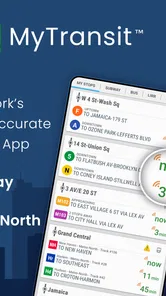
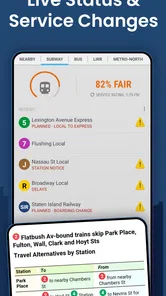
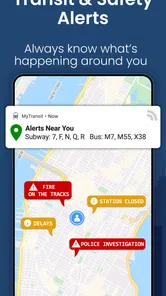
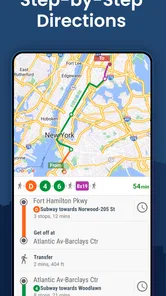
This app is packed with features that make commuting less of a headache. Real-time arrival updates? Check. Service status alerts? Double check. The app even includes a nifty trip planner. You can plan your route, see the estimated time of arrival, and even get alternative routes if there’s a hiccup in the service.
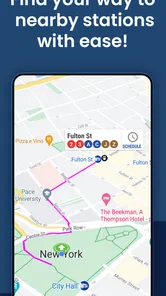
What's really cool is the integration with Google Maps. You can visualize your route and see exactly where you need to transfer. Plus, the app allows you to save your favorite routes, so you don’t have to enter the same information every time. It remembers your preferences, which is a real time-saver.
User Experience and Performance
In terms of performance, the app runs smoothly without any noticeable lags. It’s compatible with both Android and iOS, which means almost everyone can have access to its features. I found the notifications for service changes to be particularly helpful. You get a heads-up if there are any delays or cancellations on your route.
Another feature worth mentioning is the fare information. You can check out both subway and bus fares directly from the app, which is super handy if you’re budgeting your commute expenses.
Choosing it for the right kind of trip
I would recommend MyTransit most readily to someone who makes mixed-mode trips and wants a transit-first way to think them through. A commuter who sometimes uses the subway, sometimes a bus, and occasionally regional rail can benefit from seeing those options within one New York-oriented tool. A visitor who is unsure how the city’s lines connect may also find the maps reassuring, particularly before a first ride. It can make planning feel more concrete without requiring the user to become an expert in the network.
It is less compelling for someone who only needs a single, familiar subway ride and already has a reliable routine, or for someone whose navigation is mostly walking and finding locations. Those users may not need another app to check. I would also suggest that a traveler with a tightly timed connection compare the route carefully and keep a backup plan in mind rather than assuming the recommended itinerary will remain unchanged throughout the journey.
Small habits that make the app more useful
For repeat trips, I would save the route only after I have checked that it reflects the journey I actually take, including the transfer that works best for me. A saved option reduces repeated searching, but it should not become a substitute for checking service on the day. If my destination changes, or I am starting from a different station than usual, I would run a fresh plan rather than rely on a familiar route simply because it is saved.
For new journeys, I would compare the alternatives for more than their estimated time. The number and location of transfers matter, as does whether a bus leg adds uncertainty to a trip that is otherwise simple. If I am traveling with someone who is unfamiliar with the city, I would favor a route that is easier to explain and follow over one that appears marginally quicker but requires a more confusing change. The best route is the one that fits the situation, not automatically the one with the shortest estimate.
One limitation of putting many modes in one place is that the breadth can make a first-time user unsure which details matter most. My advice is to begin with the origin and destination, then focus on the line changes and the next decision point. I would avoid trying to memorize every map detail at once. The app works best as a practical reference during planning and travel, not as a replacement for paying attention to station signs or confirming that I am boarding in the right direction.
Conclusion: A Commuter’s Must-Have
Overall, MyTransit NYC Subway & MTA Bus is a must-have for anyone navigating the Big Apple's public transit system. It’s like having a personal transit concierge in your pocket. The app not only saves time but also reduces the stress of commuting. Whether you’re a local or a tourist, this app is your ticket to a smoother, more informed ride around the city.
In a city where every minute counts, having real-time updates and a reliable transit guide can make all the difference. So, if you haven’t already, give MyTransit NYC a spin and thank me later!
MyTransit NYC Subway & Bus MTA Frequently Asked Questions
Can MyTransit NYC Subway & Bus MTA help me plan a trip that uses more than one transit service?
Yes. MyTransit NYC Subway & Bus MTA brings together subway, bus, Long Island Rail Road, and Metro-North times and maps, making it useful when a journey involves more than one of those services. The app is focused on New York City transit rather than general-purpose navigation, so it is best suited to planning trips around the city and its regional rail connections.
Who develops MyTransit NYC Subway & Bus MTA, and is it a widely used app?
MyTransit NYC Subway & Bus MTA is developed by MyTransit™ and is a transit-focused app for New York City. It has more than a million installs, with an average rating of 4.6 from around 36,000 ratings. Those figures suggest it has found a substantial audience among people looking for subway, bus, and regional rail information in the area.
What areas and transit services does MyTransit NYC Subway & Bus MTA cover?
MyTransit NYC Subway & Bus MTA is centered on New York City transit, with subway, bus, Long Island Rail Road, and Metro-North times and maps. That makes it relevant for daily commutes as well as trips that involve more than one of these services. Its focus is local transit rather than general-purpose navigation, so it is best suited to people planning journeys around the city and its regional rail connections.
What features does MyTransit NYC Subway & MTA Bus offer?
MyTransit NYC Subway & MTA Bus provides a comprehensive suite of features designed to enhance the transit experience in New York City. These include real-time arrival information for subway and bus services, interactive maps, service alerts, and trip planners. The app aims to provide users with the most current and accurate transit information to ensure a smooth commuting experience.
How accurate is the real-time information provided by MyTransit NYC Subway & MTA Bus?
The app leverages official MTA data sources to deliver real-time updates on subway and bus arrivals. While the information is generally accurate, it is dependent on the MTA's own data feeds. Users should be aware that occasional discrepancies can occur due to unforeseen circumstances like service disruptions or technical issues, but the app is consistently updated to maintain accuracy.
Pros
- Real-time transit updates
- User-friendly interface
- Offline maps available
- Customizable alerts
- Comprehensive route planner
Cons
- Frequent ads
- Occasional inaccuracies
- Limited customer support
- Battery drains quickly
- Requires constant updates











