MyNISSAN®
- 2.44K
- 4.5
- Installs
- 500.00K
- Price
- Free
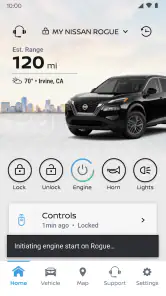
Screenshots
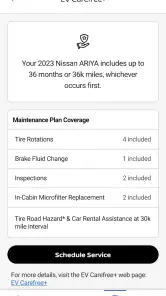
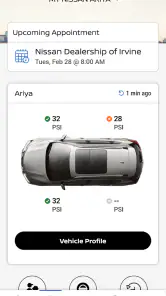
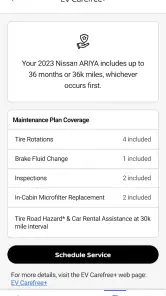
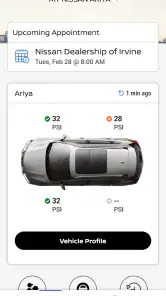
Analysis by Reviewed
I judge a car companion app by whether it helps with a routine task when my hands are full or the weather is unkind, not by how many buttons it can put on a screen. MyNISSAN® is Nissan North America, Inc.’s free Auto & Vehicles app for owners who want to manage selected vehicle tasks from a phone. Its appeal is straightforward: bring useful car information and remote controls into one place, while remembering that what you can do depends on having a compatible Nissan and the relevant service available.
A useful routine starts with the right expectations
For everyday use, I’d treat the app as a companion to the car rather than a replacement for the key, dashboard, or owner’s manual. Once it is set up for your vehicle, the natural workflow is to open it when a remote task or a quick vehicle check is useful, then use the car itself for anything that needs immediate, guaranteed feedback. That division keeps the app helpful without making a phone the only way you can access your vehicle.
A realistic example is leaving work on a cold day: if remote climate control is available for your Nissan, starting the preparation from the app can make the first few minutes of the drive more comfortable. I’d still check that the command has gone through before assuming the cabin is ready. Remote controls rely on the vehicle and connection being able to respond, so a phone screen is not a substitute for confirming the result.
Settings and habits worth checking
Before building a habit around remote access, I’d make sure the correct vehicle is associated with the account and look through the app’s available vehicle and notification settings. That small check matters if more than one person uses the car or if you switch between vehicles; it reduces the chance of acting on the wrong one. I’d also allow only the alerts I actually want to notice, so useful reminders do not get lost among notifications I tend to dismiss.
The app is free, but availability of individual connected services can depend on the vehicle and the service arrangement. I would check what appears for my own Nissan before relying on a particular remote command, report, or assistance option. The app is rated for Everyone, has a 4.5 average from around 21,000 ratings, and has passed 500,000 installs; those figures make it a well-used option, but they cannot tell you whether every feature fits your specific model.
Latest News
Faster patterns for repeat users
The biggest time-saver is turning occasional checks into a simple routine instead of opening the app whenever a vague worry comes to mind. For example, I’d review vehicle information before a longer drive, then use the app again only if a particular detail needs attention. A health report can be a useful prompt to investigate, but I would treat it as an early heads-up, not as a full mechanical inspection or a reason to ignore a warning displayed in the car.
It also helps to decide in advance which tasks belong in the app and which are better handled another way. Remote convenience is handy when I’m approaching the car, while a normal key remains the more direct choice when I’m beside it. Likewise, for route planning I’d compare the app’s navigation or traffic information with the navigation tool I already use before setting off. Picking one source to follow while driving avoids the distraction of switching between screens on the road.
Where it fits among car apps
Compared with a general navigation app, MyNISSAN is more useful for Nissan-specific ownership tasks than for being the one place I do everything on a trip. Compared with a dealer visit or a call for help, having vehicle details and assistance options on a phone can make it easier to start the next step, though it does not replace hands-on service when a problem needs diagnosis. If you drive a Nissan and value connected controls, it makes sense to try; if you drive another brand, or want an app that works as a universal remote for any car, this is not the right choice.
Limits to keep in mind
The main trade-off is that a connected feature is only convenient when the vehicle, account, and connection line up. I would not depend on a remote action as the sole way to secure or access a car, and I would not wait for an app report if the vehicle itself is showing an urgent warning. For a driver who prefers physical controls and rarely needs remote access, a standard key and the car’s own displays may be simpler. The current version is 6.7.55, and the app supports devices running Android 8.1 or later, so it is worth checking compatibility before installing on an older phone.
Getting Rolling with MyNISSAN®
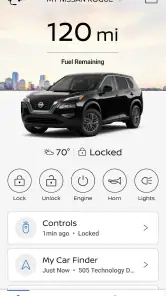
First things first, getting started with the MyNISSAN® app is smoother than a freshly paved highway. After a quick download from the App Store or Google Play, I was up and running in minutes. The app is designed to sync seamlessly with your Nissan vehicle, offering a dashboard full of features right at your fingertips.
User-Friendly Interface
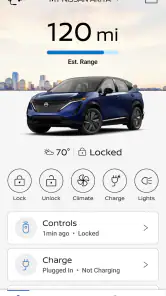
The interface is clean and intuitive, making it easy for even the least tech-savvy among us to navigate. I was pleasantly surprised by how everything was organized. It’s like Nissan took a peek into my brain and laid everything out just the way I’d want it!
Features That Make Life Easier
What really stole my heart were the remote access features. Imagine being able to start your car, lock or unlock doors, and even control the climate—all from your phone! I tested it out on a particularly cold morning, and let me tell you, hopping into a pre-warmed car was pure bliss. It’s these little conveniences that make a big difference.
Another nifty feature is the vehicle health report. It’s like having a personal mechanic in your pocket. The app keeps you updated on your vehicle’s oil levels, tire pressure, and more. I found this incredibly reassuring, especially before hitting the road for a long trip.
Stay Connected
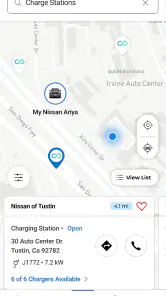
With the built-in navigation and assistance features, I felt connected at all times. The app offers real-time traffic updates and helps find the best routes. Plus, if you’re ever in a pickle, the roadside assistance feature is just a tap away. It’s like having a co-pilot who never complains!
Ending Note
Wrapping it up, the MyNISSAN® app is a must-have for Nissan owners. It’s packed with features that not only enhance your driving experience but also offer peace of mind. Whether it’s the convenience of remote access or the security of vehicle health updates, this app covers all bases. So, if you’re cruising in a Nissan, do yourself a favor and give this app a spin. You won’t regret it!
Make the first week a practical test
I would not decide whether the app belongs in my routine after a quick glance at its home screen. I’d test one or two tasks I genuinely expect to use, such as checking vehicle information before a trip or trying a supported remote action while I’m close enough to confirm the result. That gives me a realistic sense of how the account and car work together without turning the app into something I check out of habit.
If a command does not appear or does not complete, I’d first check that I selected the right vehicle and that the relevant service is available for it. Then I’d rely on the key or the car’s controls rather than repeatedly tapping the same command. This is a useful distinction: the app can make a task easier, but retrying an unresponsive remote action is not a good substitute for a dependable fallback.
Who gets the most from it
I see the clearest value for a Nissan owner who regularly parks away from home, shares a vehicle, or likes checking a car’s condition before committing to a longer drive. Remote climate control, when supported, is particularly appealing if you often return to a parked car in uncomfortable weather. Vehicle information can also help turn a vague concern into a specific question to discuss with a service professional, rather than leaving you to guess what may need attention.
It is less compelling if you mainly want turn-by-turn directions, already use a familiar navigation app, and rarely need connected vehicle controls. In that case, the Nissan-specific features may sit unused while your existing map app does the job you actually need. Drivers of other makes should skip it for remote control: this is an ownership companion for compatible Nissan vehicles, not a general-purpose car app.
Keep a useful fallback
One small habit makes the experience more reliable: use the app to prepare or check, then verify important results through the vehicle itself whenever practical. If you ask it to prepare the cabin, confirm the car is ready before you set off; if a report raises a concern, use the dashboard and appropriate service advice to decide what to do next. I would also keep the physical key accessible, especially when a remote task matters to the plan rather than being a pleasant extra.
That approach may sound cautious, but it is exactly how I’d want a connected car tool to fit into daily life. It preserves the convenience without encouraging me to treat a phone as proof that a vehicle has responded. For a shared car, agreeing on who checks alerts and who handles a follow-up can also prevent two people from assuming the other has dealt with a notification.
A sensible choice, with model-specific boundaries
MyNISSAN® has a 4.5 average from around 21,000 ratings and about 2,400 written reviews, and it has been available since March 13, 2020. Those figures suggest a substantial audience, but the deciding question is still whether your own vehicle and service arrangement expose the tools you care about. It is free, and its Everyone content rating makes it broadly suitable as an app; neither point guarantees that every connected option will work with every Nissan.
My verdict is positive but deliberately practical. I’d install it if I owned a compatible Nissan and wanted a convenient place for supported remote controls and vehicle information. I would not replace a key, a dashboard warning, a trusted navigation routine, or professional diagnosis with it. Used as a focused companion—with a couple of repeatable checks and a dependable fallback—it can earn a place on your phone without asking you to change how you drive.
MyNISSAN® Frequently Asked Questions
What does MyNISSAN® do, and who is it intended for?
MyNISSAN® is an Auto & Vehicles app for Nissan drivers who want to use their phone for vehicle-related tasks. Its central purpose is remote vehicle control, though the options available can vary according to the Nissan vehicle and connected services associated with an account. Before downloading, consider whether you own or use a compatible Nissan and which app functions you expect to need.
Who publishes MyNISSAN®, and is it intended for all ages?
MyNISSAN® is developed by Nissan North America, Inc. The app has an Everyone content rating, making its age classification suitable for a general audience. Its practical usefulness, however, is aimed primarily at Nissan owners or drivers who want to manage vehicle-related tasks from a phone. The features available after installation can depend on the vehicle and connected services.
Is MyNISSAN® free to download, and what should I know before using it?
MyNISSAN® is free to download and is designed for Nissan owners who want to manage vehicle-related tasks from a phone. The app focuses on remote vehicle control, while other functions may depend on your vehicle and its connected services. Its free download does not necessarily mean every connected feature is included at no cost, so review the terms for any services you choose to use.
Which phones can run MyNISSAN®?
MyNISSAN® is an Auto & Vehicles app from Nissan North America, Inc. It requires iOS 8.1 or later, so check your device’s operating system before installing. The app is available for mobile use, but the functions you can access after installation depend on the Nissan vehicle and services associated with your account. Keeping your phone’s software current can also help with compatibility.
What features does the MyNISSAN® app offer to enhance the driving experience?
The MyNISSAN® app provides a range of features designed to enhance your driving experience. Users can remotely start their vehicle, lock or unlock doors, and even locate their car using the app's GPS functionality. Additionally, the app offers maintenance reminders, service scheduling, and access to vehicle health reports, ensuring you stay informed about your car's condition at all times.
Pros
- User-friendly interface for easy navigation.
- Real-time vehicle status updates.
- Remote start and lock/unlock features.
- Maintenance alerts and reminders.
- Integration with smart home devices.
Cons
- Limited features for older car models.
- Requires stable internet connection.
- Some features need a subscription.
- Occasional app crashes reported.
- Limited customer support availability.
- Category
- Auto & Vehicles
- Version
- 6.7.55












