

MyINFINITI App
- 353.00
- 4.7
- Installs
- 100.00K
- Price
- Free

Screenshots
Analysis by Reviewed
When I think about a vehicle companion app, I do not judge it by how many buttons it puts on a screen. I ask a simpler question: does it make ownership easier without making me feel that I have handed over more control than necessary? MyINFINITI App is aimed at that everyday space for INFINITI owners, bringing vehicle-related information and ownership tasks into a mobile app rather than leaving everything to a glovebox manual, a phone call, or a dealership visit.
That focus gives it a clear identity. This is an Auto & Vehicles app, not a general driving tool, navigation replacement, or social platform. Nissan North America, Inc. develops it, and the app is free with an Everyone age rating. In my view, that makes it most interesting for people who already own an INFINITI and want a more direct way to stay connected with the ownership side of the car.
The app has a strong public reception, with a 4.8 average from around 2.4 thousand ratings and more than 100 thousand installs. Those figures do not prove that every owner will have a smooth experience, but they do suggest that the basic idea is useful to a substantial group of drivers. I would still treat the app as an ownership aid rather than an essential part of driving. If it saves me time at the right moment, it earns its place; if a task is quicker through the vehicle itself or a traditional service channel, I would use that instead.
What MyINFINITI App is really useful for
The best way to understand MyINFINITI App is to see it as a central place for the relationship between an owner and an INFINITI vehicle. Instead of searching through separate resources whenever a question comes up, I can open one app and look for the relevant ownership information or action. That is especially helpful when I am away from the car and need to think about the vehicle as an asset, not simply as transportation.
A realistic example is a busy weekday morning. I notice an unfamiliar warning or remember that the vehicle needs attention, but I do not have time to search through paperwork before leaving. An owner-focused app can give me a more organized starting point: check the available vehicle information, review the appropriate ownership resources, and decide whether I can handle the issue later or need professional help. The important benefit is not that a phone magically diagnoses everything. It is that the app can reduce the friction between noticing a problem and taking the next sensible step.
I also see value in using it before a service conversation. Rather than relying on memory, I can gather the details I need while the issue is fresh. That can make a dealership interaction more focused. It does not replace a trained technician, and I would never use an app as permission to ignore a warning that affects safety, but it can help me arrive better prepared.
Another useful situation is ownership away from home. If I am traveling, lending the vehicle to a family member, or simply dealing with paperwork when the car is parked elsewhere, an app is more convenient than keeping every detail in the vehicle. That convenience is one of the strongest reasons to use an official owner app instead of a generic automotive utility.
More From Our News Desk

 Gmail
GmailGmail in a Busy Inbox: Who Benefits Most?
From first account to crowded workday, Gmail earns its place through dependable search and flexible sorting—but its best fit depends on how much inbox maintenance you can tolerate.

 Prime Video
Switching to Prime Video: What Changes in Your Viewing Routine
Prime Video can make a compelling second home for streaming, but switching means learning a different catalog, rental layer, and route from browsing to playback.

 Universal TV Remote Control
Universal TV Remote Control Works Best as a Reliable Backup
A phone remote earns its place through quick setup and reliable habits. Here is how to get more from Universal TV Remote Control—and where its limits show.

 Weather - By Xiaomi
Weather by Xiaomi Review: Clear at a Glance, Less Clear Up Close
Xiaomi’s weather app makes everyday forecasts quick to scan, but its calm surface can leave useful details and recovery paths harder to find than they should be.

 X
XX Under Pressure: Can It Recover When Posting Goes Wrong?
A resilience-focused review of X, examining setup, mistaken posts, interruptions, weak connections, and the gaps that matter when recovery needs to be dependable.

 Clash of Clans
Clash of Clans Is Won Between the Battles
Its raids are quick; its community is a long-term project of coordination, teaching, rivalry, and shared responsibility—with all the friction that entails.
Latest News



Why the official connection matters
Trust is important here because vehicle information feels more personal than an ordinary app preference. I would rather begin with an official app from Nissan North America, Inc. than with an unrelated service that tries to assemble vehicle information from several sources. The official connection gives the app a clear purpose and makes it easier for me to understand why an account or vehicle-related detail might be involved.
That does not mean I would approve every request automatically. An official developer is a reason to examine the app carefully, not a reason to stop thinking. I still want to know what I am being asked to provide, which parts of the experience require an account, and whether I can make useful progress without enabling every available option.
MyINFINITI App is available at no charge, which lowers the barrier to trying it. The current version is 3.12.110, and it supports devices running Android 8.1 or later. For an owner using an older phone, that minimum requirement is worth checking before expecting the app to work. On a compatible device, I would keep the app updated, particularly for an ownership tool where reliability and account handling matter more than novelty.
Controls I would check before settling in
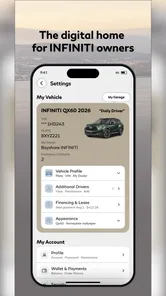
My first visit would not be about exploring every screen. I would start by checking the sign-in process, the vehicle or ownership details connected to the account, and the settings that govern communication. This is a practical trust test: if I can understand what is connected and adjust ordinary choices without hunting through confusing menus, I feel more comfortable using the app regularly.
I would also review the phone’s system-level permissions rather than assuming that every permission is required. Android and iOS both provide controls for access to device functions, and I prefer granting only what supports a feature I actually intend to use. If a function does not work without a particular permission, that is a moment to decide whether the convenience is worth it. The choice should be mine, not an automatic part of installation.
There is a useful distinction between an account control and a phone permission. An account may identify me as an owner or connect me with a vehicle, while a phone permission governs access to something on the device. Keeping those ideas separate makes troubleshooting easier. If a feature fails, I can check whether the problem is the account, the vehicle association, the app version, or a denied system permission instead of randomly changing everything.
The most trustworthy setup is the one I can explain to myself. I should know why I installed the app, what it helps me do, and which choices I have made to enable it. If I cannot answer those questions, I would pause before adding more personal or vehicle information.
Where privacy deserves extra attention
Vehicle apps naturally bring data-sensitive moments into ordinary routines. Signing in, adding a vehicle, checking ownership information, contacting support, or preparing for service can all involve details that I would not treat casually. I would avoid completing those steps on a shared phone or an unsecured public connection, just as I would with any account tied to an important purchase.
I would also be careful when another person uses the vehicle. A family member may need practical information about the car without needing access to my account. Before handing over the phone or allowing someone else to use the app, I would sign out where appropriate and review what remains visible in the app. This is a small habit, but it prevents convenience from becoming accidental account sharing.
Notifications deserve the same attention. They can be helpful when they remind me to look at an ownership task, but they can also expose vehicle-related information on a lock screen. I would choose a notification style that fits my situation, especially if other people regularly see my phone. The right setting depends on how private I need the information to be, not on whether notifications are generally useful.
When an app handles vehicle details, I prefer to make decisions at the moment they matter. I would read the explanation attached to a permission or data choice, avoid accepting optional settings purely to reach the next screen, and revisit those choices after I understand how often I use the feature. That approach is more realistic than trying to predict every future need during the first launch.
What it can and cannot replace
MyINFINITI App compares favorably with the usual alternative of searching through a manual, calling a dealership, or using a generic notes app to store ownership information. Its advantage is context. A general automotive app may offer broad tools for many makes, while an official INFINITI app is designed around one ownership relationship. That narrower scope can make it more relevant when I need brand-specific information.
At the same time, the app is not a replacement for every automotive service. A navigation app may be better for route planning, a manufacturer service department may be better for complex diagnosis, and the vehicle’s own controls remain the most direct place for tasks that must happen while driving or while sitting in the car. I would not open a phone app while moving, and I would not expect a mobile ownership portal to substitute for emergency assistance or qualified mechanical work.
This is also not the right choice for someone who does not own or regularly use an INFINITI. The brand-specific focus is a strength for the intended audience but a limitation for everyone else. A multi-brand vehicle manager would be more practical for a household with several different makes, particularly if the main goal is a single dashboard for all cars rather than a dedicated INFINITI ownership experience.
Small habits that make the app more useful
I would use the app proactively rather than waiting for a stressful problem. After installation, I would complete the account and vehicle setup when I have time, confirm that the displayed ownership details are correct, and look through the available settings. Doing this on a calm day is much better than trying to learn the app during a roadside concern or immediately before a service appointment.
A second habit is to treat the app as a preparation tool. Before contacting a dealer or arranging service, I would note the symptom, when it appeared, and anything I have already checked. If the app provides a relevant ownership path, I can use that information to make the conversation clearer. The app does not need to solve the issue to be valuable; reducing confusion is already a worthwhile result.
A third habit is to review access after changing phones or ownership circumstances. If I sell the vehicle, share it differently, or move to a new device, I would not leave the old setup untouched. I would check the account and device settings, remove access that no longer makes sense, and avoid assuming that deleting the app alone handles every account relationship.
I would also keep expectations realistic about connectivity. A mobile app depends on the phone, the account, and the services behind it. If I am in a place with weak reception or the app is temporarily unavailable, I still need the vehicle’s manual information and ordinary support channels. Keeping essential ownership documents accessible offline is a sensible backup, not a criticism of this particular app.
Who should use it, and who should be cautious
I would recommend trying it to an INFINITI owner who wants official ownership information in one place, prefers handling routine tasks from a phone, and is willing to spend a few minutes reviewing account and privacy choices. It is particularly suitable for drivers who often manage the vehicle away from home or who want to be better prepared before speaking with a service team.
I would be more cautious if I rarely use smartphone apps, dislike account-based services, or only want a simple paper manual and occasional dealership support. Installing an app that I never open adds little value. Likewise, if my household needs one tool for several vehicle brands, a broader automotive app may fit better even if it lacks the brand-specific focus found here.
People with older devices should check compatibility first because the app requires Android 8.1 or later. I would also avoid judging the whole experience from the first launch alone. The real test is whether the app remains understandable when I need it: can I find the relevant ownership information, recognize which action is mine, and tell when the matter belongs with a professional instead?
My cautious verdict
MyINFINITI App makes sense because it addresses a specific relationship rather than trying to be every kind of driving app. For an INFINITI owner, its official focus and free access make it a low-risk tool to try. I like the idea of having a dedicated place for ownership tasks, especially when the alternative is scattered paperwork or a less relevant general-purpose app.
My recommendation comes with one condition: use it deliberately. Review the account connection, inspect the permissions shown by the phone, choose notification settings that protect your privacy, and keep a backup plan for moments when the app or network is unavailable. Those steps do not take away from the convenience; they make the convenience easier to trust.
The app’s 4.8 average and roughly 2.4 thousand ratings show that many users find it worthwhile, while its 100K+ installs indicate a meaningful audience. I would read that reception as encouragement, not a guarantee. My final view is positive for current INFINITI owners who want a focused digital ownership companion, but neutral for everyone else. If you want brand-specific help and are comfortable managing an account, it deserves a place on your phone. If you want universal vehicle coverage or no digital account at all, the traditional alternatives may serve you better.
MyINFINITI App Frequently Asked Questions
Who develops MyINFINITI, and what is the app’s age rating?
MyINFINITI is developed by Nissan North America, Inc. and is intended for INFINITI owners and drivers looking for a digital companion to vehicle ownership. It is rated Everyone, which makes it suitable for a general audience. The app is free to download, although some connected services available through it may involve separate enrollment or subscription requirements.
What is the MyINFINITI App used for?
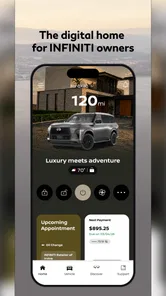
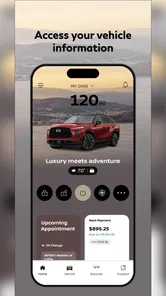
MyINFINITI is a companion app for eligible INFINITI vehicles, designed to make ownership more convenient. Depending on your vehicle, market, and connected-services plan, it can provide access to vehicle information, maintenance reminders, service scheduling, roadside assistance, owner resources, and other connected features. Available tools may differ by model year, trim level, country, and subscription status, so users should check compatibility before downloading.
Which INFINITI vehicles and phones are compatible with MyINFINITI?
Compatibility is not identical for every INFINITI model. Some features require a relatively recent vehicle equipped with compatible telematics hardware, while older vehicles may offer only basic owner or service information. The app also requires a supported Android or iOS version and an active internet connection. Before installing, confirm the supported vehicle list, operating-system requirements, and regional availability in the official app store.
Does MyINFINITI require a subscription or additional payment?
Downloading MyINFINITI is generally free, but certain connected services may require enrollment, an eligible vehicle, and an active trial or subscription. Features such as remote commands, vehicle status, location tools, or enhanced assistance can depend on the services included with your vehicle purchase or connected-services package. Mobile data charges may also apply, and availability can vary by country and account terms.
Can I use MyINFINITI to remotely control or locate my vehicle?
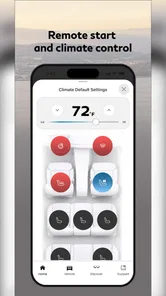
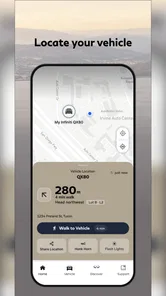
On supported vehicles and with the appropriate connected-services enrollment, MyINFINITI may allow users to view vehicle status, locate the vehicle, or send selected remote commands such as locking doors or starting the engine. These options are not guaranteed on every model and may be restricted by safety conditions, network coverage, privacy settings, or regional regulations. The vehicle and account must be properly linked.
Pros
- Quickly view vehicle status
- fuel range
- and maintenance information.
- Remote start and door-lock controls are convenient for compatible vehicles.
- Service scheduling and dealer contact tools simplify routine maintenance.
- Roadside assistance access can be useful during unexpected vehicle problems.
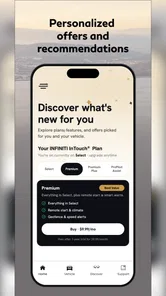
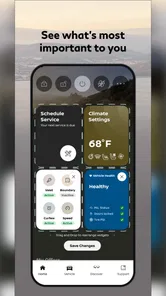
- Personalized alerts help owners keep track of important vehicle updates.
Cons
- Many remote features require a compatible INFINITI model and connected services plan.
- Remote commands may respond slowly when the vehicle or phone has a weak signal.
- Some features vary by region
- model year
- and local service availability.
- The app can require frequent sign-ins or verification for security-sensitive actions.
- Battery and data usage may increase if location-based features are used regularly.












