MyMazda
- 4.11K
- 4.5
- Installs
- 1.00M
- Price
- Free

Screenshots

Analysis by Reviewed
For me, the most useful way to think about MyMazda is as a bridge between everyday ownership and the practical tasks that usually get scattered across phone calls, calendar notes, and memory. It is a free lifestyle app from Mazda Motor Corporation, and its central appeal is not that it replaces the car itself, but that it puts selected ownership tasks in one place. If you already drive a Mazda, that focus can make routine upkeep feel easier to manage; if you do not, most of the reason to install it disappears.
Where the app earns its place
The strongest idea here is the connection between the owner and the vehicle’s care routine. Service scheduling, maintenance reminders, and a vehicle health report all point toward the same practical benefit: helping me notice and act on maintenance needs before they get lost in a busy week. That is a more grounded kind of convenience than an app that merely adds another screen to check.
I would use the reminders as prompts, not as a substitute for paying attention to the car. A notification can bring a task back to mind, but it does not make the decision for you or remove the need to discuss a concern with a service professional. The useful habit is to treat an alert as a cue to review what is due, then make a plan while the issue is still easy to handle.
The service-booking option is especially appealing when I already know I need an appointment. Instead of starting by searching for a phone number and calling during business hours, I can begin from the app and keep the task tied to my vehicle. That does not guarantee every scheduling detail will be effortless, but it gives owners a more direct starting point than managing the whole process from memory.
How I would use it during an ordinary week
Picture a normal weekday: I am heading out, remember that the car may be due for attention, and do not have time to make a call right then. A maintenance reminder can turn that vague thought into a concrete task. I can check the vehicle information, use the app to start arranging service, and then return to the rest of the day without relying on a scrap of paper or hoping I remember later.
That workflow is most valuable when the app becomes part of a routine rather than something I open only after a warning appears. I would check it when planning vehicle care, then use the reminder as a nudge to book or follow up. Keeping that small habit can reduce the mental load of ownership, especially for someone juggling work, family errands, and more than one calendar.
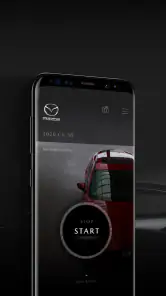
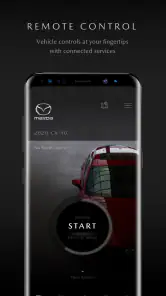
The vehicle finder and remote start add a different kind of convenience, but they depend on the owner’s circumstances and the vehicle’s support for those functions. Finding a car can be handy after leaving it in a large lot, while remote start can make a cold-weather departure more comfortable. I would check that the relevant feature is available for my particular Mazda before building a routine around it; an app’s presence alone does not mean every function applies to every vehicle.
More From Our News Desk

Clash of Clans Is Won Between the Battles

Android Auto Makes the Case for Quieter Car Software

MobiOffice: Transforming Mobile Productivity with Seamless Integration

EA SPORTS FC™ Mobile Soccer: Redefining Mobile Sports Gaming

How Microsoft OneDrive Became a Mobile Productivity Giant

How Google Translate Breaks Language Barriers Effortlessly
What to expect, and where to be cautious
Compared with a general calendar reminder or a notes app, MyMazda has the advantage of being centered on Mazda ownership and tying car-related tasks together. A calendar can remind me to call a shop, but it does not provide the same vehicle-focused place to begin. On the other hand, a calendar remains more flexible for reminders that have nothing to do with a Mazda, and a direct call may be preferable if I have a detailed question or need to explain a specific issue.
There is also a practical distinction between convenience and control. The app can help organize a service task, but it is not a reason to assume that every repair, appointment detail, or vehicle concern can be handled entirely on a phone. For unusual symptoms or questions that need a conversation, I would contact a service professional rather than expect a reminder or report to settle the matter.
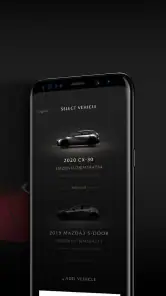
Setup is described around registering a vehicle with its VIN, so I would have that information available before getting started. That is a small but useful preparation step, particularly if I am setting things up away from the car. If more than one person shares the vehicle, it is also worth agreeing who will keep an eye on reminders and appointments; otherwise, two people can assume the other has taken care of the same task.
Getting Started with the App
So, first things first, downloading and setting up the MyMazda app is a breeze. It’s available on both Android and iOS, which is super convenient. Once you’ve downloaded it, all you need to do is register your vehicle using the VIN. Trust me, it’s as easy as pie. After the setup, you’re ready to dive into a world of features designed to make your life easier.
A Hub of Handy Features
The app is like having a personal assistant for your car. One of the standout features is the ability to schedule your service appointments directly from the app. No more calling the dealership and waiting on hold! Plus, it sends you maintenance reminders so you never miss a beat. Another cool feature is the vehicle health report. It gives you a heads-up on any issues before they become big problems.
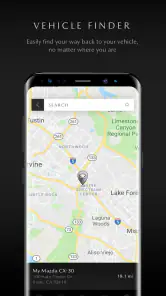
But wait, there’s more! If you’re anything like me and constantly forget where you parked, the app’s vehicle finder feature is a lifesaver. It uses your phone’s GPS to locate your car, saving you from wandering around parking lots aimlessly. And, for those chilly mornings, the remote start feature is pure gold. You can warm up your car from the comfort of your home.
Design and User Experience
Let’s talk about the design for a second. The app is sleek and modern, with a user-friendly interface that even the least tech-savvy person can navigate. Everything is laid out logically, so you’re not left scratching your head trying to figure out where to go next. I appreciate the attention to detail, and it’s clear that the developers put a lot of thought into making the app intuitive and accessible.
Why You’ll Love It
In a nutshell, the MyMazda app is a must-have for any Mazda owner. It’s packed with features that simplify car ownership and enhance the overall experience. Whether you’re booking a service appointment or using the remote start, the app makes you feel like you’ve got a little piece of the future right in your pocket.
Overall, I’d say give it a whirl. The convenience and peace of mind it offers are well worth it. Plus, who doesn’t love a bit of tech that makes life easier?
Who benefits most from keeping it installed
I see the clearest value for an owner who prefers to handle routine vehicle tasks proactively rather than waiting until they become urgent. If you already use a phone to manage appointments, having car reminders and service access in a vehicle-focused app can make those jobs easier to find. It also suits someone who sometimes forgets where they parked or appreciates being able to prepare the car before a departure, provided those functions work with their vehicle.
It is less compelling if you rarely use mobile tools, have a long-standing service routine that works well by phone, or simply want a general car log that covers vehicles from several manufacturers. In those cases, a calendar, a notebook, or a brand-neutral maintenance tracker may fit better. I would not install it expecting it to become a universal garage-management system; its appeal is specifically tied to Mazda ownership.
Small habits that make the experience more useful
One practical tip is to complete vehicle registration when you have the VIN at hand, rather than postponing setup until you need to book service. That turns the app from a last-minute experiment into something ready for ordinary planning. After registration, I would take a moment to understand where the maintenance and service areas are, so the next time a reminder appears, I can act without searching through the interface.
Another useful habit is to treat the health report as a conversation starter, not a diagnosis. If it flags something, I would note the concern and raise it while arranging service, especially if I have noticed a change in how the vehicle drives. That approach avoids both extremes: ignoring useful information and assuming an app can replace inspection or professional judgment.
For the vehicle finder, I would think of it as an aid for a particular parking situation rather than a guarantee that I will never lose track of the car. In a crowded lot, checking the app before walking around can save time; in a place where I know the row and level, a quick phone note may be simpler. Remote start is similarly situational: it can improve a cold morning, but it matters less to someone who parks in a mild climate or does not need that comfort.
Ratings, access, and the ownership fit
The app has a 4.5 average from around 52 thousand ratings, with more than a million installs, which suggests that many owners find a reason to keep it. Those figures are useful context, but they do not tell me whether a particular feature is supported by a particular Mazda or whether the app matches an individual owner’s habits. I would judge it by the tasks I actually want to manage, not by popularity alone.
It is free and rated for Everyone, so there is no purchase decision to make before trying it. Mazda Motor Corporation has continued the app through version 9.0.4, and it requires Android 10 or later. The release history reaches back to February 29, 2012, which makes this a long-running ownership companion rather than a newly introduced concept. For anyone using iOS, the app is also available there, as the setup experience describes.
Before relying on it for a time-sensitive appointment, I would still check the details shown during the booking process and make sure the plan is confirmed through the appropriate channel. The app is most helpful as a convenient starting point and reminder system; it should not leave me assuming a task is complete when I have not reviewed the appointment details. That little check is a sensible trade-off for moving routine organization onto a phone.
A sensible choice for Mazda owners
My overall view is that MyMazda is worth trying if you own a Mazda and want one place to begin with maintenance reminders, service scheduling, and selected vehicle conveniences. Its strengths are practical rather than flashy: it can help me remember, plan, and find useful ownership tools without turning car care into a separate project. The best results come when I use it alongside good judgment, not as a substitute for it.
If you want a broad vehicle tracker, prefer direct conversations for every service issue, or do not own a Mazda, another option will likely suit you better. But for an owner who wants a simple digital companion for the routine parts of keeping a Mazda on the road, I think it earns a place on the phone. I would set it up, register the vehicle, and try it during the next ordinary maintenance task; that is the clearest way to see whether its convenience fits your own driving life.
MyMazda Frequently Asked Questions
Can I use MyMazda if I am not a Mazda owner?
MyMazda is built around the experience of owning a Mazda, and its main appeal is the ability to access vehicle-related information and services. If you do not own a Mazda, the app may have limited practical value for you. Before downloading, consider whether you have a Mazda vehicle and whether the app’s owner-focused tools match what you want to do.
What information should I have ready when setting up MyMazda?
Because MyMazda is designed to connect owners with Mazda-related vehicle services, it helps to have access to the details associated with your vehicle and your Mazda account when getting started. Keep your account credentials available, and follow the prompts in the app. The setup experience and available options can depend on your vehicle and the services relevant to it.
Does MyMazda work on both Android and iPhone?
MyMazda is available for mobile devices, but the operating system requirement matters before you install it. Check your phone’s software version in its settings and make sure it meets the app’s minimum requirement of version 10 or later. Installing through your device’s official app store is the straightforward way to get the version intended for your platform.
Is MyMazda free to download, and what should I know before installing it?
MyMazda is a free Lifestyle app from Mazda Motor Corporation, intended to make owning a Mazda simpler and more convenient. It is rated for Everyone, so its content rating is suitable for a general audience. Before installing, check that your device runs iOS or Android version 10 or later. The app’s usefulness will depend on whether you own a Mazda and which features suit your vehicle.
What is MyMazda and what features does it offer?
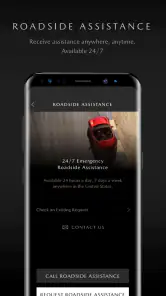
MyMazda is a comprehensive app designed for Mazda vehicle owners to enhance their driving experience. It offers features such as vehicle health and service information, remote control functionalities for locking/unlocking doors, and starting the engine, as well as navigation and trip planning tools. Additionally, it provides maintenance reminders and lets users access their vehicle's manual and contact roadside assistance when needed.
Pros
- User-friendly interface
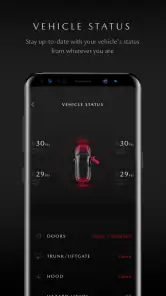
- Real-time vehicle status updates
- Remote start and stop feature
- Service appointment scheduling
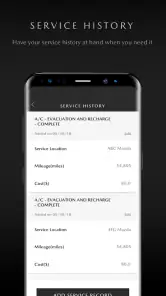
- In-app service history tracking
Cons
- Requires stable internet connection
- Limited features for older models
- Occasional app crashes
- Slow customer support response
- High battery consumption

- Category
- Lifestyle
- Version
- 9.0.4