myCashery: Play & Make Money
- 2.04K
- 4.5
- Installs
- 500.00K
- Price
- Free

Screenshots


Analysis by Reviewed
Turning spare minutes into a little extra value sounds appealing, especially when the activity is built around games and surveys rather than another complicated side-hustle routine. I spent time looking at myCashery from that practical angle: how quickly it gets you into an activity, how it behaves when you use it repeatedly, and whether it fits comfortably into an ordinary phone routine. It is a free Lifestyle app from ayeT-Studios, aimed at adults who want to earn money through game-related tasks and surveys.
My first impression is that this is best understood as a rewards companion, not a replacement for paid work. The attractive part is the low barrier to entry: you can try it without paying for the app, and the concept is easy to understand. The less attractive part is that your results depend on the opportunities available to you and on how much time you are willing to spend completing them. That makes the app more suitable for occasional spare-time use than for anyone expecting a predictable income.
How the app feels during everyday use
I found it most useful to treat each session as a small decision rather than an automatic habit: first check whether an activity fits the time and attention I have, then decide whether to continue. That approach also gives me a natural moment to consider what information a survey asks for and whether I’m comfortable sharing it. From there, the next question is how much control I actually have over using the app on my own terms.
Getting started without wasting your first session
The sensible way to approach myCashery is to treat the opening session as an evaluation period. Rather than immediately committing a long stretch of time, I would first look through the available game and survey choices, read the requirements carefully, and decide whether the reward seems reasonable for the effort involved. This small habit matters because earning apps can look attractive at a glance while hiding the real time cost inside the task details.
The interface concept is straightforward enough for the intended audience. You are not learning a complex financial tool or a full game platform; you are choosing activities that may lead to rewards. That simplicity helps the app feel approachable, particularly for someone who has never used a play-and-earn service before. At the same time, the experience is only as efficient as your ability to distinguish worthwhile tasks from ones that are likely to consume too much attention.
I would also keep expectations modest during the first few days. A good early workflow is to try one short activity, note how long it actually takes, and compare that effort with the reward progress shown in the app. After that, you can decide whether surveys, games, or a mixture of both suits you better. This is more useful than assuming every option has the same value simply because they appear in the same app.
Perceived speed and the cost of waiting
For an app like this, speed is not only about how fast screens open. The more important question is how quickly you can move from opening the app to finding an activity that genuinely fits your time. A rewards app feels slow when you spend more time browsing, qualifying, or checking conditions than actually doing something useful. I would therefore judge myCashery by the complete path from discovery to progress, not by animations or page transitions alone.
More From Our News Desk

Weather by Xiaomi Review: Clear at a Glance, Less Clear Up Close

X Under Pressure: Can It Recover When Posting Goes Wrong?

Clash of Clans Is Won Between the Battles

Android Auto Makes the Case for Quieter Car Software

MobiOffice: Transforming Mobile Productivity with Seamless Integration

EA SPORTS FC™ Mobile Soccer: Redefining Mobile Sports Gaming
Short sessions are where the concept makes the most sense. If I have a few minutes while waiting for an appointment, I can look for a survey or game task and stop when that spare time ends. Longer sessions require more discipline because the app can encourage you to keep searching for the next opportunity. The practical tip is to set a personal time limit before starting. That prevents a small break from turning into an open-ended hunt for a better task.
There is also a trade-off between convenience and choice. Having games and surveys in one place is easier than searching across separate services, but a single rewards app may not always offer the most attractive activity at the exact moment you open it. If you care more about maximizing each minute than about having one simple destination, comparing several established alternatives may be more effective. If you value convenience, myCashery’s combined format is easier to live with.
What happens during heavier use
Repeated use changes the experience. A single survey or short game session is easy to fit into a routine, while several activities in a row demand more from your attention and your phone. The app itself may not be the heaviest thing running on a device, but game-related tasks can keep the screen active for longer periods. That means battery drain, heat, and mobile-data use can become more relevant than they are during a quick check-in.
My advice is to separate browsing from extended play. Use a stable connection when possible, and avoid beginning a long task when your battery is already low. This is not just about comfort. Losing a session because the phone powers down or the connection changes can make the time investment feel much worse than the reward suggests. A short charging break or a Wi-Fi connection can make the same workflow feel considerably less frustrating.
Heavy use also exposes the difference between the app and the activities it presents. If a game takes time to install, load, or keep active, the total experience may feel demanding even when the rewards app itself remains responsive. I would not blame every delay on myCashery. The useful question is whether the app makes those transitions clear enough for you to understand what you are committing to before you begin.
Stability, interruptions, and recovery
Reliability matters more here than it does in a casual content app because your time is part of the exchange. A temporary interruption is annoying in any application, but it feels more serious when it happens partway through a survey or game-related task. I recommend checking your progress after each completed activity instead of assuming that every transition has been recorded perfectly.
This is one of the most important practical habits I took from using this type of service: do not close the app immediately after finishing. Give the completion screen time to settle, then return to the progress area and confirm that the activity has been recognized. That extra moment may feel unnecessary, but it creates a clearer record of what you have done and makes it easier to spot a problem early.
Recovery is also easier when you avoid multitasking aggressively. Switching between several demanding apps, clearing the rewards app from memory, or moving between weak and strong connections can create unnecessary uncertainty. I would keep the workflow simple: choose one task, finish it, verify the result, and then move on. This approach will not solve every technical issue, but it reduces the number of variables when something does go wrong.
Device limits and sensible expectations
myCashery supports devices running Android 8.0 or later, which gives it a broad reach among Android users. That does not mean every compatible phone will feel identical. Older hardware may handle the app itself comfortably but struggle more with game-related activity, background switching, or extended screen time. A newer phone may feel smoother, yet the reward value still depends on the task rather than on device performance.
Storage is another everyday consideration. If an earning opportunity involves a game, the game may require its own space, and that can matter on a phone with limited free storage. I would keep some room available before accepting a larger activity, particularly if you already keep photos, videos, and several games installed. This is a more useful preparation step than simply checking whether the rewards app can be installed.
Battery management deserves equal attention. Playing for rewards can make a phone feel more like a small console than a passive survey tool, especially when the activity keeps the display on. Lowering screen brightness, using a reliable charger, and avoiding long sessions in poor signal areas are simple ways to reduce strain. These steps do not increase the reward, but they improve the real value of the time you spend.
A realistic routine for busy users
Imagine that I am commuting, waiting for a friend, or taking a short break between errands. I open the app, scan the available choices, and select something that can reasonably fit the time I have. If a survey appears likely to take longer than my break, I skip it rather than starting in a rush. If a game task requires a longer commitment, I save it for a moment when my phone is charged and I can stay focused.
That routine highlights the app’s strongest use case: turning otherwise empty time into a small, structured activity. The key is not to let the possibility of earning make every idle moment feel like an obligation. I would use myCashery when I actually have spare attention, not while walking, driving, studying, or handling anything that requires concentration. The reward is never worth creating a safety or productivity problem.
For students, commuters, and people who enjoy trying mobile games, this flexible approach can be appealing. For someone who dislikes surveys, has very little mobile storage, or wants a guaranteed hourly return, the same workflow may feel disappointing. The app is not a universal answer; it works best when its format matches your habits.
How it compares with familiar alternatives
The usual alternatives fall into two groups: dedicated survey apps and game-focused rewards services. A survey-only app may be better if you want a narrow, predictable workflow and do not want to install or play games. A game-focused service may suit you more if gaming is already your main hobby and you want an experience built around that activity. myCashery sits between those approaches by bringing both kinds of tasks together.
That middle position is convenient, but it also means the experience may feel less specialized. You gain variety and one place to check, yet you may need to judge more carefully which activity deserves your time. I see this as the central trade-off: myCashery reduces the effort of searching across separate apps, while dedicated alternatives may offer a more focused experience for a particular type of user.
There is another difference from ordinary cashback or coupon apps. Those services usually fit around purchases you were already planning to make, whereas myCashery asks you to spend attention on games and surveys. If you want rewards without changing how you use your phone, a purchase-based option may be a better match. If you prefer interactive tasks and do not mind investing time directly, this app’s format is more relevant.
Who should use it, and who should skip it
I would recommend giving myCashery a fair try if you enjoy mobile games, do not mind answering surveys, and can approach rewards with patience. It is especially suitable for people who want a free way to organize these activities in one place rather than installing unrelated apps and keeping track of them separately. The mature age rating of 17+ also makes it clear that this is intended for an adult audience, not children.
I would skip it if you need dependable income, dislike installing games, or become frustrated when a task takes longer than expected. It is also a weak fit for anyone using an older phone with very little storage or a battery that already struggles during normal use. In those cases, a lighter survey service or a traditional cashback app may create less friction.
Privacy and attention should be part of your decision as well. Before completing any survey, I would read its questions and decide whether I am comfortable providing the requested information. I would never rush through a task merely because a reward is visible. A small earning opportunity should not override your judgment about what you share or which apps you place on your device.
What the current release suggests for long-term use
The app was released on April 29, 2024, and the current version is 2.0.10. Those details matter mainly because rewards platforms can change their flow over time. When you update, I would take a moment to look at the task instructions again instead of relying on memory. A familiar screen does not guarantee that every activity works exactly as it did during your previous session.
Its reception is encouraging without removing the need for personal testing: myCashery holds a 4.5 average from around 17 thousand ratings, with over 2 thousand written reviews and more than 500 thousand installs. I read that as a sign that many people find the basic concept worthwhile, not as a promise that every user will receive the same opportunities or have the same experience. Availability, device condition, and personal tolerance for surveys all affect the outcome.
The free price makes experimentation relatively easy. I can install it, test a few appropriate activities, and decide whether the time-to-reward balance works for me without paying an entry fee. Still, free does not mean effortless. Your attention, battery, storage, and sometimes mobile data are the real costs to consider.
My performance verdict
After weighing speed, heavier-use demands, stability, and device constraints, I see myCashery as a practical spare-time app rather than a serious earning platform. Its strongest quality is the combination of games and surveys in a single Lifestyle app, which makes it easy to check when I have a few unused minutes. Its biggest weakness is the uncertainty around whether the next available activity will justify the time, especially for users who expect consistent returns.
The best way to use myCashery is selectively, not continuously. I would choose tasks with clear requirements, set a time boundary, keep the phone charged, and verify progress after completion. That workflow protects you from the most common frustrations: spending too long on an unsuitable activity, losing a session during an interruption, or overlooking the effect on battery and storage.
My final recommendation is cautiously positive. If you are an adult Android user on a compatible device and you already enjoy casual games or surveys, the app is worth testing as a way to organize spare-time activities. I would not install it expecting a fixed income, and I would choose a more specialized alternative if your priority is either surveys alone, gaming alone, or rewards tied to purchases you already make. Used with realistic expectations, however, myCashery can turn occasional idle moments into something a little more productive without demanding a complicated setup.
myCashery: Play & Make Money Frequently Asked Questions
Does myCashery work on both Android and iOS?
myCashery is available as an app, but before downloading, check the app-store page for your device to confirm that it is offered for your platform. The published device requirement is Android 8.0 or later, which is useful to check if you plan to install it on an Android phone or tablet. Make sure your device meets the requirement before you begin.
What activities can I do in myCashery?
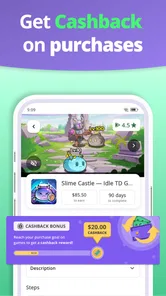
The app’s central idea is earning rewards through mobile games and surveys. In practice, available activities can vary, and individual offers may set their own requirements, such as completing a game milestone or finishing a survey. Browse the current offers before committing time to one, and read each task’s conditions so you know what completion involves.
Who is myCashery designed for, and what should I expect from it?
myCashery is a Lifestyle app from ayeT-Studios for people interested in earning rewards through games and surveys. It may suit users who enjoy trying casual activities in their spare time, but it is better approached as a gradual rewards experience rather than a dependable source of income. Before downloading, consider whether completing offers and surveys fits the way you like to use your phone.
What is myCashery: Play & Make Money?
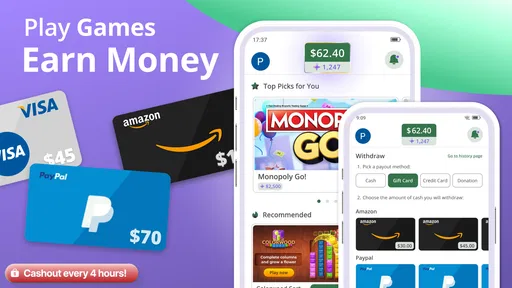
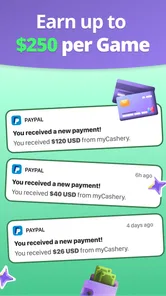
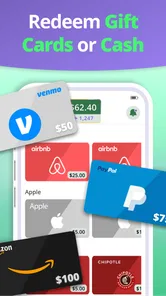
myCashery: Play & Make Money is a rewards app that lets users earn points or other incentives by completing activities such as playing selected mobile games, trying featured apps, answering surveys, or meeting specific in-app goals. After testing the main sections, the experience feels more like a gradual rewards platform than a guaranteed income source, so it is best suited to users who enjoy casual tasks and are comfortable earning small amounts over time.
How do you earn rewards with myCashery?
Earning rewards generally involves choosing an available offer, reading its requirements carefully, and completing the activity through the tracking link provided by myCashery. Some offers may require reaching a level in a game, keeping an app installed, finishing a survey, or meeting another condition within a deadline. Progress and eligibility can vary, so users should save screenshots and check the offer details before starting.
Pros
- Simple interface makes games and offers easy to browse.
- Multiple earning options beyond gameplay can improve flexibility.
- Progress and rewards are clearly visible within the app.
- Suitable for short sessions when you have spare time.
- Free to join
- with no upfront payment required.
Cons
- Earnings are typically small and may require considerable time.
- Reward availability can vary by region and user account.
- Some offers may involve lengthy tasks or strict completion rules.
- Frequent ads can make browsing and gameplay feel repetitive.
- Cash-out requirements may delay access to earned rewards.











