

My Tello
- 1.44K
- 3.9
- Installs
- 100.00K
- Price
- Free
Screenshots

Analysis by Reviewed
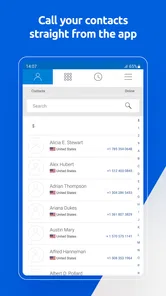
When I look at My Tello, I see a communication app built around one practical job: giving Tello customers a simple place to manage their mobile service and make calls over Wi-Fi. I spent time using it as an account companion rather than treating it like a full social or messaging platform, and that distinction matters. Its value is less about filling a screen with extras and more about putting service controls, balance information, plan purchases, and Wi-Fi calling in one mobile workflow.
That focus makes it especially interesting for people who already use Tello or are considering a flexible way to handle their phone service. The app is free, is rated for Everyone, and comes from Tello LLC. It has earned a 4.0 average from around 3.4 thousand ratings, with more than 100 thousand installs. Those figures suggest a useful, established companion for a particular customer base, although they do not make it the obvious choice for every phone user.
My Tello is most useful when account control and Wi-Fi calling belong together
I find the account-and-calling combination most helpful when I can use it to plan ahead, not just react to a service problem. In this section, I’d look at the practical choices My Tello brings together and why the usefulness of Wi-Fi calling depends on the connection in the places that matter to you.
The central capability is practical service management
The strongest idea here is the combination of account management and calling over Wi-Fi. Instead of treating your mobile plan as something you only think about when a bill arrives or service stops working, My Tello gives you a place to check your balance, manage the account, and choose between a Cell Plan and Pay As You Go service.
I like that this puts two different kinds of decisions side by side. A regular Cell Plan suits someone who wants a predictable recurring arrangement, while Pay As You Go is more appealing when usage changes or a traditional monthly commitment feels excessive. The app does not force the same approach on every customer; it lets the account structure reflect how the phone is actually used.
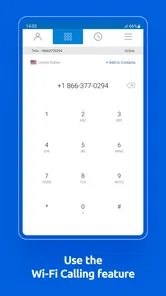
The Wi-Fi calling angle is equally important. Calling over a wireless internet connection can be helpful in places where cellular reception is inconsistent but Wi-Fi is dependable. That does not turn every weak-signal location into a perfect calling environment, but it changes the practical role of the app. It becomes more than a dashboard: it can support communication in a home, office, hotel, or other location where the available connection is better indoors than the mobile signal.
The real benefit is continuity between managing service and using service. I do not have to think of account controls as a separate chore from calling. That is the capability I would emphasize to a friend: My Tello is most compelling when you want to keep an eye on your Tello setup and use Wi-Fi as part of the calling experience.
More From Our News Desk

 Gmail
GmailGmail in a Busy Inbox: Who Benefits Most?
From first account to crowded workday, Gmail earns its place through dependable search and flexible sorting—but its best fit depends on how much inbox maintenance you can tolerate.

 Prime Video
Switching to Prime Video: What Changes in Your Viewing Routine
Prime Video can make a compelling second home for streaming, but switching means learning a different catalog, rental layer, and route from browsing to playback.

 Universal TV Remote Control
Universal TV Remote Control Works Best as a Reliable Backup
A phone remote earns its place through quick setup and reliable habits. Here is how to get more from Universal TV Remote Control—and where its limits show.

 Weather - By Xiaomi
Weather by Xiaomi Review: Clear at a Glance, Less Clear Up Close
Xiaomi’s weather app makes everyday forecasts quick to scan, but its calm surface can leave useful details and recovery paths harder to find than they should be.

 X
XX Under Pressure: Can It Recover When Posting Goes Wrong?
A resilience-focused review of X, examining setup, mistaken posts, interruptions, weak connections, and the gaps that matter when recovery needs to be dependable.

 Clash of Clans
Clash of Clans Is Won Between the Battles
Its raids are quick; its community is a long-term project of coordination, teaching, rivalry, and shared responsibility—with all the friction that entails.
Latest News



What the account tools mean in everyday use
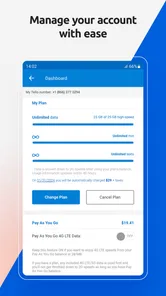
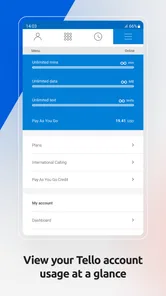
Checking a balance sounds basic, but it can prevent small problems from becoming interruptions. Before making a change or relying on the phone for an important day, I can use the app as a quick checkpoint. That is more convenient than guessing how much service remains or waiting until a limitation becomes obvious.
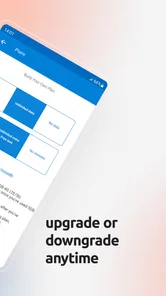
The plan-purchase options also make the app useful for people whose needs are not perfectly stable. Someone who uses a phone lightly may not want to approach service exactly like a heavy user. Someone else may prefer the regularity of a Cell Plan. Having both choices associated with the account means the app can support a change in routine instead of requiring the customer to start the whole process elsewhere.
There is a subtle advantage for households and secondary phones too. A device used for occasional calls, travel, emergencies, or a family member may not need the same service pattern as a primary phone. Pay As You Go can make more sense in that situation, while the app provides a direct way to keep the account visible. I would still compare the expected usage carefully, because convenience does not automatically mean one option is cheaper or better for everyone.
Wi-Fi calling changes where the phone feels dependable
In my experience, Wi-Fi calling is most useful when I stop expecting the cellular network to be the only path to a conversation. A thick-walled building, an interior room, or a location with uneven reception can create frustration even when the internet connection is stable. My Tello’s Wi-Fi calling capability addresses that particular mismatch.
There is an important trade-off, though. Wi-Fi calling depends on the quality and stability of the wireless connection. If the network is congested, unreliable, or requires repeated sign-ins, the experience may be less consistent than a strong cellular connection. I would not treat the feature as a universal replacement for mobile coverage. I would treat it as a second route that can be especially valuable in the right environment.
This is also why I would test it before depending on it for a critical call. Try it from the places where you normally struggle with reception, such as a back room, basement, workplace, or temporary accommodation. The feature’s usefulness is highly local: it depends on the relationship between that location, its Wi-Fi, and your normal cellular signal.
How I would use My Tello in practice
I’d use the app as part of a small routine: check the account, consider whether the service still fits, then test calling in the settings where I expect to need it. The next section walks through how that routine can work for a backup phone or an ordinary day with uneven reception, without treating Wi-Fi as a guaranteed fix.
A simple workflow for checking service before changing anything
I would begin by opening the app when I need a clear picture of the account rather than navigating through several unrelated screens. First, I would check the balance. Then I would decide whether the current service matches my upcoming usage. If I expect a busier period, a Cell Plan may be the more comfortable choice. If the phone will be used only occasionally, Pay As You Go may deserve a closer look.
The useful habit is to make that decision before the need becomes urgent. For example, if I am preparing a secondary phone for a trip or a temporary project, I would review the account early, choose the service that fits the expected pattern, and test Wi-Fi calling at home. That sequence reduces the chance of discovering a problem when I am already away from my usual setup.
I would also keep the app as a reference point after making a change. The balance view is not just something to inspect once. It helps me notice whether my actual usage is matching my assumptions. If I repeatedly choose a service that feels too large or too restrictive, that pattern is a reason to reconsider the plan rather than continuing automatically.
The best everyday scenario is a weak-signal home or workplace
Picture a person whose mobile signal is unreliable inside an apartment, but whose home Wi-Fi is steady. They need to make ordinary calls from a room where cellular reception drops, and they do not want to move around the building looking for a signal. In that situation, My Tello’s Wi-Fi calling capability has a clear practical purpose. The app connects the service-management side with the calling method that may work better in that particular room.
I would set it up and test it during a normal, low-pressure call first. That is a better test than waiting for an urgent conversation. I would move between the places where I usually spend time, notice whether the connection remains stable, and keep cellular calling in mind as the fallback when Wi-Fi is not available.
A similar scenario applies to someone who travels between locations with unpredictable reception. A hotel room, a temporary office, or a relative’s house may have usable Wi-Fi even when the cellular signal is poor. The app is valuable there because the phone does not have to rely on one type of connection in every environment.
A second useful scenario is a low-use or backup phone
I think My Tello can also suit people who do not use a phone heavily. A backup device, an emergency phone, or a line used mainly for occasional calls may not justify the same service approach as a busy primary number. The ability to consider Pay As You Go gives that kind of user a more natural starting point than assuming every line should be managed identically.
The important tip is to estimate behavior honestly. If the phone is rarely used but suddenly becomes essential during a trip or family event, the account should be checked before that change happens. A low-use setup can be convenient, but only if I remember to review it when my routine changes.
What the app is not trying to replace
My Tello is not the app I would choose for group chats, social communication, collaborative messaging, or a broad internet calling community. Its purpose is tied to Tello service and account use. A general messaging app is better when I need rich conversations across different platforms, while a carrier account app from another provider may be better for someone who does not use Tello.
That narrowness is not a flaw by itself. In fact, it helps the app stay understandable. But it does mean the decision should start with the service relationship. If you are looking for a universal communications hub, this is the wrong category of tool. If you want a Tello-focused place to manage service and support Wi-Fi calling, the focus makes more sense.
Trade-offs I noticed before recommending it
Before recommending My Tello, I’d weigh its convenience against the effort of staying aware of service choices and the reliability of the networks available to me. The following section considers those trade-offs, including the situations where another provider’s account tool or a more dependable connection would be a better fit.
The convenience depends on being inside the Tello ecosystem
The first limitation is obvious but important: the app’s usefulness is closely connected to Tello service. A person who does not have a Tello account will not gain much from account management features. This is not a neutral calling utility that stands apart from a mobile provider.
That can be a benefit for existing customers because the app has a clear purpose. It can also be a reason to skip it if you want one application that manages several carriers, numbers, or communication services. I would not install it simply because it mentions Wi-Fi calling; I would install it because Tello account control is relevant to me.
Wi-Fi calling is helpful, but the network still matters
It is easy to hear “call over Wi-Fi” and imagine that weak reception no longer matters. In practice, the wireless network becomes part of the calling chain. A strong cellular signal remains preferable when it is available, and an unstable Wi-Fi connection can introduce its own problems.
My advice is to treat Wi-Fi calling as a location-based advantage. Test it in the exact places where you need it, and do not assume that a fast connection in one room behaves the same way elsewhere. If your home Wi-Fi is unreliable, a different provider or a stronger cellular option may be a better answer than relying on this feature.
Plan flexibility requires attention, not just choice
Having both Cell Plan and Pay As You Go options is useful, but flexibility adds a small responsibility. I need to understand how I use the line and revisit that decision when circumstances change. A person who wants to set everything once and never look at it again may prefer a more predictable arrangement, even if it is less tailored.
This is where the balance view becomes valuable. I would use it as part of a monthly check, especially for a secondary line. If the balance or usage pattern repeatedly surprises me, that is a signal to change the service choice or rethink whether the line is being used as expected.
The app’s age and version are worth keeping in perspective
My Tello was released on October 13, 2015, and the current version is 3.23.1. I see that long availability as a sign that the app has had time to remain part of Tello’s customer workflow, but I would still judge it by how smoothly it handles the tasks I actually need. An older app history does not automatically guarantee a modern interface, and a current version number does not tell me whether every screen feels equally polished.
It requires at least OS 10, so compatibility should be checked before installing it on an older device. For most supported users, that threshold should not be a major obstacle, but it matters if this is intended for an aging backup phone. I would verify the operating system first rather than discovering the issue after preparing the device.
Who gains the most from My Tello?
My Tello makes the most sense to me for people whose Tello account and calling needs overlap, especially when dependable Wi-Fi can help in places with weak cellular reception. I’d also consider whether you prefer hands-on plan choices or a more set-and-forget arrangement; the final section weighs those preferences to help decide who is likely to benefit and who should look elsewhere.
It is a good fit for practical Tello customers
I would recommend My Tello to a Tello customer who wants quick access to account details and a convenient way to consider service changes. It is particularly suitable for someone who values control over how a line is funded or used, rather than wanting a one-size-fits-all arrangement.
It also makes sense for people who regularly encounter uneven cellular reception but have dependable Wi-Fi in the places where they spend time. The best results come from combining the app’s account tools with a realistic understanding of the networks available around you.
Light users may appreciate it as well. If you maintain a backup line, use a phone only occasionally, or need a number that becomes active in specific situations, the Pay As You Go option deserves consideration. The app gives that decision a visible home instead of leaving it as an abstract plan choice.
Who should choose something else?
I would skip My Tello if you are searching for a general-purpose communication app. It is not meant to replace a messaging service, a social network, or a multi-carrier account manager. I would also be cautious if your Wi-Fi is unreliable and cellular coverage is already weak, because the feature that makes the app distinctive may not solve the underlying connectivity problem.
Someone who prefers a completely hands-off phone plan may also find the flexibility less useful. If you do not want to check balances, compare service patterns, or think about whether a regular plan or Pay As You Go fits better, another arrangement may feel simpler.
My final recommendation
After using My Tello as a focused communication and account tool, I think its appeal comes from a very specific combination: Tello service management plus Wi-Fi calling. The app is free, accessible to Everyone, and developed by Tello LLC, but those basic facts are less important than whether its central capability matches your daily situation.
For me, the strongest use is a Tello line used in places where Wi-Fi is dependable and cellular reception is not. I would install it, check the balance before making service decisions, compare Cell Plan with Pay As You Go according to real usage, and test Wi-Fi calling before depending on it. That approach turns the app from a passive account screen into a practical part of the phone setup.
My recommendation is positive, with a clear condition: choose My Tello when you want Tello-specific control and have a real reason to use Wi-Fi calling. If you need a universal communication platform or a solution for poor internet as well as poor cellular coverage, look elsewhere. For the right customer, though, its narrow focus is exactly what makes it useful.
My Tello Frequently Asked Questions
What devices and operating systems can run My Tello?
My Tello is available for Android and iOS devices, giving Tello customers a way to manage their account from a phone or tablet. Before downloading, check that your device meets the app’s operating-system requirement; the current version requires Android 10 or later. Keeping your device’s software and the app up to date can also help account features work as expected.
Is My Tello free to download, and who develops it?
My Tello is a free communication app developed by Tello LLC. Downloading the app does not itself replace choosing or maintaining a Tello wireless plan, so consider the service options that fit your needs as well as the app. It has an Everyone content rating and is intended for customers who want to access Tello account tools on a mobile device.
What is My Tello and what can I use it for?
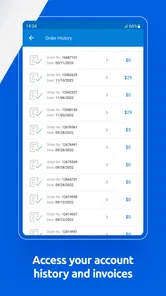
My Tello is a mobile application designed for Tello customers to manage their wireless service from an Android or iOS device. After signing in, users can generally check their plan, review data and minute usage, monitor account information, manage available services, and handle billing-related tasks. The app also lets customers see their balance, manage their account, buy a Cell Plan or Pay As You Go option, and call over WiFi. It is most useful for customers who want quick access to account controls without opening the full Tello website.
Do I need to be a Tello customer to use the My Tello app?
Yes, My Tello is primarily intended for people who already have a Tello account or mobile service. You will normally need valid account credentials to access personal information, usage details, plan settings, or payment features. If you are only comparing Tello plans or looking for general company information, the app may offer limited value until you become a customer and can sign in.
Can I change my Tello plan or manage my services through the app?
The app is designed to provide convenient account management, including access to plan information and, depending on your account and the current version of the application, options to modify services or renew a plan. My Tello also provides access to buying a Cell Plan or Pay As You Go option. Available controls may vary by customer type, billing status, and Tello policies. Before confirming a change, carefully review the new allowance, price, renewal date, and any applicable conditions.
Pros
- Simple controls make the app approachable for beginners.
- Remote piloting feels responsive when the connection is stable.
- Flight practice can improve coordination and basic drone skills.
- The interface is easy to understand after a short setup.
- Useful for checking battery and drone status before flying.
Cons
- Requires a compatible Tello drone to provide any real value.
- Connection range can be limited by Wi‑Fi interference and obstacles.
- Video quality is modest compared with newer camera drones.
- Some features may depend on the phone’s hardware and permissions.
- Unexpected disconnections can interrupt flights or recordings.











