

Mudflap
- 2.28K
- 4.4
- Installs
- 1.00M
- Price
- Free

Screenshots


Analysis by Reviewed
For drivers who pay close attention to fuel costs, I see Mudflap as a focused tool rather than a replacement for every road app. It is a free Maps & Navigation app from Mudflap, with a 4.4 average from around 4,000 ratings and over 500,000 installs. Its Everyone age rating makes it broadly approachable, though the people most likely to get value from it are drivers who can plan fuel stops around participating stations.
Reading the road and the offers
The app’s central idea is easy to grasp: check nearby fuel stops, compare what is available, and use a digital coupon at a selected location. That is a different job from a general navigation app, which is usually better at routing from A to B but may not make discounted fuel the focus. I would treat Mudflap as a companion for choosing where to stop, not as my only source of directions or route planning.
That distinction matters when a driver has a tight schedule. Before leaving, I would look at the options along the route rather than waiting until the tank is nearly empty. A discount is useful only if the stop fits the trip, and a small detour can eat into the benefit in time or fuel. Comparing the offer with the total journey—not just the displayed price—is the practical habit that makes the app more useful.
A less rushed way to use it
For a long-haul driver, one workable routine is to check likely stops during a break, choose a station that makes sense for the next leg, then open the coupon when ready to fuel. That keeps browsing separate from the busy moment at the pump. I would avoid handling a phone while driving; a passenger can check options, or the driver can do it while parked. The app’s usefulness depends on a safe moment to make the choice, not on reacting instantly to every price change.
Drivers with limited dexterity, low vision, or sensory sensitivities may find any phone-based fuel workflow tiring in certain conditions: glare, vibration, noise, gloves, or a hurried stop can all make small on-screen tasks harder. I would set up the account and get comfortable with the steps while stationary, then avoid trying to learn the interface in a crowded forecourt. Mudflap is most accessible in practice when the driver has time, a stable place to use the phone, and a clear view of the station details.
Where it fits—and where it does not
The app is aimed at truckers, but it may also suit delivery drivers, tradespeople, and frequent road travelers who regularly buy diesel and can adjust their stop choices. It is less compelling for someone who rarely drives, always refuels at one convenient location, or cannot make use of participating stops on their normal routes. A general navigation app may be the better first choice when reliable routing is the main need; a fuel-discount tool is valuable only when its offers align with where you actually travel.
One useful trade-off is to compare a discounted stop with a familiar nearby alternative before committing. The lowest displayed cost is not automatically the best stop if reaching it adds a detour or disrupts a planned break. I would also keep a backup station in mind, since relying on a single preferred option can be inconvenient if plans change. That simple habit helps turn a price comparison into a sound trip decision.
More From Our News Desk

 Weather - By Xiaomi
Weather by Xiaomi Review: Clear at a Glance, Less Clear Up Close
Xiaomi’s weather app makes everyday forecasts quick to scan, but its calm surface can leave useful details and recovery paths harder to find than they should be.

 X
XX Under Pressure: Can It Recover When Posting Goes Wrong?
A resilience-focused review of X, examining setup, mistaken posts, interruptions, weak connections, and the gaps that matter when recovery needs to be dependable.

 Clash of Clans
Clash of Clans Is Won Between the Battles
Its raids are quick; its community is a long-term project of coordination, teaching, rivalry, and shared responsibility—with all the friction that entails.

 Android Auto
Android Auto Makes the Case for Quieter Car Software
The car interface is no longer judged by how much it can do, but by how quietly it helps. Android Auto shows what drivers now expect—and what still gets in the way.

 MobiOffice: Word, Sheets, PDF
MobiOffice: Transforming Mobile Productivity with Seamless Integration
MobiOffice: Word, Sheets, PDF is redefining mobile productivity with a surprising blend of functionality and innovation.

 EA SPORTS FC Soccer Mobile 26
EA SPORTS FC™ Mobile Soccer: Redefining Mobile Sports Gaming
Dive into EA SPORTS FC™ Mobile Soccer, where immersive gameplay and strategic depth transform mobile sports gaming.
Latest News



Mudflap is free, and its current version is 3.30.2. The app was released on December 23, 2019, and its strong rating suggests many users find the core idea worthwhile. Still, a rating cannot tell you whether the stations suit your particular route, so I would judge it by checking the places you actually drive before building a routine around it.
What Makes Mudflap Stand Out?
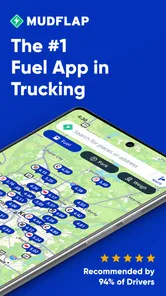
First off, let me tell you, the concept behind Mudflap is pretty genius. It's like having a discount card for fuel, but without the hassle of carrying an actual card. You open the app, find participating fuel stops near you, and voila! Instant savings at your fingertips. The app is designed with truckers in mind, but honestly, anyone who spends a lot of time on the road could benefit from it.
How Does It Work?
Using Mudflap is as easy as pie. After downloading the app, you set up an account and start browsing through a list of fuel stations offering discounts. The app's interface is user-friendly, which is a huge plus for those of us who aren't exactly tech-savvy. You can filter stations based on your preferences, and once you select one, the app generates a digital coupon that you show at the pump. It's that simple! Plus, there's no need for credit checks or long-term commitments.
My Experience with Mudflap
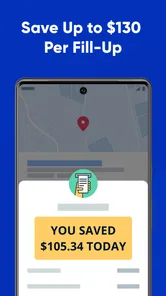
I took Mudflap for a spin during a recent road trip, and I've got to say, it was pretty impressive. Not only did I save a chunk of change on gas, but the app also helped me discover some fuel stops I wouldn't have known about otherwise. The savings can add up quickly, especially if you're driving a gas-guzzler like me.
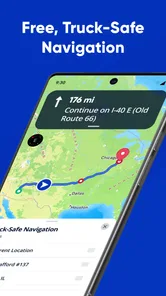
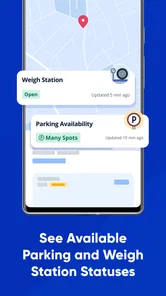
One of the coolest features is the real-time pricing updates. You get to see the current fuel prices at different stations, which is a game-changer when you're trying to plan your budget. And let's be honest, who doesn’t love saving money? I also appreciated the app's map feature, which made it easy to navigate to my chosen fuel stop without any detours.
Choosing a stop that works in real life
A useful way to test the app is to check a familiar route before you depend on it during a busy trip. I would look at a regular commute or a run between two places I already know, then compare the listed options with stops I would normally consider. That makes it easier to spot whether the app’s offers are genuinely convenient for my routine, rather than judging it by an attractive price at a station I would never reach naturally.
For example, imagine I am making a delivery run with a planned break and enough fuel to choose where to stop. I can check Mudflap while parked, see whether an eligible station fits the next leg, and compare that choice with my usual stop. If it sits near the break I already intended to take, the app can add value without changing the day much. If it requires a separate detour or a rushed change of plan, I would keep driving and use the familiar option instead.
That workflow also answers a practical question: do I need to use the app every time I refuel? I would not. It makes more sense to check when I have flexibility, especially before a longer drive or when the fuel stop is already part of the plan. On a short errand with little choice about where to stop, opening another app may add effort without changing the outcome.
How it compares with ordinary navigation
Compared with a general-purpose navigation app, Mudflap has a narrower purpose: it brings fuel offers and participating stops into the decision. A navigation app remains the more natural place to start when I need a route, live directions, or help reaching an unfamiliar destination. I would use each for the job it handles best, rather than expecting a discount-focused fuel tool to replace route planning.
It also differs from simply choosing the closest station or following a familiar habit. Familiarity is quick and predictable, while comparing offers can reveal an alternative worth considering. The trade-off is that the cheapest-looking stop may not be the best overall choice once I account for extra distance, time, and the convenience of the site. My practical rule is to treat the displayed offer as one part of the decision, not the decision itself.
People sometimes ask whether it is useful without changing their route. In my view, that depends on whether participating stops already fall near places they travel. A driver whose usual roads pass suitable options has a better chance of making the app part of an existing routine. Someone who would have to plan an inconvenient detour around every offer is likely better served by their regular station choices and navigation app.
Small habits that reduce friction
I would do the first account setup and explore the station details at home or during a quiet break, not while standing at a pump with other tasks competing for attention. This is a simple but important distinction: learning the sequence in a calm setting means less fumbling when it matters. If I am travelling with someone, I can also agree in advance who will check the options, so the driver is not tempted to interact with a phone on the road.
Another good habit is to make a short list mentally—or in whatever trip notes I already use—of one preferred stop and one fallback. The app can help me identify an appealing option, but plans can change because of timing, traffic, or a missed turn. A backup keeps a single coupon or station from becoming a point of pressure. I would also check the station information before setting off toward it, rather than assuming every listing suits the vehicle, timing, and needs of the trip.
When comparing prices, I would consider the amount of fuel I actually expect to buy and the extra distance involved. A small saving on a partial fill may not justify a lengthy diversion, while a stop already on the route could make the same offer worthwhile. This is not a complicated calculation; it is simply a reminder that a fuel discount is useful only when the whole stop makes sense.
Access depends on the moment and the person
The app’s approach can be straightforward for someone comfortable reading a phone screen, browsing fuel choices, and presenting a coupon. But the forecourt is not always an easy place to do those things. Sunlight on the display, a noisy environment, gloves, fatigue, or pressure from a queue can make a sequence that feels simple at home harder to manage. I would judge the experience in the conditions where I actually refuel, not only by how clear it feels while sitting indoors.
For a driver with low vision, limited hand control, or difficulty processing information quickly, the most useful adjustment may be to move the decision earlier: review the station and offer while stationary, then use the phone only for the necessary step at the stop. A passenger can take on the comparison when travelling together. These are practical workarounds, not a substitute for an interface that works for every individual, so anyone uncertain should try the complete process in a low-pressure setting before relying on it during a demanding journey.
There are contexts where a paper note, a familiar station, or help from a travel companion is simply easier. That does not make the app useless; it means the best tool can change with the driver’s energy, surroundings, and needs that day. I appreciate that distinction because accessibility is not just about whether an app opens on a phone—it is also about whether the person can use it comfortably and safely at the point of need.
Final Thoughts
Overall, my experience with Mudflap was nothing short of positive. It's an app that delivers on its promises, which is refreshing in today's world of over-hyped tech solutions. Whether you're a trucker hauling goods across states or just someone who spends a lot of time on the road, Mudflap is definitely worth checking out. The potential savings on fuel are significant, and the app's ease of use makes it accessible to everyone.
Would I recommend Mudflap? Absolutely! It's a no-brainer for anyone looking to cut down on fuel expenses without jumping through hoops. So, next time you hit the road, why not give Mudflap a try and see how much you can save?
A practical, inclusive verdict
I would recommend trying it if discounted fuel is relevant to your regular driving and you are comfortable checking a phone while parked. Its clearest strength is helping turn fuel-stop selection into a deliberate part of a journey rather than a last-minute decision. The main friction is that the benefit depends on suitable participating stops and a workflow that works for you; it is not a universal answer for every route or every driver.
For anyone who finds the screen difficult to read or the coupon process awkward, taking time to explore the app before a trip is a sensible first step. If the interface remains uncomfortable, asking a passenger to compare options or sticking with a familiar fuel routine may be preferable. My verdict is positive, with that practical caveat: the best savings are the ones you can use safely, comfortably, and without making the trip harder.
Mudflap Frequently Asked Questions
What devices and operating systems can run Mudflap?
Mudflap is available for Android and iOS devices, so drivers can use it on either of the major smartphone platforms. The Android version requires Android 9 or later. Before downloading, check that your device meets that requirement and has enough space for the app. Once installed, Mudflap is designed to help you look for fuel savings while on the road.
What is Mudflap and what can I use it for?
Mudflap is a mobile application designed to help truck drivers find and save on fuel expenses. It provides real-time information on fuel prices at various truck stops and offers discounts at participating locations. This app is particularly beneficial for independent truck drivers and fleet operators looking to optimize fuel costs.
How does Mudflap offer discounts on fuel purchases?
Mudflap partners with various truck stops and fuel stations to provide discounts directly through the app. Users can access these discounts by selecting a fuel stop within the app and following the instructions to redeem the offer. The discounts are applied at the time of purchase, helping users save significantly on their fuel expenses.
Is Mudflap available for both Android and iOS devices?
Yes, Mudflap is available for download on both Android and iOS platforms. Users can find the app on the Google Play Store for Android devices and the Apple App Store for iOS devices, ensuring accessibility for a wide range of smartphone users. This makes it easy for truck drivers to use the app regardless of their device preference.
Are there any fees or subscription costs associated with using Mudflap?
Mudflap does not charge any membership fees or subscription costs to use the app. Users can download and use the app for free, enjoying all the benefits and discounts on fuel purchases without any additional financial commitments. This makes Mudflap an attractive option for cost-conscious drivers.
Pros
- User-friendly interface.
- Real-time fuel price updates.
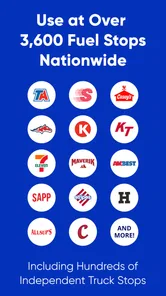
- Wide network of partnered stations.
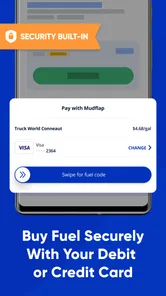
- Secure payment options.
- Loyalty rewards for frequent users.
Cons
- Limited to certain regions.
- Requires constant internet connection.
- Occasional app glitches.
- Limited customer support.
- No offline mode available.











