MTN App ZA
- 21.00
- 3.9
- Installs
- 1.00M
- Price
- Free

Screenshots



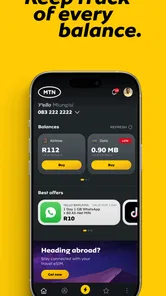
Analysis by Reviewed
If you use MTN in South Africa, the MTN App ZA is best thought of as a self-service place for routine account tasks rather than a general phone utility. I’d reach for it when I want to check my account or handle a top-up without switching between several channels. It is a free lifestyle app from MTN South Africa, and its appeal depends mainly on whether you already use MTN services.
What free access means in practice
There is no purchase price to get started, which makes trying it a low-commitment choice. That does not mean every activity inside the app is cost-free: buying airtime or data is a separate transaction, and the amount you spend depends on what you choose. I see the value in the app as easier access to account tasks, not as a promise of free mobile service or cheaper bundles.
That distinction matters if you are comparing it with a carrier’s website or other ways of managing an account. The app can put common actions in one place, while the underlying service and any purchases remain tied to your MTN account. If you are not an MTN customer, the main reason to install it is much weaker.
Getting to Know the MTN App ZA
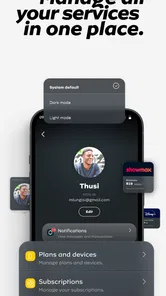
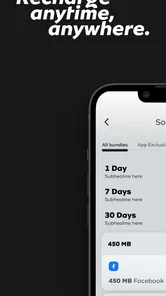
First things first, let’s talk about what this app is all about. The MTN App ZA is essentially your hub for managing everything related to your MTN account. Whether you’re keen on checking your airtime balance, purchasing data bundles, or just managing your subscriptions, this app has got you covered. It’s like having a personal MTN assistant right in your pocket.
A User-Friendly Experience
Let me tell you, navigating this app is smoother than a hot knife through butter. The interface is clean and intuitive, which means you don’t have to be tech-savvy to get around. Everything is neatly categorized, making it easy to find what you’re looking for. Plus, the app loads quickly, which is always a bonus, especially when you're on the go.
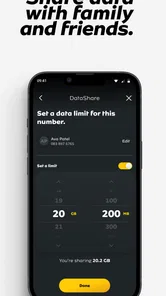
One feature I particularly enjoyed is the ability to monitor data usage in real-time. It’s like having a little data watchdog that keeps you in the loop about your consumption. No more nasty surprises when your data suddenly runs out!
Everyday value beyond checking a balance
The practical benefit is less about a dramatic new capability and more about reducing small bits of friction. For example, if I notice my data is running low while planning a trip, I can check usage and decide whether to buy a bundle before leaving home. That is more useful than waiting until I am away from Wi-Fi and trying to sort it out in a hurry. I would still check the purchase details carefully before confirming, especially if I am comparing bundle options.
More From Our News Desk

Weather by Xiaomi Review: Clear at a Glance, Less Clear Up Close

X Under Pressure: Can It Recover When Posting Goes Wrong?

Clash of Clans Is Won Between the Battles

Android Auto Makes the Case for Quieter Car Software

MobiOffice: Transforming Mobile Productivity with Seamless Integration

EA SPORTS FC™ Mobile Soccer: Redefining Mobile Sports Gaming
For a household with more than one MTN user, the app can also make account chores easier to remember: one person can check their own balance, while another can handle a top-up or bill-related task when needed. Airtime transfers may help when a family member runs short, though I would treat them as a deliberate action rather than a casual tap. Check the recipient and amount before confirming so a quick favor does not become a correction exercise.
Features That Make Life Easier
Aside from the basics, the app offers plenty of nifty features. You can transfer airtime, pay bills, and even locate the nearest MTN store, all from the comfort of your phone. The app also supports secure payments, which means you can top up without any hassle or worries about security breaches.
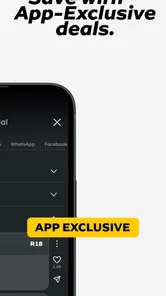
And if you’re someone who loves promotions and deals, you’ll appreciate the personalized offers available through the app. MTN often rolls out special deals, and having the app ensures you’re always in the loop.
How it compares with other ways to manage MTN
Compared with handling each task through a separate route, a single account hub is convenient when you regularly check usage, buy bundles, or need to find a store. The trade-off is that you are choosing MTN’s own interface, rather than a neutral tool that brings several networks together. If you switch providers often, or simply want one app for services from different companies, a broader account-management approach may suit you better. For an MTN customer, though, the app’s focus is also its strength: fewer steps between checking a service and acting on it.
Promotions are worth treating as offers to inspect, not automatic savings. I would compare the bundle or deal with what I actually need and check the terms shown before buying. A promotion only represents good value if it fits your usage; an attractive offer can still be the wrong choice if it encourages spending on more than you would otherwise use.
Room for Improvement
Now, no app is without its quirks, and the MTN App ZA is no exception. I did encounter a few minor glitches here and there, especially when trying to refresh my account info. However, these were few and far between, and certainly not deal-breakers.
Another thing to note is that while the app is comprehensive, new users might find the sheer number of options a bit overwhelming at first. A quick-start guide or tutorial within the app could be a great addition for those just getting started.
Who is likely to get the most from it?
I would recommend it most to people who use MTN regularly and often want to check balances, keep an eye on data, or manage simple account tasks from their phone. It is also a sensible option for someone who prefers self-service over finding a shop for routine needs. The app is aimed at everyone, and it has a 3.9 average from around 8,600 ratings, with more than a million installs. It is free, currently at version 1.22.12, and works on Android 10 or later.
If you use MTN only occasionally, rarely change bundles, and are content with your existing way of managing the account, installing another app may not add much. I would also skip it if you expect it to manage another carrier’s services or replace broader budgeting and payment tools. Its usefulness is specific: it brings MTN-related tasks together, rather than trying to be a complete financial or telecom dashboard.
A realistic routine and a few sensible checks
Imagine you are about to leave for work, notice that your data may not last the day, and have only a minute before heading out. Checking usage first helps you make a more informed choice than buying a bundle by guesswork. If you decide to top up, pause to verify the selected option and payment details; that small habit matters more than rushing through the screens. Later, if a balance looks stale, refreshing once and giving the account a moment to update is more sensible than repeating a transaction.
For a new user, I would start with one task at a time: find the balance view, learn where usage appears, and only then explore transfers, bills, store locations, or offers. That approach makes the range of options less daunting and helps you avoid tapping through a purchase before understanding what it covers. The app can support quick account management, but it is still worth reading the details on any transaction rather than assuming every button is just informational.
Questions about whether it works for a particular account or whether a deal is worthwhile are best answered by checking the account and offer details presented in the app before acting. The app is a convenient starting point, not a reason to skip those checks. Its main value is having MTN tasks close at hand; the sensible user still decides what to buy and confirms where the action is going.
Planning around shared phones and busy days
There is another practical distinction worth keeping in mind: an account app is most useful when the person holding the phone is also the person making the account decision. If you sometimes help a relative with airtime or a bill, it is easy to move from a helpful check to a transaction. I would confirm whose service is selected and who is meant to receive the value before proceeding. That quick pause is especially useful when several people in a household use MTN and their needs are discussed in the same conversation.
For a busy day, I would use the app as a preparation tool rather than wait until a connection problem becomes urgent. A quick balance and usage check before commuting, travelling, or relying on mobile data for a task can help you decide whether to act while you still have time. It does not remove the need to judge how much data you need, but it can replace guesswork with a clearer view of your current account. The useful habit is checking early, not repeatedly refreshing in the middle of a purchase.
Making offers and payments work for you
Personalized offers can be useful when they match a pattern you already have, such as regularly needing data, but I would not treat an offer appearing in the app as a recommendation that fits everyone. Before buying, compare the amount and terms with your normal use and ask whether you would have made the same purchase without the promotion. This simple test helps separate a genuine convenience from spending prompted by a banner or a limited-time feeling.
The same care applies to bill payments and top-ups. Having these actions alongside account information makes the app handy, but it also puts information and spending decisions close together. I would use the balance and usage views to decide what is needed, then inspect the transaction details before confirming. If the amount, destination, or selected option does not look right, backing out and checking again is better than assuming it will sort itself out afterward.
What to expect when something feels out of date
Account information can sometimes take a moment to catch up, so a screen that appears unchanged is not automatically a sign that you need to repeat an action. My approach would be to refresh once, wait briefly, and check the account again before trying another purchase or transfer. This is a small but important workflow: duplicate actions are a more frustrating outcome than taking a few extra seconds to see whether the first request registered.
If a task is time-sensitive and the app is not giving you a clear result, it is sensible to use another available MTN route rather than keep tapping. The app is a convenient front door for routine self-service, not a reason to depend on one screen in every circumstance. That flexibility is part of using any carrier tool wisely: keep the app for ordinary checks, but do not let a temporary refresh issue turn a simple task into a stressful one.
Who should choose another approach?
Someone who mainly wants to compare plans across providers may be better served by researching each carrier separately or using a neutral comparison resource. This app is built around MTN account activity, so its focus will not help much when the real decision is whether to stay with MTN or move to another network. Likewise, if you already manage a very simple account through a method you trust and hardly ever need to check it, the convenience may not justify adding another icon to your phone.
It is also not a replacement for a household budget, a general payments app, or a complete record of personal spending. You can make account-related payments and handle MTN tasks, but that narrower role is a benefit only if it matches what you need. I would install it for direct access to MTN services, not because I expect it to organize every part of my digital life.
How I would decide whether to keep it
After installing, I would judge its usefulness by a few ordinary questions: Do I check my MTN balance often? Do I buy bundles or airtime from my phone? Would having store locations or account tasks in one place save me a trip or a search? If the answer is yes to several of these, the app has a clear role. If the answer is no, there is little reason to keep it simply because it is free.
That is also why the overall rating is only one part of the picture. The app has an average of 3.9, based on around 8,600 ratings, and has passed a million installs, but those broad figures cannot tell me whether its particular workflow suits an individual account. I would weigh the app’s practical convenience and occasional refresh friction against my own habits. For regular MTN users, that is a more useful test than expecting every feature to matter equally.
The age classification is Everyone, and the Android version requirement is 10 or later, so those details help with basic suitability before installing. MTN South Africa is the developer, and the current release is version 1.22.12. Those facts are most useful as a quick compatibility check; the real decision still comes down to whether you want a carrier-specific tool for routine account management.
In conclusion, the MTN App ZA is a solid choice for anyone looking to streamline their MTN services. With its array of features and user-friendly design, it’s a handy tool that brings a lot of convenience to the table. Sure, there’s a little room for improvement, but overall, it’s a reliable companion for MTN customers. Give it a shot, and you might just find it becomes an essential part of your digital routine.
MTN App ZA Frequently Asked Questions
What devices can run MTN App ZA?
MTN App ZA is available for Android and iOS, and the Android version requires Android 10 or later. Before downloading, check that your device’s operating system meets that requirement and that you have enough space for the installation. The app is listed as a Lifestyle app and is free to download.
Who develops MTN App ZA, and what should I expect from its content rating?
MTN App ZA is developed by MTN South Africa. Its content rating is Everyone, so it is presented as suitable for a broad audience. The app’s store summary, “Your MTN World in one App,” describes its focus on MTN services. These details can help you decide whether the app is relevant for your needs before installing it.
What is the primary purpose of the MTN App ZA?
The MTN App ZA is designed to offer users a seamless experience in managing their MTN accounts directly from their mobile devices. It allows users to track their data usage, purchase data bundles, pay bills, and access exclusive offers. The app also provides customer support features, making it easier for users to resolve issues without visiting a service center.
Is the MTN App ZA available for both Android and iOS devices?
Yes, the MTN App ZA is available for download on both Android and iOS platforms. Users can download the app from the Google Play Store for Android devices and the Apple App Store for iOS devices. It ensures that a wide range of users can access their MTN services conveniently from their smartphones.
Are there any costs associated with using the MTN App ZA?
Downloading and using the MTN App ZA is free of charge. However, users should be aware that while the app itself is free, any transactions made through the app, such as purchasing data bundles or paying bills, will incur the usual charges as per the user's MTN plan. Data charges may apply when using the app if not connected to Wi-Fi.
Pros
- User-friendly interface.
- Fast and reliable transactions.
- Wide range of services.
- Secure mobile banking.
- 24/7 customer support.
Cons
- Limited offline features.
- Occasional app crashes.
- Some features need internet.
- Data-heavy app.
- Limited customization options.











