

MTM Link Member
- 2.02K
- 4.5
- Installs
- 100.00K
- Price
- Free

Screenshots

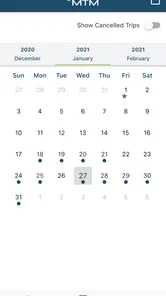
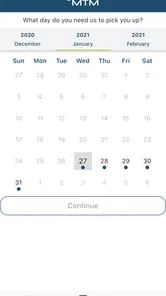
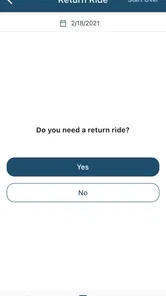
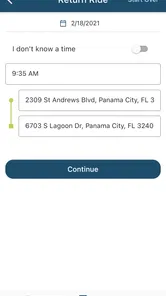
Analysis by Reviewed
I approached MTM Link Member as a practical transportation app rather than a general map or navigation replacement. Its purpose is narrower and more focused: helping members manage rides through a mobile device. That distinction matters immediately. If you are looking for turn-by-turn directions, traffic layers, restaurant searches, or a broad public-transit planner, this is not the kind of app I would put first. If your rides are arranged through MTM, however, the app is aimed at a very specific problem: making ride-related tasks easier to handle away from a phone call or desktop.
The app sits in the Maps & Navigation category and is developed by MTM, Inc. It is free to use, carries an Everyone content rating, and has reached more than 100 thousand installs. Those details make it approachable for a wide range of members, including people who may not consider themselves especially comfortable with technology. In my experience, the most important question is not whether it has a long feature list, but whether its focused design fits the way you already receive transportation support.
How MTM Link Member feels in everyday use
The first thing I noticed is that a specialized ride-management app should be judged by the amount of friction it removes, not by how much it resembles Google Maps or another full-service navigation tool. A general map app is built around exploring places and planning routes. MTM Link Member is built around the member’s relationship with arranged rides. That narrower role can be a strength because it keeps the app relevant to a particular task instead of surrounding it with unrelated map features.
For a member who regularly needs scheduled transportation, the useful moment is often before leaving home: checking the ride information, confirming what is expected, and keeping the relevant details available on the phone. I found that this kind of workflow feels more manageable when the app is treated as a ride companion rather than as a replacement for every transportation tool. You open it with a question in mind, deal with that question, and close it again.
The best reason to install it is convenience within the MTM ride process, not general navigation. That is also the key expectation to set before downloading. The store summary describes it as an easier way to manage rides, while the short description identifies it as an MTM member app. Those phrases point toward a service-specific utility, so I would not recommend installing it simply because you want another map application.
Where the speed experience matters most
For this type of app, perceived speed is less about drawing a complicated map and more about how quickly you can reach the information or action you opened the app to find. When I use a focused transportation tool, I want the first screen to feel purposeful. I do not want to spend time navigating through unrelated content before dealing with a ride. A member-facing design has an advantage here because the intended audience and task are clearly defined.
There is also a practical difference between speed while browsing and speed while information is being refreshed. A screen can open quickly, yet ride-related details may still depend on the service connection. I would therefore avoid judging the app solely by how fast it launches. The more useful test is whether it lets you complete a routine check without unnecessary steps and whether you can tell when information is still loading or has finished updating.
More From Our News Desk

 Weather - By Xiaomi
Weather by Xiaomi Review: Clear at a Glance, Less Clear Up Close
Xiaomi’s weather app makes everyday forecasts quick to scan, but its calm surface can leave useful details and recovery paths harder to find than they should be.

 X
XX Under Pressure: Can It Recover When Posting Goes Wrong?
A resilience-focused review of X, examining setup, mistaken posts, interruptions, weak connections, and the gaps that matter when recovery needs to be dependable.

 Clash of Clans
Clash of Clans Is Won Between the Battles
Its raids are quick; its community is a long-term project of coordination, teaching, rivalry, and shared responsibility—with all the friction that entails.

 Android Auto
Android Auto Makes the Case for Quieter Car Software
The car interface is no longer judged by how much it can do, but by how quietly it helps. Android Auto shows what drivers now expect—and what still gets in the way.

 MobiOffice: Word, Sheets, PDF
MobiOffice: Transforming Mobile Productivity with Seamless Integration
MobiOffice: Word, Sheets, PDF is redefining mobile productivity with a surprising blend of functionality and innovation.

 EA SPORTS FC Soccer Mobile 26
EA SPORTS FC™ Mobile Soccer: Redefining Mobile Sports Gaming
Dive into EA SPORTS FC™ Mobile Soccer, where immersive gameplay and strategic depth transform mobile sports gaming.
Latest News



A realistic example is a morning appointment. I might open the app before getting ready, review the ride details, and then check again shortly before leaving. That two-stage habit is more useful than opening it only at the last second. The first check gives me time to notice anything that needs attention; the second confirms that I am working from the latest available information. This is one of the small workflow improvements that a generic store description would not explain.
Handling busy moments and repeated checks
Heavy use for MTM Link Member is unlikely to mean drawing a long route or constantly tracking several destinations. It is more likely to mean repeated checks around a scheduled ride, switching between the app and messages or calls, and opening it when time is limited. That changes what I consider good performance. The app should remain understandable when I am distracted, in a hurry, or helping another person manage transportation.
I would use it most carefully during transitions: before leaving home, after arriving at a pickup location, and when a ride does not appear to be progressing as expected. Those are the moments when a member may be tempted to refresh repeatedly. My advice is to avoid treating repeated opening and closing as a substitute for understanding the current ride information. If the service needs time to update, rapid tapping may add confusion rather than clarity.
Another useful habit is to keep the phone charged before a day involving several rides. That is not a criticism unique to this app; it is simply sensible for any transportation tool that you may need away from home. A ride-management app is most valuable when it is available at the moment you need it, so battery preparation is part of the workflow even if the app itself is lightweight.
I also prefer checking the app before entering a vehicle rather than waiting until I am already moving. That gives me a calmer opportunity to verify the relevant ride information and reduces the chance of trying to read a screen while traveling. For a caregiver or family member assisting someone else, this can make the app a shared reference point: one person can review the ride details while the member focuses on getting ready.
Reliability and recovery when something feels wrong
Reliability in a ride-management app has two layers. The first is the app’s own behavior: whether it opens, responds to taps, and presents information clearly. The second is the connection between the app and the transportation service. A member may experience a delay in updated information without the app itself being broken, so it is important not to confuse slow service data with a frozen interface.
My recovery routine would be simple. First, I would pause and check whether the phone still has a working connection. Next, I would leave the screen and reopen the app rather than tapping the same control repeatedly. If the information still does not look current, I would use the established MTM support route instead of relying on the app alone, especially when a ride is time-sensitive. A mobile app is helpful, but it should not become the only backup for an important appointment.
This is also where the app’s focused nature creates a trade-off. A general navigation app may offer several alternative ways to understand where you are going, such as a map view or route planning. MTM Link Member is more useful when the concern is the managed ride itself, but it may not answer every broader travel question. If you need to independently plan the final walk, compare public-transit routes, or find an unfamiliar address, I would pair it with a conventional maps app rather than expect one tool to cover everything.
For recovery, I recommend keeping the app updated through the normal app-store process and checking that it remains available before a day when transportation is important. The current version is 4000.18.0, and the stated minimum operating system is Android 7.0. That makes the compatibility requirement relatively approachable for many older Android phones, although an older device can still feel slower because of its overall condition, available storage, or background activity.
Device limits, battery use, and practical constraints
Because MTM Link Member is a ride-management utility rather than a continuously running navigation display, I would expect its resource demands to be more modest than those of an app that constantly renders maps and tracks a moving position. Still, I would not promise identical behavior on every phone. A device with limited memory, an outdated system environment, or many apps competing in the background may take longer to open or switch between screens.
The minimum operating-system requirement of Android 7.0 is useful when deciding whether an older phone can be considered. Before installing, I would check the Android version in the device settings and make sure there is enough free space for normal app updates. I would also avoid testing it for the first time immediately before an appointment. Install it earlier, sign in or complete the setup that the service requires, and learn where the important ride information appears.
That preparation is especially important for people who share a phone, use accessibility settings, or rely on a family member for technical help. A simple setup session can reveal whether text is comfortable to read, whether notifications are easy to notice, and whether the member can reach the needed screen without assistance. These are not glamorous details, but they often decide whether a transportation app is genuinely useful in daily life.
I would also be cautious about using an older phone with aggressive battery-saving settings. Battery optimization can sometimes delay background activity in mobile apps, even when the app itself is well designed. I cannot treat that as a confirmed behavior of this particular application, but it is a sensible device-level check if ride information does not appear as expected. Reviewing the phone’s battery settings and keeping the app permitted to operate normally may prevent avoidable confusion.
Who will benefit most from this focused approach?
MTM Link Member makes the most sense for people who already use MTM transportation services and want a mobile way to manage the member side of that experience. It can also suit a caregiver who helps coordinate rides and wants the relevant information accessible on a phone instead of depending entirely on paper notes or a separate computer session.
The app is less suitable for someone who simply wants to explore transportation options in a new city. It is not the first choice I would make for comparing driving routes, finding nearby businesses, estimating walking time, or planning a trip across several public-transit systems. In those situations, a broad mapping application has the better toolset. The right comparison is not “which app has more features?” but “which app matches the transportation problem I am trying to solve?”
There is a second group that may want to skip it: people who do not have an MTM-related reason to manage rides. A free download is still unnecessary if the service does not apply to your travel routine. On the other hand, members who repeatedly arrange or use rides may find that a specialized app earns its place precisely because it avoids the clutter of a general-purpose map.
The public response is encouraging without being a reason to install blindly. The app holds a 4.5 average from around 7.9 thousand ratings and has roughly 2 thousand written reviews. I read those figures as evidence that many users find the concept worthwhile, while still remembering that a rating cannot predict how well the app will fit an individual member’s device, service situation, or accessibility needs.
Comparing it with phone calls, paper notes, and map apps
The most meaningful alternative may not be another app. For many members, the choice is between using MTM Link Member, calling for assistance, keeping ride details in notes, or relying on someone else to manage the process. The app’s advantage is availability: the phone is already in your hand, and the ride-related workflow can be kept in one place. Its disadvantage is that it introduces another login, another interface, and another point of dependence on the phone and connection.
Compared with paper, the app is easier to revisit when details change, but paper can be more comfortable for someone who dislikes screens or has difficulty navigating mobile menus. Compared with a phone call, the app may be more convenient for routine checks, while a call remains valuable when the situation is unusual or the information does not look right. Compared with Google Maps or Apple Maps, it is more relevant to the MTM member experience but much narrower for independent route planning.
I would use these tools together rather than force one to do everything. MTM Link Member can handle the service-specific side of the ride, while a regular map app can help with the destination, surrounding streets, or a walking connection. That combination is particularly useful when a member needs both ride information and a clear understanding of what happens after arriving.
What I would do before depending on it
My setup checklist would be short but deliberate:
- Install it well before the first important ride, not while already waiting.
- Confirm that the phone runs Android 7.0 or newer and has room for normal updates.
- Open the app on both a reliable connection and the connection you usually use away from home.
- Learn the quickest path to the ride information you check most often.
- Keep a non-app backup, such as the appropriate MTM contact method, for time-sensitive problems.
The third step is more valuable than it sounds. An app may behave perfectly at home yet feel different when the phone changes networks or has a weak signal. Testing the actual environment you expect to use can reveal whether you need to wait for information to load or whether you should plan extra time. It also helps separate a device or connection issue from a problem with the app itself.
I would not spend time searching for advanced map controls that are not central to the product. Instead, I would focus on mastering the member workflow: opening the app calmly, locating the ride details, recognizing when information appears current, and knowing when to switch to direct support. That approach makes the app more useful and prevents unfair comparisons with tools designed for entirely different jobs.
My performance verdict after weighing the trade-offs
MTM Link Member is a sensible, narrowly targeted app for MTM members who want ride management available on Android. Its free price and Everyone rating lower the barrier to trying it, while the broad install base and strong average rating suggest that the basic idea works for many people. The developer, MTM, Inc, has positioned it around a real service need rather than trying to turn it into an all-purpose navigation platform.
My overall view is positive, with one important condition: use it as a companion to the MTM ride process, not as your only transportation tool. Its likely performance strengths are its focused purpose and manageable everyday workflow. Its practical weaknesses are the dependence on the phone, connection, and service information, plus the fact that it does not replace a general map app when you need independent route planning.
If I were recommending it to a friend, I would say this: install it if MTM rides are part of your routine, set it up before you need it, and practice the few screens that matter most. Keep a backup contact method for urgent situations, and pair the app with a regular map tool when the trip involves unfamiliar streets or additional walking. For that audience, the app is most valuable when it turns a repeated transportation task into a calmer, more predictable part of the day.
It was released on February 24, 2021, and its current version is 4000.18.0. Those details are useful when checking compatibility and keeping expectations realistic: this is an established member utility, not a new experimental map service. I would give it a try if I depended on MTM transportation, but I would skip it if my needs were limited to ordinary directions, traffic updates, or discovering places nearby.
MTM Link Member Frequently Asked Questions
What should I check before downloading MTM Link Member?
MTM Link Member is a Maps & Navigation app from MTM, Inc, designed to make it easier to manage rides. Before downloading, consider whether you are an MTM member or otherwise have access through a participating program, since the app is intended for eligible users. The app is free, rated for Everyone, and requires Android 7.0 or later.
Is MTM Link Member compatible with my device?
For Android, MTM Link Member requires version 7.0 or later. If your device runs an older version, you may need to update its operating system before installing the app. Compatibility also depends on the app store and device you use, so check the installation page on your device before downloading. Keeping your operating system and app updated can help avoid compatibility issues.
What is MTM Link Member and who is it designed for?
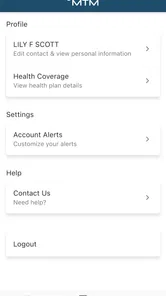
MTM Link Member is a member-focused mobile application intended to help eligible users access information and services connected with MTM. Depending on the program or organization providing access, the app may support viewing member details, checking benefits, reviewing messages, and finding useful resources. Availability and features can vary, so users should confirm that their membership or plan is supported before downloading.
How do I sign in to MTM Link Member?
After installing MTM Link Member, you generally need to sign in with the credentials or personal information associated with your membership. Some users may be asked to complete an account registration or verification step before accessing the main dashboard. Use the official details provided by MTM or your organization, and avoid creating duplicate accounts if you already have an existing member profile.
What information or services can I access in the app?
The exact tools available in MTM Link Member depend on your membership type and the organization connected to your account. The app may provide access to member information, program updates, notifications, support resources, or other account-related services. It is best viewed as a convenient companion for eligible members rather than a universal app with identical features for every user.
Pros
- Quick access to membership details and account information.
- Convenient way to receive updates and announcements from MTM.
- Useful digital access to member services while on the go.
- Reduces the need for printed membership materials.
- Simple interface focused on essential member functions.
Cons
- Requires an active MTM membership to be useful.
- Some features may depend on the organization’s online services.
- Account or login issues can limit access to key information.
- Notifications may become excessive if not configured carefully.
- App usefulness may vary depending on your membership type or location.











