

MPLS Parking
- 1.33K
- 4.4
- Installs
- 100.00K
- Price
- Free
Screenshots
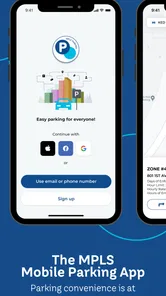
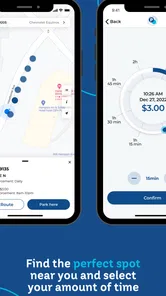
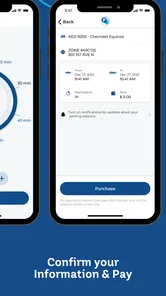
Analysis by Reviewed
Finding a parking space in Minneapolis is one problem; paying for it without standing beside a meter is another. MPLS Parking is designed for that second part. It is a free Maps & Navigation app from the City of Minneapolis, brought to users through Flowbird, and its purpose is refreshingly narrow: help drivers handle mobile parking in the city.
I like that focus. This is not trying to replace a full navigation app, become a city guide, or turn parking into a complicated account-management project. When I am already parked and want to pay from my phone, extend a session, or avoid walking back to a meter, a dedicated parking app can be more useful than opening a general map and trying to work out what to do next.
The important qualification is that MPLS Parking is most useful once I am dealing with Minneapolis parking itself. It is not the app I would choose to plan a complete trip, compare every garage in the region, or navigate through unfamiliar streets. Its value comes from reducing friction at the curb, not from covering every part of a journey.
How MPLS Parking feels in its current form
The current release is version 10.7.1, and the app has been available since August 20, 2015. That long presence matters because parking apps are only worthwhile when people can rely on them during an ordinary, slightly stressful moment: I have arrived, traffic is behind me, I need to leave the car, and I do not want to stand at a machine figuring out coins, cards, or instructions.
In that situation, the app’s strongest quality is its directness. I can treat it as a practical tool rather than another general-purpose service competing for attention. The store short description, “MPLS Parking,” says very little, but that simplicity reflects the product’s role. It is intended for Minneapolis drivers who need a mobile route into the city’s parking process.
The app has an average rating of 4.4 from around 5.7 thousand ratings, with roughly 1.3 thousand written reviews. It has also passed 100 thousand installs. Those figures do not guarantee that every parking session will be smooth, but they do suggest that the app has found a real audience among people who regularly park in Minneapolis.
I would especially recommend it to residents, commuters, visitors who drive into the city, and anyone who dislikes returning to a meter simply to add time. It is also a sensible backup for people who normally use a physical payment method but want a phone-based option available when a meter is inconvenient or when they are carrying bags, managing children, or trying to get out of the rain.
More From Our News Desk

 Weather - By Xiaomi
Weather by Xiaomi Review: Clear at a Glance, Less Clear Up Close
Xiaomi’s weather app makes everyday forecasts quick to scan, but its calm surface can leave useful details and recovery paths harder to find than they should be.

 X
XX Under Pressure: Can It Recover When Posting Goes Wrong?
A resilience-focused review of X, examining setup, mistaken posts, interruptions, weak connections, and the gaps that matter when recovery needs to be dependable.

 Clash of Clans
Clash of Clans Is Won Between the Battles
Its raids are quick; its community is a long-term project of coordination, teaching, rivalry, and shared responsibility—with all the friction that entails.

 Android Auto
Android Auto Makes the Case for Quieter Car Software
The car interface is no longer judged by how much it can do, but by how quietly it helps. Android Auto shows what drivers now expect—and what still gets in the way.

 MobiOffice: Word, Sheets, PDF
MobiOffice: Transforming Mobile Productivity with Seamless Integration
MobiOffice: Word, Sheets, PDF is redefining mobile productivity with a surprising blend of functionality and innovation.

 EA SPORTS FC Soccer Mobile 26
EA SPORTS FC™ Mobile Soccer: Redefining Mobile Sports Gaming
Dive into EA SPORTS FC™ Mobile Soccer, where immersive gameplay and strategic depth transform mobile sports gaming.
Latest News



Because the developer is the City of Minneapolis, the app feels more relevant to local parking than a generic payment utility would. That city-specific identity is useful: I am not trying to guess which parking service applies to a particular street from a collection of unrelated apps. At the same time, the local focus means I would not install it expecting the same usefulness in another city.
A realistic parking session
Imagine arriving downtown for a short appointment. I park at a space that supports mobile payment, open the app, and work through the location and payment flow instead of searching for loose change. Once the session is active, I can leave the car without making a second trip to the meter. If the appointment runs longer than expected, the phone becomes the natural place to check whether more time can be added, subject to the rules and limits attached to that parking location.
That workflow is more valuable than it sounds. The real benefit is not simply replacing a coin with a phone. It is keeping the parking task connected to the device I already carry. I can deal with the session before walking several blocks away, and I can make a decision about extending it while I am inside a building rather than guessing how long the appointment will take.
My practical advice is to complete the setup before I am in a hurry. I would open the app while safely parked, identify the relevant parking location, and check the session details before walking away. I would also keep the physical signs and meter instructions in view. A parking app can simplify payment, but it does not replace street-level restrictions, temporary signs, loading rules, or no-parking notices.
Where the focused design helps
Compared with paying entirely at a traditional meter, mobile parking can reduce the number of small interruptions in a trip. I do not have to return to the vehicle just to add time, and I can keep a digital process in the same place as other phone-based travel tasks. For someone who parks in Minneapolis regularly, that convenience can become a meaningful everyday improvement.
Compared with a broad navigation app, MPLS Parking has a different advantage: it is not asking a map product to perform a parking-payment job. A navigation app may help me reach an address, but it may not give the parking session the same attention. I would use the navigation app to get there and this city-focused tool to handle the curbside transaction.
Compared with using a physical meter, the trade-off is obvious. The phone method can be faster and more flexible, but it depends on a charged device, a usable connection, and an account or payment setup that is ready when I need it. A meter may be less elegant, yet it can remain the better fallback when my phone is nearly dead or I do not want to create another digital account.
Compared with a garage operator’s own app, MPLS Parking is better suited to the city parking context rather than a single private facility. If I am entering a garage with its own clearly marked payment system, that operator’s tool may provide more relevant information. For street parking handled through Minneapolis, however, a city-specific app is the more natural place to start.
Small habits that make it less frustrating
One useful habit is to confirm the location before accepting the parking session. In a dense area, it is easy to be close to a boundary, a different zone, or a space governed by a different rule. I would not rely on the phone alone to identify what applies; I would compare the app’s location details with the nearby sign or meter.
Another is to treat the end time as something worth checking, not something to assume. If plans change, I would look at the active session before deciding whether I need an extension. That is particularly important when an appointment, meal, or event takes longer than expected. The convenience of mobile payment is greatest when I use it proactively rather than waiting until the last possible minute.
A third tip is to avoid testing the app for the first time during a crowded arrival. I would install it, sign in, and make sure the basic payment process is familiar before heading into a busy part of town. This is not a criticism unique to MPLS Parking; it is simply the difference between preparing a parking tool at home and troubleshooting it with traffic waiting behind me.
I would also keep a backup plan. A phone can lose power, a connection can be unreliable, or an unexpected screen prompt can slow things down. Carrying a physical payment option and knowing where the meter or posted instructions are gives me more confidence. The app reduces effort, but it should not encourage me to ignore the physical parking environment.
What the latest version means for existing users
Version 10.7.1 is the current release, so existing users should update through their normal app store channel rather than assuming an older installation behaves identically. I would pay attention to the version shown on my own device, especially if the app has been installed for a long time. Parking services are connected to real-world rules and systems, so keeping the application current is a sensible part of using it.
The app’s history also shows that it is not a one-season experiment. It has been present since 2015 and has continued to receive versioned updates. That is encouraging for people who want a parking tool they can keep using, although I would separate that evidence from any prediction about future features. A current version number confirms the present release; it does not promise a particular upcoming redesign or capability.
For someone already using an older version, the practical effect of updating is mainly confidence and compatibility with the current service. I would update before an important trip, then open the app once afterward to make sure I can still reach the parking flow without surprises. If the app asks me to review account or payment details after updating, I would handle that before arriving at the curb.
For a new user, the version history makes the app feel established, but the first-use experience still deserves preparation. I would not judge it solely by how quickly it opens. The important test is whether I can identify the right parking location, understand the session I am starting, and know what to do if my plans change.
Where it still falls short
The biggest limitation is the app’s narrow geography. If I live outside Minneapolis and only occasionally visit, I may not use it often enough to justify another parking application. A regional parking app, a garage-specific tool, or a general travel setup may be more convenient if my driving routinely crosses city boundaries.
It is also not a substitute for navigation. I would not expect turn-by-turn directions, broad traffic planning, public transit discovery, or a complete comparison of every parking option in the metro area simply because the app sits in the Maps & Navigation category. Its job is parking in Minneapolis, and evaluating it against a full map app would be unfair in one sense but useful in another: many drivers will need both.
The phone dependency is another genuine weakness. A dead battery can turn a convenient process into a difficult one. The same is true if I arrive without having prepared my account or payment details. For a single short stop, the traditional meter may be quicker if the app requires setup at the exact moment I need to park.
I would also avoid assuming that mobile payment removes the need to read signs. The app can help with the transaction, but street rules remain the authority for where and when a vehicle may stay. Construction, special events, restricted spaces, and time limits are the kinds of details I would verify at the location itself.
Finally, the experience depends on how well the digital session matches the physical space. If I select the wrong location, misunderstand a zone, or walk away without checking the confirmation, the convenience works against me. My recommendation is to use the app as one part of a careful parking routine, not as permission to stop paying attention.
Who should use it, and who should skip it
I think MPLS Parking is a good fit for anyone who parks in Minneapolis often enough to value a repeatable mobile routine. Commuters, residents, service workers, and visitors with appointments are likely to get the most from it. The benefit grows when I regularly need flexibility after leaving the car or when returning to a meter is inconvenient.
I would be more cautious if I only park in private garages, rarely visit Minneapolis, or prefer not to manage parking through a phone. In those cases, the app may add setup without saving much time. Someone whose phone battery is unreliable should also keep a physical alternative ready rather than making this the only way to pay.
The Everyone content rating makes it appropriate as a general-use parking utility rather than an age-restricted entertainment product. Its free price removes the financial barrier to trying it, which is helpful for occasional visitors. Still, “free” does not mean the parking itself is free; I would always review the active session and the posted terms before leaving the vehicle.
What I would watch in future updates
If I continue using the app, I would watch for improvements that make the curbside workflow clearer rather than simply adding more screens. Better handling of location confirmation, straightforward session status, and dependable recovery after an interrupted connection would matter more to me than decorative changes.
I would also look for signs that the experience remains friendly to both regular users and occasional visitors. A commuter may want speed, while a first-time visitor needs context and reassurance that the selected location is correct. The best evolution would serve both without turning a simple parking payment into a lengthy process.
For existing users, the sensible approach is to judge each update by what happens during a real parking session. Does the app make the correct location easy to verify? Is the active session understandable? Can I deal with a change of plans without confusion? Those are the questions that matter more than a new version number by itself.
My overall view is positive but deliberately practical. MPLS Parking is a useful city-specific tool when the problem is paying for Minneapolis parking from a phone. It does not replace a navigation app, a garage operator’s service, or common sense at the curb, and it is not the right choice for every driver. But for regular Minneapolis parking, its focused purpose, free access, and established development make it worth trying.
I would recommend installing it before the next trip rather than waiting until I am already parked. Once the basic process is familiar, the app can remove one of those small travel annoyances that repeatedly wastes time. Just keep the street signs in view, confirm the session before walking away, and carry a backup payment option when the outing matters.
MPLS Parking Frequently Asked Questions
Who operates MPLS Parking, and is it intended for Minneapolis?
MPLS Parking is a mobile parking app for Minneapolis, brought to you by Flowbird, and the developer is the City of Minneapolis. It is intended for people who need to handle supported parking activities in the city from a phone. Before relying on it for a particular space or facility, check that the app supports that location and follow the posted parking instructions.
Is MPLS Parking free to download, and which devices can run it?
MPLS Parking is free to download and is rated for everyone. Its current version is 10.7.1, and it requires iOS 7.1 or later. The app is listed in Maps & Navigation, so it may suit drivers who want parking-related information and mobile parking tools in Minneapolis. Check your device’s compatibility in the relevant app store before downloading.
What is MPLS Parking, and what can I use it for?
MPLS Parking is a parking-related app designed to help users manage parking in Minneapolis, including finding available parking options, checking relevant parking information, and completing supported parking activities from a mobile device. Depending on the location and service available, the app may also provide details about rates, restrictions, payment, and parking sessions. Features can vary by area and may change over time.
How do I pay for parking through MPLS Parking?
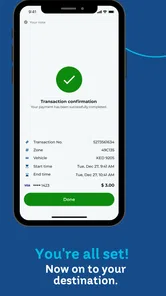
After selecting an eligible parking location, you can usually enter or confirm your vehicle information, choose the desired parking duration, and complete payment using an accepted method shown in the app. Before confirming, review the zone, rate, service fees, and expiration time carefully. Keep your phone or payment confirmation available in case you need to verify the active session or transaction.
Does MPLS Parking show parking availability in real time?
The app may provide parking information and location details, but users should not assume that every availability indicator is perfectly real time. Spaces can become occupied quickly, and data may depend on connected parking systems or information supplied by the city. Always check posted signs, meters, and local restrictions when you arrive, because on-street rules take priority over information displayed in the application.
Pros
- Finds nearby parking options quickly in busy areas.
- Clear map interface makes locations easy to compare.
- Useful for planning parking before reaching your destination.
- Can reduce time spent searching for an available space.
- Convenient for drivers who regularly park in unfamiliar places.
Cons
- Availability information may not always reflect real-time conditions.
- Coverage can vary significantly between cities and neighborhoods.
- Some parking details may be incomplete or outdated.
- Location services can increase battery and data usage.
- Pricing and restrictions may require additional verification on site.











