Moggr - Haircut & Looksmax AI
- 397.00
- 4.5
- Installs
- 1.00M
- Price
- Free

Screenshots
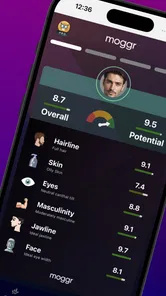

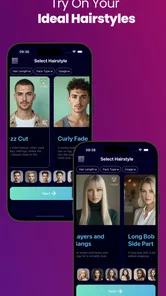
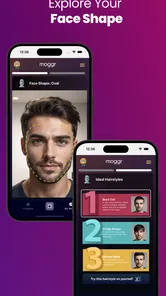
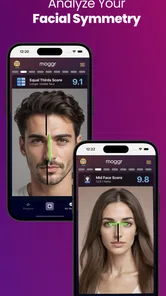
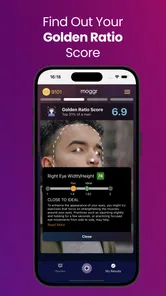
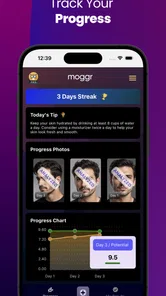
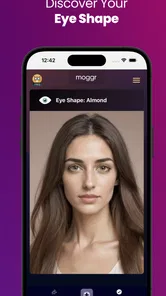
Analysis by Reviewed
Ever found yourself in front of the mirror, pondering whether a new haircut would suit you or not? Well, let me introduce you to Moggr - Haircut & Looksmax AI. This nifty app is a game-changer for anyone who’s ever fretted over a bad hair day or contemplated a drastic hairstyle change.
Start with the question you actually have
I’d open this lifestyle app with one clear decision in mind: do I want to compare a few haircut ideas, or am I only curious about a different color? That keeps the experiment useful rather than turning it into endless scrolling. A quick selfie gives the AI a starting point, but I’d choose a photo where my face is easy to see and the lighting is even. That makes the comparison easier to judge, even though a digital preview can’t reproduce how a stylist will cut hair around a particular texture or hairline.
For a realistic everyday test, imagine I have a salon appointment coming up and I’m unsure whether to keep my current length. I can try a couple of contrasting looks, save the one that feels closest to what I want, and use it to explain the idea during the consultation. I wouldn’t treat the image as an exact blueprint: it’s better as a conversation starter than a promise of the final result.
A practical shortlist beats endless experimenting
One way I’d keep the process grounded is to decide what I want the hairstyle to solve before opening the camera: perhaps I want less length around my face, a softer fringe, or a change that still feels familiar. Then I’d compare only a few options that answer that question. This prevents a common trap with visual try-on tools: judging a stream of dramatic images as if each were a realistic recommendation. A preview is most useful when it helps me explain a preference, not when it tries to choose my identity for me.
I’d also take a moment to check whether the selfie is doing the style a fair test. Hair partly covering the face, a strong shadow, or an unusual camera angle can make it harder to compare one result with another. I would use the same photo while testing different ideas, rather than changing both the image and the style at once. That simple consistency makes the differences easier to read and stops a flattering photo from being mistaken for a better haircut.
Transform Your Look Virtually
The first thing that grabbed my attention with Moggr was its innovative use of AI to help you visualize different hairstyles. You simply upload a selfie, and the app does its magic, overlaying a variety of hairstyles onto your photo. It's like having a virtual stylist at your fingertips. Whether you’re thinking about going for a bold pixie cut or just want to see how you’d look with bangs, this app has got you covered.
Make the preview useful, not just entertaining
I get the most value from treating each option as a comparison, not a verdict. Trying one familiar style alongside a more daring cut helps me see what changes the overall impression, while changing one element at a time makes it easier to decide what I actually like. If I switch the cut and color together, I may enjoy the combined image without knowing which change made it work for me. That small bit of discipline turns a playful try-on into a more practical shortlist.
More From Our News Desk

Weather by Xiaomi Review: Clear at a Glance, Less Clear Up Close

X Under Pressure: Can It Recover When Posting Goes Wrong?

Clash of Clans Is Won Between the Battles

Android Auto Makes the Case for Quieter Car Software

MobiOffice: Transforming Mobile Productivity with Seamless Integration

EA SPORTS FC™ Mobile Soccer: Redefining Mobile Sports Gaming
There’s also a useful handoff between the app and the real world: the preview can help me describe a direction, but a barber or stylist still needs to discuss maintenance, hair texture, and what is achievable. I’d bring the image and explain what I like about it—perhaps the length or fringe—rather than ask someone to reproduce every detail. For a major change, that conversation matters more than a convincing screen image.
From phone screen to salon chair
For a useful consultation, I’d bring one image that captures the direction I like and, if needed, a second that shows what I want to avoid. I’d point out the specific part that appeals to me instead of saying only that I want “this haircut.” A stylist can then ask about length, styling time, and upkeep in terms that match my real hair. That handoff makes the AI image a visual aid rather than an instruction sheet, which is especially important when the generated result looks polished but the cut itself may be difficult to maintain.
This workflow is also helpful when I am not ready to book anything. I can use the previews to figure out whether I’m drawn to a shorter shape or simply want a different color, then wait a day before making a decision. If the same idea still appeals after the novelty fades, I have a more useful question to take to a professional. If it doesn’t, I’ve explored it without making a costly or hard-to-reverse change to my actual hair.
User-Friendly Interface
I have to say, the interface is as slick as they come. Navigating through the app is a breeze, with clear instructions and a seamless design that even the least tech-savvy among us can appreciate. The developers really nailed it with the intuitive layout, making it super easy to find your way around and experiment with different styles.
The app doesn't just stop at haircuts, though. It offers suggestions on hair colors and even facial hair for the gents. This is particularly handy for those who like to switch things up with their look regularly. Imagine being able to test out that vibrant red hair color before committing to it at the salon!
Choosing a sensible test, not a perfect prediction
Hair and color experiments answer different questions, so I would avoid treating every category as equally useful for every person. A haircut preview can help me compare broad silhouettes, while a color preview is more about whether I like the general direction. Neither settles the practical questions of how a shade will look in daylight or how a particular cut will sit after washing and styling. If I’m considering a change that needs a lot of upkeep, that is a reason to ask a stylist about the routine before treating the image as a green light.
The facial-hair option can be useful for a quick visual comparison, especially if I’m undecided about changing the shape of my beard. But I’d keep the same caution: a digital overlay can suggest a look without telling me whether it suits my growth pattern or how much daily grooming it will take. I’d use the tool to name what I’m curious about, then make the real-world decision based on my own habits and a professional’s practical advice.
Where the result needs a reality check
Hair and facial hair previews are still visual approximations. A generated look may not capture how a style behaves on your own hair, and a color shown on a screen can feel different in person. I’d use the result to narrow down preferences, then ask a professional whether the cut suits my hair and how much upkeep it involves. If I need precise technical advice, a consultation is a better choice than relying on an AI image alone.
The same distinction helps when comparing Moggr with the usual alternatives. A basic photo filter is quick for a novelty but often gives little help with a real salon decision; a stylist offers personal expertise but usually requires an appointment before I can see an idea on myself. Moggr sits between those options: it gives me a way to explore a look before that conversation, without replacing the human judgement that makes a haircut workable.
What to do when a preview looks off
If an option seems strange, I wouldn’t immediately conclude that the style itself is wrong for me. I’d check whether the photo gives a clear view of my face and hair, then try the same idea with a more straightforward image. If the result still feels unconvincing, I’d move on rather than keep adjusting until I find an image I like. The goal is to learn what direction appeals to me, not to force the AI to validate a decision I have already made.
There is a trade-off between convenience and nuance here. An app can show several possibilities quickly, but it cannot ask the follow-up questions a good barber would ask about my routine, comfort, and willingness to style my hair every morning. For someone choosing between a small trim and a dramatic restyle, that missing conversation can matter more than the number of previews. I would use Moggr to prepare for that conversation, not to skip it.
AI-Powered Precision
The real MVP here is the AI technology that powers Moggr. It’s incredibly precise, adapting each style to fit the contours of your face perfectly. The level of detail is impressive, right down to the way the hair falls naturally around your face. This isn’t just a gimmicky filter—it’s a tool that genuinely helps you make informed decisions about your style choices.
A Community of Style Enthusiasts
One of the coolest features is the community aspect. You can share your before-and-after shots with other users, getting feedback and inspiration for your next look. It’s like having a global style community in your pocket, ready to offer advice and encouragement. Plus, you can browse through countless transformations from around the world, which is perfect for sparking some creativity.
I’d use that community as inspiration rather than a source of definitive advice. Other people can point out a style I hadn’t considered, but their taste and hair are not mine. If I share a photo, I’d also pause to consider whether I’m comfortable putting that image into a social setting. For someone who prefers to keep selfies private or wants only a private, practical consultation, the community side may be less appealing than the try-on tools.
Deciding whether it fits your routine
I can see this being most useful for someone who is curious but hesitant: a person with a salon visit planned, someone thinking about a first fringe, or someone who wants to compare a beard change before committing. It also suits a friend group choosing between a few broad looks, as long as the feedback stays kind and the final decision belongs to the person in the photo. For a fast, low-stakes experiment, the app is easier than collecting random reference images and trying to imagine how they might translate to your face.
I’d skip it if I wanted a guaranteed prediction, professional hair-care guidance, or a tool that replaces a face-to-face consultation. It may also be a poor match if I do not want to use a selfie or would rather keep appearance experiments entirely offline. A regular photo editor is enough if I only want a playful effect; a stylist is the better choice if I need advice about a complex cut, color treatment, or the condition of my hair. Moggr makes the most sense in the middle: for exploring and communicating an idea.
Who will get the most from it
MSE Apps’ free app is an easy one to try if you’re curious about a haircut, color, or facial-hair change but want a visual starting point before committing. It has a 4.5 average from around 106,000 ratings and has been installed over a million times. The app is rated Teen, and optional in-app purchases range from about $2.25 to $8.99 per item, so I’d check what is offered in the app before assuming every option is included at no cost.
It’s a less natural fit if you already know exactly what you want and would rather get tailored advice from a stylist, or if you expect a preview to predict the precise result of a cut. The current version is 3.8 and it requires Android 7.0 or later. If you’re on a compatible device and mainly want to make a shortlist, the free starting point makes experimentation approachable; if you’re seeking professional guidance, use the preview only as a supplement.
A measured recommendation
My recommendation is to approach the app with a small, practical goal: test a few directions, notice what stands out, and carry that preference into a real conversation if you decide to change your look. I would not spend a long session chasing a perfect image or treat a preview as proof that a particular cut will suit my hair. The strongest outcome is a clearer idea of what I want, even if that idea is simply that I prefer my current style.
That makes the free starting point appealing for casual exploration, while the optional purchases are worth considering only if the options available to me feel useful. The app’s Teen content rating is another point to keep in mind for younger users and families deciding whether a selfie-based style tool is appropriate. It is a lifestyle app from MSE Apps, and its 3.8 release works on Android 7.0 or later; those basics make it straightforward to decide whether the app is a practical fit for a device and a personal style experiment.
To sum it up, Moggr - Haircut & Looksmax AI is not just an app; it’s a style revolution. Whether you’re a fashion-forward individual or someone who just wants to try something new without the risk, this app is a must-have. So next time you’re in doubt about a haircut, let Moggr take the reins. You might just find your next signature look without ever leaving your home.
Moggr - Haircut & Looksmax AI Frequently Asked Questions
Who develops Moggr, and what is the app intended for?
Moggr - Haircut & Looksmax AI is a Lifestyle app developed by MSE Apps. Its focus is experimenting with hairstyles and appearance ideas using AI, so it may appeal if you want to explore a new look before making a change. The app is free to download, with optional in-app purchases for users who want access to paid features.
How old does a user need to be to use Moggr?
Moggr is rated Teen, which is an important consideration for families deciding whether it is suitable. Its appearance-focused tools invite users to experiment with haircuts and looks, so it is worth thinking about how the user may respond to visual changes and comparisons. It can be approached as a playful styling aid, rather than as a measure of anyone’s worth or attractiveness.
Is Moggr suitable for teenagers?
Moggr - Haircut & Looksmax AI is rated Teen, so it may be worth checking whether its appearance-focused tools feel appropriate for the person using it. The app is in the Lifestyle category and centers on trying out haircuts and looks. As with any app that invites users to assess their appearance, it is best approached as a playful styling aid rather than a measure of anyone’s worth.
What is Moggr - Haircut & Looksmax AI?
Moggr - Haircut & Looksmax AI is an innovative app designed to help users experiment with different hairstyles and grooming options using artificial intelligence. The app provides a realistic preview of various haircut and style options, allowing users to visualize changes before committing to them. This makes it a useful tool for those looking to makeover their appearance without the uncertainty. It is developed by MSE Apps and is available as a free app, with some optional in-app purchases.
How does Moggr - Haircut & Looksmax AI work?
The app utilizes advanced AI algorithms to analyze users' facial features and suggest hairstyles that complement their unique look. By uploading a photograph, users can see a virtual representation of themselves with different hairstyles. The app also allows for customization, letting users adjust lengths, colors, and other style elements to fit their preferences. This preview can help you narrow down ideas, though it is best treated as inspiration rather than a guaranteed prediction of how a cut will look in real life.
Pros
- AI-powered haircut suggestions.
- Easy-to-use interface.
- Wide variety of styles available.
- Personalized recommendations.
- Frequent updates with new features.
Cons
- Requires stable internet connection.
- Limited free features.
- Occasional app crashes.
- Some styles not realistic.
- Subscription required for premium features.











