

Mocha TN5250
- 23.00
- 3.5
- Installs
- 10.00K
- Price
- $28.99
Screenshots
Analysis by Reviewed
When a business still depends on an AS/400 system, the hardest part is often not the data itself but getting to it conveniently. Mocha TN5250 is built for that exact situation: it turns an Android device into a TN5250 terminal for accessing an AS/400. I approached it less like a general communication app and more like a focused work tool, because that is where its value becomes clear.
The app comes from MochaSoft, a developer known here for terminal-oriented software rather than consumer messaging or social communication. Its Android version sits in the communication category, carries an average rating of 3.5 from around 94 ratings, and has passed 10K installs. Those figures suggest a specialized audience rather than a mass-market product, which matches my experience: this is useful when you already have a specific IBM i or AS/400 workflow, but it is not something most people would install casually.
From an AS/400 task to a usable mobile session
My starting condition for testing was straightforward: imagine receiving a work request while away from a desk, with the required information stored in an AS/400 application. A normal smartphone browser cannot simply open a traditional green-screen terminal session. A remote desktop solution might work, but it adds another layer between the phone and the host. A general remote-access app can also be excessive when all I need is a terminal window.
That is where this app makes sense. Instead of pretending the AS/400 is a modern web service, it speaks the terminal language expected by the host. The result is a direct, purpose-built route from the Android device to the existing system. The main strength is not visual polish; it is reducing the distance between a mobile user and a legacy workflow.
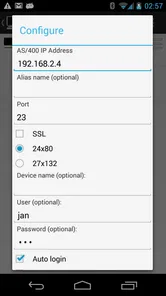
Before using it, I would make sure I had the correct host details and the same account information required by the organization’s normal terminal access. This is an important practical point: the app does not replace the AS/400 account, host configuration, or workplace access rules. It provides the terminal client. If the host is unavailable, the credentials are wrong, or the network path is blocked, no terminal emulator can turn that failed connection into a successful one.
Setting expectations before the first connection
The first question many readers will have is whether this is suitable for any Android phone. The listed minimum operating system is Android 5.1, so the compatibility threshold is relatively broad. That does not mean every handset will be equally pleasant for terminal work. Screen size, keyboard behavior, and the quality of the network connection matter more here than they do in a typical chat application.
I would also consider the purchase carefully. The app costs $28.99, which is a substantial price for someone who only wants to experiment with AS/400 access. For a person whose work depends on occasional terminal sessions, that cost may be easier to justify than maintaining a more complicated remote-access setup. For a curious user without an actual AS/400 workflow, it is difficult to recommend spending that amount simply to see what a TN5250 client does.
More From Our News Desk

 Gmail
GmailGmail in a Busy Inbox: Who Benefits Most?
From first account to crowded workday, Gmail earns its place through dependable search and flexible sorting—but its best fit depends on how much inbox maintenance you can tolerate.

 Prime Video
Switching to Prime Video: What Changes in Your Viewing Routine
Prime Video can make a compelling second home for streaming, but switching means learning a different catalog, rental layer, and route from browsing to playback.

 Universal TV Remote Control
Universal TV Remote Control Works Best as a Reliable Backup
A phone remote earns its place through quick setup and reliable habits. Here is how to get more from Universal TV Remote Control—and where its limits show.

 Weather - By Xiaomi
Weather by Xiaomi Review: Clear at a Glance, Less Clear Up Close
Xiaomi’s weather app makes everyday forecasts quick to scan, but its calm surface can leave useful details and recovery paths harder to find than they should be.

 X
XX Under Pressure: Can It Recover When Posting Goes Wrong?
A resilience-focused review of X, examining setup, mistaken posts, interruptions, weak connections, and the gaps that matter when recovery needs to be dependable.

 Clash of Clans
Clash of Clans Is Won Between the Battles
Its raids are quick; its community is a long-term project of coordination, teaching, rivalry, and shared responsibility—with all the friction that entails.
Latest News



The content rating is Everyone, but that should not be confused with being designed for everyone. The rating describes suitability from an age perspective; the app’s real audience is much narrower. It is aimed at people who know why they need TN5250 access, including staff supporting inventory, orders, operations, administration, or other established AS/400 processes.
Opening a session and moving through the host
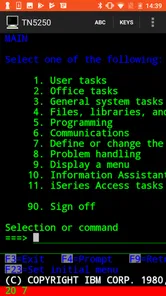
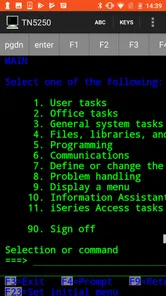
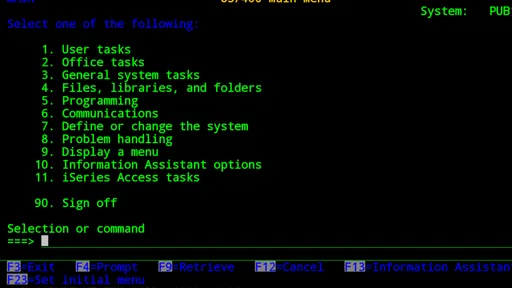
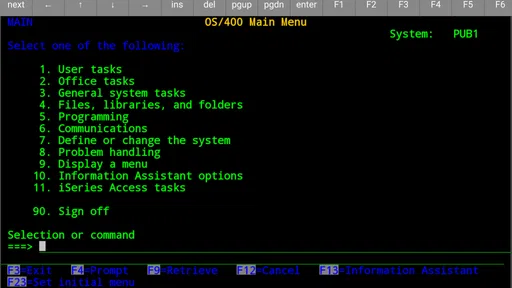
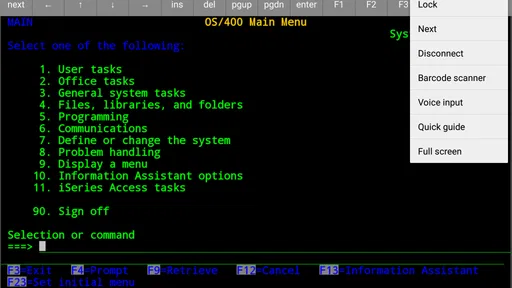
Once the host information is available, the workflow is more direct than using a full remote desktop. I would open the client, enter the connection details, and authenticate using the account supplied by the organization. After the session starts, the important adjustment is mental: this is not a touch-first mobile interface with large buttons and guided cards. It is a terminal environment, so the user should expect text-based screens, fields, commands, and function-key-style navigation.
That distinction affects how quickly someone can work. An experienced AS/400 user may immediately recognize the structure and move through screens efficiently. A newcomer may find the interface plain, dense, and less forgiving than a modern app. The software can provide access to the host, but it cannot make an unfamiliar business application self-explanatory.
My practical advice is to keep the first session small. Rather than trying to complete a complicated operation immediately, start with a harmless lookup and confirm that the screen responds correctly, that text entry behaves as expected, and that the session remains connected while moving between fields. This simple check can prevent a larger task from being interrupted by an input problem discovered too late.
Touch input is the central trade-off. A phone is convenient because it is always nearby, but a traditional terminal screen was generally designed around a physical keyboard and predictable function keys. If the task involves frequent entry, repeated corrections, or many navigation commands, an external keyboard or a larger Android device may be more comfortable than a small phone. The app’s usefulness therefore depends partly on the work pattern, not only on the connection itself.
A realistic mobile work scenario
Imagine a warehouse supervisor who is away from the office when a delivery question arrives. The order status lives in an AS/400 application, and the supervisor needs to check it before calling the customer back. With the required access details already in place, the supervisor launches the client, connects to the host, navigates to the relevant inquiry screen, reads the order information, and then hands the result to a colleague or customer through the usual communication channel.
In that scenario, the app is valuable because it removes the need to return to a fixed terminal for a simple lookup. It does not perform the business decision, rewrite the order, or communicate with the customer automatically. Its role is narrower and more useful: it provides a mobile window into the system that already contains the answer.
A second example would be an IT or operations worker checking a status screen during an evening handoff. The worker can use the Android device to inspect the same host-based information instead of relying on a screenshot sent by someone else. That can reduce delays, but it also introduces responsibility. A small screen can make a dense line of text easier to misread, so I would verify important values before passing them onward.
Where the handoffs happen
The most interesting part of this workflow is what happens around the app. The client sits between several handoffs: the user receives a request, connects to the AS/400, interprets the host screen, and then transfers the result into a conversation, ticket, call, or operational decision. Only one of those stages is handled directly by Mocha TN5250.
That narrow role is both a benefit and a limitation. It avoids the overhead of a full remote computer session, but it also means the user must manage the surrounding work manually. If a colleague needs the result, I would copy the relevant information into the organization’s normal messaging or ticketing tool rather than expecting the terminal client to become a complete collaboration platform.
This separation can be helpful for security and accuracy in a practical sense: the terminal session remains focused on the host, while communication happens in the approved channel. At the same time, it creates an opportunity for transcription mistakes. When transferring an item number, quantity, date, or status, I would compare it against the terminal screen before sending it. Mobile convenience is not the same as automatic reliability.
Another handoff occurs between the organization’s existing procedures and the phone. A company may have rules about who can connect, where access is allowed, and how sensitive information should be handled. The app can fit into that process, but the user should not assume that mobile access is automatically authorized just because the application supports it. In a real workplace, approval and host configuration remain part of the deployment decision.
What the completed workflow feels like
When the connection, credentials, and host workflow are all familiar, the outcome is pleasantly simple: I can reach the AS/400 screen I need without carrying a laptop or finding a dedicated terminal. For quick lookups and occasional operational checks, that convenience is meaningful. It is especially useful when the alternative is asking another employee to perform a basic inquiry on my behalf.
The current version is 6.0, and the app’s long presence on the platform is consistent with its specialized purpose; it was released on October 14, 2010. I would not judge it by the standards of a modern consumer app with animated onboarding and constantly changing visual design. Its success is better measured by whether the session connects, the terminal responds, and the user can complete a known task without unnecessary layers.
Compared with a remote desktop application, this approach is usually more focused. A remote desktop gives access to an entire computer session, which can be useful when the AS/400 is reached through a desktop program or when other tools are needed at the same time. However, that broader access can also mean more setup, more screen scaling, and more points of failure. For direct TN5250 work, a dedicated client is the cleaner choice.
Compared with a web-based modernization of an AS/400 application, this app has a different purpose. A redesigned web interface may be easier for occasional users, more comfortable on a phone, and better suited to guided workflows. But modernization is not always available, and replacing a mature host application can be expensive or impractical. In that situation, a terminal client offers a realistic bridge rather than requiring the underlying system to change first.
It also differs from generic SSH or remote-shell tools. Those applications target other protocols and server environments, while this one is specifically intended for TN5250 access. Choosing the right protocol matters more than choosing the most fashionable interface. If the host expects TN5250, a general-purpose tool may simply be the wrong instrument.
Small details that affect everyday use
One non-obvious trade-off is the difference between access and comfort. A successful session does not guarantee that every task is pleasant on a phone. I would reserve mobile use for short searches, confirmations, and urgent checks, while leaving long data-entry sessions to a larger screen or physical terminal. The app can extend the reach of the system without making a phone the ideal replacement for every workstation.
A second useful insight is to separate “read-only confidence” from “update confidence.” Looking up a record is generally easier to verify than changing one. Before submitting an update from a mobile terminal, I would slow down, check the target record, review each entered value, and confirm the resulting screen. This is not a criticism unique to the app; it is a consequence of combining a dense legacy interface with touch input and a small display.
A third is to plan for interrupted sessions. Mobile users move between Wi-Fi and cellular networks, lock their screens, and receive calls. Even when the app is functioning correctly, those transitions can make a live terminal workflow less predictable than one performed at a desk. For a task with serious consequences, I would avoid starting the final submission while moving between locations and would keep a clear record of what had already been completed.
A fourth is to treat the keyboard as part of the setup rather than an afterthought. If the daily task depends heavily on function keys, rapid field movement, or repeated text entry, the phone’s on-screen keyboard may become the main source of friction. A larger device or compatible physical keyboard can change the experience considerably. Someone evaluating the app for a team should test the actual hardware and workflow, not only the installation screen.
Where this flow breaks down
The workflow breaks first when the user expects a modern mobile interface. This is not a visual front end for an AS/400 application, and it does not turn host screens into touch-friendly forms. If your staff need guided buttons, visual dashboards, attachments, or simple access for people unfamiliar with terminal commands, a web or native business app would likely be a better investment.
It also breaks when the task requires more than terminal access. If you need to move files, operate several desktop applications, or manage a complete office computer remotely, a remote desktop solution may be more suitable. Installing this client will not replace those tools. Its advantage comes from doing one specialized job without pretending to be an all-purpose remote workstation.
Another weak point is the price-to-frequency calculation. At $28.99, it makes more sense for a person who will use AS/400 access repeatedly or whose time saved has real value. A user who needs one rare connection may find that an organization-provided workstation, a browser-based company tool, or assistance from an administrator is more sensible. The app is a professional utility, not a casual free companion.
The rating of 3.5 gives me a balanced impression rather than a reason to dismiss it. The audience is specialized, and ratings for a technical client can reflect device compatibility, host setup, keyboard expectations, or the difficulty of legacy systems as much as the core idea. I would treat the rating as a prompt to test the exact workflow before rolling it out widely, especially when the purchase is for a team.
Who should use it and who should skip it
I would recommend it to an AS/400 user who already understands the host application and needs occasional Android access away from a fixed terminal. It is also worth considering for support staff, supervisors, and small operational teams whose main requirement is checking or completing known terminal tasks while moving around a workplace.
I would be more cautious for first-time AS/400 users. The app may provide the connection, but learning the host application, its commands, and its business rules is a separate challenge. Training and a tested procedure matter more than the installation itself.
I would skip it if your organization already offers a reliable mobile web interface, if all work is performed comfortably at a desktop, or if your needs are really full remote-computer access. I would also avoid treating it as a replacement for proper authorization and workplace security procedures. The best use case is specific: a legitimate TN5250 requirement, a compatible Android device, and a user who benefits from mobility.
After following the complete path from request to host lookup to handoff, my opinion is that MochaSoft has made a focused tool for an unfashionable but still important job. It will not make an AS/400 feel like a modern smartphone service, and its cost makes casual experimentation hard to justify. But when the alternative is being tied to a terminal for every small inquiry, it can be a practical bridge.
My recommendation is conditional but positive: choose it when direct TN5250 access is the real requirement, test it with your actual host and keyboard workflow, and use it for the tasks a phone handles well. If your priority is a polished mobile experience or broad remote control, choose a different category of tool instead. For the right user, its value lies in completing a specific handoff faster, not in offering more features than the job requires.
Mocha TN5250 Frequently Asked Questions
Is Mocha TN5250 available for Android and iOS?
Mocha TN5250 is a communication app, and its Android version provides TN5250 emulation for accessing AS/400 systems. Before downloading, select the version made for your device and check that your operating system meets its requirements. The app is intended to connect to a compatible host, so installing it alone will not provide access to an IBM i or AS/400 environment.
What is Mocha TN5250 used for?
Mocha TN5250 is a mobile terminal-emulation app designed to connect Android or iOS devices to IBM i systems, AS/400 computers, and other hosts that support the TN5250 protocol. After configuring the server address and connection details, you can access text-based applications remotely. It is mainly intended for business users who need to monitor or operate legacy systems while away from a desktop terminal.
Does Mocha TN5250 support secure connections?
The app may support security features such as SSL or TLS, depending on the version, platform, and server configuration. However, users should not assume that every connection is encrypted automatically. Before entering credentials or transmitting business data, check the available security settings and confirm that the IBM i or host is configured for the same encryption method. Your organization may also require certificates, VPN access, or additional authentication.
Is Mocha TN5250 easy to configure on a phone or tablet?
Initial setup is generally straightforward for users who already know their host information, but it can feel technical for beginners. You normally need the server name or IP address, port, connection type, and sometimes login or display settings. The on-screen keyboard and terminal controls require a short adjustment period, especially on a small phone. A tablet usually provides a more comfortable experience for frequent sessions.
Can I use Mocha TN5250 without an IBM i or AS/400 server?
No. Mocha TN5250 is a client application, not a standalone business system or an emulator that provides an IBM i environment by itself. You need access to a compatible TN5250 host, such as an IBM i or AS/400 system, and valid permission to connect. If your company uses VPN restrictions, firewall rules, or private network addresses, those requirements must also be satisfied before the app can work.
Pros
- Reliable IBM i and AS/400 terminal emulation over TN5250 connections.
- Supports SSL/TLS encryption for safer access to remote systems.
- Customizable keyboard helps enter function keys and commands efficiently.
- Session profiles make it easy to save and reuse connection settings.
- Works well for remote administration and business tasks on mobile devices.
Cons
- The interface feels dated compared with modern productivity apps.
- Initial setup may be confusing for users unfamiliar with IBM i systems.
- Advanced features and extended use may require an in-app purchase.
- Small phone screens can make dense terminal text difficult to read.
- Performance depends heavily on a stable network connection.











