

Mobile Text Alerts | SMS + MMS
- 28.00
- 3.3
- Installs
- 10.00K
- Price
- Free

Screenshots
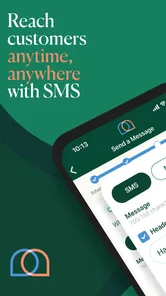
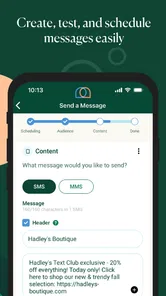
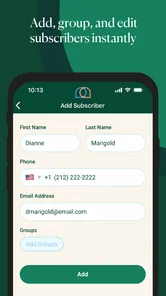
Analysis by Reviewed
When I first opened Mobile Text Alerts | SMS + MMS, I approached it less like a general messaging app and more like a practical communication tool for reaching a group of people at once. Its purpose is clear: help a business, organization, or individual send text messages to an audience with the hope of encouraging replies, visits, purchases, or continued engagement. That focused purpose is its biggest strength, but it also means the app is not automatically the best choice for every kind of communication.
The app comes from Vimbly MTA and sits in the communication category. It is free to install, rated for Everyone, and supports devices running Android 7.0 or later. I found the basic idea easy to understand, especially for someone who wants to work with text alerts rather than build a complicated marketing system. At the same time, the average rating of 3.3 from around 97 ratings suggests that the experience is not universally smooth. I would treat it as a focused tool worth testing, not as an automatic replacement for every messaging service.
What to consider before choosing a text-alert app
The first question is not simply whether you can send a message. Most modern phones already handle ordinary texting well. The more useful question is whether your communication needs are organized enough to justify a dedicated audience-messaging app. If you are sending occasional updates to a few friends, this is probably more structure than you need. If you regularly need to reach customers, members, clients, or event attendees, the ability to think in terms of an audience becomes much more relevant.
I would judge this app on four practical points: how quickly you can prepare a message, how well it fits your audience workflow, whether it supports the kind of content you want to send, and how comfortable you are with costs that may appear beyond the free installation. The store lists in-app purchases ranging from $4.99 to $274.99 per item, so the word “free” should be understood as free to download rather than a promise that every possible use will remain cost-free.
The second decision is about the audience itself. A small local business may want to announce an opening change, remind regular customers about an appointment, or send a short promotion. A community group might need to notify members about a schedule adjustment. A larger operation may already depend on customer-management software, email automation, or a full marketing platform. In that last case, a standalone mobile text tool may be convenient for quick outreach but less suitable as the central system.
There is also a difference between sending an alert and holding a conversation. Text alerts are strongest when the message is short, timely, and easy to understand. They are less attractive when the communication requires long explanations, detailed documents, visual presentation, or a permanent searchable knowledge base. Before installing anything, I would decide whether my audience needs a quick prompt or a complete information channel.
A realistic everyday workflow
Imagine I run a small fitness studio and need to tell members that an evening class has moved to another room. I could send individual messages, post on social media, or rely on email and hope everyone checks it in time. A dedicated text-alert workflow gives me a more direct route: prepare one concise notice, send it to the relevant audience, and use the same channel for a follow-up if the change creates confusion.
More From Our News Desk

 Gmail
GmailGmail in a Busy Inbox: Who Benefits Most?
From first account to crowded workday, Gmail earns its place through dependable search and flexible sorting—but its best fit depends on how much inbox maintenance you can tolerate.

 Prime Video
Switching to Prime Video: What Changes in Your Viewing Routine
Prime Video can make a compelling second home for streaming, but switching means learning a different catalog, rental layer, and route from browsing to playback.

 Universal TV Remote Control
Universal TV Remote Control Works Best as a Reliable Backup
A phone remote earns its place through quick setup and reliable habits. Here is how to get more from Universal TV Remote Control—and where its limits show.

 Weather - By Xiaomi
Weather by Xiaomi Review: Clear at a Glance, Less Clear Up Close
Xiaomi’s weather app makes everyday forecasts quick to scan, but its calm surface can leave useful details and recovery paths harder to find than they should be.

 X
XX Under Pressure: Can It Recover When Posting Goes Wrong?
A resilience-focused review of X, examining setup, mistaken posts, interruptions, weak connections, and the gaps that matter when recovery needs to be dependable.

 Clash of Clans
Clash of Clans Is Won Between the Battles
Its raids are quick; its community is a long-term project of coordination, teaching, rivalry, and shared responsibility—with all the friction that entails.
Latest News



The important lesson is not to write the message like an advertisement. I would put the action and timing first, keep the wording brief, and avoid combining the room change with unrelated promotions. If the same audience later receives sales messages, I would separate those campaigns mentally and operationally. A text message feels personal, so sending too many unrelated notices can quickly make people ignore future alerts.
This is where I see a useful but easily missed trade-off. The app may make distribution easier, but it does not automatically make communication better. The quality of the result depends on audience selection, message timing, and discipline. I would prepare a small set of reusable message patterns outside the app first: urgent notice, reminder, confirmation, and promotional update. That reduces rushed writing and makes it easier to keep each message focused.
Where Mobile Text Alerts stands out
The clearest advantage is its narrow focus on reaching an audience through SMS and MMS-style communication. Instead of treating text as just one small feature inside a broad social or productivity application, it is built around the idea that a message should move quickly from the sender to a group of recipients. For someone who already knows that text is the right channel, this focus can feel more useful than opening a general-purpose platform filled with unrelated tools.
I also like the fit for mobile-first work. A small business owner or event organizer may not be sitting at a desk when a message needs to go out. A phone-based tool can be useful when the decision is immediate: a cancellation, a last-minute change, a reminder, or a short announcement. That does not mean every task is easier on a phone, but it does make the app relevant to people who manage communication while moving between appointments, customers, and daily responsibilities.
The MMS part of the product name also matters for users who do not want every message to be plain text. When an image or richer message is genuinely useful, a multimedia option can make an announcement more understandable or noticeable. I would still use that capability selectively. A simple text is often better for urgent information, while a visual message may make more sense for an event notice or a product-focused update.
Another strength is the directness of the concept. I did not have to reinterpret the app as a social network, email client, or team chat service. Its intended job is easy to explain to a colleague: use it when an audience needs a mobile text alert. That clarity helps when deciding whether the app belongs in a workflow at all.
For a small operation, that simplicity can be more valuable than a long list of advanced features. If I only need to send timely updates and engagement messages, I would rather begin with a focused tool than spend days configuring a large communications suite. The app’s modest scale, reflected by over 10 thousand installs, also makes me view it as a specialized option rather than a universal standard.
Practical habits that make the app more effective
My first tip would be to create audience boundaries before sending anything. Even when the app makes group outreach convenient, “everyone” is rarely the right audience for every message. A schedule change may belong only to attendees of one session. A product announcement may belong only to customers who asked for updates. Separating those situations reduces irrelevant messages and protects the value of the channel.
My second tip is to use a two-stage review before pressing send. I would check the recipient group first, then read the message as if I were receiving it while distracted. Can I understand the purpose immediately? Is the date or time obvious? Is there a clear next step? This small pause is especially important for mobile alerts because a typo or missing detail can create more follow-up work than the original message saved.
A third useful habit is to treat MMS as a communication choice, not a default setting. Images can attract attention, but they can also make a message feel promotional when the audience only needs a quick instruction. I would reserve richer messages for cases where the visual actually clarifies the information. For urgent operational notices, plain wording is usually easier to scan.
I would also keep a simple record of what was sent and why. That record does not need to be elaborate. A note with the date, audience, message purpose, and any response pattern can prevent accidental repetition. It is particularly useful when several people share responsibility for communication. A dedicated app can distribute the message, but a lightweight internal process helps keep the overall system understandable.
Where another category may fit better
Mobile Text Alerts is not the right answer when the main need is private, one-to-one conversation. For that situation, the phone’s normal messaging app is usually more natural and may require less setup. If I am chatting with a friend, coordinating with one contractor, or having an ongoing personal exchange, an audience-focused alert tool would add unnecessary distance and structure.
Email may be better when the message needs paragraphs, attachments, detailed instructions, or a format people can save and search later. I would not use a short-alert workflow to replace a formal document or a long customer explanation. Text is excellent for prompting attention, but it is not always the best place to store the full story.
Social platforms can be a better fit when the goal is public discovery, comments, or community discussion. A text alert reaches people more directly, but it is not designed to create the same open conversation around a post. If I want people to browse a gallery, discuss an idea, or share a public announcement, a social channel may offer a more natural environment.
Team collaboration tools also have an advantage when communication involves internal projects, files, threaded discussions, and ongoing work. A text alert can tell a team that something changed, but it does not replace a workspace where the details, decisions, and related documents remain organized. I would use the alert as a prompt and keep the working material somewhere designed for collaboration.
Finally, a larger marketing platform may be a better investment for organizations that need complex automation, detailed customer segmentation, or a broad campaign system. I am not treating that as a claim about a particular rival product; it is simply a different category. The trade-off is straightforward: a specialized mobile alert app may be easier to start with, while a full platform may make more sense once communication becomes a central business operation.
Cost, commitment, and the effort of changing tools
The free download lowers the barrier to trying the app, but I would not make a decision based on installation cost alone. The listed in-app purchase range reaches from $4.99 to $274.99 per item, which is wide enough that I would inspect the available purchase options carefully before building an important workflow around the service. The right question is not only “Can I install it?” but also “Will the way I plan to use it remain comfortable as my audience or message volume grows?”
Switching tools has a cost even when the software itself is inexpensive. I may need to rebuild audience groups, recreate message templates, explain the new process to colleagues, and make sure important contacts are not overlooked. That is why I would begin with a limited, non-critical use case rather than moving every communication channel immediately. A short trial with one audience can reveal whether the workflow feels natural without putting essential notices at risk.
I would also think about audience expectations before changing platforms. People may respond well to text because it is immediate, but they may become frustrated if messages arrive too often or if the sender changes channels without explanation. A careful transition means telling recipients what kind of updates they will receive and keeping the purpose consistent. The app can support the delivery, but trust comes from predictable behavior.
The current version is 3.4.21, and the app was released on November 15, 2019. Those details make compatibility worth checking before committing an older device or a shared business phone to the workflow. Since the minimum operating system is Android 7.0, many users will be covered, but I would still test the app on the exact device used for daily work. A tool that works on one phone but feels awkward on another can create avoidable friction.
There is also a human cost to choosing an audience-messaging app: someone must own the sending process. I would assign responsibility for reviewing recipients, approving sensitive announcements, and handling replies or follow-up requests. Without that ownership, the convenience of rapid sending can lead to duplicated messages, unclear promises, or alerts sent to people who did not need them.
Who should try it, and who should skip it
I would recommend trying this app if I were running a small business, local service, event, class, club, or community activity where timely text communication matters. It is especially appealing when the sender needs to work from a phone and wants a tool centered on audience alerts rather than personal chats. The free installation makes a cautious test practical, provided the purchase options are reviewed before wider use.
I would be more cautious if my communication needs are mostly private conversations, long-form information, internal project work, or public community discussion. In those cases, the usual phone messenger, email, social platform, or team workspace may be a better match. I would also hesitate to make it the sole system for a complex organization that already depends on integrated customer records and elaborate campaign management.
The rating of 3.3, based on around 97 ratings and 28 reviews, reinforces my balanced view. It is not a reason to dismiss the app, because a specialized tool can still be useful to the right person. It is a reason to test the actual workflow on your device and with a small audience before treating it as mission-critical. I would pay attention to how quickly I can prepare a message, how confidently I can target recipients, and how clear the purchase path feels.
For me, the deciding factor is not whether it replaces every alternative. It does not need to. Its value comes from being a focused option for sending audience-oriented text and multimedia alerts from a mobile environment. If that is the exact problem I need to solve, the app deserves a trial. If I am looking for a complete communications hub, I would choose a broader category instead.
My recommendation is to start small, define the audience carefully, and use Mobile Text Alerts as a direct alert channel rather than a complete business system. I would choose it for concise updates, reminders, timely notices, and engagement messages where text is more likely to be seen than email. I would keep longer explanations, public discussion, and ongoing team work in tools designed for those jobs. Used with that clear boundary, this communication app can be a practical addition; used as a universal replacement, it is much less convincing.
Mobile Text Alerts | SMS + MMS Frequently Asked Questions
Is Mobile Text Alerts free to download, and what costs should I expect?
Mobile Text Alerts is free to download, but sending messages through the service may involve paid plans or in-app purchases. The app’s listed purchase range is $4.99 to $274.99 per item, so costs can vary with the option selected. Before using it for a campaign, check the current plan and any applicable messaging charges to make sure they suit your organization’s needs.
What is Mobile Text Alerts, and who is it designed for?
Mobile Text Alerts is a business-focused messaging platform for sending SMS and MMS communications to groups of contacts. After reviewing its features, it is best suited to organizations, teams, schools, nonprofits, marketers, and service providers that need to send announcements, reminders, updates, or promotional messages. It is not primarily intended as a replacement for a personal texting app.
Can Mobile Text Alerts send both SMS and MMS messages?
Yes, the platform supports SMS text messages as well as MMS content, allowing users to include media such as images when the feature is available under their account and messaging plan. This makes it useful for richer announcements and campaigns. However, message limits, supported file types, carrier rules, and possible additional charges can vary, so users should check the current plan details before sending large campaigns.
Does Mobile Text Alerts require a subscription or charge for sending messages?
Mobile Text Alerts is generally aimed at organizations that send messages at scale, so access may depend on a paid subscription, account plan, or usage-based limits rather than being completely free. The final cost can depend on the number of contacts, messages, phone numbers, and included features. Before downloading or signing up, review the latest pricing, trial conditions, carrier fees, and cancellation terms.
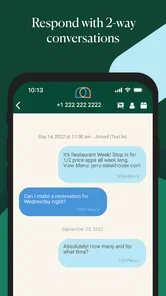
Can recipients reply to messages sent through Mobile Text Alerts?
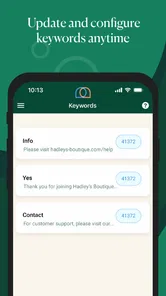
In many configurations, recipients can reply to messages, which can make communication more useful than one-way announcements. Replies may be collected in the platform or handled according to the account’s selected number and messaging settings. The exact behavior can depend on the plan, sender type, keywords, and local regulations. Businesses should also provide clear opt-out instructions and monitor replies responsibly.
Pros
- Supports both SMS and MMS messaging for broader communication options.
- Offers scheduled messages to help automate reminders and announcements.
- Contact management makes it easier to organize recipients and campaigns.
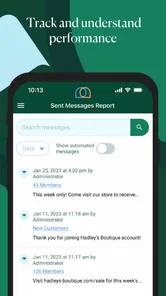
- Delivery tracking helps confirm whether messages reached their intended audience.
- Useful for businesses sending updates
- alerts
- and time-sensitive notifications.
Cons
- Some features may require a paid subscription or additional messaging credits.
- MMS delivery can vary depending on the recipient’s carrier and network.
- Large contact lists may require extra setup and careful organization.
- Frequent alerts can feel intrusive if recipients have not opted in.
- The interface may take time to learn for users new to bulk messaging tools.











