Mobile Link for Generators
- 3.67K
- 4.6
- Installs
- 500.00K
- Price
- Free

Screenshots
Analysis by Reviewed
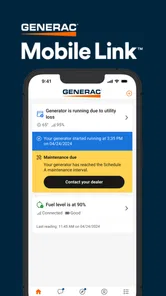
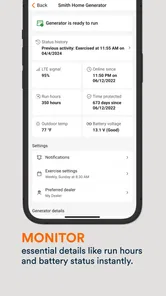
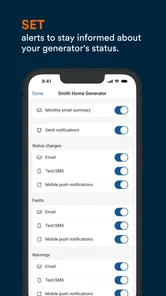
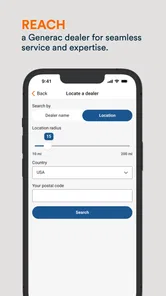
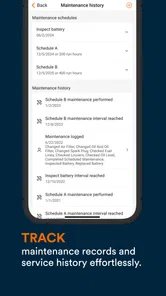
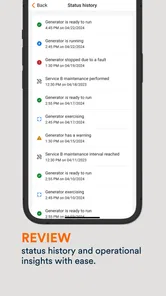
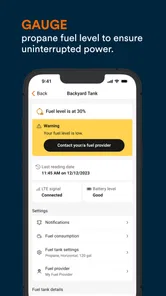
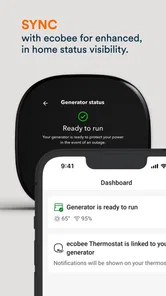
Keeping track of a home generator is one of those jobs that feels simple until you actually need reliable information. Mobile Link for Generators is designed for that narrow but important task: it lets customers check generator status from a mobile device. I found its value less in constant browsing and more in reducing the need to walk outside, open a cabinet, or wonder whether the unit is ready when the weather turns bad.
This is a free Lifestyle app from Generac Power Systems, Inc, aimed at people who own a compatible Generac generator and want a more convenient way to stay informed. It is available to Everyone, and its long presence on mobile—released in February 2014—shows that this is an established companion rather than a brand-new experiment. The current version is 3.17.0, with a minimum operating system requirement of 12.
My overall impression is practical rather than flashy. The app does not replace generator maintenance, a proper electrical installation, or attention to local conditions. What it can do is give generator owners a central place to check the unit’s reported condition. That distinction matters: it is a monitoring aid, not a substitute for understanding the equipment itself.
Where the experience usually gets stuck
I’ve found that the most frustrating moments usually come from not knowing which part of the chain is responsible: the phone, the connection, the account, or the generator itself. In this section, I’d separate those possibilities before taking action, so a delayed screen doesn’t immediately become a presumed equipment fault. That starts with a few quick checks that are easier to do before an outage than during one.
The first hurdle is usually connection, not navigation
When an app like this feels difficult, the problem often appears before the main status screen becomes useful. The generator has to be associated with the right account and device, and the phone needs to communicate with the service in a way that allows current information to appear. If that relationship is incomplete, a blank, stale, or unhelpful status can look like an app failure even when the generator is operating normally.
I would begin with the basics rather than repeatedly tapping refresh. Confirm that I am using the account connected to the generator, check that the phone has a working internet connection, and make sure the app is updated. A status screen is only as useful as the information reaching it, so a temporary network problem can make an otherwise healthy system appear uncertain.
Another common source of confusion is expecting the app to behave like a local control panel. A phone screen is convenient, but it is not the same as standing beside the generator and reading its physical indicators. If I need to investigate an unusual condition, I would treat the app’s status as an important clue and then inspect the equipment safely, following the generator’s instructions rather than making assumptions from the phone alone.
More From Our News Desk

Weather by Xiaomi Review: Clear at a Glance, Less Clear Up Close

X Under Pressure: Can It Recover When Posting Goes Wrong?

Clash of Clans Is Won Between the Battles

Android Auto Makes the Case for Quieter Car Software

MobiOffice: Transforming Mobile Productivity with Seamless Integration

EA SPORTS FC™ Mobile Soccer: Redefining Mobile Sports Gaming
Read status information as a starting point
The most useful habit is to notice changes over time. A single glance tells me what the app is reporting now; checking after a known event, such as a power interruption or a scheduled test, gives that information more context. I would avoid interpreting a delayed update as proof that the generator has stopped working. First I would check the phone connection, reopen the app, and allow time for the service to present current information.
This is especially important for owners who only open the app during severe weather. In that situation, the app is being asked to perform at the exact moment networks may be busy and household internet connections may be unstable. A calmer approach is to open it occasionally during ordinary conditions, learn what a normal status looks like, and notice whether the displayed information changes as expected.
Why expectations can make the app seem limited
Mobile Link is focused on generator status. Someone expecting a full home-energy dashboard, a detailed maintenance planner, or a universal control center may find the scope narrower than expected. I see that as a trade-off rather than a flaw: the focused purpose makes sense for generator owners, but it also means the app is not a replacement for every tool associated with home power equipment.
The app is also tied to the generator ecosystem it supports. If I do not own a compatible Generac generator, there is little reason to install it. A general smart-home app may be a better fit for someone who wants one place to manage unrelated devices, while this app is more relevant to the owner who wants generator information in a dedicated companion.
Setup checks that prevent unnecessary frustration
A little preparation makes status checks more useful later, especially when more than one person in the household may need to look at the generator. I’d make sure everyone knows which account to use and what a normal display looks like, rather than relying on memory in a stressful moment. With that groundwork in place, the next step is a calm recovery routine for information that seems out of date or inconsistent.
Prepare before trying to diagnose anything
I would set up the app when the generator is accessible and the phone has a dependable connection, not during the middle of a storm. That gives me time to sign in carefully, confirm the correct equipment is represented, and understand the wording used for normal operation. Rushing through setup while power is already out makes every later message harder to interpret.
It is worth checking the operating-system requirement before downloading or troubleshooting. The app requires version 12 or later, so an older phone cannot be fixed through ordinary reinstalling. If the device meets that requirement, I would still keep its software and the app current. Version 3.17.0 is the current version identified for this review, and updates can matter when a service depends on communication between an app, an account, and equipment.
I would also avoid creating multiple accounts just because the first attempt feels slow. Duplicate sign-ins can make it difficult to tell which account is associated with the generator. Using one clearly remembered account and recording the sign-in details somewhere secure is a small step that can save time later, especially when another household member needs to check the status.
Use a simple setup checklist
- Confirm the phone runs the required operating system.
- Install the latest available version of the app.
- Use the account intended for the generator.
- Check the phone’s internet connection before judging the displayed status.
- Keep the generator’s documentation nearby for equipment-specific questions.
This checklist is deliberately ordinary, but it addresses the most likely points of failure without pretending that a phone can repair an installation problem. If the app opens but the generator is not represented correctly, I would review the account and equipment association before changing unrelated phone settings.
Understand the cost boundary
The app itself is free, which makes it easy to try without committing to a purchase. It also includes in-app purchases ranging from $3.39 to $149.99 per item. I would pay attention to any purchase screen and make sure I understand what is being offered before confirming anything. The free download does not mean every possible service or option inside the wider experience has the same cost structure.
That is one reason I would not describe the app as universally free in every sense. For a basic decision about whether to install it, the important point is that there is no charge to download the app. For anything presented inside it, I would read the wording and price carefully rather than assuming the initial free status covers every item.
Set expectations for other household users
If several people need access, I would agree on one household process instead of having everyone create separate workarounds. The person who normally manages the generator can explain what a normal status looks like and when to escalate a concern. This reduces the chance that one person sees an unfamiliar message, interprets it as an emergency, and starts changing settings or equipment without context.
The app is rated for Everyone, but that does not remove the need for adult judgment around a generator. Children can understand that a phone is showing information, yet generator cabinets, electrical connections, fuel systems, and exhaust areas are not places for casual experimentation. I would keep the digital convenience separate from physical safety decisions.
Recovering a useful workflow when information looks wrong
When a reading looks wrong, I try to preserve the clues before changing anything: note the time, the message, and whether the phone is online. That small record can help distinguish a temporary reporting delay from a recurring issue and gives a technician or support person a clearer starting point. I’d then compare the app with safe observations at home, rather than treating the screen as a repair instruction.
Start with the least disruptive checks
When the displayed status seems stale or unexpected, my first response would be to pause. I would check the phone’s connection, close and reopen the app, and try again after a short interval. I would not repeatedly reinstall the app as a first step, because that can add account confusion without addressing a temporary communication issue.
If the problem continues, I would compare the app with what I can safely observe from the generator and with the circumstances at home. Is the house experiencing an outage? Has the generator recently run? Is the phone connected through a different network than usual? These questions help separate a reporting problem from an equipment event.
A useful recovery habit is to write down the time and the exact message or status shown. Memory is unreliable during a power problem, while a short note gives customer support or a technician something concrete to work with. I would record what happened before changing anything, including whether the app was opened on mobile data or a household Wi-Fi connection.
Do not turn a status message into a repair instruction
The app can tell me what the connected service is reporting, but that does not make every message self-explanatory. I would resist the temptation to reset the generator, open panels, or alter fuel and electrical components based only on a phone notification. Those actions belong in the generator’s documentation or with a qualified professional.
This is one of the most important practical limitations. A monitoring app can shorten the path to awareness, but it cannot safely diagnose every physical cause. If the generator is making unusual sounds, producing an odor, showing a physical warning, or behaving unexpectedly, I would prioritize safety and the equipment instructions over trying to solve everything inside the app.
A realistic storm-day example
Imagine a power outage begins while I am away from home. I open Mobile Link to check the generator’s reported status. If the app presents current information, I have a useful first indication of whether the unit appears to be operating. If the screen does not update, I would not immediately conclude that the generator failed. I would first check whether my phone has internet access, then try again later, and contact someone at home if a physical check is safe.
If the person at home confirms that the generator is running and the app remains stale, the likely issue may be communication rather than generation. If the person reports that the generator is not running, the app becomes supporting evidence, not the sole diagnosis. This workflow prevents a frustrating screen from causing an unnecessary or unsafe intervention.
When reinstalling is reasonable
Reinstalling can be a sensible later step if the app repeatedly behaves abnormally after the connection and account checks are complete. Before doing it, I would make sure I know the correct account details and understand that signing in again may be required. I would also note the current status and any relevant message so I can compare the result afterward.
I would not use reinstalling to solve a generator problem that is visible at the equipment itself. If the physical unit has a warning or will not operate, a fresh app installation cannot correct the underlying condition. The phone workflow and the generator workflow need to be treated as related but separate troubleshooting paths.
When the app is not the cause
A phone can report generator status, but it cannot settle every question about the equipment’s physical condition. I’d use the app as one source of information and pay attention to what is happening at the unit, following its documentation and prioritizing safety. That distinction helps show when another tool—or qualified help—is the more appropriate next step.
Separate communication from equipment health
There are three different questions that can easily become mixed together: can the phone reach the service, is the service showing recent information, and is the generator physically ready to operate? Mobile Link is most helpful with the middle question, while the other two may require network checks, equipment inspection, documentation, or professional assistance.
That distinction changes how I use the app. I treat a normal display as reassuring information, not a guarantee that every future event will be handled perfectly. I treat an unusual display as a reason to investigate calmly, not automatic proof of mechanical failure. This balanced approach is more reliable than either trusting the screen blindly or dismissing it whenever it is inconvenient.
Know when another tool is better
For a Generac generator owner who mainly wants status information on a phone, this dedicated app is more appropriate than a generic notes app, a home-screen shortcut, or a broad smart-home platform that does not understand the generator. Its strength is the direct relationship between the equipment and the monitoring purpose.
On the other hand, a person managing several brands of home equipment may prefer a broader platform for everyday smart-home routines. Someone who needs detailed electrical diagnosis will need equipment documentation and qualified service rather than a more feature-heavy phone app. The right choice depends on whether the priority is generator awareness or wider home automation.
Consider household connectivity honestly
This app is less compelling for someone who rarely has a dependable way to get online or who lives in a situation where generator information must be checked locally at the unit. It is also not the right answer for someone shopping for a generator-independent power-monitoring system. The app’s usefulness depends on having the supported equipment and a workable path for status information to reach the phone.
For the intended owner, however, the focused design can be an advantage. I would rather open one purpose-built companion and see generator information than search through unrelated smart-home controls. The trade-off is that the app cannot be expected to solve connectivity, installation, maintenance, or physical safety issues by itself.
My practical verdict for generator owners
After looking at the way the app fits into real household routines, I see Mobile Link for Generators as a useful convenience with a clearly defined job. It helps put generator status within reach of a phone, which is valuable when the equipment is outdoors, the weather is poor, or I am away from home. The free app is easy to justify for owners of supported Generac equipment who want that extra layer of awareness.
Its strongest use is preventative familiarity. I would install it before an emergency, learn the normal status, and use it occasionally so that an outage is not the first time I open it. I would also keep the generator’s manual available, because the app should complement—not replace—the instructions for safe operation and maintenance.
The main friction comes from the chain of dependencies around the app. Account association, phone connectivity, current information, and the generator’s physical condition all affect what I see. When something looks wrong, the best workflow is to check those layers one at a time, record the exact message, and avoid unsafe equipment changes based solely on the screen.
With an average rating of 4.6 from around 21 thousand ratings and more than 500 thousand installs, it is clearly being used by a substantial group of generator owners. Those figures do not remove the need for realistic expectations, but they do fit my view that this is a mature, purpose-specific utility rather than a novelty.
I would recommend it to a Generac generator owner who wants convenient status checks and is comfortable treating mobile information as one part of responsible ownership. I would skip it if I did not have compatible equipment, needed a complete smart-home controller, or expected the app to diagnose and repair generator faults. For the right household, its real benefit is faster awareness without pretending to be a replacement for the generator itself.
Mobile Link for Generators Frequently Asked Questions
Is Mobile Link for Generators available for both Android and iOS?
Mobile Link for Generators is a mobile app for checking generator status from a smart device. You can look for it in the official app store for your phone or tablet and check the listed requirements before downloading. The minimum operating system requirement is version 12, so make sure your device meets that requirement for installation and use.
What information can I check in Mobile Link without being near my generator?
The app is intended to let customers check generator status from a smart device, which can be helpful when you are away from home. What you see depends on the generator’s connection and setup. For dependable remote checks, make sure the generator’s communication setup is active and your phone has internet access when you open the app.
Do I need an account or special setup before using Mobile Link for Generators?
Plan to connect the app with your generator and complete the setup steps for the service before expecting remote status information. The app’s usefulness depends on a compatible generator and its communication connection being configured. Follow the instructions provided for your equipment, and confirm the connection is working so you can check status from your smart device.
What is the cost of downloading Mobile Link for Generators?
Mobile Link for Generators is free to download. In-app purchases are also available, with listed prices ranging from $3.39 to $149.99 per item, so optional costs may apply depending on what you choose. Review the purchase details shown in the app before confirming a transaction, particularly if you only need basic status checking.
What devices and operating systems can I use with Mobile Link for Generators?
Mobile Link for Generators is a mobile app for checking generator status from a smart device. Before downloading, check that your phone or tablet meets the minimum operating system requirement: version 12. Keeping the operating system and app up to date can help with compatibility and a smoother setup experience.
Pros
- Works with compatible generators for convenient remote monitoring.
- Helps check generator status without being physically nearby.
- Can simplify routine inspections and operational checks.
- Useful for managing generator information from a mobile device.
- May reduce unnecessary trips to the generator location.
Cons
- Requires a compatible generator and supported communication hardware.
- Remote features may depend on cellular or Wi-Fi availability.
- Setup can be difficult for users unfamiliar with generator systems.
- Older devices may experience compatibility or performance issues.
- Limited usefulness if the generator is rarely monitored remotely.











