

Mirror: LED Makeup & Beauty
- 10.00
- 3.7
- Installs
- 10.00K
- Price
- Free

Screenshots
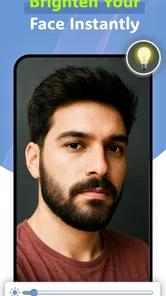

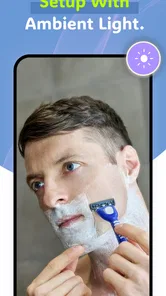
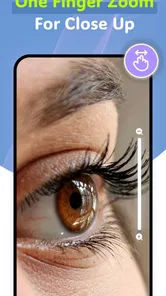
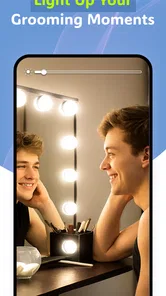
Analysis by Reviewed
I usually think of a mirror as one of those tools that should disappear into the routine: open it, see clearly, make the adjustment, and move on. Mirror: LED Makeup & Beauty takes that simple idea and turns it into a phone-based beauty tool from Applab Studios. It is a free Android app in the Beauty category, designed around a live camera view, screen lighting, zoom, and a larger full-screen presentation.
After using it as a practical mirror rather than treating it like a camera effect, I found that its value depends heavily on the situation. It can be handy when the room is dim, when a normal mirror is not nearby, or when I need a closer look at a small area of my face. At the same time, it does not replace every kind of mirror equally well. The phone screen, camera position, and the need to hold the device all affect the experience.
The app has a 3.7 average from around 96 ratings, with roughly 10 written reviews and over 10K installs. Those figures suggest a small but established audience rather than a heavily tested mainstream beauty platform. It is free, rated Everyone, and the current version is 1.4.1, requiring Android 7.0 or later. I would describe it as a focused utility: useful for quick checks, less convincing as a complete makeup workstation.
How I would decide whether this mirror app fits
I decide whether a phone mirror earns a place in my routine by looking past the novelty of a brighter, enlarged camera view. The useful question is whether it solves a recurring problem—like checking a shaving line when the bathroom mirror is busy—or merely duplicates a mirror I already use comfortably. That distinction makes it easier to judge its week-to-week usefulness before considering the trade-offs.
Start with the kind of mirror you actually need
The first question is not whether the app looks attractive. It is whether a phone screen can solve your particular mirror problem. If you want to check lipstick, tidy eyebrows, inspect a shaving line, or fix a small detail before leaving home, a camera-based mirror can be convenient. If you need both hands free, a broad view of your outfit, or a stable reflection for detailed makeup application, a physical mirror remains easier.
I also consider lighting before anything else. A regular mirror only reflects the light already in the room, while this app uses the phone display as an added light source. That can make a face easier to see in a dark bedroom, hallway, or hotel bathroom. The benefit is practical rather than dramatic: the screen helps illuminate the area in front of the phone, but it cannot turn a badly lit room into a professional beauty setup.
Zoom is another important decision point. A standard wall mirror gives me a natural view at a comfortable distance, but it does not let me enlarge one small area without moving my face closer. Here, the zoom control is useful for checking a precise detail. I found that this is most helpful for finishing touches, not for judging the overall balance of makeup, because an enlarged view can make tiny details seem more important than they are.
More From Our News Desk

 Gmail
GmailGmail in a Busy Inbox: Who Benefits Most?
From first account to crowded workday, Gmail earns its place through dependable search and flexible sorting—but its best fit depends on how much inbox maintenance you can tolerate.

 Prime Video
Switching to Prime Video: What Changes in Your Viewing Routine
Prime Video can make a compelling second home for streaming, but switching means learning a different catalog, rental layer, and route from browsing to playback.

 Universal TV Remote Control
Universal TV Remote Control Works Best as a Reliable Backup
A phone remote earns its place through quick setup and reliable habits. Here is how to get more from Universal TV Remote Control—and where its limits show.

 Weather - By Xiaomi
Weather by Xiaomi Review: Clear at a Glance, Less Clear Up Close
Xiaomi’s weather app makes everyday forecasts quick to scan, but its calm surface can leave useful details and recovery paths harder to find than they should be.

 X
XX Under Pressure: Can It Recover When Posting Goes Wrong?
A resilience-focused review of X, examining setup, mistaken posts, interruptions, weak connections, and the gaps that matter when recovery needs to be dependable.

 Clash of Clans
Clash of Clans Is Won Between the Battles
Its raids are quick; its community is a long-term project of coordination, teaching, rivalry, and shared responsibility—with all the friction that entails.
Latest News



What the interface is trying to do
The app keeps its purpose narrow. It presents the camera feed as a mirror and combines that with LED-style screen lighting, zoom, and a full-screen view. That narrow focus is a strength because I do not have to work through a social feed, editing timeline, beauty filters, or a collection of unrelated tools before checking my face.
The full-screen option matters more than it may sound. When the camera view is surrounded by ordinary phone controls or other visual distractions, the experience feels like using a camera. A larger view makes it feel closer to a dedicated handheld mirror. I prefer switching to that view when I am checking my face from arm’s length, while the regular interface is more practical when I need to adjust controls.
Because the app is a camera-based mirror, I treat the result as a live viewing aid rather than a perfect optical reflection. The phone is doing the looking for me, and the way I hold it changes the angle. That means I make a final check from a normal distance before going out, especially after using zoom. The app helps me see details; it should not be the only judge of how the finished look appears in everyday light.
Where it is especially useful in daily life
One realistic example is getting ready in a shared bathroom. If someone else is using the main mirror, I can open the app in another room, turn on the brighter screen view, and check whether my shaving line or makeup needs a small correction. I do not need a second piece of equipment, and I can keep the task brief instead of waiting for access to the wall mirror.
It is also useful while travelling. A hotel room may have a mirror placed awkwardly, a dim light above it, or no convenient close-up view. A phone can be moved closer to the face, and the zoom function gives me a way to inspect a small area without pressing against the mirror. I would still use the room’s mirror for a wider final check, but this app can fill the gap when the setup is inconvenient.
A third use is a quick check before a video call or an appointment. I can use the full-screen view to see whether hair, facial hair, or makeup looks tidy from a normal phone distance. This is different from applying a filter to an image: the point is to see the current appearance without turning the task into photo editing.
Where the app wins, and where another option fits better
For me, the choice comes down to the task, not a blanket claim that one kind of mirror is better. A phone-based view is convenient when I need portability or a close look, while a stationary mirror is more comfortable for longer routines and hands-free work. I weigh those everyday differences first, then consider what kind of use is likely to keep the app helpful rather than tiring.
The strongest case for a phone-based beauty mirror
The clearest advantage is convenience. Most people already carry a phone, so the app avoids buying or packing a separate compact mirror. Since it is free, trying it involves little commitment. For an occasional user, that can be more sensible than purchasing a dedicated illuminated mirror that may spend most of its time in a drawer.
The screen light is particularly helpful when I am dealing with uneven room lighting. A small light source close to the face can reveal details that disappear in a darker environment. I still pay attention to shadows, since a bright screen directly in front of me can make the face look flatter than it does under daylight. My practical approach is to use the light for the detail work, then step near a window or another ordinary light source for the final decision.
Zoom gives the app a second useful advantage. Instead of moving the entire phone closer and repeatedly changing my grip, I can enlarge the view while keeping the device at a manageable distance. That is convenient for checking a moustache edge, a stray eyebrow hair, eyeliner placement, or a small smudge around the lips. The important trade-off is that zoom is a detail tool, not a replacement for stepping back.
The app also avoids a common distraction found in broader beauty applications. I am not opening it to create a polished selfie or experiment with virtual makeup. I am opening it to see myself now. That makes the experience better suited to a quick practical routine than to someone who wants filters, tutorials, product discovery, or saved looks.
Why a physical mirror can still be the better choice
A regular mirror has a major advantage: it lets me use both hands while keeping a stable, natural view. With the phone, one hand may be occupied holding the device unless I have somewhere safe to place it. That matters for detailed eyeliner, contact lens work, trimming, or any task where a small movement can ruin the result.
A physical mirror also gives a more familiar sense of distance and proportion. The phone camera may sit slightly above, below, or to one side of my face, and that angle can influence what I notice. For a quick correction this is acceptable. For a careful makeup session, I prefer a real mirror or a dedicated lighted mirror because I can move naturally without managing the phone at the same time.
There is also the question of field of view. This app is designed around the face and close-up inspection, not around seeing a full outfit or checking how makeup looks from several steps away. Anyone choosing a mirror mainly for clothing, hairstyle shape, or overall presentation should use a larger mirror as the primary tool.
How it compares with other app categories
Compared with a normal camera app, this beauty mirror is more direct. A camera application may offer more controls, but those controls can get in the way when all I want is a clean live view. The dedicated purpose here is the advantage: I can approach it as a mirror instead of navigating a photography workflow.
Compared with a selfie or beauty-filter app, it is more honest for routine checking. Filters can be entertaining, but they may smooth or alter features in ways that are unhelpful when I am trying to see whether a product is blended properly. This app’s appeal is that it concentrates on viewing, lighting, and enlargement rather than presenting a stylized version of my face.
Compared with a makeup tutorial app, it is a companion rather than a teacher. It can help me see what I am doing, but it does not turn a beginner into an experienced makeup user. Someone who needs step-by-step instruction, product recommendations, or guided looks should choose a different category and use this app only as a viewing aid.
Small workflow changes that make it more useful
I get better results by cleaning the phone’s camera area before opening the mirror. A fingerprint or dust mark can soften the live view and make me blame the app for a problem caused by the lens. I also hold the phone slightly away from my face instead of pressing it close, then use zoom for the detail. This gives me a steadier working distance and reduces the temptation to judge everything at extreme magnification.
For makeup, I use the screen light in two stages. First, I turn it on while applying or correcting a small area, because the extra brightness helps me locate uneven edges. Then I lower my reliance on that light and check the result under the room’s normal lighting. This is a useful safeguard because a look that appears balanced under a bright front-facing screen may appear different outdoors or beside a window.
For shaving, I divide the task into sections rather than trying to inspect the entire face at once. I check one side, adjust the angle, and then compare both sides from a normal distance. Zoom helps me spot leftover stubble or an uneven boundary, but comparing only enlarged sections can make the two sides seem more different than they really are.
Another practical tip is to choose a safe resting position before using the app for more than a few seconds. A phone balanced on an unstable surface can slide or fall, particularly in a bathroom. If I cannot hold it comfortably and safely, I switch back to a physical mirror. Convenience is not worth risking the device or rushing a delicate task.
What switching to this app costs
The financial barrier is low because the app is free. The real cost is attention: I need to open the app, hold the phone, manage the viewing angle, and remember that the screen is not the same as a large stationary mirror. For a quick check, that overhead is minor. For a long beauty routine, it becomes noticeable.
There is also a habit cost. People who already have a well-lit mirror may not gain much by changing their routine. The app becomes valuable when the usual mirror is unavailable, too far away, poorly lit, or not close enough for detail work. In those situations, the phone is not necessarily better in every way, but it is immediately available.
Someone moving from a dedicated illuminated mirror may notice the biggest difference in stability and hands-free use. Someone moving from a basic camera app may appreciate the more focused purpose. The best choice depends on what is currently frustrating: lighting, magnification, portability, or the lack of a mirror at the right moment.
Who should use it and who should skip it
I would recommend it to people who want a portable backup mirror, travellers who prefer not to carry another accessory, and anyone who regularly needs a closer look at small facial details. It is also a sensible trial for someone curious about screen-lit mirror apps but unwilling to spend money before knowing whether the workflow suits them.
I would be more cautious recommending it as the main mirror for a full makeup routine. If you need both hands free, a wide view, consistent perspective, or a stable surface, a physical mirror is the better tool. I would also skip it if your main goal is tutorials, virtual try-ons, photo enhancement, or beauty filters, because the app’s value is practical viewing rather than content creation.
The Everyone age rating makes it suitable as a straightforward household utility, and the Android requirement of version 7.0 or newer keeps it accessible to many older devices. Still, I would check that the phone’s camera is clear and that the device is comfortable to hold before building a routine around it. The app cannot compensate for a poor camera lens, an awkward grip, or lighting that gives a misleading impression.
My recommendation after using it as a daily tool
My recommendation is to treat this as a useful backup mirror, not a complete replacement for a real one. It wins when portability, quick access, screen lighting, and close inspection matter more than hands-free comfort. The combination of a live camera view, zoom, and full-screen presentation makes it more purposeful than simply opening the camera, especially for short grooming checks.
The app’s free price makes experimentation easy, and its focused design avoids the clutter of broader beauty platforms. I can see it becoming a regular part of a travel bag or a useful option when the bathroom mirror is occupied. Its limitations are equally clear: holding a phone is less comfortable than facing a stationary mirror, zoom can encourage overchecking, and the lighting may not represent every real-world setting.
In the end, I would install Mirror: LED Makeup & Beauty if I wanted a simple Android utility for occasional makeup, shaving, and appearance checks. I would not install it expecting professional lighting, guided beauty lessons, or a hands-free workstation. For the right situation, it is a convenient little tool that solves a specific problem without asking me to buy extra hardware. For a complete beauty setup, I would pair it with a physical mirror rather than asking it to do a job it was never designed to handle.
Mirror: LED Makeup & Beauty Frequently Asked Questions
Will Mirror: LED Makeup & Beauty work on my phone?
Mirror: LED Makeup & Beauty is an Android beauty app that requires Android 7.0 or later. It uses your phone’s camera and screen to provide a digital mirror, so the experience can feel different across devices depending on their camera and display. If your phone meets the minimum system requirement, you can use the app for quick appearance checks and makeup or grooming adjustments.
Is Mirror: LED Makeup & Beauty suitable for children?
The app has an Everyone content rating, making its listed age classification suitable for a general audience. Its purpose is practical rather than social: it turns a phone into a mirror for checking your appearance or applying makeup. As with any app that uses a camera, parents may still want to review its permissions and guide younger users on when camera access is appropriate.
What is Mirror: LED Makeup & Beauty used for?
Mirror: LED Makeup & Beauty turns your phone into a practical digital mirror for checking your appearance, applying makeup, fixing your hair, or making quick adjustments when a real mirror is unavailable. Its LED-style lighting controls can help brighten your face and improve visibility in darker environments. It is especially convenient for travel, work, events, or carrying in a small bag.
Does Mirror: LED Makeup & Beauty require an internet connection?
The basic mirror experience generally works without an internet connection because it uses your device’s camera and screen rather than an online service. However, certain features, advertisements, updates, or optional beauty tools may depend on connectivity, depending on the version installed. For the most reliable offline use, open the app once after installation and check which functions remain available without mobile data or Wi-Fi.
Can I adjust the lighting and zoom while using the app?
Yes, the app is designed to make the phone’s camera view more useful as a personal mirror. Depending on your device and the installed version, you may be able to adjust screen brightness, use an LED-style light, zoom the image, or switch between front-camera options. These controls are helpful for detailed makeup application, although results can vary with your phone’s camera quality and screen brightness.
Pros
- Bright LED lighting helps with makeup in dim environments.
- Adjustable light intensity supports more precise application.
- Simple interface makes the mirror quick to use.
- Useful for travel when a physical vanity mirror is unavailable.
- Can help check makeup details before photos or video calls.
Cons
- Requires camera access
- which may concern privacy-conscious users.
- Front-camera quality can limit how accurately details appear.
- Continuous screen and camera use may drain the battery quickly.
- Some lighting or beauty tools may be locked behind purchases.
- Results depend heavily on your phone’s camera and screen quality.











