Mint Gaming
- 52.00
- 4.0
- Installs
- 10.00K
- Price
- Free

Screenshots
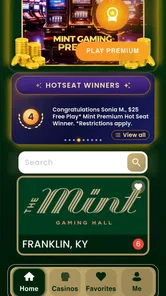

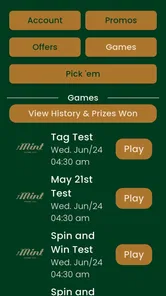


Analysis by Reviewed
I approached Mint Gaming as a practical companion for planning a gaming-focused trip, rather than as another game to play. Its role is to bring casino and entertainment information into one place: games, hotels, dining options, offers, and ideas for a larger gaming getaway. That makes it a lifestyle app with a fairly specific audience. If you are already considering a casino destination and want one place to browse the surrounding experience, it can be useful. If you only want a game, a general hotel app, or a broad travel planner, this is probably not the best fit.
My first impression was that the app’s value depends heavily on intent. It is not the kind of download I would recommend to everyone who enjoys mobile gaming. Instead, I would suggest it to someone comparing entertainment choices, looking at a casino stay, or trying to organize a weekend where gaming is only one part of the plan. The best way to judge it is not by asking whether it replaces every travel tool, but whether its focused view makes a particular kind of trip easier to explore.
What Mint Gaming is really useful for
The app is developed by ECL Entertainment and sits in the Lifestyle category. It is free to download, which lowers the barrier to trying it, although it includes in-app purchases ranging from $1.99 to $99.99 per item. That combination is worth keeping in mind: browsing may be easy to start, but I would still pay attention to any purchase screen before confirming anything, especially when exploring offers or entertainment options.
Its store summary points to five connected activities: viewing games, checking hotels, exploring dining, finding offers, and planning a gaming getaway. In practice, I found that combination more interesting than any one section on its own. A hotel listing by itself is not unusual, and dining information is common in travel apps. The more specific advantage is being able to think about the full visit instead of treating the gaming venue as an isolated stop.
For example, imagine planning a short trip with a friend. You may begin by checking which games or gaming experiences interest you, then look at nearby accommodation, consider where to eat, and review available offers before making a decision. A general search engine can handle each task, but it leaves you moving between unrelated pages. Mint Gaming is aimed at reducing that switching, at least for this particular type of getaway.
That focus also creates its main limitation. I would not use it as my only source for a complete travel itinerary. A dedicated hotel service is usually more suitable for comparing broad accommodation choices, while a restaurant app may offer a wider range of independent venues and user feedback. Mint Gaming makes more sense as a focused discovery layer, especially when the gaming destination is the center of the trip.
A focused audience, not a general gaming app
The name could initially suggest a conventional mobile game, but the app is better understood as a planning and information tool. There is no reason to download it expecting levels, characters, competitive matches, or a casual game to play during a commute. Its purpose is connected to real-world entertainment and travel decisions.
More From Our News Desk

Weather by Xiaomi Review: Clear at a Glance, Less Clear Up Close

X Under Pressure: Can It Recover When Posting Goes Wrong?

Clash of Clans Is Won Between the Battles

Android Auto Makes the Case for Quieter Car Software

MobiOffice: Transforming Mobile Productivity with Seamless Integration

EA SPORTS FC™ Mobile Soccer: Redefining Mobile Sports Gaming
That distinction matters because it changes how I evaluate the experience. I care less about replay value and more about whether the information is easy to scan, whether the choices feel understandable, and whether the app helps me move from vague interest to a realistic plan. Someone looking for a fun game should skip it. Someone who wants to explore a gaming destination may find the narrow focus helpful.
The app carries a Mature 17+ content rating. I would treat that as a meaningful signal about the intended audience rather than a minor label. It is not an app I would hand to a child or recommend for a family activity without considering the setting and the nature of the content being presented. Adults should also approach offers and spending choices with the same care they would use on any gambling-related or entertainment service.
Trust begins with knowing what you are opening
Trust is easier to assess when an app’s purpose is clear. Here, the purpose is relatively direct: Mint Gaming connects gaming-related entertainment with hotels, dining, offers, and trip planning. I appreciate that the concept is more specific than a vague lifestyle feed, because I can decide quickly whether it belongs on my phone.
The public response is modest but positive overall, with an average rating of 4.0 from around 140 ratings and 52 written reviews. I would not treat that as conclusive proof of quality, because a smaller review pool can reflect a narrower audience and may not cover every device or use case. Still, it suggests that the app has found some users who consider the concept worthwhile.
It has passed the 10K-plus install mark, which gives it some real-world reach without making it a universally established travel platform. I see that as a reason to try it carefully rather than assume it has the depth of the biggest names in travel. The app may be most valuable when its information matches the destination and type of outing I already have in mind.
When I review an app with offers and trip planning, I look for visible choices rather than relying on assumptions. I want to know what I am being asked to do, what action follows a tap, and whether a purchase feels optional or rushed. Mint Gaming should be used with that mindset. I would browse first, understand the context of an offer, and only then decide whether it is relevant to my plans.
Account decisions and personal information
One practical question for any lifestyle app is whether I can explore before committing to a deeper relationship with it. I prefer being able to understand the basic purpose and available options before creating an account or sharing more information. With Mint Gaming, I would make that an early checkpoint: open the app, inspect what can be viewed immediately, and notice which screens ask for sign-in or additional details.
I would not enter personal information simply to see whether the app might be useful. If an account is requested for a particular action, I would read the surrounding explanation and decide whether that action is worth the trade-off. This is especially important when the app combines travel planning with offers, because convenience can make people share information more quickly than they intended.
The same cautious approach applies to notifications. A planning app may be more useful when it can remind me about an offer or update, but alerts can also become distracting. I would enable only the notifications that support an active trip or decision, then review them afterward. If I am not currently planning a visit, there is little reason to let a focused lifestyle app compete for my attention every day.
I also recommend checking the device-level controls after installation. Permissions should be considered individually, not accepted automatically. If a permission does not make sense for the action I am trying to complete, I would leave it disabled until the app clearly explains why it is needed. That is not specific criticism of Mint Gaming; it is a sensible habit for any app that may connect browsing, offers, and real-world plans.
Where data sensitivity matters most
The most sensitive moments are likely to occur around offers, purchases, account access, and trip planning. An offer can look attractive while still requiring careful reading. I would check the conditions, timing, eligibility, and final cost before treating it as a saving. A prominent discount is not automatically a good deal if it pushes me toward spending I had not planned.
The in-app purchase range makes this especially important. Free installation does not mean every part of the experience is free, so I would use purchase confirmation as a deliberate pause rather than a routine tap. On a shared device, I would also make sure the relevant store authentication settings are active. That simple step can prevent accidental purchases when someone else is browsing.
Location is another area where I would be attentive. A travel-oriented app may be more useful when I am searching for a destination or venue, but I would rather choose when to provide location access than leave it enabled without a clear reason. If the app offers a manual way to select a destination, I would prefer that when I am only researching a future trip.
I would also avoid treating the app as a private diary of my travel intentions. I would not enter more details than necessary, and I would be careful when using it on a shared phone or public network. These are ordinary precautions, but they matter more when an app brings together entertainment preferences, accommodation interests, and spending decisions.
For readers who want a complete picture of data handling, the right place to inspect is the app’s current privacy and permission information on the device or store page before installation. I would read those notices myself and compare them with the controls shown during setup. The important point is to make an informed choice instead of assuming that a lifestyle label tells me everything about data use.
How I would use it before and during a trip
My preferred workflow would begin with browsing, not buying. I would use Mint Gaming to identify the kind of gaming destination I am interested in, then review hotel and dining possibilities to see whether the overall trip makes sense. Only after that would I examine offers. This order helps prevent an appealing promotion from becoming the starting point for a trip that does not fit my budget or schedule.
A useful second step is to separate discovery from commitment. During the first session, I would save notes outside the app or keep a simple list of the places and options that caught my attention. Later, I would compare the shortlist with a general travel service. That gives the focused app a clear job while preserving the broader price and availability checks that a specialist travel tool may handle better.
During the trip itself, I would use the app as a reference rather than as the sole authority for every detail. Dining hours, room availability, offer conditions, and venue rules can change, so I would confirm important arrangements before relying on them. The app is most helpful for organizing ideas and narrowing choices; final decisions deserve a second look when money or timing is involved.
There is also a behavioral advantage to this workflow. By deciding a budget and trip purpose before opening offers, I can judge them against my plan instead of letting the app define the plan for me. That is a small but valuable distinction for any service connected to gaming and entertainment spending.
Where it beats ordinary alternatives—and where it does not
Compared with a general search engine, Mint Gaming can feel more coherent because its topics belong to the same type of outing. I do not have to invent every search phrase myself, and the connection between games, hotels, dining, and offers is clearer. That is its strongest practical case.
Compared with a broad travel app, however, its scope is narrower. A general travel service is usually the better choice when I need flights, transport, independent accommodation comparisons, extensive maps, or a wide selection of restaurants. Mint Gaming should complement those tools, not necessarily replace them.
Compared with a standard casino or venue app, its getaway angle may be more useful for someone who is still deciding how to spend a whole visit. A venue-specific app may be better once I already know exactly where I am going and need operational details. Mint Gaming is more suitable earlier in the process, when I am connecting entertainment with the rest of the trip.
The trade-off is simple: specialization can reduce clutter, but it can also leave out services I need for a broader itinerary. I would keep the app if its focused view saves me time, and remove it if I only visit gaming venues occasionally and can manage the same research more efficiently elsewhere.
Performance expectations and practical fit
The current version is 2.2.33, and the app supports devices running Android 7.0 or later. That makes it accessible to people using older Android hardware, although access alone does not guarantee that every device will feel equally smooth. I would keep the system updated and allow enough storage for ordinary app updates, particularly before traveling.
Because this is a planning tool, reliability matters more than flashy presentation. I would test it before leaving home rather than installing it at the destination. A short trial lets me see how quickly the relevant sections load, whether the information is easy to interpret, and whether any account or permission prompts interrupt the workflow.
I would also avoid depending on it as the only place where important plans are stored. Keeping booking details, addresses, and confirmation information in a separate, accessible place is sensible. If the app is unavailable or I lose connectivity, I should still be able to find the essentials for the day.
Who should download it
I think Mint Gaming is a reasonable choice for an adult who is actively exploring a gaming getaway and wants gaming, lodging, dining, and offers considered together. It is also useful for someone comparing destinations at an early planning stage, before choosing a final hotel or venue. The free download makes that initial exploration relatively low risk, provided I remain alert to purchases and account requests.
I would be more cautious about recommending it to someone who wants a general-purpose travel planner, a broad restaurant directory, or a conventional mobile game. It is also not a good match for anyone who dislikes promotional content or prefers to keep entertainment spending completely separate from travel research. The Mature 17+ rating reinforces that it is intended for adults who can make those decisions thoughtfully.
My advice is to install it with a specific question in mind: Which gaming destination or getaway option am I trying to understand? If the answer is clear, the app’s focused design has a better chance of helping. If I have no interest in that kind of trip, the download is unlikely to add much to my daily routine.
My cautious verdict
Mint Gaming is a specialized Lifestyle app with a clear purpose and a useful planning angle. I like the way it encourages me to consider the whole outing rather than looking at gaming, accommodation, and dining as unrelated decisions. Its strongest benefit is convenience during the discovery stage, especially when I want to compare the shape of a getaway before committing to details.
At the same time, I would not mistake it for a complete travel replacement or assume that every offer is automatically worthwhile. I would compare important details elsewhere, review purchase prompts carefully, limit permissions and notifications to what I understand, and avoid sharing more information than necessary. Those habits make the app more useful without handing it control of the decision.
With an average rating of 4.0 and more than 10K installs, it has enough adoption to justify a careful trial, but not enough breadth for me to recommend it blindly to every traveler. My final view is positive but measured: Mint Gaming is best used as a focused discovery and planning companion, not as the only tool behind a major trip or spending choice.
Mint Gaming Frequently Asked Questions
What is Mint Gaming, and what can I do with the app?
Mint Gaming is a mobile gaming platform designed to give users access to a selection of games and gaming-related features in one place. Depending on your region and the current version of the app, it may include casual games, rewards, tournaments, profiles, or promotional content. Before downloading, check the official store description to confirm which features and titles are available on your device.
Is Mint Gaming free to download and use?
Mint Gaming may be free to download, but some games, features, virtual items, or special promotions can include optional in-app purchases. The exact pricing structure may vary according to your location and the version available through Google Play or the App Store. Review the store listing and payment information carefully, especially if children may use the device, and enable purchase restrictions when necessary.
Does Mint Gaming require an account or an internet connection?
Some parts of Mint Gaming may be accessible immediately, while other features can require registration, login, or linking a supported account. An internet connection is generally recommended for downloading content, synchronizing progress, viewing updates, participating in online activities, or receiving rewards. Offline availability can differ between individual games, so users should not assume that every feature will work without mobile data or Wi-Fi.
Is Mint Gaming safe for children and does it collect personal information?
Parents should review Mint Gaming’s age rating, privacy policy, permissions, and advertising practices before allowing children to use it. Gaming platforms may collect information such as device details, usage activity, account data, or purchase records, depending on the features enabled. It is also wise to activate parental controls, supervise chat or social functions, and avoid sharing personal information through profiles or in-game communication.
What should I do if Mint Gaming crashes, does not install, or fails to save progress?
If Mint Gaming does not install or runs poorly, first confirm that your device meets the listed requirements, has enough storage, and is using a stable internet connection. Updating the app and operating system, restarting the device, and clearing temporary cache data can often help. For lost progress or account problems, use the app’s support option and provide your device model, operating-system version, and account details without sharing sensitive passwords.
Pros
- Clean interface makes browsing games and categories straightforward.
- Supports quick access to gaming content from a single app.
- Useful for discovering titles that may not appear in your usual recommendations.
- Navigation feels responsive on most modern Android devices.
- Regular content updates can help keep the game selection feeling fresh.
Cons
- Some features or games may vary depending on your region or device.
- The app may require a stable internet connection for its main functions.
- Notifications can become distracting if several updates are enabled.
- Older phones may experience slower loading or reduced performance.
- Privacy details should be reviewed carefully before creating an account.











