

Messages - Text SMS Home
- 0.00
- 0.0
- Installs
- 10.00K
- Price
- Free

Screenshots
Analysis by Reviewed
Text messaging is one of those tasks that should feel effortless: open the app, find the right conversation, write clearly, and send. Messages - Text SMS Home takes that familiar job and adds a more organized front door for SMS, with message scheduling and conversation categories built into the experience. After using it as a communication app, I found its main appeal less about replacing every messaging tool and more about making ordinary texting easier to sort and plan.
The app is free, aimed at everyone, and belongs to the communication category. It is developed by Text Sticker Maker, Love Sticker, 4K Wallpapers, and the current release is version 1.0.3. It requires Android 11 or later, so compatibility is an important first check before installing it. The app has passed the early stage of reaching over ten thousand installs, which gives it some practical visibility while still placing it among smaller alternatives rather than the established names in messaging.
How Messages - Text SMS Home feels to use
I’d judge this app by whether its categories and scheduled texts become part of a routine, rather than by how tidy the first screen feels on day one. A useful way to test that is to pick one recurring task, such as preparing a reminder before a busy morning, and see whether the process saves effort over several weeks. That habit is what determines whether the extra structure earns a lasting place.
Readability and navigation in everyday texting
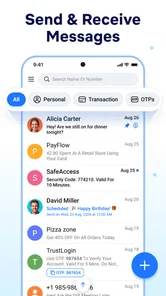
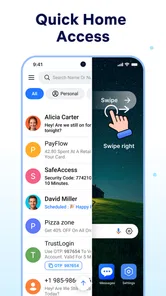
The most useful idea here is the combination of a launcher-style home screen and categories. Instead of treating every SMS thread as one long, undifferentiated list, the app is designed around quicker access to the conversations that matter. That can be helpful if your inbox includes family chats, appointment reminders, delivery updates, work contacts, and one-time verification messages all mixed together.
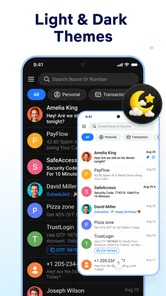
I particularly like the potential of categories for people who think visually or prefer a tidy starting point. A category can act as a mental shortcut: rather than scanning the entire inbox, you begin with the type of conversation you need. This is more than a cosmetic change. For someone who loses track of messages in a crowded list, a structured home screen can reduce the number of decisions required before replying.
There is also a readability benefit in separating communication by purpose. A personal message and a practical reminder do not demand the same kind of attention. When those threads are presented in a clearer structure, it becomes easier to focus on one task instead of repeatedly searching through unrelated conversations.
That said, categories only help when they match the way you actually think. If you rarely receive many SMS messages, organizing them may feel like extra work. Users who prefer the simplicity of the standard phone messaging app may find a launcher-style layout less immediate at first. My advice is to start with only the categories you genuinely need. Creating too many from the beginning can turn a useful sorting system into another list to manage.
More From Our News Desk

 Gmail
GmailGmail in a Busy Inbox: Who Benefits Most?
From first account to crowded workday, Gmail earns its place through dependable search and flexible sorting—but its best fit depends on how much inbox maintenance you can tolerate.

 Prime Video
Switching to Prime Video: What Changes in Your Viewing Routine
Prime Video can make a compelling second home for streaming, but switching means learning a different catalog, rental layer, and route from browsing to playback.

 Universal TV Remote Control
Universal TV Remote Control Works Best as a Reliable Backup
A phone remote earns its place through quick setup and reliable habits. Here is how to get more from Universal TV Remote Control—and where its limits show.

 Weather - By Xiaomi
Weather by Xiaomi Review: Clear at a Glance, Less Clear Up Close
Xiaomi’s weather app makes everyday forecasts quick to scan, but its calm surface can leave useful details and recovery paths harder to find than they should be.

 X
XX Under Pressure: Can It Recover When Posting Goes Wrong?
A resilience-focused review of X, examining setup, mistaken posts, interruptions, weak connections, and the gaps that matter when recovery needs to be dependable.

 Clash of Clans
Clash of Clans Is Won Between the Battles
Its raids are quick; its community is a long-term project of coordination, teaching, rivalry, and shared responsibility—with all the friction that entails.
Latest News



The short description is simply “Messages,” which reflects the app’s straightforward purpose but does not explain the practical difference between it and a typical SMS client. That difference becomes clearer in use: this is aimed at people who want messaging to feel more arranged and intentional, not just people looking for any way to send a text.
Scheduling as a practical support, not just a novelty
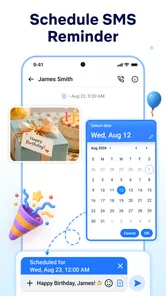
Message scheduling is the feature that gives the app a stronger reason to exist. I can see it helping with situations where the timing matters but I do not want to rely on memory. A birthday greeting, a reminder to a family member, or a work-related message that should arrive during reasonable hours can be prepared in advance instead of being written in a rush.
A realistic example is planning a morning message the night before. If I need to remind someone about an appointment, I can write it while the details are fresh and arrange it for a more suitable time. This reduces the chance of forgetting and avoids sending a late-night message simply because that is when I remembered it.
Scheduling can also support people whose routines are inconsistent. Someone working changing shifts, caring for another person, or managing several appointments may benefit from preparing communications during a quiet period. The important trade-off is that scheduling moves responsibility earlier: I still need to review the recipient, wording, and timing before committing the message. A scheduled text is convenient, but it should not encourage careless automation.
I would use scheduled messages for low-risk reminders and planned greetings, not for urgent conversations or anything that depends on a rapidly changing situation. If circumstances change, a message prepared earlier may become confusing or inappropriate. That is a limitation of the workflow rather than a reason to dismiss it, but it is worth keeping in mind.
Motor and sensory considerations
For users with motor difficulties, the strongest possible advantage is reducing repeated navigation. A home screen that brings important conversations and message actions closer together may mean fewer taps and less searching. Categories can also reduce the need for precise scrolling through a long inbox, especially when the desired conversation is easy to identify by context.
Scheduling may further reduce pressure on hands and attention. Instead of opening the app several times to remember and send a message later, I can complete the task in one planned session. That can be useful for anyone who finds repeated phone interaction tiring, although the actual benefit depends on how comfortably the device and Android’s own controls can be used.
For sensory needs, organization can make the screen feel less overwhelming. A smaller, purpose-based view is often easier to process than a crowded stream of unrelated conversations. I would especially consider this useful for users who become distracted by too many simultaneous choices. Starting from a category rather than a full inbox can create a calmer route to the intended task.
Still, I would not describe the app as a complete accessibility solution. The confirmed product details establish messaging, scheduling, and categories, but they do not justify claims about specialized display modes, screen-reader optimization, voice control, haptic settings, or accessibility certification. Anyone relying on a particular assistive feature should test the app directly on their device before making it the main messaging tool.
Android 11 compatibility is another practical consideration. The requirement is not especially restrictive for newer phones, but people using older devices may be unable to install it. That matters for accessibility because an older phone may be the device a person already knows how to operate confidently. A new messaging app is only helpful if it works on the hardware and operating system that person depends on.
Situational access for busy and shared routines
The app makes the most sense when SMS is still a meaningful part of daily life. That includes people who communicate with contacts that do not use the same internet messenger, users who receive service messages by text, and anyone who wants a single place to manage ordinary mobile messaging with a little more structure.
It may also suit households where one person handles many practical communications. Categories could separate school-related messages, medical reminders, household tasks, and personal conversations. The value is not that the app changes SMS itself; it gives the user a clearer way to approach different kinds of messages.
For people who often forget to send messages at the right moment, scheduling is the most convincing everyday advantage. I can imagine preparing several routine reminders during a weekly planning session rather than relying on scattered notes. This turns messaging into part of a routine, which may be more dependable for users who struggle with time management or interruptions.
There is a useful distinction between scheduled communication and instant communication. If I need a quick back-and-forth conversation, a familiar messaging app with richer presence indicators, media tools, or group features may be better. If I need to prepare a simple SMS and have it sent later, this app’s focus is more relevant.
It is also worth considering the recipient’s experience. A scheduled SMS arrives like a normal text, so the other person does not need to install anything. That makes the feature practical for communicating across different phones and preferences. At the same time, SMS remains less feature-rich than many internet messaging services, so users expecting reactions, high-quality media sharing, or advanced group collaboration should look elsewhere.
Where the experience may create friction
The biggest possible barrier is the extra layer of organization. A traditional messaging app is often predictable because users already know where conversations appear and how to start a text. This app asks me to engage with its home-screen approach and categories, which can be helpful after setup but may feel like a detour during the first few sessions.
There is also a learning cost around scheduling. The benefit depends on remembering to review the planned message and its timing. If the app makes that process feel more complicated than writing a text immediately, occasional users may abandon the feature. Scheduling is most valuable when the interface keeps the decision-making clear: who receives the message, what it says, and when it goes out.
Another limitation is that organization cannot solve every inbox problem. Categories can separate conversations, but they do not automatically make a message more important, more trustworthy, or more urgent. I would still treat unexpected requests for personal information carefully, even when they appear in an orderly category. A neat interface should never be mistaken for a security guarantee.
The app’s age rating is Everyone, which makes its intended audience broad. That does not mean every user will find it equally suitable. Older adults, people with low vision, users with motor limitations, and anyone depending on assistive technology may need to check the actual interaction on their phone. Screen size, system text settings, and the user’s familiarity with Android can change the experience significantly.
People who mainly use encrypted internet messaging should probably skip this app unless they also need SMS. It is not the natural choice for someone whose conversations revolve around large groups, shared files, multimedia, or cross-device chat history. Likewise, users with only a handful of texts may gain little from categories and a dedicated launcher-style home screen.
Who should choose it and who should keep the default app
I would recommend trying it if your SMS inbox feels disorganized, if you regularly forget planned messages, or if you want to divide practical texts from personal conversations. The combination of categories and scheduling gives it a clear identity beyond simply being another place to type an SMS.
I would be more cautious if you want a mature all-purpose messenger with a broad ecosystem. The developer, Text Sticker Maker, Love Sticker, 4K Wallpapers, is associated here with this communication app, but the product itself is still a relatively small option compared with the default messaging tools built into major phone brands. Its install base is over ten thousand, and that suggests a more limited track record than the most familiar alternatives.
Before switching fully, I would install it on a compatible Android phone, create a small number of categories, and test one ordinary conversation. Then I would schedule a harmless reminder far enough ahead to understand the workflow. This trial reveals more than a quick glance at the store page: whether the navigation feels clear, whether the text is comfortable to read, and whether the extra organization genuinely saves effort.
Because it is free, that experiment does not require a purchase decision. The more important cost is attention. If the app makes you think more carefully about where messages belong and when they should be sent, that effort can pay off for a busy inbox. If you find yourself managing the app instead of communicating, the default SMS client may remain the better choice.
An inclusive verdict based on real contexts
My overall impression is that Messages - Text SMS Home is a focused communication app for people who want ordinary SMS to be easier to arrange and plan. Its strongest ideas are practical rather than flashy: a launcher-style entry point, categories for separating conversations, and scheduling for messages that should be prepared now but sent later.
From an inclusive-use perspective, the app has a promising direction because reducing clutter and repeated navigation can help in many contexts. It may support users who are busy, easily distracted, managing irregular routines, or uncomfortable with a crowded inbox. It can also make SMS more approachable for someone who benefits from grouping communication by purpose.
My recommendation comes with clear boundaries. I would not choose it solely on the assumption that it includes specialized accessibility tools, and I would not expect it to replace an internet messenger for rich conversations. Android 11 or later is required, and the app should be tested with the user’s own display settings, assistive tools, and motor preferences before becoming essential.
For the right person, the app’s value is simple: it turns SMS from a passive list into a more deliberate communication workspace. I would choose it for planned reminders, a busy text inbox, and people who appreciate categories. I would stay with a familiar alternative when speed, advanced messaging features, or proven device integration matter more than organization.
Messages - Text SMS Home Frequently Asked Questions
Is Messages - Text SMS Home compatible with my phone?
Messages - Text SMS Home is an Android app with a minimum operating system requirement of Android 11. Check your phone’s software version before downloading; a device running an older version may not be able to install it. Compatibility also depends on your device and carrier’s support for SMS and MMS, so it is sensible to make sure those services work on your phone.
Who develops Messages - Text SMS Home?
Messages - Text SMS Home is developed by Text Sticker Maker, Love Sticker, 4K Wallpapers. It is a communication app focused on SMS messaging, with features including message scheduling and categories. Knowing the developer and the app’s stated purpose can help you decide whether it fits your needs before installing it.
What is Messages - Text SMS Home, and what can I use it for?
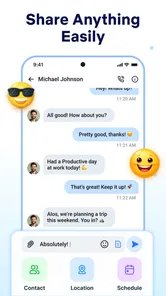
Messages - Text SMS Home is a messaging application designed for sending and receiving traditional SMS and MMS messages on a mobile device. After setting it as the default SMS app, you can use it to organize conversations, write new texts, share media where supported, and manage incoming messages from one central inbox. Its usefulness depends on your carrier, device compatibility, and the permissions granted during setup.
Does Messages - Text SMS Home require an internet connection?
The app primarily works with your mobile carrier’s SMS and MMS services rather than requiring a constant internet connection. Standard text messages can usually be sent through the cellular network, while picture messages and group texts may depend on carrier settings and mobile data. Internet access may still be used for optional features, updates, advertising, diagnostics, or other functions included in the particular version.
Is Messages - Text SMS Home free to download and use?
Messages - Text SMS Home is free to download. However, sending SMS and MMS messages is not necessarily free. Your carrier can apply messaging fees, use an allowance from your mobile plan, or charge for international and premium-rate texts. Before relying on the app, check your operator’s pricing, especially if you regularly send media or messages abroad.
Pros
- Simple interface makes sending and reading SMS messages quick.
- Supports organizing conversations for easier access to recent contacts.
- Lightweight design can work well on older or less powerful devices.
- Useful as a straightforward alternative to feature-heavy messaging apps.
- Familiar texting experience requires little time to learn.
Cons
- Requires carrier SMS service and may involve standard messaging fees.
- Does not offer the full encryption of most modern internet messengers.
- Features may vary depending on the Android device and messaging setup.
- Limited appeal for users who mainly communicate through internet chats.
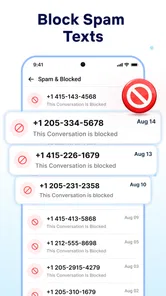
- Spam protection and message filtering may not match dedicated SMS apps.











