

MeshCore
- 43.00
- 4.5
- Installs
- 50.00K
- Price
- Free

Screenshots
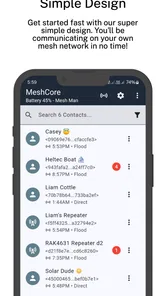
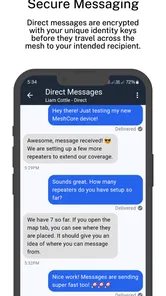
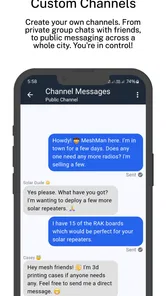
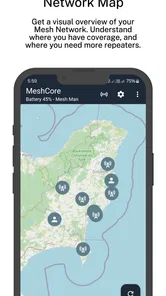
Analysis by Reviewed
I first looked at MeshCore as a practical communication tool rather than as another chat app. Its purpose is narrower and more technical than familiar services such as WhatsApp, Signal, or SMS, so the right question is not whether it can replace every messenger in a household. The better question is whether a family, group of friends, or small team needs a companion for MeshCore and is willing to learn a different way of coordinating.
That distinction matters. This is the official MeshCore companion app, developed by Liam Cottle, and it sits in the communication category. I found it most interesting when several people need to stay organized around the same MeshCore setup, especially when the conversation is connected to a shared activity rather than casual one-to-one chatting. It is free to install, carries an Everyone age rating, and has reached over fifty thousand installs, which gives it a useful community presence without making it feel like a mass-market messenger.
How MeshCore fits into a shared household
A realistic household example would be two adults coordinating equipment and messages while other family members need to know what is happening. One person may handle the technical side, another may use the app mainly to check communication, and a teenager might only need access during a group outing. In that situation, the app can be useful because it gives the household a common communication layer around MeshCore instead of forcing everyone to rely on separate notes, verbal updates, or a mixture of unrelated messaging services.
However, I would not treat one phone as a communal terminal by default. A shared device creates a simple but important boundary: whoever can open the app may be able to see the same communication context and interact with it. That makes it suitable for a household tablet used by trusted adults, or for a phone assigned to a particular activity, but less suitable when several people need clearly separated personal spaces.
This is the first trade-off I would explain to a friend. MeshCore works best when the household agrees who is responsible for the device and the communication context. It is not a substitute for each person having an independent account experience, and I would not assume that switching between family members automatically creates privacy boundaries. If personal separation is the priority, an ordinary messenger with established individual profiles may be easier to manage.
The app also makes more sense when the group has a reason to use MeshCore in the first place. A family planning a hike, a group managing equipment, or people experimenting with mesh communication may appreciate having a dedicated companion. Someone looking only for quick messages to relatives will probably find mainstream chat apps more familiar and less demanding. The value here comes from the MeshCore workflow, not from offering a larger collection of everyday social features.
What the first setup feels like
My advice is to begin with one technically confident person and keep the first session focused. Rather than handing the phone around and changing several things at once, I would establish who owns the device, who is allowed to configure it, and who is only expected to read or send messages. Even without inventing formal roles that the app may not provide, this simple household agreement prevents confusion later.
More From Our News Desk

 Gmail
GmailGmail in a Busy Inbox: Who Benefits Most?
From first account to crowded workday, Gmail earns its place through dependable search and flexible sorting—but its best fit depends on how much inbox maintenance you can tolerate.

 Prime Video
Switching to Prime Video: What Changes in Your Viewing Routine
Prime Video can make a compelling second home for streaming, but switching means learning a different catalog, rental layer, and route from browsing to playback.

 Universal TV Remote Control
Universal TV Remote Control Works Best as a Reliable Backup
A phone remote earns its place through quick setup and reliable habits. Here is how to get more from Universal TV Remote Control—and where its limits show.

 Weather - By Xiaomi
Weather by Xiaomi Review: Clear at a Glance, Less Clear Up Close
Xiaomi’s weather app makes everyday forecasts quick to scan, but its calm surface can leave useful details and recovery paths harder to find than they should be.

 X
XX Under Pressure: Can It Recover When Posting Goes Wrong?
A resilience-focused review of X, examining setup, mistaken posts, interruptions, weak connections, and the gaps that matter when recovery needs to be dependable.

 Clash of Clans
Clash of Clans Is Won Between the Battles
Its raids are quick; its community is a long-term project of coordination, teaching, rivalry, and shared responsibility—with all the friction that entails.
Latest News



The current release is version 1.49.0, and the app supports Android 7.0 or newer. That makes it accessible on many older Android phones, which can be useful if a household wants to dedicate an unused device to communication. Still, an older compatible phone should be tested before an important trip or group activity. Compatibility with the operating system does not automatically mean that every older handset will feel equally comfortable for daily use.
I would also avoid treating installation as the whole setup. The important preparation is deciding what the device is for. Is it a personal phone, a shared household handset, or a dedicated MeshCore controller? Those choices affect how carefully people should handle messages, settings, and handoffs. A dedicated device is easier to explain to children or occasional users because its purpose is clear; a personal phone is more convenient but can blur responsibility.
One useful habit is to have the primary user perform a short rehearsal before inviting everyone else into the workflow. Send a harmless test message, check that the intended people understand where to look, and agree on what counts as an urgent update. This is more valuable than assuming that the app will be self-explanatory to every family member. Communication tools often fail in real life because people do not share the same expectations, not because the buttons are impossible to find.
The free price removes the biggest barrier to trying it, but in-app purchases are listed at $7.99 per item. I would therefore discuss purchases before installing it on a shared device, particularly if children can use that device. The app is rated for Everyone, which is reassuring from an age-label perspective, but an age rating is not the same thing as a household communication policy. Parents still need to decide whether a child should read all group messages, send messages independently, or use the app only with supervision.
Coordinating people without creating confusion
In my experience, the strongest household use is structured coordination. For example, one adult can prepare the communication setup before a day out, while another checks that the group knows how to use it. During the activity, the app can serve as the place where the group communicates through its MeshCore arrangement rather than scattering updates across SMS, a family chat, and spoken instructions.
The non-obvious lesson is that a shared communication tool benefits from a shared vocabulary. I would agree in advance on short, clear messages such as where someone is waiting, whether a person has arrived, or whether the group is changing plans. That is not a special feature of the app; it is a workflow improvement that makes this particular tool more dependable. When a family uses vague messages or assumes everyone is watching continuously, even a well-configured companion app becomes frustrating.
I would also keep the app’s purpose separate from emergency expectations. A household should not assume that a companion app is automatically an emergency service, a replacement for local help, or a guarantee that every message will reach every person in every situation. MeshCore may be valuable for a particular communication setup, but responsible planning still means carrying whatever backup method the activity requires.
Another practical tip is to nominate one person to handle changes. If several household members alter the setup casually, it becomes difficult to know which configuration is current. A single responsible user can document the agreed routine in plain language: which device is used, who checks it, and what the group does when a message is unclear. This is especially helpful when the app is installed on a shared phone that is passed between adults.
Compared with a normal family messenger, the trade-off is clear. WhatsApp or Signal usually wins for effortless conversations, broad contact lists, media sharing, and the expectation that each person will use a personal account. SMS is even simpler for basic reachability. MeshCore is more appropriate when the household’s communication needs are tied to the MeshCore environment and when the participants accept a more specialized workflow.
Account boundaries and trust between users
I would pay close attention to account boundaries before letting several people use the same phone. A shared handset can be convenient, but it also means that messages, configuration choices, and usage habits may become visible to the next person. That may be perfectly acceptable for a family-owned device used for group coordination. It is less comfortable when one phone mixes private communication with household duties.
For that reason, I would not install it on a child’s personal phone merely because the age rating says Everyone. The rating indicates broad suitability, but it does not answer the more practical questions: who is allowed to contact the child, who can inspect the device, and whether the child understands that a shared group conversation may be visible to other users. Those are family decisions, and they should be made before the first message rather than after a misunderstanding.
The same principle applies to guests. If a friend borrows a household device during an outing, I would explain exactly what they are expected to do and avoid leaving them responsible for technical changes. A short handover is worthwhile: show the communication screen, describe the group’s messaging convention, and make clear that configuration is not part of ordinary use. This reduces the chance that an inexperienced user will press something simply because they are trying to help.
Trust also affects how the app should be used between adults. A shared device is not automatically a neutral device. If one person is the technical owner and another is the daily user, both should understand what information is visible and who can make changes. I prefer an explicit agreement over assumptions, especially when the device is used by a family with different levels of technical confidence.
One of the app’s advantages in this setting is focus. It is not trying to become the household’s entire digital life, so a dedicated installation can keep MeshCore-related communication in one place. The weakness is that focus can feel restrictive if the family expects a full-featured social messenger. I would choose it for a defined communication job, not as the default app for every conversation.
Age, confidence, and everyday accessibility
The Everyone rating makes the app approachable in principle, but technical accessibility is not only about age. A younger user may understand messaging quickly yet struggle with the MeshCore concept, while an older relative may be comfortable reading updates but dislike being asked to manage setup. I would give different household members different expectations instead of assuming that everyone should learn every part of the app.
A good family routine might involve one person preparing the technical side, another person checking messages during the day, and children using the app only for clearly defined updates. This avoids turning every user into an administrator. It also makes it easier to spot when someone is not comfortable with the workflow. If a participant repeatedly asks where to look or what a message means, the answer may be better instructions rather than more features.
I would introduce the app to a child through a supervised, low-pressure test. Use a planned household scenario, keep the messages simple, and explain that the app is for the agreed group rather than for contacting unknown people. The point is not to make the child responsible for the whole communication system. It is to teach a safe, predictable routine and make sure they know when to ask an adult for help.
For older relatives, the best approach may be a dedicated phone with a short written guide beside it. The guide can say who to contact, what kind of update to send, and whom to ask when something looks different. This is one of the few cases where a supposedly simple app can become more usable through household preparation. The software cannot decide the family’s communication rules, but the family can make the rules easy to follow.
I also appreciate that the app is free to start with, because a household can test the workflow without committing money immediately. The possible $7.99 in-app items mean that the person responsible for the shared device should still understand how purchases are handled. I would not let a child experiment with paid options on a family phone without an adult present, even though the app itself is intended for a general audience.
Where it falls short for a family
The biggest limitation is specialization. If your household wants polished group chats, effortless contact discovery, familiar notifications, and a service everyone already knows, this is probably not the easiest choice. The app’s identity is tied to MeshCore, so people who do not need that environment may experience the setup as extra work rather than extra value.
Another limitation is the risk of shared-device ambiguity. If several people use one phone, messages can be read by the wrong person, responses can appear to come from an unclear household identity, and responsibility for checking updates can become vague. These are not problems I would solve by installing more copies. I would solve them by assigning the device a clear purpose or giving each regular user a separate personal setup where appropriate.
I would also be cautious about relying on it as the only communication method for a mixed group. A technically experienced adult may be happy to use the companion app, while a visiting relative may prefer ordinary texting. If the group includes people who will not learn MeshCore, the household should agree on a fallback channel before the activity begins. The app can be the main tool for the people who need it without forcing every participant into the same system.
That balance is important in a family. A tool can be excellent for the person who manages the equipment and still be inconvenient for the person who only needs a quick update twice a day. I would judge it by the whole household’s workflow, not by how impressive it feels during a focused technical test.
My household verdict
After using it as a communication companion, I see MeshCore as a focused tool for households and groups that already have a reason to work with MeshCore. I like the idea of dedicating an older compatible Android phone to it, agreeing who manages the setup, and giving occasional users a simple set of instructions. That approach turns a potentially confusing shared device into a predictable coordination point.
I would recommend it to technically curious families, outdoor groups, and small teams that value a MeshCore-specific communication workflow more than the convenience of a mainstream messenger. The rating is strong at 4.5 from around five hundred ratings, and the app has enough adoption to feel like a real option rather than an obscure experiment. Still, popularity does not remove the need to decide whether the household actually needs this kind of companion.
I would skip it for a family that simply wants a private, familiar chat room with separate personal identities and minimal setup. Signal, WhatsApp, or ordinary SMS may be the better fit there. I would also skip using one shared phone if the household expects private conversations or if no adult is willing to take responsibility for configuration and purchases.
My final recommendation is to start with a controlled trial: one responsible adult, one clearly assigned device, one small group, and one ordinary coordination scenario. If everyone understands where messages belong and who handles changes, the app can become a useful part of the household routine. If the trial produces more questions about accounts, visibility, or responsibility than useful communication, that is a sign that a conventional messenger would serve the family better.
For the right household, MeshCore is valuable precisely because it stays focused. It does not need to replace every communication app to earn a place on a shared device; it only needs to make MeshCore-based coordination clearer and more manageable for the people who genuinely need it.
MeshCore Frequently Asked Questions
Is MeshCore free to download, and are there any possible costs?
MeshCore is free to download, so you can install the app without paying an upfront price. Some in-app purchases are listed at $7.99 per item, so check the purchase details in the app before confirming anything. You may also need compatible mesh-network hardware for the setup you want; that hardware is separate from downloading the app.
Which operating systems can run MeshCore?
MeshCore supports Android devices running Android 7.0 or later. Before downloading, check your phone’s operating-system version in its settings to make sure it meets that minimum. The app is categorized as a communication app and is rated for Everyone, but the specific functions available can still depend on compatible hardware and the configuration you use.
What is MeshCore, and what is it used for?
MeshCore is a communication application designed to work with compatible mesh-network hardware, allowing users to exchange messages without depending entirely on traditional cellular coverage or Wi‑Fi. It is mainly aimed at outdoor enthusiasts, emergency-communication users, hobbyists, and communities that need local device-to-device communication. Its usefulness depends on having compatible hardware, nearby participants, and a properly configured network.
Does MeshCore work without internet or mobile service?
MeshCore can support communication through a compatible mesh network, so some functions may continue working when there is no internet connection or mobile signal. However, the app itself normally requires suitable external hardware and an established mesh environment. Range, reliability, and available features depend on the radio devices, antenna setup, terrain, regional regulations, and whether other nodes are nearby to relay messages.
What devices and hardware are compatible with MeshCore?
Before downloading MeshCore, check the current compatibility information provided by the developer because the app is not necessarily a standalone messenger for every Android or iOS phone. You may need a supported mesh radio, Bluetooth connection, firmware, or companion device. Compatibility can also vary by operating-system version, hardware model, and regional radio requirements, so confirming the supported setup is essential.
Pros
- Works without cellular coverage using compatible LoRa radio hardware.
- Supports encrypted
- decentralized messaging without central servers.
- Can relay messages through other MeshCore nodes over long distances.
- Low-power operation suits off-grid trips and emergency communication.
- Useful for creating private local networks in remote areas.
Cons
- Requires separate compatible hardware; the app alone cannot form a mesh.
- Range and reliability depend heavily on terrain
- antennas
- and node placement.
- Fewer users mean messages may be slow or impossible outside active networks.
- Initial setup can be technical for users unfamiliar with LoRa devices.
- Limited multimedia and convenience features compared with mainstream messengers.











