meShare
- 2.03K
- 2.4
- Installs
- 100.00K
- Price
- Free

Screenshots
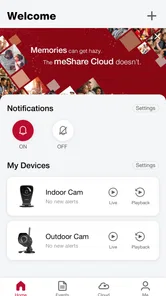
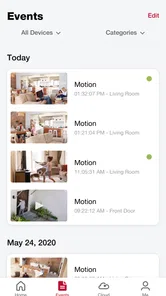
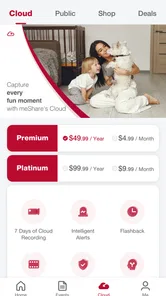
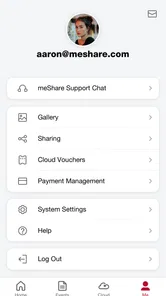

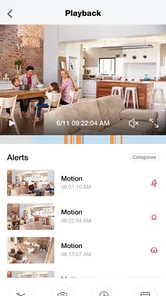
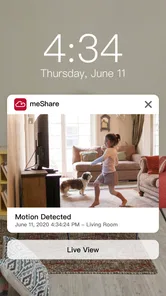
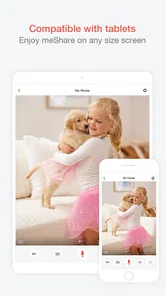
Analysis by Reviewed
When a smart-home app is connected to cameras, sensors, or other household devices, convenience is only half the story. I also want to know what I can control, when an account is required, and whether the app gives me clear choices before I connect something personal. That is the lens I used with meShare, a free lifestyle app from meShare Support that links smart-home products with the company’s cloud services.
My overall impression is mixed. The app has a clear purpose and can be useful if your household already uses products built around the meShare ecosystem. It is less convincing as a general smart-home control center, especially if you expect broad compatibility, polished account management, or a consistently reassuring experience. Its average rating sits at 2.4 from around 4,000 ratings, while its presence has grown to over 100,000 installs. Those figures suggest that people do use it, but also that the experience has not satisfied everyone.
I would approach it as a companion for compatible hardware rather than as an app worth installing on its own. That distinction matters. If you already own a supported device, meShare may be part of the setup you need. If you are still choosing a smart-home platform, I would compare its controls, cloud dependence, and account experience carefully before committing.
What meShare is really useful for
I’d use this section to pin down the app’s best role: a practical control point for compatible meShare equipment, not a reason by itself to build a whole smart home around one ecosystem. The useful test is whether it makes a device you already own easier to manage in ordinary routines, and whether that benefit holds up when you are away from home or another person in the household needs access.
A companion app, not a universal smart-home dashboard
The app belongs to the lifestyle category, but its practical role is much narrower than that label suggests. It is designed to help control smart-home products and connect them with meShare’s cloud services. In everyday terms, it is the software layer between your phone and compatible equipment at home.
That makes the first question simple: do you already have hardware that expects meShare? If the answer is yes, the app has a clear job. You can use it as the place where you check the status of your connected products and manage the functions exposed by those products. If the answer is no, downloading it first is unlikely to teach you much or provide useful value by itself.
This is different from choosing a broad platform such as a voice-assistant ecosystem or a general automation hub. Those alternatives are usually judged by the number of brands they support and by how easily devices from different manufacturers work together. meShare is better understood as a focused ecosystem. That can reduce complexity when everything in your home belongs to the same product family, but it can also become restrictive when you want to mix equipment.
More From Our News Desk

Weather by Xiaomi Review: Clear at a Glance, Less Clear Up Close

X Under Pressure: Can It Recover When Posting Goes Wrong?

Clash of Clans Is Won Between the Battles

Android Auto Makes the Case for Quieter Car Software

MobiOffice: Transforming Mobile Productivity with Seamless Integration

EA SPORTS FC™ Mobile Soccer: Redefining Mobile Sports Gaming
I found that distinction important because smart-home apps often look interchangeable in screenshots. They are not. The real experience depends on the device, the cloud account, the network, and the controls the manufacturer has decided to expose. The app can only be as useful as that relationship allows.
Where the cloud connection changes the experience
The connection to meShare’s cloud services is central to the product’s identity. That can be convenient because cloud-based control is designed to let your phone communicate with the service supporting your home products rather than relying only on a local connection. It may also make remote access part of the intended workflow.
At the same time, cloud dependence deserves attention. A smart-home action is not just a tap on a screen; it can involve your phone, your home network, the device, and the service in between. When something feels slow or fails, it may not be obvious which part is responsible. I would not treat the app as a guarantee that every command will work instantly or that every device remains fully useful during a connection problem.
My practical advice is to test the actions you care about most soon after setup. Do not stop at opening the app and seeing a device listed. Try the ordinary routine you expect to use: check a status, change a setting, and reconnect after leaving and returning to the app. If remote access matters to you, test it away from your home network instead of assuming that a successful first setup proves everything.
The setup mindset that saves time
With a companion app like this, preparation matters more than people expect. Before installing, I would identify the exact product model, keep the device close to the home router during initial setup, and make sure the phone is running a supported operating system. The current version is 6.0.3.54 and the app requires Android 6.0 or later, so older phones should be checked before troubleshooting the hardware.
I would also avoid adding several devices at once. Setting up one product, confirming that its controls work, and only then moving to the next makes it much easier to identify whether a problem comes from the app, the device, or the network. This is a small workflow change, but it prevents a common smart-home mistake: creating a pile of half-finished connections and then not knowing which one needs attention.
Another useful habit is to decide who actually needs account access before inviting anyone into the setup. A shared household may want more than one person to use the system, but adding people casually can make it harder to understand who has access later. I would keep the main account under the control of the person responsible for the devices and treat every additional account or sharing option as a deliberate choice.
Trust, privacy, and the choices that matter
I’d treat trust as a set of everyday decisions rather than a single yes-or-no judgment about the app. Reviewing permissions, notification previews, account access, and device removal before they become urgent gives me more control over how the system fits into the household, while also revealing whether its cloud-based approach is a comfortable match for the way I want my home technology to work.
What I can judge from the visible product experience
Trust in a smart-home app should not come from a friendly interface alone. I look for visible account controls, understandable prompts, and a clear sense of what happens when a device is connected. With meShare, the most important trust decision happens before the app becomes part of your routine: you are choosing to place household equipment inside an ecosystem that uses cloud services.
That does not automatically make the app unsafe, and it does not automatically make it private. It simply means the account and service relationship deserves the same attention as the device itself. A person using a connected product may be dealing with information about the home, daily routines, visitors, or family members. I would therefore read the permission prompts and account screens rather than accepting every request quickly.
I also prefer to distinguish between what the app visibly lets me control and what I merely assume it does. A screen that shows a device does not, by itself, explain every data practice behind that device. Likewise, a cloud connection does not tell me whether a particular function is local or remote. The responsible approach is to use the choices that are shown, review them when the app changes, and avoid making stronger privacy claims than the interface supports.
Permissions deserve a deliberate review
My recommendation is to inspect permissions during installation and again after adding hardware. Grant only what the setup flow clearly needs, and pay attention to whether a permission is being requested for device discovery, notifications, location-related setup, or another purpose. If a request is unclear, pause and look for an explanation inside the app or in the operating system settings before continuing.
This is especially important because the usefulness of a permission can change over time. A permission that helps discover a nearby product during setup may not feel equally necessary every day. On the other hand, removing something later could affect a feature you rely on. I would make changes one at a time and then test the relevant device function, rather than turning off several permissions and guessing which change caused a problem.
There is a practical privacy benefit to this approach: it keeps the account and phone configuration understandable. If every prompt is accepted automatically, you lose a clear record of the choices you made. If you review them as part of setup, you are more likely to notice when the app asks for something new or when a device has a different control pattern from the one you expected.
Data-sensitive moments happen outside the main screen
The most sensitive moments are not necessarily the moments when you open the app. They can happen while adding a device, enabling notifications, sharing access with another person, changing a password, or removing equipment from the account. These transitions deserve more care because they can alter who receives information or who can operate a product.
For example, if a household changes ownership of a device, I would not rely only on uninstalling the app from the old phone. I would review the account, remove the device or shared access through the controls available, and then complete a fresh setup for the new owner if the product requires it. The exact steps depend on the hardware and the options shown in the app, but the principle is consistent: remove access at the account level, not just from one handset.
Notifications are another area where convenience and privacy can pull in different directions. A notification can be useful when you need to react quickly, but it can also reveal information on a locked screen. I would check the phone’s notification privacy settings and decide whether the convenience of detailed previews is worth the exposure. This is a phone-level choice, but it directly affects how a cloud-connected home app feels in daily life.
Account control should be part of the buying decision
Before relying on meShare for an important routine, I would find the account-management options and make sure I understand how to update credentials, sign out, and remove connected products. I would also keep recovery details current. Losing access to an account can be more disruptive than losing access to a single app because the account may be the route back to several household devices.
For families, I would avoid sharing one password whenever the app provides another way to manage access. A shared password makes it difficult to know who changed a setting and creates extra work when one person should no longer have access. If the available controls do not match the way your household needs to operate, that is a meaningful limitation, not a minor inconvenience.
I would also consider the consequences of ending the relationship with the service. Removing the app does not necessarily remove a device from an online account, and deleting an account may have different consequences from signing out. I would review the visible account choices before making a permanent decision, especially if the hardware is being sold, returned, or given to another household.
A realistic day with the app
Imagine that I am leaving home for work and want to check a connected product before walking out. The useful experience is not simply that the app opens; it is that I can identify the right device, understand its current state, make the intended change, and know whether the action succeeded. Later, while away from home, I may want the same confidence without being on the household network.
That is where I would judge meShare most honestly. If the device list is clear and the control responds predictably, the app can fade into the background, which is exactly what I want from a home-control tool. If I have to repeat actions, wonder whether a command worked, or troubleshoot an account before every routine, the cloud connection becomes a source of friction rather than convenience.
For a shared home, I would add another test: ask another resident to perform the same basic task using their own approved access. This reveals whether the system is practical for real household use or only manageable for the person who installed it. It also helps expose unclear permissions before they become a problem during an urgent moment.
Who should use it, and who should look elsewhere?
I think meShare makes the most sense for someone who already owns compatible products and wants the intended control app from meShare Support. It may also suit a household that prefers keeping its smart-home equipment within one focused ecosystem instead of combining several brands and platforms.
I would be more cautious if you are buying new devices and want maximum flexibility. In that situation, a broader platform may be a better starting point, particularly if you expect to combine lighting, security, climate, and household appliances from different manufacturers. A platform with stronger cross-brand support can reduce the chance that each new product requires its own app and separate cloud account.
I would also skip this app as a primary choice if your priority is minimizing cloud involvement or maintaining detailed local control. The app’s connection to meShare’s cloud services is part of how it works, so someone who wants an offline-first setup should compare alternatives designed around that goal. That is not a criticism of every cloud feature; it is a matter of matching the product to your priorities.
People who are uncomfortable managing accounts, permissions, and device access should also think carefully before building a large setup around it. Smart-home convenience brings maintenance with it. You need to review who can use the system, keep the phone and account secure, and understand what happens when a device changes hands. If that sounds like too much administration, a simpler non-connected product may genuinely be the better choice.
Cost, age rating, and the practical commitment
The app is free to install and is rated for Everyone, which makes the initial barrier low. However, in-app purchases are listed from $0.99 to $399.99 per item. Those purchases may relate to the broader connected-product experience, so I would not assume that downloading the app tells me the full cost of owning compatible hardware or using every optional service.
For that reason, I would separate three decisions: whether the app installs, whether the device works as expected, and whether any optional purchase is worthwhile. I would not pay for an add-on simply because a setup flow presents it as the next step. First confirm what the purchase changes, whether it affects a function you actually need, and whether the benefit fits your household’s privacy and reliability expectations.
The age rating is not a substitute for a privacy review. An Everyone rating describes the intended content audience, not the sensitivity of the home information that may pass through a connected product. Parents and shared households should still decide who gets account access and what appears in notifications.
My cautious verdict
After looking at meShare as both a control tool and an account-based cloud service, I see a product with a legitimate, focused use but a limited reason to choose it outside its ecosystem. Its strongest case is straightforward: you own compatible meShare equipment, you want the companion app, and you are comfortable reviewing permissions, notifications, and account access yourself.
Its weaker case is for someone starting from scratch and hoping for a universal smart-home solution. The modest average rating and the need to think carefully about cloud dependence make me less likely to recommend it blindly. I would first confirm compatibility, test the essential workflow, and examine the available account controls before adding more devices or paying for optional items.
My recommendation is conditional rather than enthusiastic: use it when your hardware requires it, but make the account and privacy choices part of the setup instead of treating them as background details. Keep the installation small at first, test remote and shared use, and remove access deliberately when a device changes hands. For an existing meShare household, that cautious approach can make the app practical. For everyone else, a more open or local-focused alternative may be the wiser long-term foundation.
The app was released on November 18, 2014, and continues under the meShare Support developer with its current version at 6.0.3.54. That history shows an established product rather than a brand-new experiment, but longevity alone is not proof that it matches your expectations today. I would let the actual controls visible on your phone, the permissions you are comfortable granting, and the devices you plan to connect decide whether it belongs in your home.
meShare Frequently Asked Questions
Is meShare free to download, and are there any additional costs?
meShare is a free lifestyle app for controlling compatible smart-home products and using the company’s cloud services. Some optional purchases are available in the app, with listed prices ranging from $0.99 to $399.99 per item. Those purchases are separate from downloading the app, so check the purchase details before confirming anything and consider whether the features offered match what you need.
Will meShare work on my phone?
The current version of meShare is 6.0.3.54 and requires Android 6.0 or later. It is an app for managing compatible smart-home products, so having a supported phone is only one part of the setup; the device you want to control must also work with meShare. Check your phone’s operating system and the product’s compatibility before getting started.
What is meShare and what can I use it for?
meShare is a smart-home monitoring platform designed to connect compatible security cameras and related devices to your phone. After setting up an account and adding your equipment, you can typically view live video, receive motion or activity alerts, review recorded clips, and manage selected camera settings remotely. The exact features depend on your camera model, subscription plan, and the services available in your region.
How do I set up a camera with the meShare app?
To begin, install meShare, create or sign in to your account, and follow the in-app pairing instructions. Most compatible cameras need to be connected to a supported Wi-Fi network during setup, and you may need to scan a QR code or enter network details. Keep the camera close to your router while pairing, grant the requested permissions, and check that your device model is officially supported before purchasing or installing it.
Does meShare require a subscription to work?
meShare can generally be used for core functions such as account access, device setup, and live viewing without necessarily requiring a paid plan, but available options vary by camera and region. Cloud recording, longer video history, advanced alerts, or other premium services may require a subscription. Before relying on a feature, review the plan information shown in the app, including storage limits, trial terms, and recurring billing conditions.
Pros
- Simple interface makes checking cameras quick and accessible.
- Push alerts can help you notice motion or activity promptly.
- Supports remote viewing when you are away from home.
- Two-way audio enables communication through compatible cameras.
- Camera sharing lets trusted family members access selected devices.
Cons
- Video quality and playback depend heavily on your internet connection.
- Some camera features may require compatible meShare hardware.
- Frequent alerts can become distracting in busy or high-traffic areas.
- Cloud recording options may involve additional subscription costs.
- Background operation can increase battery and mobile data usage.











