Merry Call From Santa Claus
- 18.00
- 3.7
- Installs
- 1.00M
- Price
- Free

Screenshots



Analysis by Reviewed
I see Merry Call From Santa Claus as a seasonal bit of make-believe rather than an everyday communication app. Its appeal is simple: it gives families a way to bring Santa into a child’s day through a call or message, and that focused idea can be charming when used with a little planning. I would treat it as a small holiday activity, not as a replacement for a real conversation or a full Christmas entertainment package.
A quick check before the holiday moment
Because the appeal depends on surprise and timing, I would set things up before a child is waiting expectantly. Open the app yourself, check what choices are presented, and decide whether the tone feels right for the child in front of you. That lets you avoid fumbling through menus while trying to preserve the illusion, and it gives you a chance to stop if the experience seems too intense or confusing.
It is also sensible to think about the setting. A quiet room makes it easier for a child to hear and respond, while a crowded gathering can make a call feel like a performance. If the child is shy, I would let them listen alongside a trusted adult rather than insist they speak. The activity works best when the child can opt into the fun at their own pace.
Getting Started with a Jingle
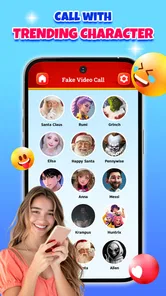
Diving into the Merry Call From Santa Claus app is like opening a gift on Christmas morning. The installation process is straightforward, and once it's up and running, you're greeted with a festive interface that screams holiday cheer. The app promises a personalized call from Santa himself, and it delivers on that promise in the most delightful way.
What makes the Santa idea work
The app’s central strength is its seasonal framing. A Santa-themed call has a clear purpose for a young child: it can turn an ordinary moment into a bit of Christmas theatre. A parent can use that sense of occasion to make a quiet afternoon feel special, or to add a playful surprise before a family gathering. That is a different kind of appeal from a general video-calling app, where the fun depends on who is available to answer.
The app is a free lifestyle release from Era Games Studio, and its Teen content rating is worth noticing if you are setting it up for a child. I’d make the first visit an adult’s job: look through the available screens together, explain what the app is for, and decide how it fits your family’s holiday routine. That small bit of preparation makes it easier to keep the experience light and age-appropriate rather than handing over a phone without context.
A better fit for a planned moment
Although the Santa theme suggests spontaneous fun, I think it works best when a grown-up chooses the moment. For example, if relatives are visiting and a child is getting restless, a short Santa-themed activity can give everyone a shared talking point. I would avoid presenting it as proof that Santa is watching or as a way to pressure a child into behaving. Used as pretend play, it can be a warm surprise; used as leverage, the same setup could make the child uneasy.
More From Our News Desk

Weather by Xiaomi Review: Clear at a Glance, Less Clear Up Close

X Under Pressure: Can It Recover When Posting Goes Wrong?

Clash of Clans Is Won Between the Battles

Android Auto Makes the Case for Quieter Car Software

MobiOffice: Transforming Mobile Productivity with Seamless Integration

EA SPORTS FC™ Mobile Soccer: Redefining Mobile Sports Gaming
That distinction is one of the most useful things to consider before installing it. A child who enjoys holiday stories and understands playful make-believe is more likely to enjoy the idea. A child who is nervous about unfamiliar voices, unexpected calls, or being put on the spot may prefer a storybook or a familiar family video instead. Let their reaction guide the choice, rather than assuming every child will find a Santa call exciting.
Where it sits beside familiar alternatives
Compared with a video call to a relative dressed as Santa, an app is easier to arrange when family members are busy or far away. The trade-off is that a real relative can respond naturally to a child’s questions and follow the conversation wherever it goes. Compared with a Christmas story or holiday video, the app feels more interactive in concept, while a story gives parents more control over pacing and content. I’d choose based on the child: the app for a brief novelty, a relative for genuine back-and-forth, and a story when a calm, predictable activity is more useful.
It also helps to treat the phone itself as part of the activity. Before inviting a child to use it, check that the device is ready, that the volume is comfortable, and that the setting is not so noisy that the moment becomes frustrating. If you are planning to share the experience with family, decide in advance whether you want the child’s reaction recorded or simply enjoyed in the moment. That avoids turning a spontaneous-looking surprise into a scramble for the camera.
Keeping expectations realistic
Holiday apps can be most enjoyable when their limits are understood. The Santa theme is the point, so anyone looking for a broad messaging tool, a regular way to keep in touch with relatives, or a year-round activity should choose something designed for that purpose. I would also skip this one if a child is already uneasy about Santa or dislikes staged surprises. A gentle story or an ordinary call with a trusted person is likely to be a better fit in those cases.
The app has an average rating of 3.7 from around 1,200 ratings, with 18 written reviews, and more than a million installs. Those figures suggest it has reached a sizeable audience, though I would not take popularity as a guarantee that every family will enjoy the same experience. Its current version is 2.8.1, it was released on November 12, 2024, and it runs on Android 7.0 and newer. The practical takeaway is that it is accessible on a range of Android devices, while families using iOS should check their own store before making plans.
Features that Sleigh
The app offers a range of features that make you feel like Santa is just a call away. You can schedule a call at your convenience, and Santa addresses the recipient by name, which adds a personal touch that kids absolutely adore. There’s also an option to select different scenarios, like Santa checking in to see if you've been naughty or nice. It keeps the engagement levels high, especially for the little ones eagerly awaiting Santa's visit.
One of the standout features for me was the ability to customize the call. You can choose the time, date, and even the reason for Santa’s call. Whether it's a birthday wish or a reminder to behave, this app covers all bases. The voice of Santa is jolly and convincing, and it really does bring a smile to your face, no matter your age.
Making the setup feel personal
The most useful choice is not necessarily the most elaborate one; it is the one that suits the child’s temperament. I would pick a cheerful, low-pressure reason for a first try, especially with a child who has never used a Santa-call app. Avoid framing the interaction as a test or a report card. A playful greeting gives the child room to enjoy the character without feeling they need to defend themselves or perform for the adults in the room.
Names and timing can make a staged moment feel more tailored, but they also raise the stakes for the grown-up doing the setup. Double-check what you have entered before starting, and keep the child’s personal details to the minimum needed for the activity. If the app is being used at a party, I would also avoid passing the phone around unsupervised; an adult can keep the experience focused and prevent the activity from becoming a competition to get Santa’s attention.
Ho Ho Hilarious Moments
Another fun aspect of the app is the laughter it brings. Imagine the surprise on a child’s face when their favorite holiday character calls them out of the blue. It's moments like these that make the app a treasure during the holiday season. It’s not just for kids either; adults can enjoy a chuckle too. After all, who doesn't want a call from Santa?
The app also allows you to record the call, so you can relive the joy over and over again. This feature is perfect for capturing those priceless reactions from kids and sharing them with family and friends. It adds another layer of enjoyment to the whole experience.
Choose the right kind of surprise
A realistic use is a brief pause in a busy afternoon: a parent has a few minutes before dinner, a child is excited about Christmas, and a planned Santa interaction gives them something festive to talk about while everyone resets. I would keep it short and let the child decide whether to respond. If they lose interest, move on rather than replaying the call or asking them to react again for a camera. The memory is more valuable when it feels like their moment, not a performance staged for adults.
Recording can be a nice keepsake, but it changes the mood if the phone is held up as soon as the call begins. I would first let the child experience the interaction without prompting, then decide afterward whether a recording is worth keeping. Before sharing any clip with relatives, consider whether the child is comfortable with it and whether it includes anything they would rather keep private. The feature adds convenience, but discretion matters more than collecting a perfect reaction.
One practical question is whether this belongs on a child’s own device. For a one-off holiday activity, I would usually keep it on an adult’s phone and supervise the interaction. That makes it easier to control when the app is opened and to guide the child through the setup. It also avoids turning a seasonal novelty into something they expect to use independently throughout the year, which is not what this kind of focused app is best suited for.
Wrapping Up the Experience
In the end, the Merry Call From Santa Claus app delivers a package of holiday joy wrapped with care. It’s a simple yet effective way to keep the Christmas spirit alive and kicking. Whether you’re using it to surprise your kids or just to add some festive cheer to your own day, this app is a delightful addition to the holiday season. So, if you're looking to add a sprinkle of magic to your festivities, why not let Santa give you a call? You definitely won’t be disappointed.
My recommendation is to use it as a little seasonal extra, with an adult nearby to set expectations and keep the moment comfortable. If your family likes playful Christmas surprises, it may be just the kind of novelty that earns a place in the holiday routine. If you need dependable communication or a flexible activity for every age, a regular call or a familiar Christmas story will serve you better.
Merry Call From Santa Claus Frequently Asked Questions
What age group is Merry Call From Santa Claus suitable for?
Merry Call From Santa Claus is a Christmas-themed lifestyle app intended for families who want to add a playful Santa experience to the holiday season. Its content rating is Teen, so parents should check whether that rating and the app’s activities are appropriate for their child before downloading. It can also be used together, giving adults a chance to guide younger children through the experience.
What features does the Merry Call From Santa Claus app offer?
The Merry Call From Santa Claus app provides a variety of entertaining features, including personalized calls from Santa Claus, where users can schedule a call for their children. The app also offers customizable messages, allowing parents to tailor the Santa experience to their child's behavior or achievements. Additionally, it includes festive animations and sounds to enhance the Christmas spirit. Its holiday theme makes it best suited to seasonal fun rather than a general-purpose communication app.
Is the Merry Call From Santa Claus app safe for children to use?
Yes, the Merry Call From Santa Claus app is designed with child safety in mind. It does not require access to sensitive information and follows strict privacy standards to ensure a safe environment for children. Parents can supervise and control the settings, ensuring that all interactions with the app are appropriate and secure for young users. As with any app children use, adults should review its options themselves and supervise younger users, especially when setting up a call or message.
How can I schedule a call from Santa using the app?
Scheduling a call from Santa is easy with the Merry Call From Santa Claus app. Once installed, users can navigate to the scheduling section, select a date and time for the call, and personalize the message Santa will deliver. This feature ensures that the call fits seamlessly into your holiday plans, creating a magical experience for your child. Setting it up in advance gives you time to choose a moment that works for your family’s Christmas plans.
Does the Merry Call From Santa Claus app offer any in-app purchases?
Yes, while the Merry Call From Santa Claus app is free to download, it does offer in-app purchases. These purchases include additional features such as premium messages, more personalized call options, and festive add-ons. Users can choose to enhance their experience with these optional purchases, ensuring a more customized interaction with Santa Claus. If you prefer not to spend money, consider reviewing the available options before a child uses the app and making any purchase decisions yourself.
Pros
- User-friendly interface for all ages
- Voice call feature enhances realism
- Customizable call settings
- Supports multiple languages
- No internet required for calls
Cons
- Ads can be intrusive at times
- Limited free features
- Not suitable for very young children
- Requires in-app purchases for more
- May lack updates and new content












