

Men's Hair Cuts & Hairstyles
- 69.00
- 3.9
- Installs
- 100.00K
- Price
- Free

Screenshots
Analysis by Reviewed
When I’m considering a haircut, the hard part is often explaining what I want without knowing the right name for it. A visual guide can make that conversation easier, and Men's Hair Cuts & Hairstyles is aimed at men who want to explore cuts and think about what might suit their face. I’d treat it as inspiration and a planning aid, not as a substitute for a barber’s judgement or a guarantee that a preview will match the finished cut.
Who gets the most from a style guide
I think this app is most useful if you have a haircut coming up and a vague sense that you want something different, but no clear way to describe it. Browsing possible looks can help turn “shorter on the sides, maybe?” into a reference you can show and discuss. It also suits someone who is new to experimenting with men’s hairstyles and wants to consider face shape before settling on a direction.
It is less compelling if you already have a trusted barber and a settled cut, or if you are looking for a technical consultation about hair loss, scalp concerns, or a particular texture challenge. A style guide can help you think through appearance, but it is not a replacement for a professional who can inspect your hair in person. I would also skip relying on it as a final answer if a cut needs to work around a cowlick, uneven growth, or another detail that only becomes obvious when someone sees your hair directly.
A practical way to prepare for an appointment
For an ordinary trim, I’d open the app a day or two before the appointment rather than while I’m already sitting in the chair. I’d look for a few styles that feel close to my current length and routine, then keep one main reference and one backup. That small comparison helps me explain what I like about the look—perhaps the outline, the top length, or the overall shape—instead of asking a barber to reproduce an image without room for adjustment.
One useful trade-off is that a striking reference is not always the most wearable choice. A dramatic change can look appealing on screen while requiring more frequent barber visits or daily styling than I want. Before choosing, I’d ask myself how much time I realistically spend on my hair in the morning and whether I’m happy returning for upkeep. That makes the app’s ideas more useful: the goal is not just to find an attractive image, but to find a cut I can actually live with.
Quick browsing, with a decision still to make
The app is free to install, is developed by İlhan LLC, and is listed in the beauty category. Its average rating is 3.9 from around four thousand ratings, with over one hundred thousand installs. That suggests a useful audience, but I wouldn’t take popularity as proof that every recommendation will suit me. The practical value is whether its hairstyle ideas help me narrow down options before I sit in the barber’s chair.
For speed, I’d expect browsing ideas to be the quick part; choosing carefully takes longer. A useful approach is to save a couple of plausible directions in mind rather than scrolling until one image feels exciting. Then I can compare the shape and length with what I have now and bring a clear visual reference to my appointment. This is especially helpful when I know I want a change but can’t describe it in barber-friendly terms.
More From Our News Desk

 Gmail
GmailGmail in a Busy Inbox: Who Benefits Most?
From first account to crowded workday, Gmail earns its place through dependable search and flexible sorting—but its best fit depends on how much inbox maintenance you can tolerate.

 Prime Video
Switching to Prime Video: What Changes in Your Viewing Routine
Prime Video can make a compelling second home for streaming, but switching means learning a different catalog, rental layer, and route from browsing to playback.

 Universal TV Remote Control
Universal TV Remote Control Works Best as a Reliable Backup
A phone remote earns its place through quick setup and reliable habits. Here is how to get more from Universal TV Remote Control—and where its limits show.

 Weather - By Xiaomi
Weather by Xiaomi Review: Clear at a Glance, Less Clear Up Close
Xiaomi’s weather app makes everyday forecasts quick to scan, but its calm surface can leave useful details and recovery paths harder to find than they should be.

 X
XX Under Pressure: Can It Recover When Posting Goes Wrong?
A resilience-focused review of X, examining setup, mistaken posts, interruptions, weak connections, and the gaps that matter when recovery needs to be dependable.

 Clash of Clans
Clash of Clans Is Won Between the Battles
Its raids are quick; its community is a long-term project of coordination, teaching, rivalry, and shared responsibility—with all the friction that entails.
Latest News



Discovering the Perfect Style
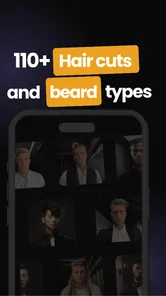
First things first, let's talk about the interface. As soon as you open the app, you're greeted with a clean and intuitive design. It's like stepping into a virtual barber shop, but without the awkward small talk. Whether you're looking for a classic cut or something more adventurous, this app has it all. The variety is impressive, ranging from timeless styles to the latest trends that even David Beckham would envy.
Customization and Recommendations
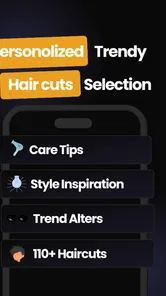
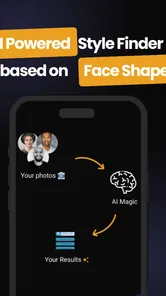
Alright, so you've found a style that catches your eye. Now what? The app takes it a step further by offering personalized recommendations. You can enter details about your hair type, face shape, and even your personal style preferences. I found this feature incredibly handy because, let's face it, not every hairstyle suits everyone. The app's AI-driven suggestions felt like having a personal stylist at my fingertips.
For a more useful result, I’d start with the face shape and hair details I can describe honestly, then treat the recommendations as a shortlist rather than a verdict. Hair density, natural growth patterns, and the amount of daily styling I’m willing to do can matter just as much in real life. If a suggested cut looks appealing but seems demanding to maintain, that mismatch is worth noticing before I commit.
Getting more from recommendations
I would not change every preference at once just to chase a more flattering suggestion. If the results feel off, it is easier to reconsider one factor—such as the face shape choice or the kind of finish I prefer—than to start over without knowing what influenced the outcome. This is a practical way to use recommendations: treat them as prompts for comparison, not as a mysterious score that decides what suits me.
It also helps to distinguish between a style that suits a face in a general sense and one that fits the hair I actually have. A reference may show a tidy shape, but the same cut can sit differently depending on thickness, texture, and growth. I’d take the image to a barber and ask which parts are achievable with my hair, rather than assuming the suggested match has accounted for every physical detail.
The Virtual Try-On Feature
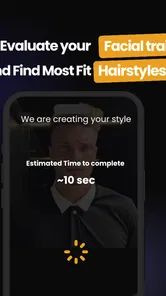
This is where Men's Hair Cuts & Hairstyles really shines. The app includes a virtual try-on feature, allowing you to see how different styles look on you before making any drastic changes. You just snap a selfie, and voilà! You get a preview of your potential new look. It's fun, interactive, and saves you from any post-haircut regrets.
I’d use a clear, straight-on selfie and compare several styles under the same conditions, rather than relying on one flattering preview. A digital image can help me judge the broad silhouette, but it cannot show exactly how my own hair will fall after washing or how a barber will adapt a cut. The best use is to take the preview as a conversation starter: show the image, then ask what needs adjusting for my hair and routine.
Making the preview useful
For a fair comparison, I’d keep the photo and viewing conditions consistent while switching between looks. Otherwise, changes in angle or expression can make one option seem better for reasons that have nothing to do with the haircut. I’d focus on broad proportions and whether a style feels like me, not tiny details in the simulated result. That keeps the try-on entertaining without letting a polished image set unrealistic expectations.
A good everyday example is preparing for a wedding or work event when I want to look sharper but do not want to gamble on an unfamiliar cut at the last minute. I’d use the previews to identify a direction, then get the actual trim early enough to see how it behaves and adjust my styling routine. For a major change, I’d still ask the barber to make a gradual modification if I’m unsure; a preview can reduce indecision, but it cannot remove the risk of disliking a real haircut.
Keeping It Fresh
Now, you might be wondering about maintenance. The app doesn't leave you hanging. It provides step-by-step tutorials and tips on how to maintain your new do. From the right products to use to styling techniques, it's like having a barber on speed dial. This feature is a game-changer for those who want to keep their style fresh between visits to the barber.
That maintenance angle matters most for someone trying a style that needs deliberate upkeep. I’d check whether the suggested routine feels realistic on a rushed weekday, not just appealing when I have time to experiment. If I prefer a wash-and-go cut, a complex styling routine is a signal to choose a simpler look instead. For a big event, I’d also test the routine beforehand rather than learning it on the day.
Using advice without overbuying
When a tutorial mentions products or techniques, I’d treat it as a starting point rather than a shopping list. A styling tip is only useful if it fits my hair and the finish I want; buying several products before I know what works is an easy way to spend money without improving the result. I’d try the basic technique first, pay attention to whether it holds through an ordinary day, and only then decide if a product or a different approach is worth exploring.
There is also a difference between maintaining a cut and recreating a barber’s finish. A routine that helps shape hair for a photo may be more effort than I want every morning. I’d judge the advice by whether I can repeat it comfortably, not by whether I can make my hair look perfect once. That simple test helps separate an appealing style from a practical one.
When another approach may work better
Compared with searching image boards or asking a barber to suggest a cut from scratch, this app brings inspiration, face-shape thinking, and a try-on concept into one grooming-focused place. Image searches offer a broader range of references, while an experienced barber can assess texture and growth patterns directly. I’d use the app to arrive with a direction, then rely on the barber to translate it into something workable.
It may not be the right choice if I already know exactly what cut I want, or if I expect a digital preview to predict the finished result precisely. Its content rating is Everyone, and it runs on Android version 5.0 or later; the current version is 6.2.1. The app is free, with in-app purchases listed from $3.99 to $279.99 per item, so I’d check the purchase details before paying for anything and stick to the free experience if it already meets my needs.
What to expect from a longer session
If I am comparing many looks, I would make a short list and take a break instead of trying to decide in one long browsing session. Looking at similar hairstyles back to back can blur the differences and make me less confident, not more. Returning later with a clearer idea of what I want—such as keeping length on top or changing the outline—makes the app’s recommendations and previews easier to judge.
On performance, I would separate the light task of browsing from the more involved task of working with a selfie. The first should be straightforward on a compatible device; image-based use can feel more demanding in general, especially on an older phone, so I would keep expectations sensible rather than assume every interaction will feel equally quick. If an image does not look right, I’d check the photo itself and try again before drawing conclusions about the style or the app.
I also would not use one awkward session as a verdict on reliability. A grooming app is most valuable when it helps across the whole decision: exploring, narrowing choices, and checking whether the upkeep suits me. If it becomes slow or inconvenient on my device, I can still use a barber’s portfolio or a few saved reference images for the same appointment-planning purpose. That fallback matters because the app is a helper, not the only route to a good haircut.
Choosing the right source for the decision
The alternatives each solve a different problem. Image searches are better when I want a very broad range of examples or a niche cut; a barber is better when I need advice based on how my hair grows and behaves; this app is useful when I want a guided way to explore options and imagine them on my face. I would not expect one source to do all three jobs equally well.
Before an appointment, I’d keep the strongest reference simple: one image that captures the overall shape, plus a sentence about what I want to keep or change. That avoids asking for an exact copy of a look that may rely on different hair or styling. If the barber suggests modifying the cut, I’d see that as useful translation rather than a failure of the app’s recommendation.
In everyday use, I’d open it before a haircut, narrow the options to a few styles, and take the strongest reference to the appointment. If I’m simply curious, browsing can be a low-pressure way to explore; if I want a highly precise consultation or professional advice about my hair’s condition, a barber is the better source. I’d also avoid judging reliability from a single session: the useful test is whether the app remains practical across browsing, trying ideas, and revisiting a routine when I actually need it.
Overall, Men's Hair Cuts & Hairstyles is a must-have tool for anyone serious about their hair game. It's user-friendly, packed with features, and genuinely helps you look your best. Whether you're prepping for a big event or just want to switch things up, this app has you covered. So, go ahead, give it a try, and unlock a world of style possibilities. You won't regret it!
Men's Hair Cuts & Hairstyles Frequently Asked Questions
Does Men's Hair Cuts & Hairstyles help me choose a style for my face shape?
Its store summary describes it as a face-shape guide and haircut finder, so the app is intended to help you explore hairstyles with your face shape in mind. It may be useful when you are comparing possible looks before a barber visit. Treat the suggestions as inspiration rather than a substitute for discussing your hair, preferences, and maintenance needs with a professional stylist.
What kind of app is Men's Hair Cuts & Hairstyles, and who is it for?
Men's Hair Cuts & Hairstyles is a beauty app focused on men's hair. Its short description is simply “Men's Hair,” and its face-shape and haircut-finder focus makes it relevant to people considering a new cut or looking for hairstyle inspiration. The app is rated for Everyone, so its content rating does not restrict it to adults.
What features does the Men's Hair Cuts & Hairstyles app offer?
The Men's Hair Cuts & Hairstyles app offers a comprehensive gallery of various haircuts and styles, ranging from classic to modern trends. Users can browse through detailed images and descriptions, get step-by-step styling guides, and watch tutorial videos. The app also includes a consultation feature where users can ask professional stylists for advice on what hairstyle suits their face shape and hair type best.
Is the Men's Hair Cuts & Hairstyles app free to use?
The app is free to download, though it includes in-app purchases, with listed items ranging from $3.99 to $279.99. The app offers a free version that includes access to a basic range of hairstyles and styling tips. However, for a more extensive collection of styles, tutorials, and personalized consultation features, users can subscribe to a premium version. The premium subscription typically includes no ads and regular updates with the latest hairstyle trends.
Can I use the Men's Hair Cuts & Hairstyles app offline?
While the app requires an internet connection for initial downloads, updates, and accessing premium features, many of the basic features are available offline. Users can save their favorite hairstyles and guides for offline access, ensuring they can explore different styles without needing continuous internet connectivity.
Pros
- Wide variety of hairstyle options.
- Easy-to-use interface.
- Regular updates with new styles.
- High-quality images and tutorials.
- Community feedback feature available.
Cons
- Some styles require in-app purchases.
- Limited free options for styling.
- Ads can be intrusive.
- Occasional app crashes reported.
- Requires internet for full features.











