McAlister's Deli
- 4.20K
- 4.7
- Installs
- 1.00M
- Price
- Free

Screenshots




Analysis by Reviewed
I use the McAlister’s Deli app as a practical companion for ordering from the chain, rather than as a general restaurant finder. That distinction matters: it is most useful when I already know I want McAlister’s sandwiches, soups, salads, or spuds and would like to arrange a meal from my phone. The app is free, published by McAlister's Deli, and sits in the lifestyle category. Its 4.7 average from around 14,000 ratings suggests it has found an audience among customers who return to the restaurant, though a high score alone cannot tell me whether it suits every location or ordering routine.
Who gets the most from a dedicated deli app
I would recommend it first to people who already have a McAlister’s order in mind and want a more organized way to place it. Regulars can benefit from remembered orders, menu customization, and rewards without having to search through a broader service. It can also suit someone planning lunch for a small group: each person can settle on a sandwich, salad, soup, or spud before the order is entered, which makes the final review less rushed.
It is less compelling if McAlister’s is only an occasional choice. A general restaurant-ordering app is usually more useful when I am deciding between several places, comparing menus, or looking for options beyond this one chain. And if I prefer to ask questions directly at the counter, the app does not need to become part of my routine. Its value comes from making a McAlister’s visit easier, not from replacing every way of choosing lunch.
Where a connection matters most
Most of the app’s appeal depends on being able to browse and submit an order while connected. That is especially relevant when I am deciding between pickup and delivery: I would want to check the menu, customize the meal, and confirm the order before relying on it for a tight lunch break. I would place the order before leaving work or home, then use the time saved to get on with the day. If I am already at the counter or have a weak signal, calling or ordering in person may be the simpler fallback rather than assuming the app will complete a request.
Connectivity matters at more than the final tap. I would want a steady connection while checking item details, building a basket, and confirming the order, because those steps are where an interrupted session is most inconvenient. This is one reason I prefer to order before heading out rather than trying to assemble lunch from a parking lot or while walking into a restaurant. The app is best treated as an ordering tool that needs a reliable connection at the moment I use it, not as a plan I can count on to work in every network condition.
Useful on the move, with a little planning
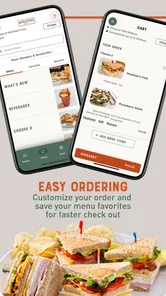
The strongest mobile use case is a familiar routine: I can repeat a usual meal, make a small adjustment, and avoid rebuilding the entire order from scratch. That is handy for a regular lunch, but I would still review every item before checking out, especially if I am ordering for other people. Customization makes it easier to express a preference; it does not remove the need to verify that the final basket reflects it. Customers who want to compare many nearby restaurants, rather than choose McAlister’s, may get more value from a broader food-ordering service.
A realistic lunch routine
Imagine I have a short break between meetings and know what I want before the day gets busy. I can use a connected moment at home or work to browse, choose the meal, check any available offers, and place the order. Then I can focus on the rest of the morning instead of making the whole decision when I arrive. The useful part is not simply that the order is on a phone; it is that I can make the choices when I have a moment to think, then verify the basket before the meal becomes time-sensitive.
More From Our News Desk

Weather by Xiaomi Review: Clear at a Glance, Less Clear Up Close

X Under Pressure: Can It Recover When Posting Goes Wrong?

Clash of Clans Is Won Between the Battles

Android Auto Makes the Case for Quieter Car Software

MobiOffice: Transforming Mobile Productivity with Seamless Integration

EA SPORTS FC™ Mobile Soccer: Redefining Mobile Sports Gaming
For a group order, I would use a slightly different routine. I would collect everyone’s choices first, including any changes to ingredients or bread, and then enter them one at a time. Before submitting, I would scan the basket by person rather than just checking the total number of items. That extra pass is helpful when two orders look similar, and it is a more dependable approach than assuming that customization alone guarantees the kitchen will receive the intended details.
Ordering Made Easy
When it comes to food apps, ease of use is paramount, and McAlister's Deli doesn’t disappoint. As soon as you open the app, you're greeted with a clean and intuitive interface. The menu is categorized in a way that makes sense—sandwiches, salads, soups, and the famous spuds are just a tap away. I was particularly impressed by how quickly I could customize my order. Want extra cheese on that spud? No problem. Prefer your sandwich on wheat instead of white? Done and done. The app even remembers your previous orders, making reordering a breeze.
Features That Stand Out
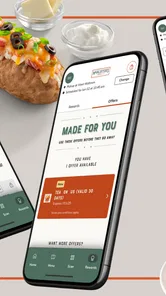
One of the features I found particularly useful is the nutritional information provided for each item. For those of us who like to keep an eye on our calorie intake, this is a godsend. Plus, the app offers exclusive deals and coupons, which means you're saving money while enjoying your favorite meals. Who doesn’t love a good deal?
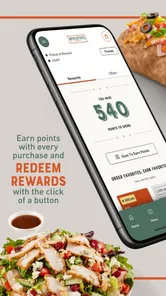
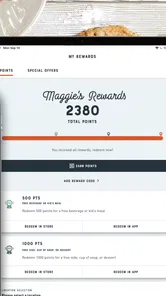
Another cool feature is the loyalty program. Every purchase earns you points, which can be redeemed for free items. After a few orders, I was thrilled to get a free lemonade—talk about a refreshing reward!
Rewards, choices, and sensible checks
A useful way to get more from the rewards program is to check the offers before choosing what to order, then decide whether a coupon or points redemption actually suits the meal you want. I would not add an unwanted side just to chase a deal; the best saving is one that fits a purchase I would make anyway. The app is particularly appealing if I visit McAlister’s often enough to make rewards relevant. If I only want a one-off meal and care most about comparing prices across restaurants, a general delivery app may be a better place to start.
Nutrition details can also help me make a more deliberate choice, but they are most useful as a comparison tool while browsing, not as a substitute for checking the details of a particular order. For a group, I would settle everyone’s choices first, then enter the items and review customizations together before submitting. That small pause reduces the chance of overlooking a bread preference or an added ingredient when several similar sandwiches are in the basket.
Delivery or Pickup? Your Choice
Flexibility is key in today’s fast-paced world, and the app provides it in spades. Whether you want your meal delivered to your doorstep or prefer to pick it up on your way home, the choice is yours. The app provides real-time updates on your order status, so you're never left wondering when your food will arrive.
I tested both options and found the delivery service to be prompt, with food arriving hot and well-packaged. The pickup option was equally efficient, with a designated area in the restaurant for app orders that made the process seamless.
Choosing between pickup and delivery
For me, the better option depends on what the rest of the day looks like. Pickup makes sense when I am already passing a restaurant and can collect the meal on my way; delivery is more convenient when leaving would interrupt work or home plans. Either way, I would make the choice before checkout and leave room for the order to take the time it needs. A phone order can reduce uncertainty about what I requested, but it cannot make travel, preparation, or a busy moment disappear.
There is also a practical trade-off between a dedicated chain app and ordering through a general delivery service. The McAlister’s app keeps the focus on its own menu, customization, and rewards, which is useful when those are exactly what I want. A broader service is the more natural choice if I want to compare other restaurants or coordinate different cuisines in one place. I would choose based on the decision I am actually making, rather than expecting one app to be best for both.
If an order does not go as planned
For a time-sensitive meal, I would avoid leaving checkout until the last possible moment. A connection can falter, an order can take longer than expected, or a pickup plan can change, so I would check the order status and allow enough time to switch plans if needed. If the app appears stuck, I would first confirm whether the order actually went through before trying again; submitting a duplicate without checking could create an avoidable mix-up. For an urgent order, contacting or visiting the restaurant is a more sensible backup than repeatedly tapping the same button.
This cautious approach is especially useful if I am ordering for someone else or heading into a meeting where I may not be able to monitor the phone. I would make sure I have reached the confirmation stage and then check the status when practical, rather than assuming that a slow screen means the request failed. If I cannot establish what happened, I would use a direct contact with the restaurant before placing another order. It is a small step, but it can prevent the hassle of duplicate orders and unclear pickup plans.
Data-conscious ordering and practical limits
Browsing a menu and placing an order uses a mobile connection, so I would do it on Wi-Fi when convenient, particularly if I am comparing options or building a larger group order. Once I know what I want, the remembered-order workflow can reduce the time spent browsing on a future visit. I would still open the basket and check it each time, since a saved routine is a starting point, not proof that every detail is right for today.
If I am trying to be careful with mobile data, I would avoid leaving menu browsing until I am somewhere with a weak connection and limited time. Making the decision while connected to Wi-Fi, when available, is a simple way to keep the ordering process predictable. I would not treat a past order as a substitute for opening the current basket: a small change in appetite or a different group of diners can make an old favorite the wrong order for today.
The app is free, rated for Everyone, and its current version is 8.2; it requires iOS 11 or later. It has passed one million installs, which makes it a well-established option for the chain’s customers, but its usefulness remains tied to wanting McAlister’s and having a participating ordering option nearby. I would skip it if I rarely eat there, need a single app to compare restaurants, or prefer deciding face-to-face without using a phone. For regulars who value customization, rewards, and a quicker repeat order, it is a convenient choice—provided they stay connected through checkout and give the final basket a careful look.
What to consider before making it a habit
The main question I would ask before installing it is whether I expect to order from McAlister’s often enough for saved choices and rewards to matter. If the answer is yes, the app can make a familiar meal easier to arrange. If I am only visiting once, the time spent setting up a phone-based routine may not add much over ordering at the restaurant or using a service I already use for other places.
I would also think about how I prefer to handle changes. The app is a good fit when I know my order and can review it calmly. If I have detailed questions, want to discuss substitutions, or am deciding on the spot with a group, speaking with restaurant staff may be more comfortable. The strongest routine is the one that matches the situation: use the app for a straightforward order, and choose a direct conversation when that gives me more confidence.
Connectivity verdict
For me, this is a useful chain-specific ordering app when I can get online, know what I want, and have enough time to confirm the basket. Its remembered orders, customization, nutrition information, offers, and rewards give regular McAlister’s customers reasons to return to it. The trade-off is its narrow focus: it is not the tool I would open to compare a city’s lunch options, and I would not rely on a weak connection for a rushed order. A little planning—choose the meal, place it while connected, and check the status—makes the experience more dependable.
Final Thoughts
In a world where convenience is king, the McAlister's Deli app shines brightly. It combines ease of use with fantastic features, all while offering the delicious menu you’ve come to love from McAlister’s. Whether you’re a regular or a first-time diner, this app makes enjoying your favorite meals easier than ever. So, next time your stomach rumbles, consider giving the McAlister’s app a try—your taste buds will thank you!
McAlister's Deli Frequently Asked Questions
What is the McAlister's Deli app, and who is it for?
McAlister's Deli is a free lifestyle app from the deli’s own developer, designed for customers who want to access McAlister's favorites from a phone. Its store summary highlights easy ordering and rewards, so it is most relevant if you already enjoy the restaurant or expect to use its ordering features. It is not a game or a general entertainment app.
What does the McAlister's Deli app let me do before placing an order?
The app brings McAlister's favorites to your fingertips, with easy ordering and rewards as its main focus. It can be useful for customers who prefer to browse and arrange an order on a mobile device rather than handle the process another way. The experience is centered on McAlister's Deli, so its usefulness depends on whether you want to engage with that restaurant.
What devices can I use the McAlister's Deli app on?
The McAlister's Deli app is available for Android and iOS devices, so you can use it on a compatible smartphone or tablet. Before downloading, check that your device meets the app's operating system requirement: it needs version 11 or later. The app is free to download, and its Everyone age rating makes it suitable for a broad audience.
Who makes the McAlister's Deli app, and is it a general lifestyle app or a game?
McAlister's Deli develops this app, which is a lifestyle app rather than a game. Its focus is on helping customers access McAlister's favorites through easy ordering, rewards, and related convenience features. If you are looking for a way to interact with the deli from your phone, rather than an entertainment or gaming experience, its purpose is straightforward.
What is McAlister's Deli app and what features does it offer?
The McAlister's Deli app is a convenient tool for customers to order their favorite meals from McAlister's Deli locations. It offers features such as online ordering, customizing your meal, locating nearby stores, and accessing exclusive deals and rewards. The app also allows users to track their order history and save favorite orders for quick access in the future.
Pros
- User-friendly interface.
- Fast delivery options.
- Order customization available.
- Loyalty rewards program.
- Wide variety of menu options.
Cons
- Limited delivery areas.
- Occasional app crashes.
- High delivery fees.
- No nutritional info on app.
- Limited payment options.











