

MARTA — Official
- 1.91K
- 4.4
- Installs
- 500.00K
- Price
- Free

Screenshots
Analysis by Reviewed
I use MARTA On the Go as a practical companion for getting around Atlanta by public transit. Its biggest appeal is simple: it puts useful trip information in one place, so I can check my plans before leaving rather than relying on guesswork at a stop. The app is free, which makes it easy to try if MARTA is already part of your routine. I would still treat live updates as guidance, not a guarantee, and keep a little flexibility for the occasional disruption.
What free access means in practice
There is no purchase price to consider when deciding whether to try this transit app. I see that as a low-friction starting point, not proof that it will suit every rider: the real value depends on whether its MARTA-focused information helps with the trips you actually make. You can test it alongside your usual planning habit and decide whether it saves enough time or uncertainty to keep using it.
That distinction matters if you are comparing it with a paid navigation tool. I would not pay for a broader service just to check a MARTA journey if this app already covers the questions I need answered. On the other hand, free access does not make it a substitute for every feature someone might want from a general-purpose map. I would choose based on the job—MARTA trip checking here, broader travel planning elsewhere—rather than treating price alone as the verdict.
Getting around Atlanta with less guesswork
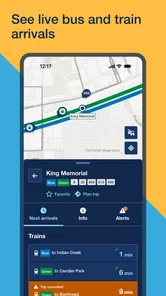
First off, the MARTA On the Go app is designed to make your daily commute as smooth as possible. When you open the app, you’re greeted with a straightforward interface that quickly becomes your best friend. Whether you’re a daily commuter or just visiting the city, the ease of use is a major perk. The app provides real-time updates on bus and train schedules, so you know exactly when your ride is arriving. No more standing around in the heat or rain, wondering if you’ve missed your bus.
Real-time tracking is useful, not a promise
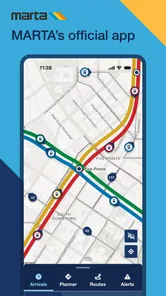
One of the standout features is the real-time tracking. Gone are the days of guessing when your bus will show up. With this feature, you can see exactly where your bus or train is on the map. It’s like playing a game of connect-the-dots, but the dots are buses moving through the city. This feature alone has saved me from being late to countless appointments.
For a more realistic use of that map, I check it before walking to the stop, then check again if the vehicle seems late. That second look can help me decide whether to wait or reconsider my connection, but I don’t treat a moving marker as proof that the vehicle will reach me at an exact minute. If I have a tight appointment, I leave a buffer instead of planning around the most optimistic arrival estimate. That small habit matters most when a missed bus would mean a long wait or a difficult transfer.
Simple trip planning for routine journeys
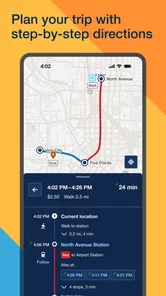
Another thing I appreciate about the app is its user-friendly interface. It’s clean, intuitive, and doesn’t overwhelm you with information. Even if you’re not tech-savvy, you’ll find it easy to navigate. The app allows you to plan your trips ahead of time, view service alerts, and even save your favorite routes for quick access. It’s like having a personal transit planner at your fingertips.
More From Our News Desk

 Weather - By Xiaomi
Weather by Xiaomi Review: Clear at a Glance, Less Clear Up Close
Xiaomi’s weather app makes everyday forecasts quick to scan, but its calm surface can leave useful details and recovery paths harder to find than they should be.

 X
XX Under Pressure: Can It Recover When Posting Goes Wrong?
A resilience-focused review of X, examining setup, mistaken posts, interruptions, weak connections, and the gaps that matter when recovery needs to be dependable.

 Clash of Clans
Clash of Clans Is Won Between the Battles
Its raids are quick; its community is a long-term project of coordination, teaching, rivalry, and shared responsibility—with all the friction that entails.

 Android Auto
Android Auto Makes the Case for Quieter Car Software
The car interface is no longer judged by how much it can do, but by how quietly it helps. Android Auto shows what drivers now expect—and what still gets in the way.

 MobiOffice: Word, Sheets, PDF
MobiOffice: Transforming Mobile Productivity with Seamless Integration
MobiOffice: Word, Sheets, PDF is redefining mobile productivity with a surprising blend of functionality and innovation.

 EA SPORTS FC Soccer Mobile 26
EA SPORTS FC™ Mobile Soccer: Redefining Mobile Sports Gaming
Dive into EA SPORTS FC™ Mobile Soccer, where immersive gameplay and strategic depth transform mobile sports gaming.
Latest News



Saved routes are especially handy for journeys I repeat, such as the trip between home, work, or a regular appointment. I can keep the common plan close at hand and spend less time rebuilding it each time I travel. For a visitor, planning before setting off is a sensible way to get comfortable with a route; for a local, saved favorites are more useful once the itinerary is familiar. I’d still check service alerts before leaving, because a saved route is convenient but does not make a disrupted service run normally.
Alerts, alternatives, and the value of a free app
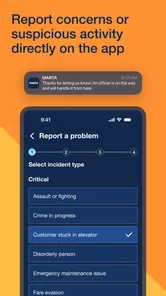
MARTA On the Go also keeps you in the loop with alerts and notifications. If there’s an unexpected delay or a change in the schedule, the app lets you know immediately. This means fewer surprises and a more predictable commute. Trust me, there’s nothing worse than showing up for a train that’s been delayed without you knowing.
In my view, the value here is practical rather than flashy: the app is free, and its usefulness comes from helping me make better decisions about MARTA trips. Its maker, MARTA, is also the transit provider whose service the app is meant to help navigate, which makes it a natural place to check for transit-specific information. The usual alternatives are general map apps or other journey planners. Those can be better when I’m comparing several transport modes or coordinating a broader city itinerary, while this app makes more sense when my main question is about using MARTA. I like having both types available rather than expecting one tool to be best for every trip.
Where I’d be cautious
While the app is generally reliable, it’s not without its quirks. Occasionally, the real-time tracking can be a bit off, especially during peak hours. It’s not a dealbreaker, but something to keep in mind. Also, the app could benefit from a more robust offline mode for those moments when your signal is less than stellar.
That limitation changes how I use it on travel days. I check the route and alerts while I have a dependable connection, then avoid assuming I’ll be able to refresh information once I’m underground or somewhere with weak reception. If my plan depends on a quick connection or an unfamiliar transfer, I leave extra time and make sure I know the broad direction of the journey before boarding. For a rider who needs detailed offline navigation throughout a trip, another tool with offline maps may be a better fit.
Making a MARTA journey easier to manage
A useful way to fit this app into a commute is to divide the planning into stages instead of trying to solve everything at the stop. Before leaving home, I would look at the route and alerts together: the route gives me a familiar outline, while an alert may change whether that outline is sensible today. Close to departure, the vehicle map can help me judge when to head out. At a transfer, I would treat it as a prompt to reassess rather than assume that the next leg is guaranteed.
For example, imagine I am going to an appointment across Atlanta and need a bus connection after a train ride. I can check the planned journey before setting out, then look for service changes that could affect either part. If the first vehicle appears delayed, I have a reason to reconsider my timing before I reach the platform or stop. I would still allow room for an imperfect estimate; the practical benefit is making a more informed choice, not eliminating uncertainty from transit.
This workflow is more useful than repeatedly refreshing the map without a decision in mind. I ask a specific question each time I open it: has service changed, is the vehicle approaching, or should I reconsider the connection? That keeps the app from becoming a stream of information that I watch anxiously. It also makes the distinction between a planned trip and live conditions clearer, especially on a day when the service does not follow the expected pattern.
When a specialist transit app beats a general map
For someone who already knows Atlanta’s streets but needs MARTA details, a transit-focused tool can be more direct than a general map app. I do not have to make broader driving or sightseeing options the center of the experience when the immediate task is checking a bus, train, alert, or saved route. That focus is the main reason I would keep it available even if I also use a general planner.
The reverse is true when a trip is not mainly about MARTA. If I am deciding between walking, driving, and several forms of transit, or building a day around multiple destinations, a broad map app is the more natural place to compare the whole journey. I would not force MARTA On the Go to do that larger job. Using both tools selectively is less frustrating than expecting a specialist to be an all-purpose city guide.
Visitors have a different trade-off from regular riders. A visitor may appreciate having MARTA information close at hand while learning a route, but may also need a broader map to understand the walk to a destination or compare other ways of getting there. A regular rider can get more value from saved routes and quick checks because familiar journeys recur. If you only take MARTA occasionally, the app may still help on those days, but it may not become a daily essential.
Who will get the most from it
This is a good fit if you regularly ride MARTA, are visiting Atlanta and want a transit-focused starting point, or simply prefer checking bus and train information in an app instead of piecing it together at the stop. A realistic weekday example is heading to work, checking the service alert before leaving, opening a saved route, and then glancing at the vehicle location before walking out. Each step answers a different question: whether service is affected, which familiar plan to use, and whether it is worth leaving now.
I’d be less inclined to rely on it as my only navigation tool if I rarely use MARTA, need an offline-first experience, or want one planner to compare transit with walking, driving, and other options. Its focus is an advantage for MARTA journeys, but that same focus makes a broader map app a more convenient choice for mixed-mode travel. The average rating is 3.1 from around 4.9 thousand ratings, so I’d approach it with sensible expectations rather than assuming every update will be perfect. It has more than 500 thousand installs, and its Everyone age rating makes it suitable for a broad audience.
What to expect from everyday use
A reasonable question is whether this can replace checking information elsewhere. I would use it as my MARTA-specific reference, particularly for saved trips, alerts, and vehicle location, while keeping a general map available when the journey involves more than transit. That approach avoids treating any single screen as the complete picture. If a trip is important, checking the details before leaving and leaving a time cushion are sensible habits regardless of which planner I open.
Another practical question is whether it is worth trying if I am not a confident transit rider. I think it can be a helpful starting point because the planning and route-saving tools give a newcomer somewhere to organize a familiar journey. I would begin with a straightforward trip and review the route before departure rather than learning every feature at once. For a complicated itinerary, I would compare the journey in a broader map app too, so the walk between stops and the final approach are part of the plan.
As an Android app, it is available for devices running Android 5.0 or later, and the current version is 9.66. Those details are useful when deciding whether an older device can run it, but they do not change the main judgment: what matters is whether the MARTA information fits your routine. MARTA is the developer, and the app has been available since May 3, 2013. Its long presence does not make every live estimate certain, so I would still use judgment when timing a connection.
My verdict for MARTA riders
In conclusion, MARTA On the Go is a solid choice for anyone using Atlanta’s public transit system. It’s like having a personal assistant that helps you navigate the city with ease. Whether you’re a seasoned commuter or a newbie, this app is sure to make your transit experience more enjoyable. Just remember to keep an eye on those alerts and you’ll be good to go!
For me, the decision is straightforward: I’d try it if MARTA is central to my travel, since there is no purchase price to weigh against the convenience. I would skip it as a primary planner if my needs are mostly offline or span many transport types. The app has been available since May 3, 2013, and version 9.66 supports Android 5.0 and later. Overall, I see it as a useful, focused aid—not a guarantee against delays—whose value depends on how often Atlanta’s MARTA network is part of your day.
MARTA — Official Frequently Asked Questions
Who publishes MARTA On the Go, and what kind of app is it?
MARTA On the Go is the official transit app from MARTA, intended for people who use the agency’s bus and train services. It falls into the maps and navigation category, with tools centered on checking transit information and organizing journeys. If you regularly travel using MARTA, the app brings useful trip information together on your phone.
What is MARTA On the Go and what features does it offer?
MARTA On the Go is a user-friendly app designed to enhance the commuting experience for users of the Metropolitan Atlanta Rapid Transit Authority (MARTA). The app offers real-time bus and train tracking, service alerts, and trip planning features. With this app, users can easily navigate the transit system, view schedules, and receive notifications about service disruptions, making it an essential tool for anyone relying on MARTA for daily transportation.
Is MARTA On the Go available for both Android and iOS devices?
Yes, MARTA On the Go is available for download on both Android and iOS devices. Users can find the app on Google Play Store for Android devices and the Apple App Store for iOS devices. It ensures that commuters using different smartphones can have access to all the features and updates provided by the app, enhancing their overall transit experience. The Android version requires Android 5.0 or later.
Does MARTA On the Go provide real-time updates on bus and train schedules?
Absolutely, MARTA On the Go is equipped with real-time tracking capabilities that allow users to get up-to-the-minute updates on bus and train schedules. This feature helps commuters plan their trips more efficiently by providing arrival-time information and alerts about delays or changes in service, so they can check for current transit updates while on the go.
Can I use MARTA On the Go to plan my entire trip across the MARTA network?
Yes, one of the key features of MARTA On the Go is its comprehensive trip planning tool. This allows users to plan their journeys from start to finish across the MARTA network. By entering their starting point and destination, the app provides step-by-step directions, including transfer information and estimated travel times, helping riders organize a journey before setting out.
Pros
- User-friendly interface
- Real-time transit updates
- Trip planning feature
- Favorite routes saving
- Multi-modal transit options
Cons
- Occasional app crashes
- Limited offline functionality
- Infrequent update bugs
- Battery consumption issues
- Data usage concerns











