

Map Tracker & Location Share
- 3.00
- 4.6
- Installs
- 10.00K
- Price
- Free
Screenshots
Analysis by Reviewed
Keeping track of people you care about can be surprisingly awkward. A message asking “Have you arrived?” often comes too early, while checking a map repeatedly can become tiring for everyone involved. Map Tracker & Location Share takes a narrower approach: it focuses on sharing real-time location and notifying friends about arrivals and departures. After spending time with it, I see the appeal immediately. It is less about exploring maps and more about reducing the number of small check-in messages needed during a busy day.
This is a free Android app in the Maps & Navigation category, developed by HuanYoung Tech of SZ. It is suitable for Everyone, and its current version is 1.1.2. The app has passed the early curiosity stage without becoming a huge, crowded service: it has over 10 thousand installs, a 4.6 average from around 36 ratings, and three written reviews. Those figures suggest a promising but still relatively small product, which matters when deciding whether you want a familiar, mature platform or a focused tool with a simpler purpose.
Location sharing that is meant to answer one practical question
I find it helpful to judge a location-sharing tool by the decision it helps someone make, rather than by how often the map updates. For this section, I’m focusing on the practical handoff between sharing a journey and knowing when to act; that makes it easier to see where alerts are useful and where a quick message still matters.
The capability that matters most
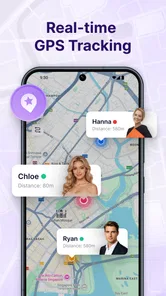
The central idea is straightforward: let friends see where you are in real time, then use arrival and departure alerts to reduce manual updates. In everyday terms, the app can turn “I’m on my way” and “I’m here” into events that other people can follow rather than messages you have to remember to send.
That distinction is more useful than it may sound. A normal map application is usually built around finding a place, planning a route, or checking traffic. A messaging app is built around conversation. Map Tracker & Location Share sits between those habits, using the map as a shared point of reference while making movement the important information. I would not install it because I need another general-purpose map. I would install it when a small group needs a clearer way to coordinate movement.
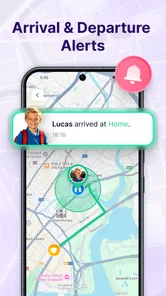
The strongest part of the concept is the arrival and departure focus. A live location can be too detailed when all someone really needs to know is whether you have left or reached a meeting point. Alerts can make the interaction more passive: instead of asking for updates, a friend can wait for the relevant change. The real benefit is less checking, not simply more map detail.
What this changes in a normal day
Imagine meeting a friend after work. You leave later than planned, travel across town, and do not want to keep typing updates while carrying a bag or changing transport. With a location-sharing tool, the friend can understand your progress without a chain of vague messages. When you arrive, the event that matters is clear. If your plans change, you can still communicate directly, but the routine status updates no longer have to carry the whole arrangement.
More From Our News Desk

 Weather - By Xiaomi
Weather by Xiaomi Review: Clear at a Glance, Less Clear Up Close
Xiaomi’s weather app makes everyday forecasts quick to scan, but its calm surface can leave useful details and recovery paths harder to find than they should be.

 X
XX Under Pressure: Can It Recover When Posting Goes Wrong?
A resilience-focused review of X, examining setup, mistaken posts, interruptions, weak connections, and the gaps that matter when recovery needs to be dependable.

 Clash of Clans
Clash of Clans Is Won Between the Battles
Its raids are quick; its community is a long-term project of coordination, teaching, rivalry, and shared responsibility—with all the friction that entails.

 Android Auto
Android Auto Makes the Case for Quieter Car Software
The car interface is no longer judged by how much it can do, but by how quietly it helps. Android Auto shows what drivers now expect—and what still gets in the way.

 MobiOffice: Word, Sheets, PDF
MobiOffice: Transforming Mobile Productivity with Seamless Integration
MobiOffice: Word, Sheets, PDF is redefining mobile productivity with a surprising blend of functionality and innovation.

 EA SPORTS FC Soccer Mobile 26
EA SPORTS FC™ Mobile Soccer: Redefining Mobile Sports Gaming
Dive into EA SPORTS FC™ Mobile Soccer, where immersive gameplay and strategic depth transform mobile sports gaming.
Latest News



The same pattern works for a small group going to a concert, a family member travelling to a shared destination, or housemates coordinating a pickup. The app is most convincing when everyone agrees on one temporary purpose. It is less compelling as a permanent window into someone’s day, because constant visibility can feel excessive when no coordination problem exists.
I also like that the concept does not require the user to turn every journey into a formal trip plan. The value comes from sharing a current position and receiving meaningful movement alerts. That keeps the mental overhead lower than a full itinerary tool. The trade-off is that the app’s usefulness depends heavily on people using it at the right moment and understanding what they are sharing.
How I would use it before sharing a location
Before starting a session, I would decide exactly who needs the information and why. That sounds obvious, but it prevents a common mistake with location tools: sharing first and thinking about the audience later. For a one-off meeting, I would keep the group small and make the destination or purpose clear in the accompanying conversation.
I would also tell the recipient what kind of update to expect. A friend waiting at a café may only need an arrival notification. Someone collecting me may benefit more from seeing movement while I travel. These are different needs, and treating them as the same can create unnecessary attention. The app works best when the alert has a job rather than being enabled simply because it is available.
Another practical habit is to check the map context before relying on it. A shared position is useful for coordination, but it is not the same as a guaranteed estimate of when somebody will walk through a door. Streets, entrances, large buildings, and crowded venues can all make a map marker less precise for the final few minutes. I would use the location as a guide and keep a direct message available for the last handoff.
How it compares with familiar alternatives
Compared with a general navigation app, this tool has a much narrower purpose. A navigation app is the better choice when I need route planning, turn-by-turn directions, place discovery, or traffic context. Map Tracker & Location Share makes more sense after the route question has already been answered and the remaining problem is keeping another person informed about movement.
Compared with ordinary messaging, the advantage is structure. Messages depend on someone remembering to send them, noticing the right moment, and describing their status accurately. Location sharing can provide a more continuous picture, while arrival and departure alerts can handle routine milestones. Messaging remains better for exceptions: delays, changed meeting points, accessibility needs, or anything that needs explanation rather than a map position.
Compared with a broad social location service, a focused tracker may feel easier to understand because the purpose is visible from the start. However, a larger established service may be preferable for people who already have trusted groups, extensive map tools, or a long history with one platform. I would choose this app when its directness is more valuable than having a large ecosystem around the location feature.
The best everyday scenario: coordinating a pickup
The clearest use case for me is a pickup where the person collecting someone needs timing information but does not need a conversation running continuously. For example, a friend travelling to a station could share their location while approaching the meeting area. The person waiting can watch for movement and rely on the arrival alert instead of asking for repeated updates.
This workflow has a useful human advantage: it separates coordination from social pressure. The traveller does not have to reply while navigating, and the driver or friend does not have to send increasingly impatient messages. When both people understand the arrangement, the map becomes a quiet background tool rather than another chat thread.
There is also a less obvious benefit for groups. If several friends are converging on one place, a shared location view can reveal whether the group is arriving together or in stages. That can help the earliest arrival decide whether to wait at the entrance, move inside, or contact the others. I would still avoid using it as a substitute for naming a precise meeting point, because a large venue may have several entrances that appear close together on a map.
Small habits that make the feature more useful
First, I would use arrival alerts for milestones that genuinely change what the recipient should do. A notification that tells someone to leave home, unlock a door, or walk to a pickup point has clear value. An alert for every minor movement would be distracting and could make the feature feel intrusive.
Second, I would pair the map with a simple written landmark when the destination is complicated. “I’m at the north entrance” is more actionable than a marker alone in a shopping centre or event venue. The app can handle the movement layer, while a short message handles the human detail that maps often cannot express well.
Third, I would treat a shared session as temporary coordination rather than an open-ended relationship habit. Ending the sharing when the task is complete is a good boundary, especially when the other person no longer benefits from seeing movement. This is not a criticism of the app’s core idea; it is the responsible way to use any live-location feature.
Fourth, I would agree in advance on what to do if the map stops being enough. If someone is late, loses signal, changes transport, or reaches a different entrance, a direct call or message should take over. A tracker is strongest for routine progress and weakest when a situation becomes unusual.
The trade-off between convenience and attention
Real-time sharing is convenient because it reduces repeated explanations, but it also exposes more information than a single “arrived” message. That makes consent and timing important. I would not share a location with a broad group merely because the app makes it possible. The right audience is the smallest one that can solve the coordination problem.
There is a psychological trade-off as well. Some people feel reassured by a moving marker; others feel watched. The same feature can be helpful during a late-night pickup and uncomfortable in a casual friendship. Before recommending the app to someone, I would explain that its usefulness depends on mutual expectations. If one person assumes continuous monitoring and the other expects a short travel update, the technology will not fix the disagreement.
Accuracy is another practical consideration. A map position is an aid to coordination, not a promise that the person is standing at the exact visible point. Indoor areas, tall buildings, underground travel, and crowded streets can all complicate interpretation. I would avoid making important safety decisions from the marker alone. For ordinary meetups, it should be enough; for urgent situations, users should rely on appropriate emergency or direct-contact options instead.
Who should skip it
I would skip this app if I mainly want turn-by-turn navigation, public transit planning, saved places, or detailed route research. Its location-sharing purpose does not replace a full navigation suite. I would also look elsewhere if my friends and family already use another trusted platform for live location and alerts, since convincing everyone to adopt a separate tool can erase the convenience.
It may also be a poor fit for anyone who dislikes live sharing on principle. An arrival-only message, a phone call, or a normal chat may be more comfortable and perfectly adequate. The app is not automatically better simply because it offers more continuous information. The best choice is the one that solves the actual coordination problem while respecting the preferences of everyone involved.
People managing large, complex events may want a more specialized group-planning system. Map Tracker & Location Share appears better suited to personal coordination among friends or family than to formal dispatch, professional fleet management, or detailed event operations. I would not treat a simple tracker as a replacement for tools built around those responsibilities.
Who gains the most from it
The biggest beneficiaries are people who regularly meet across busy areas and dislike sending progress messages. It can be especially practical for friends arranging pickups, families coordinating arrivals, or small groups travelling to the same destination at different times. The value increases when the participants are comfortable with location sharing and the task has a clear beginning and end.
It is also a good fit for users who want a focused Android utility rather than a large social platform. The app is free, supports devices running Android 7.0 or newer, and carries an Everyone age rating, so the basic entry barrier is low. Still, the technical compatibility is only one part of the decision. The people you want to coordinate with must also be willing to use the same workflow.
HuanYoung Tech of SZ has kept the product’s identity easy to understand: this is a map tracker built around sharing movement and notifying people about arrivals or departures. The modest install base means I would approach it as a focused tool that is still growing, not as a replacement for every established map or communication service. Its 4.6 average is encouraging, but the small number of ratings means I would place more weight on whether its central capability matches my routine than on the score alone.
My recommendation after using the workflow
I recommend Map Tracker & Location Share to anyone who has a specific, recurring need to let friends know where they are while travelling. The arrival and departure concept is practical, and it can remove a surprising amount of repetitive messaging from pickups and meetups. I especially like it when the shared location has a defined purpose and the recipient needs progress rather than a full conversation.
I would not recommend installing it just to collect another map app. Its strengths are concentrated, and that is both the reason to try it and the reason to pass on it. If you need navigation, route discovery, or a broad communication platform, a conventional alternative will probably serve you better. If your problem is “How can my friend know I am on the way and recognize when I have arrived without me constantly replying?”, this app is aimed at exactly that moment.
My final advice is to start with one simple journey, one trusted recipient, and one useful alert. See whether the shared map actually reduces messages and makes the meeting smoother. If it does, the app earns a place in your travel routine. If it merely adds another screen to monitor, the usual combination of a map and a short message may remain the better choice.
Map Tracker & Location Share Frequently Asked Questions
Is Map Tracker & Location Share suitable for family or group meetups?
It can be useful when family members, friends, or travel companions want to coordinate around one another’s locations. Real-time sharing and arrival or departure alerts can help with meeting up or knowing when someone has reached a destination. Before relying on it for a group, agree on who will share their location and for how long, and make sure everyone is comfortable with the arrangement.
What should I check before installing Map Tracker & Location Share?
Map Tracker & Location Share is a free Maps & Navigation app from HuanYoung Tech of SZ. It is rated for Everyone and requires Android 7.0 or later. The current version is 1.1.2, and the app has a 4.6 average rating from 36 ratings. Check that your device meets the OS requirement, then review the permissions requested during setup so you can make informed choices about location access.
What is Map Tracker & Location Share used for?
Map Tracker & Location Share is designed to help you share your current position and keep track of locations through a map-based interface. It can be useful for coordinating with family, friends, or travel companions, checking where shared contacts are, and making it easier to meet in unfamiliar places. The exact tracking and sharing options may depend on the permissions, device settings, and features available in your version of the app.
Does Map Tracker & Location Share track my location continuously?
Location tracking generally depends on the permissions you grant and the tracking mode you activate. If the app is allowed to access your location in the background, it may continue updating your position while you are moving, although battery-saving settings, weak GPS signals, mobile data restrictions, or system limitations can affect accuracy. Before using it, review the app’s location permissions and disable background access when continuous tracking is not necessary.
Can I choose who sees my location and stop sharing it?
Location sharing should be used carefully because anyone with access to a shared link, group, or account may be able to see information about your movements. Check the recipient or sharing settings before sending your location, and look for an option to stop sharing when you reach your destination or no longer need to be visible. You should also remove old contacts or links that you no longer trust.
Pros
- Live location sharing helps contacts follow your journey in real time.
- Useful tracking features for trips
- meetups
- and family coordination.
- Simple map view makes shared locations easy to understand.
- Can improve safety when traveling alone or in unfamiliar areas.
- Location updates may reduce the need for repeated calls or messages.
Cons
- Continuous GPS use can noticeably reduce battery life.
- Location sharing may raise privacy concerns if permissions are mismanaged.
- Accuracy can drop indoors or in areas with weak GPS signals.
- Some features may depend on a stable mobile data connection.
- Background tracking could be restricted by phone battery-saving settings.











