MANE: AI Hairstyle Pro
- 0.00
- 0.0
- Installs
- 10.00K
- Price
- Free

Screenshots
Analysis by Reviewed
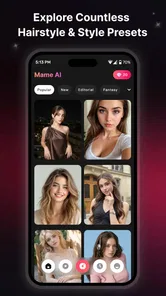
I’d use MANE: AI Hairstyle Pro as a way to explore a haircut idea before taking it to a stylist, not as a promise of exactly how I’ll look after an appointment. Its appeal is the chance to experiment with AI-generated hairstyle images and videos using a photo or a written prompt. That makes the app more playful and potentially more useful than scrolling through reference photos, though the results are best treated as inspiration rather than a precise preview.
The most helpful mindset is to treat each result as a question: what part of this look appeals to me, and could it work with my actual hair and routine? That keeps the experience fun without letting a polished image make the decision for me. For anyone who has ever struggled to explain a vague haircut idea, that small shift—from asking for a prediction to looking for a direction—is where the app can earn its place.
Trying a look before committing
MANE is a free beauty app from developer Elizabeth Cheyanne Langrum. The current version is 2.0.4, it has reached over 10,000 installs, and it is rated for Everyone. It was released on September 7, 2026, and works on devices running Android 7.0 or later. Those basics make it approachable to try, but the experience is aimed at people curious about AI styling rather than anyone seeking a complete salon-planning tool.
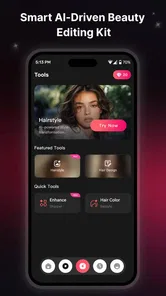
The central idea is simple: use a photo or text to explore hairstyle concepts, with the option to turn an idea into a vivid video. I like that combination because the two starting points serve different needs. A photo gives the app a personal reference; text is better when I want to begin with a mood or a change I cannot yet describe visually. Either way, the most valuable outcome is a clearer conversation with a stylist, not a final decision made from a generated image alone.
That distinction matters. A hairstyle can look convincing in an image while still being impractical for someone’s hair texture, length, routine, or willingness to style it daily. I would use MANE to answer questions such as whether I’m drawn to a shorter silhouette or a different fringe, then ask a professional what would work with my actual hair. It is a low-pressure first step, not a substitute for hands-on advice.
Where photo and text experiments help
Starting from a personal photo can make an idea feel more relevant than browsing a gallery of other people’s cuts. It gives me a way to imagine a change on a familiar face, which can be useful when I am unsure whether a broad style direction feels like me. Still, an AI image should not be read as a reliable forecast of the exact cut, color, or finish a stylist can deliver.
To make that comparison more useful, I would look for the broad shape rather than scrutinizing every strand or color transition. I would also keep the starting photo consistent when comparing ideas; changing the image at the same time as the hairstyle makes it harder to tell what is driving my reaction. This is a small but practical way to turn casual experimentation into a clearer preference.
More From Our News Desk

 Gmail
Gmail in a Busy Inbox: Who Benefits Most?
From first account to crowded workday, Gmail earns its place through dependable search and flexible sorting—but its best fit depends on how much inbox maintenance you can tolerate.

 Prime Video
Switching to Prime Video: What Changes in Your Viewing Routine
Prime Video can make a compelling second home for streaming, but switching means learning a different catalog, rental layer, and route from browsing to playback.

 Universal TV Remote Control
 Works Best as a Reliable Backup
A phone remote earns its place through quick setup and reliable habits. Here is how to get more from Universal TV Remote Control—and where its limits show.

 Weather - By Xiaomi
Weather by Xiaomi Review: Clear at a Glance, Less Clear Up Close
Xiaomi’s weather app makes everyday forecasts quick to scan, but its calm surface can leave useful details and recovery paths harder to find than they should be.

 X
X Under Pressure: Can It Recover When Posting Goes Wrong?
A resilience-focused review of X, examining setup, mistaken posts, interruptions, weak connections, and the gaps that matter when recovery needs to be dependable.

 Clash of Clans
 Is Won Between the Battles
Its raids are quick; its community is a long-term project of coordination, teaching, rivalry, and shared responsibility—with all the friction that entails.
Latest News



Text-led exploration has a different strength: it lets me test a concept before I know what reference image to search for. Instead of choosing a style name and hoping I have the right term, I can describe the general look I have in mind and see what direction emerges. This is most useful for brainstorming, especially when I want to compare a few distinct ideas rather than endlessly adjust one result.
When a prompt feels too broad, I would describe the silhouette or one defining detail in plain language, then leave the rest open. That gives the experiment a focus without piling on assumptions about how the output should look. If I get a promising result, I can use it to identify the vocabulary I need for a stylist conversation; if I do not, I have still learned which direction is not quite right.
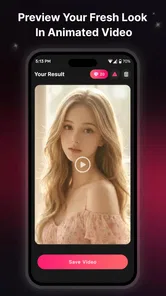
The video angle adds another kind of inspiration. A moving presentation can make a hairstyle feel more vivid than a single still, but it also invites a sensible question: does the motion clarify the cut, or merely make the result look more dramatic? I would judge the underlying shape and overall impression first. For a salon consultation, a clear still image may be easier to discuss than a stylized video.
A practical way to use it
For a useful experiment, I would begin with one clear photo and a specific goal, such as exploring a shorter outline or a softer fringe. I would change one idea at a time rather than asking for a complete transformation in a single prompt. That makes it easier to tell which part of the result I like and gives me something concrete to explain if I decide to book a haircut.
There is also value in saving a small set of contrasting ideas rather than collecting every attractive result. I would choose one conservative option, one more adventurous option, and perhaps a third that changes only the detail I am most curious about. Comparing those side by side helps separate a genuine preference from the novelty of seeing an AI makeover. It also gives a stylist room to suggest a realistic variation instead of treating the generated image as a rigid instruction.
A realistic everyday use would be opening the app before a routine haircut, while I am deciding whether to keep my current length or try something noticeably different. I could explore a few visual directions, choose the one that feels closest to my taste, and bring that reference to the appointment. If the generated look is impossible to reproduce exactly, it can still communicate the mood or shape I want.
It can also help when I am not booking a haircut yet. If I am simply curious about a change, I can use a quick experiment to decide whether the idea is exciting enough to research further, rather than treating a generated image as a commitment. That makes the app useful for low-stakes browsing as well as appointment prep, provided I keep the distinction between imagining and deciding clear.
What it does better than browsing alone
Compared with ordinary hairstyle galleries, the personal-photo approach can make exploration feel more connected to the person making the choice. Gallery photos are useful for showing a stylist a real cut on real hair, but it can be hard to picture how that look might translate to your own face. MANE offers a more immediate imaginative step, especially for someone who wants to test a direction privately before discussing it with another person.
Compared with general-purpose image tools, its beauty focus gives the experience a clearer purpose: trying hairstyle ideas rather than generating unrelated scenes. That focus is useful when I want a quick visual starting point. However, someone who needs precise control over technical details or dependable salon-reference photography may be better served by collecting real examples and asking a stylist to assess them. The AI route is faster for daydreaming; real reference images are stronger evidence of what a particular cut actually looks like.
My practical comparison is therefore not that one approach replaces the others. A gallery helps me see how a real style appears on someone with real hair; this app helps me picture an idea in a more personal way; a stylist can judge whether the idea is achievable and suitable. Combining those sources is more dependable than asking any single one to answer every question.
One practical trade-off is that generated results can make a style seem more settled than it is. Hair is affected by texture, density, growth patterns, and daily upkeep, so an attractive preview does not answer whether the look will be comfortable to maintain. I would use the app to discover preferences, then check the maintenance and suitability questions outside the app before making a major change.
Limits worth keeping in mind
The main limitation is the gap between a visual concept and a dependable prediction. AI can help me picture a direction, but I would not assume it has accurately represented how a particular cut behaves on my hair or how much styling it requires. If I am making a substantial change, a consultation remains more useful than trusting a generated result as a guarantee.
There is also a creative trade-off in text prompts. A broad description can produce an appealing direction, but it may not reflect the exact detail I had in mind. I would refine the request gradually and focus on one change at a time. If repeated attempts still do not capture the idea, I would switch to real reference pictures rather than spend too long trying to coax a perfect output from the app.
Cost is another reason to explore deliberately. The app is free to download, while in-app purchases range from $4.99 to $79.99 per item. I would try the basic experience first and decide whether the results genuinely help me before paying for anything. That is especially sensible if I only want a one-off hairstyle idea rather than a regular creative tool.
Before considering a purchase, I would decide what I expect to do with the app: test one haircut idea, explore looks regularly, or make videos for creative use. If I only want a quick visual nudge before one appointment, a paid option may not be worthwhile for me. Someone who expects to return to the tool often may judge that trade-off differently, but I would still want to see that the basic experience fits my needs first.
Because the app works with personal photos, I would also be thoughtful about which image I choose and whether I am comfortable using it for this kind of experiment. A casual, well-lit portrait is a sensible starting point; there is little reason to use a highly personal image just to test a style. Anyone who prefers not to use their own photo can begin with text-led ideas instead.
One question people may have is whether a text prompt can replace a photo entirely. It can be a useful way to explore a general concept when I do not want to start with a personal image, but it serves a different purpose: it helps me brainstorm rather than visualize a style on my own face. I would choose the starting point based on what I want to learn, not assume the two methods produce interchangeable answers.
Who will get the most from it
I think MANE is best for people who enjoy experimenting with their appearance but want a visual nudge before changing their hair. It can suit someone collecting ideas for a stylist, someone curious about a new look, or someone who wants to turn a passing thought into a more concrete image. The combination of photo and text starting points gives both cautious planners and imaginative browsers a way in.
It is particularly appealing if the hardest part of choosing a haircut is explaining what you mean. I would bring a generated result to an appointment and point out the element I like—the overall outline, the feeling of a fringe, or the degree of change—while making clear that I am open to a stylist’s practical adjustment. Used that way, it can turn an uncertain “maybe something different” into a more productive conversation.
It is less suitable for people who want guaranteed realism, professional hair analysis, or an exact representation of a future salon result. If you already know the cut you want, bringing clear photos of real examples is likely more efficient. And if you are choosing a style around specific practical needs, such as minimal daily styling or a particular hair texture, a stylist’s assessment should carry more weight than an AI preview.
I would also steer away from relying on it when the choice has important practical consequences that the image cannot answer, such as whether a style will fit a strict routine or work with a particular hair concern. In those cases, the better next step is direct professional advice, supported by real examples if helpful. The app can still be a creative starting point, but it should not be asked to resolve questions outside that role.
The app’s Everyone age rating and free download make it easy to explore, but those details do not change the basic advice: treat the output as creative guidance. I would not make a costly or difficult-to-reverse decision based solely on a generated image. The strongest use is as a conversation starter, especially when I can point to a result and explain what I like about it.
A measured recommendation
My view is that MANE: AI Hairstyle Pro has a clear, appealing niche: it makes hairstyle experimentation feel more personal and immediate than browsing alone. Its photo and text approaches encourage different kinds of exploration, while the video element adds a more animated presentation. The experience is most satisfying when I arrive with a specific question and use the result to narrow my options, rather than expecting a perfect salon simulation.
I would recommend giving it a try if you are curious about a new hairstyle and want a low-pressure way to explore possibilities. Keep a real-world reference or stylist’s advice in the loop, be selective about any optional spending, and remember that a striking preview is an idea—not a promise. For that purpose, MANE is a useful creative companion; for precise decisions about how your own hair will cut and behave, practical expertise is still the better guide.
MANE: AI Hairstyle Pro Frequently Asked Questions
What is MANE: AI Hairstyle Pro?
MANE: AI Hairstyle Pro is an AI-powered hairstyle app designed to help you preview different looks using a photo. Depending on the features available in your version, you may be able to explore hairstyles, lengths, colors, or other style variations. Treat its results as digital previews rather than exact predictions: lighting, hair texture, face angle, and image quality can all affect how realistic a transformation appears.
How do I get the best hairstyle preview in MANE: AI Hairstyle Pro?
Start with a clear, recent photo in which your face and hair are easy to see. Even lighting, a straightforward camera angle, and a simple background generally make it easier for an AI tool to produce a useful preview. Avoid hats, heavy filters, and hair covering your face. If the first result looks inaccurate, try another photo; the app’s output is a visualization, not a guarantee of how a hairstyle will look in real life.
Is MANE: AI Hairstyle Pro free to use?
The app’s pricing and available features can vary by platform, region, and version. Check its current store listing before downloading to see whether it offers free previews, paid features, a subscription, or in-app purchases. If a trial or recurring plan is presented, review its price, renewal terms, and cancellation instructions carefully. Do not assume that every hairstyle or export option is free just because the app can be downloaded without an upfront charge.
Does MANE: AI Hairstyle Pro upload or store my photos?
A hairstyle app may need to process an image to create a preview, but exactly how MANE: AI Hairstyle Pro handles photos should be confirmed in its current privacy policy and app-store disclosures. Before uploading a personal picture, check whether processing happens on your device or through online services, how long images may be retained, and whether they may be used to improve AI features. Only provide photos you are comfortable sharing under those terms.
Can I rely on MANE: AI Hairstyle Pro to choose a haircut or hair color?
Use MANE: AI Hairstyle Pro as an inspiration tool, not as a substitute for professional advice or an exact salon preview. AI-generated results can be affected by your photo and may not represent your natural hair texture, styling effort, or the precise color a salon can achieve. Save a preview you like and discuss it with a stylist, who can assess your hair condition, maintenance needs, and whether the cut or color is practical for you.
Pros
- Preview different hairstyles on your own photo before committing to a new look.
- Quickly explore styles without needing to visit a salon first.
- A convenient way to gather hairstyle ideas to share with a stylist.
- Useful for comparing how different cuts may suit your face.
- Can make hairstyle experimentation feel more approachable.
Cons
- Results may look different from your actual hair after a salon visit.
- Photo quality and lighting can affect the realism of previews.
- Some styles or features may require a paid plan or in-app purchase.
- AI previews may not account for your hair texture or thickness.
- Uploading personal photos may raise privacy concerns for some users.