Magic Beauty Makeup Camera
- 40.00
- 4.4
- Installs
- 500.00K
- Price
- Free

Screenshots


Analysis by Reviewed
I treat a beauty-camera app as a quick way to explore possibilities, not as a promise that a filtered portrait will match real life. Magic Beauty Makeup Camera is most appealing when I want to compare makeup or hair-color ideas without committing to them first. Its casual, try-it-and-see approach makes it easy to use for fun, but the results are best judged with a little care: lighting, screen color, and the strength of an effect can all change what looks convincing.
Network conditions can shape a session
I find beauty-camera apps most useful when I have a little time to experiment, rather than when I need a finished portrait immediately. With Magic Beauty, trying makeup, hair color, and face effects is best treated as a preview session: compare a few looks, check them in ordinary lighting, then decide whether one feels like you. That makes it handy before a video call, a casual profile refresh, or a night out when I want to test an idea without applying makeup first.
Because filters and photo tools can involve online services, I plan to use the app where my connection is steady instead of assuming every part will work without one. If a feature takes time to load, I avoid tapping repeatedly; I give it a moment and try again once the connection settles. That small habit can prevent a frustrating session and makes it easier to tell whether a delay is temporary.
Transform Your Photos Instantly
One of the first things I noticed about Magic Beauty Makeup Camera is its user-friendly interface. Even if you're not a tech whiz, you'll find it easy to navigate through its features. The app offers a wide range of makeup styles, from classic looks to trendy, vibrant styles. So, if you're in the mood for experimenting, this app gives you the freedom to play around until you find the look that suits you best.
What the beauty tools are useful for
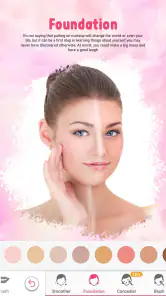
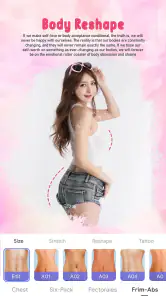
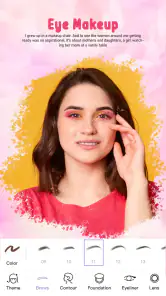
The app is packed with features that are both fun and functional. The real-time makeup feature is a game-changer. As someone who loves taking selfies, I found this feature incredibly useful. You can see how different makeup styles will look on you before snapping the photo. The app also boasts a skin smoothing option, which is perfect for those days when your skin isn't cooperating.
Moreover, the app includes a variety of beauty filters and effects that can transform any ordinary photo into something Instagram-worthy. Whether you want to brighten up your face or add a hint of color to your cheeks, the Magic Beauty Makeup Camera ensures that you never have a dull photo moment.
Make comparisons that stay useful
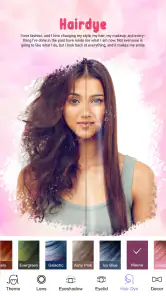
A useful way to get more honest previews is to take the same selfie in consistent light before switching styles. I look at the overall impression, not just whether a filter makes skin look smoother: a strong effect can hide texture, while a softer one may keep the result closer to a real-life look. For hair-color experiments, I treat the result as inspiration rather than a reliable prediction of how dye will appear in person, since screen color and lighting can change what I see.
More From Our News Desk

Clash of Clans Is Won Between the Battles

Android Auto Makes the Case for Quieter Car Software

MobiOffice: Transforming Mobile Productivity with Seamless Integration

EA SPORTS FC™ Mobile Soccer: Redefining Mobile Sports Gaming

How Microsoft OneDrive Became a Mobile Productivity Giant

How Google Translate Breaks Language Barriers Effortlessly
If the camera view or an effect seems stuck, I first check whether the phone has a stable connection, then close and reopen the app if it still does not respond. I would not keep editing an important image until I know it has been saved where I expect. For a quick social post, the built-in style changes may be convenient; for detailed retouching, precise color work, or layered edits, a dedicated photo editor usually gives more control.
How it compares with other beauty apps
Compared with a general photo editor, Magic Beauty is aimed more at trying a look than carefully finishing an image. That difference matters: when I want to preview makeup or a possible hair shade, a focused beauty camera is a more direct place to start than a tool built around cropping, exposure, and layers. When I need those deeper adjustments, though, I would switch to a conventional editor rather than expecting this app to provide the same fine-grained control.
It also serves a different purpose from applying makeup in person or asking a stylist for advice. A digital preview is quick and low-commitment, but it cannot tell me how a product feels on my skin or how a hair color will behave under different lights. I use the app to narrow down ideas and communicate a preference, not to make a final decision about a major change.
Good fits, and a few practical limits
What really sets this app apart is its ability to enhance photos without making them look overly edited. The changes appear natural, which is something I really appreciate. Plus, the app continuously updates its features, so there's always something new to try out. It's like having a makeup artist in your pocket!
Another aspect I love about the app is its accessibility. Whether you're an Android or iOS user, you can easily download and start using it without any hassle. The app also allows you to share your edited photos directly to social media platforms, making it seamless for those who love showcasing their looks online.
A realistic way to use it before heading out
For a practical everyday example, I might use it at home before meeting friends: take a selfie near a window, compare a natural makeup option with a bolder one, and keep the version that still looks believable when I step away from the screen. It is also a lighthearted way to show a friend a possible hair shade before making a salon decision, though I would never rely on a filter alone for that choice. These small comparisons are more useful than applying several effects at once, which can make it hard to tell what actually improved the photo.
One useful habit is to change one thing at a time. I would first settle on a makeup direction, then consider a face effect or hair shade separately. If I stack changes before looking at the original again, it becomes difficult to judge whether I like the individual treatment or just the more dramatic overall image. Keeping an unedited reference nearby also helps me avoid confusing a flattering preview with a realistic result.
The app is a better match for someone who wants a playful, fast portrait experiment than for someone building a carefully consistent set of professional images. If I were preparing a portfolio or product photo, I would want control and repeatability that a casual beauty tool is not designed to prioritize. For a quick personal post, a profile-photo idea, or a private comparison to discuss with a friend, its lighter workflow makes more sense.
Who may want another option
Beauty Hut’s app is free, has an Everyone age rating, and is currently at version 8.2.5, with Android 7.0 as its minimum OS. It has a 4.4 average from around 3,200 ratings, and more than 500,000 installs. Those figures suggest it has found an audience, but popularity does not guarantee that its look will suit everyone. I would skip it if I wanted professional-grade retouching, precise control over every edit, or a dependable no-connection workflow. Anyone who is cautious about sharing face images should also review the app’s current privacy details and phone settings before using it.
For a data-conscious session, I would choose the photo deliberately rather than browsing through a whole camera roll, and I would think before sharing a face image beyond the app. A beauty preview can feel casual, but the image is still personal. If privacy choices are a deciding factor, checking the current app and device settings before starting is a sensible step; if those choices do not meet your comfort level, a local editing workflow you already trust may be preferable.
It is also worth separating a temporary connection hiccup from a problem with the image itself. If an effect stalls, I would wait, check the connection, and reopen the app only if needed, rather than repeatedly selecting the same option. For anything I care about keeping, I would confirm the edited result is saved before closing the session. That simple check is more useful than assuming a preview has automatically become a stored photo.
My connectivity verdict
All in all, Magic Beauty Makeup Camera is a must-have for anyone who loves photography and makeup. Its variety of features and ease of use make it a standout app in the beauty category. So, if you're looking to elevate your photo game, give this app a try. You won't be disappointed!
My recommendation is to think of it as a casual beauty preview tool, not a replacement for a camera editor or a real makeup trial. It is strongest when I have a steady connection, good light, and a clear idea of what I want to compare. The app comes from Beauty Hut and was released on November 23, 2022; those details place it in the established beauty-app space, but my decision would still come down to whether its playful, quick approach matches how I edit. If you want easy experimentation before sharing a selfie, it is worth trying. If control, privacy certainty, or offline reliability matters most, another kind of editor may be the better fit.
Magic Beauty Makeup Camera Frequently Asked Questions
Does Magic Beauty Makeup Camera need access to my camera and photos?
Camera and photo access are useful for trying makeup looks on a live view or editing pictures saved on your device. Before installing, consider which features you want to use and review the permission prompts when they appear. You can choose whether to grant access, while keeping in mind that declining a permission may limit the related camera or photo-editing functions.
What is Magic Beauty Makeup Camera and how does it work?
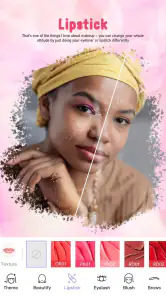
Magic Beauty Makeup Camera is a photo editing app designed to enhance your selfies and photos with a variety of virtual makeup tools. The app uses advanced facial recognition technology to apply makeup in real-time, allowing you to try different looks with ease. You can choose from various filters, lipstick shades, blush, and more to create the perfect photo-ready appearance before saving or sharing your images.
Is Magic Beauty Makeup Camera free to use?
Yes, Magic Beauty Makeup Camera offers a free version that provides access to basic features. However, to unlock premium features such as additional makeup tools, filters, and ad-free usage, you may need to purchase a subscription or make in-app purchases. The pricing details for these features are available within the app's store listing on both Android and iOS platforms.
Can Magic Beauty Makeup Camera be used offline?
Magic Beauty Makeup Camera requires an internet connection for downloading new filters and updates, as well as for certain features that rely on online processing. However, once the necessary filters and tools are downloaded, you can use the app's basic features offline. Bear in mind that some advanced editing options may still require an active internet connection.
What devices are compatible with Magic Beauty Makeup Camera?
Magic Beauty Makeup Camera is compatible with most Android and iOS devices that support photo editing applications. It requires a minimum operating system version, typically Android 5.0 or iOS 10.0, to function smoothly. Always check the specific app requirements on the Google Play Store or Apple App Store to ensure your device can run the app effectively.
Pros
- User-friendly interface with intuitive controls.
- Wide variety of makeup styles and filters.
- Real-time makeup application for perfect selfies.
- High-quality image processing and enhancements.
- Free to download with optional in-app purchases.
Cons
- Occasional ads may interrupt user experience.
- Limited features in free version.
- In-app purchases can be expensive.
- Some filters may look unnatural.
- Requires a good camera for best results.
- Category
- Beauty
- Version
- 8.2.5