

MacroPoint for Truckers
- 4.35K
- 4.5
- Installs
- 1.00M
- Price
- Free

Screenshots

Analysis by Reviewed
Hey there, fellow truckers! If you’re like me, always on the road and trying to find ways to make our lives a tad easier, then you might have already heard of MacroPoint for Truckers. If not, buckle up because this app could be a game-changer for us truckers navigating the highways and byways.
Where it fits into a working day
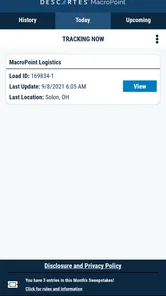
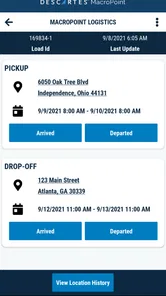
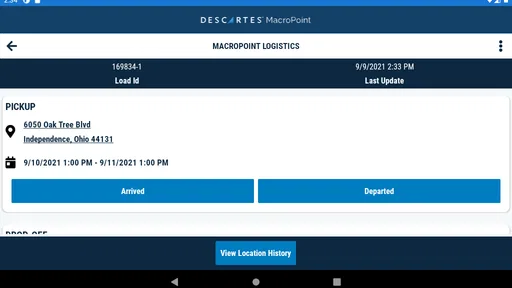
I see the strongest case for MacroPoint when a driver’s progress needs to be visible to other people without turning every milestone into a phone call. Descartes Intl. makes this free Maps & Navigation app for drivers and transport partners. It automatically shares arrival, departure, and location information, so it is best understood as a coordination tool rather than a general-purpose route planner.
Picture a delivery day with several stops and a dispatcher who needs to know whether the truck has left one site and reached the next. Automatic status updates can reduce the need for a driver to stop, find a number, and report each change manually. I would still treat the app as one part of the job: follow the route and site instructions you have been given, and use the usual contact method if a delay or an unusual situation needs explanation.
That distinction matters when comparing it with familiar navigation apps. A standard map app is usually the more natural choice when the main task is choosing a route or finding a destination. MacroPoint’s value is the shared movement and status information around a load. If you are an independent driver who rarely reports progress to a customer or dispatch, that extra coordination may not justify another app on your phone.
There is also a useful middle ground between relying on it for everything and ignoring it. I would use it for predictable milestones that someone else needs to see, then reserve a call or message for information that needs context. For example, an arrival notice can communicate that the truck reached a site, while a short direct explanation can clarify that the entrance is blocked or the receiving team has asked you to wait. Separating routine reporting from exceptions keeps the tool in its lane.
What’s the Buzz About?
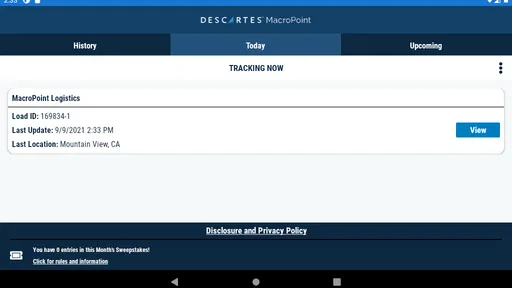
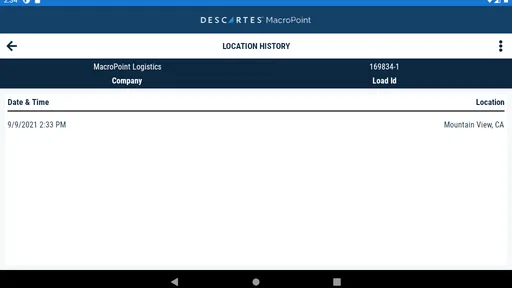
So, what exactly is MacroPoint for Truckers? Well, it’s a nifty little app designed to help us track our loads in real time. Imagine having the power to know exactly where your shipment is at any given moment! It works by integrating with your mobile device to provide frequent updates on your load’s status, making it super handy for both drivers and dispatchers alike.
Simplifying Load Management
One of the standout features is the real-time tracking. I’ve been on the road long enough to know how much time can be wasted just waiting around for load updates. With this app, you get automatic updates, which means less time on the phone and more time focusing on the drive. Plus, it’s not just about tracking; it also helps in managing loads efficiently by providing detailed delivery instructions and updates.
More From Our News Desk

 Weather - By Xiaomi
Weather by Xiaomi Review: Clear at a Glance, Less Clear Up Close
Xiaomi’s weather app makes everyday forecasts quick to scan, but its calm surface can leave useful details and recovery paths harder to find than they should be.

 X
XX Under Pressure: Can It Recover When Posting Goes Wrong?
A resilience-focused review of X, examining setup, mistaken posts, interruptions, weak connections, and the gaps that matter when recovery needs to be dependable.

 Clash of Clans
Clash of Clans Is Won Between the Battles
Its raids are quick; its community is a long-term project of coordination, teaching, rivalry, and shared responsibility—with all the friction that entails.

 Android Auto
Android Auto Makes the Case for Quieter Car Software
The car interface is no longer judged by how much it can do, but by how quietly it helps. Android Auto shows what drivers now expect—and what still gets in the way.

 MobiOffice: Word, Sheets, PDF
MobiOffice: Transforming Mobile Productivity with Seamless Integration
MobiOffice: Word, Sheets, PDF is redefining mobile productivity with a surprising blend of functionality and innovation.

 EA SPORTS FC Soccer Mobile 26
EA SPORTS FC™ Mobile Soccer: Redefining Mobile Sports Gaming
Dive into EA SPORTS FC™ Mobile Soccer, where immersive gameplay and strategic depth transform mobile sports gaming.
Latest News



One practical habit I’d recommend is checking the load and delivery details before setting off, while safely parked. That gives you time to spot a mismatch between the information in the app and the instructions you already have, rather than trying to resolve it at a gate or in traffic. Automatic updates can help with routine progress reports, but they are not a substitute for confirming a changed appointment or explaining why a stop is taking longer than expected.
For a driver covering several stops, this distinction can make the working day feel more orderly. Before leaving a stop, I’d check what the next handoff requires and make sure I know which updates are routine and which situations call for a direct conversation. That small pause can prevent a common kind of confusion: assuming that a location marker has communicated a new plan when it has only shown where the truck is. The strongest workflow is to let automatic reporting handle the ordinary movement, while keeping the driver responsible for decisions and exceptions.
Easy to Use Interface
Now, I’m not the most tech-savvy person out there, but the user interface of this app is refreshingly simple. Everything is laid out clearly, so you don’t need a degree in rocket science to figure it out. From setting it up to navigating through its features, everything is pretty intuitive, which is a big win in my book!
For readability, a simple layout is useful when you only need to check a load status quickly, but the real test is whether you can do that without taking attention from the road. I’d make any necessary checks before moving and avoid handling the phone while driving. If small text, glare, or a busy screen makes phone use difficult, a familiar, larger display or help from someone while parked may be more comfortable; the app should not be treated as a reason to compromise safe driving.
That advice applies to more than screen size. Drivers who find touch controls awkward, who are dealing with fatigue, or who have difficulty reading a display in changing light should plan their checks around safe stops rather than trying to make the interface work under pressure. A passenger or dispatcher can help interpret a status while the vehicle is parked, but I would not assume another person can operate the app on the driver’s behalf unless that fits the carrier’s established process. Accessible use is partly about the interface and partly about giving yourself enough time and a safe setting to use it.
Staying Connected
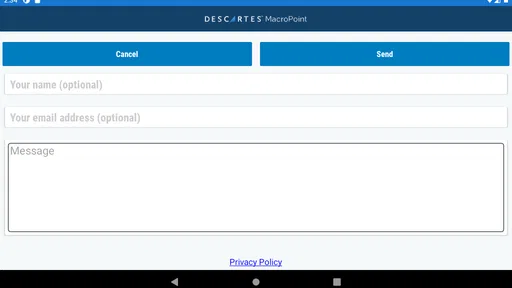
Another cool feature is the communication aspect. The app allows you to stay connected with your dispatchers without the constant back and forth of phone calls. You can send and receive messages directly through the app, which helps in reducing misunderstandings and keeping everyone on the same page. It’s like having a little dispatcher in your pocket, always ready to help!
That can be especially handy when a dispatcher needs a simple status update while you are waiting at a loading area. I would keep messages short and factual, and leave longer explanations for when the truck is parked. A useful trade-off is that a shared status can answer routine “where are you?” questions, but a map position alone cannot explain a closed entrance, a queue, or a change in unloading plans.
In practice, the value of communication depends on how the people on both ends use it. If dispatch needs a simple progress signal, automatic sharing can avoid interrupting the driver for a routine check. If a message requires a decision, such as choosing how to handle a delay, I would want a clear exchange rather than assuming that a status change is enough. That is also why I would not treat the app as a replacement for every phone call: a short conversation can be more effective when the issue is unusual or time-sensitive.
Moreover, the app is designed to consume minimal data, which is always a concern when you’re relying on mobile data out on the road. It doesn’t hog your phone’s resources, which means you can use it without worrying too much about running out of data or battery.
As with any location-based work tool, I’d make sure I understand when it is expected to be active and how its updates fit into the load workflow before relying on it for a time-sensitive handoff. On a route through patchy coverage, I would not assume that a location update has reached everyone instantly; if a delivery change depends on confirmation, contact dispatch directly using the agreed method. That is a sensible backup, not a criticism of automatic reporting.
The app is free, has an Everyone content rating, and is available on Android with a minimum operating system requirement of 6.0. Its current version is 25.10.08. It has a 4.6 average from around 64,000 ratings and more than a million installs, which suggests that many users find this kind of coordination useful. Those figures do not tell me whether it suits every carrier’s process, though, so I’d first check that the people handling your load expect you to use it.
That first check matters if you are new to a load or switching between different customers’ routines. I would ask who expects the updates, when the app should be active, and what to do if a status appears not to match the latest instruction. That is more useful than installing it and hoping the workflow becomes obvious on the road. The app’s purpose is specific enough that its usefulness depends on the partner’s process as much as on the driver’s phone.
When a different tool is the better fit
MacroPoint is not the choice I would reach for if my main problem were selecting a truck-appropriate route, finding a fuel stop, or navigating to an unfamiliar address. Those are the jobs a dedicated navigation app is meant to handle. Here, the central benefit is keeping movement and milestones visible to people involved in a load. Using the two kinds of tools side by side can make sense: navigation helps the driver get to the destination, while load coordination helps others follow progress.
It is also less useful when there is no partner expecting status information. An owner-operator who handles straightforward local work and already has a reliable way to report arrival may gain little from another layer of coordination. The opposite is true for a driver who regularly fields progress calls during a multi-stop day; reducing routine interruptions can be worthwhile, provided the dispatcher and driver agree on how to handle exceptions.
A realistic example is a driver leaving a pickup late in the afternoon with a delivery planned at another site. While parked, the driver can review the next instructions and ensure the relevant load details are clear. Once the trip is underway, the shared location and milestone updates can give dispatch a view of progress without asking for repeated manual reports. If traffic, a site queue, or a changed instruction alters the plan, the driver should stop safely and explain the situation directly rather than expecting a position update to tell the whole story.
One less obvious benefit is that this approach can help keep a driver’s attention on the work that needs human judgement. A status update can communicate movement, but it cannot decide whether a revised appointment is workable, whether a loading delay changes the plan, or which instruction takes priority. I would treat the app as a way to reduce repetitive reporting, not as a decision-maker. That boundary makes it easier to use without giving a location tool more authority than it deserves.
Situational access and remaining barriers
Location-based reporting is most useful when the phone can connect and the driver can check it safely. At a busy terminal, a driver may have limited time to compare a load update with the site’s instructions; on a long route, coverage may be uneven. I would prepare before departure, keep a familiar way to contact dispatch, and avoid making a time-sensitive plan depend on an update arriving at exactly the right moment. This is a practical safeguard for any work app that shares progress from a mobile device.
There is a privacy and comfort trade-off too. Some drivers will appreciate not having to explain their position repeatedly, while others may be uneasy about location sharing as part of a job. I would clarify the work expectations with the people handling the load before relying on the app, and make sure I understand when location reporting is relevant to the assignment. If sharing location is not part of the driver’s agreed workflow, a conventional contact routine may be a better fit.
For people who rely on spoken instructions, larger text, or a particular way of interacting with a phone, the best preparation is to make the workflow predictable. Review the information when parked, keep key delivery instructions available in a format that works for you, and ask dispatch to confirm anything that is ambiguous. I would not assume that automatic updates remove the need for an accessible way to receive changing instructions; they mainly help communicate progress.
The main friction, then, is not that every driver needs a complicated setup. It is that an app built around shared load visibility only works smoothly when the driver, dispatcher, and other partners understand the same process. If expectations are unclear, a driver may be left wondering whether a status is enough or whether a call is required. A brief agreement at the beginning of a load can prevent that uncertainty and keep attention where it belongs: on safe, careful driving.
Wrap Up
In conclusion, MacroPoint for Truckers is more than just a tracking app; it’s a tool that makes life on the road a bit easier. Whether you’re an independent driver or part of a large fleet, this app helps streamline the load management process, saving you time and reducing stress. So, if you’re looking to up your trucking game, give this app a go. Safe travels, my friends!
My recommendation is strongest for drivers whose loads involve regular coordination with dispatchers or other partners, particularly when repeated progress calls interrupt a busy day. It is less compelling if you only need directions, prefer not to share location as part of work, or have no partner asking for status updates. In those cases, a conventional navigation app or the communication routine you already use may be the better fit. For drivers who do need shared load visibility, MacroPoint offers a focused way to keep routine updates moving while leaving judgement, safety, and direct conversations where they belong: with the driver.
For me, the inclusive verdict is practical rather than absolute: the app can support a more predictable reporting routine, but it cannot make every phone interaction comfortable or every work setting accessible. Drivers with different reading, motor, or sensory needs should decide whether the way they use a phone on the road suits them, and arrange safe alternatives for checks and communication when it does not. Used within a clear load workflow, it can take routine status reporting off the driver’s hands without taking away the driver’s responsibility to judge what the situation actually requires.
MacroPoint for Truckers Frequently Asked Questions
What kind of information does MacroPoint for Truckers share with logistics partners?
MacroPoint for Truckers is built around communicating a driver's location and load progress to logistics partners. Its core role includes sharing arrival, departure, and location information, which can help partners follow a shipment without relying only on manual check-ins. Before downloading, consider whether this kind of visibility fits the way you coordinate trips and loads.
Will I need a logistics partner to use MacroPoint for Truckers?
MacroPoint for Truckers is intended for drivers sharing load progress with logistics partners, such as brokers and shippers. Its usefulness therefore depends on the coordination process around your work: partners need to be part of the communication workflow for shared location and status information to serve its purpose. It is best viewed as a work-focused tool rather than a general-purpose navigation app.
Is MacroPoint for Truckers free to download, and who is it intended for?
MacroPoint for Truckers is a free Maps & Navigation app from Descartes Intl. It is intended for truck drivers who need to share load progress with their logistics partners. Its content rating is Everyone, so the app is not restricted to an adult audience. Before downloading, check that your device meets the app’s operating-system requirement.
What is MacroPoint for Truckers?
MacroPoint for Truckers is a robust mobile application designed to enhance the tracking and management of loads for truck drivers. It allows drivers to share their location in real-time with brokers and shippers, ensuring seamless communication and efficient logistics management. The app is tailored to meet the needs of truck drivers, providing them with tools to improve their operations on the road.
How does MacroPoint for Truckers improve tracking and communication?
MacroPoint for Truckers enhances tracking and communication by enabling real-time location sharing and status updates directly from the driver's mobile device. This feature allows brokers and shippers to monitor the progress of their loads without constant check-ins. The app also facilitates instant messaging, reducing the need for multiple phone calls and improving overall efficiency.
Pros
- User-friendly interface simplifies navigation.
- Real-time location tracking enhances reliability.
- Automated updates reduce manual entry.
- Supports multiple languages for global use.
- Custom alerts keep drivers informed.
Cons
- Requires constant internet connection.
- Can drain battery with continuous use.
- Limited offline features available.
- Some features hidden behind paywall.
- Occasional sync issues reported.











