Luxer One
- 1.72K
- 3.1
- Installs
- 500.00K
- Price
- Free

Screenshots

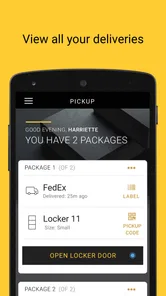
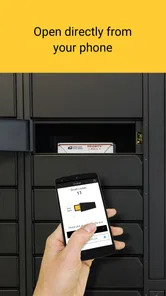
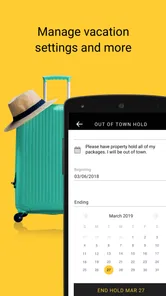

Analysis by Reviewed
Receiving a parcel is usually the easy part; finding a convenient moment to collect it is what causes trouble. Luxer One is a free lifestyle app from Luxer One that turns package collection into a more organized routine when your building uses the company’s locker system. I found its value less in flashy extras and more in reducing the small uncertainties around a delivery: whether the parcel is ready, where it has been placed, and what I need to do when I arrive.
The app is available to everyone in its content rating, and it has grown into a fairly familiar option, with over 500 thousand installs. Its average rating sits at 3.2 from around 4.5 thousand ratings, which tells me the experience is useful for many residents but not universally smooth. That makes sense because the app depends heavily on the locker installation and delivery process at a particular property. When those pieces work together, it can be genuinely convenient. When they do not, the app cannot solve every problem by itself.
How the everyday pickup workflow feels
The basic routine is straightforward. A parcel is delivered to a Luxer One locker, the app helps me identify that it is ready, and I use the available pickup instructions to collect it. Instead of checking a shared mailroom or wondering whether a carrier left something at reception, I can treat the locker as a defined handoff point. For apartment residents who receive several online orders, that change in routine is more important than it may first appear.
My preferred habit is to open the app when I have a realistic chance to collect the package, rather than checking it repeatedly throughout the day. That keeps the process practical: I confirm the delivery, gather anything else I need before leaving, and make one trip. The app is at its best when it becomes part of that simple loop instead of another notification demanding constant attention.
A realistic example is an evening return from work. I might already know that a delivery is expected, but I do not want to detour to the locker area unless it has actually arrived. Once the app indicates that the parcel is available, I can decide whether to pick it up immediately or wait until the next time I pass through the building. That small decision is where the service earns its place. It turns package collection into a planned action rather than a guess.
There is also a useful distinction between delivery tracking and locker pickup. The app is focused on the latter. It is not a replacement for the retailer’s order page or the carrier’s full tracking history. I still use those other sources when I need to understand a shipment’s wider journey. Luxer One becomes most useful at the final stage, when the question changes from “Where is my order?” to “Can I collect it now, and how do I access it?”
That division of responsibility is worth remembering before installing it. If your building does not use Luxer One lockers, the app will not become a universal parcel manager. Its usefulness is tied to the property and delivery arrangement around you. For someone living in a participating building, that specialization is a strength. For someone looking for one app to manage every carrier and every delivery address, it is a reason to choose a broader alternative instead.
More From Our News Desk

Weather by Xiaomi Review: Clear at a Glance, Less Clear Up Close

X Under Pressure: Can It Recover When Posting Goes Wrong?

Clash of Clans Is Won Between the Battles

Android Auto Makes the Case for Quieter Car Software

MobiOffice: Transforming Mobile Productivity with Seamless Integration

EA SPORTS FC™ Mobile Soccer: Redefining Mobile Sports Gaming
Start by making the account and property details dependable
The first practical step is to make sure the app is connected to the correct residential location and that the contact details used for delivery notifications are current. A package workflow can feel unreliable when the underlying account information is outdated, even if the locker itself is working properly. I would check this early, especially after moving, changing phone numbers, or using more than one address.
It is also sensible to keep the retailer’s delivery address consistent with the address associated with the locker service. A tiny difference in apartment information can create confusion that looks like an app problem but actually begins during checkout. Experienced users reduce that risk by saving one carefully checked address in their shopping accounts and reviewing it before placing an order.
Another good habit is to treat the app notification as a prompt to verify the pickup situation, not as permission to forget the package entirely. I still look at the order details when timing matters, particularly for something urgent or temperature-sensitive. The locker app helps with collection, but it does not replace common sense about what was ordered or how long it should remain unattended.
Settings and phone habits that are worth checking
The most valuable settings are the ones that affect whether I notice a pickup message at the right time. I would review notification permissions on the phone, check that alerts are not being silenced by a focus mode, and make sure the app is not being aggressively restricted in the background. These are ordinary phone controls, but they matter here because a missed notification can turn a convenient pickup into a delayed one.
I would also look at the app’s notification behavior after the first delivery. If alerts are too frequent, changing the phone’s notification presentation is better than ignoring every message. The goal is a clear signal when a parcel is ready, while avoiding so much noise that an important update disappears among unrelated alerts. This is one of the easiest ways to make the service feel calmer without changing the locker itself.
Privacy-conscious users should take a moment to understand what information they are comfortable keeping in a package-management app. I prefer to share only what is needed for the locker relationship and to keep my phone protected with a screen lock. That is not a criticism unique to Luxer One; it is simply sensible whenever an app is connected to deliveries, addresses, and access to a physical collection point.
Before heading downstairs, I would open the app while connected to a reliable network and let the relevant pickup information load. This is a small precaution rather than a guarantee, but it avoids discovering at the locker that the phone has poor reception or that the app needs to refresh. I also keep the phone charged enough for a short collection trip. A digital access process is convenient only when the device is ready to participate.
The app runs on devices using at least iOS or Android version 12, and the current version is 6.0.15. That means compatibility is not something I would overlook when helping an older family member or using an aging phone. If the device cannot run the required operating system, the practical solution is to use the building’s other approved pickup method, if one is available, rather than assuming an update will fix everything.
Repeatable patterns that make collection faster
The quickest users do not necessarily tap faster; they remove unnecessary decisions. I like to group pickups with routine trips, such as leaving for work, taking out recycling, or returning from shopping. When the locker is already on the route, the app becomes a confirmation step instead of a separate errand. This is especially helpful for residents who receive multiple smaller parcels during the week.
A second useful pattern is checking the app before putting on shoes or leaving the apartment. If the parcel is not ready, I have saved a wasted trip. If it is ready, I can take any identification or phone accessories I may need and go once. That habit sounds obvious, but it is the difference between using the app as a convenience tool and using it as a source of last-minute interruptions.
For households that share responsibility, I would agree on a simple rule about who checks the app and who collects deliveries. Repeatedly opening the app on several phones can create uncertainty about whether someone else has already handled the parcel. A shared household routine, with one person acknowledging the pickup plan, is often more effective than everyone reacting independently.
Another practical tip is to separate urgent packages from ordinary ones in my own planning. If an item is needed that day, I check the retailer’s order information as well as the locker status and collect it promptly. For routine purchases, I wait until a convenient route. This avoids treating every notification as equally urgent and helps preserve the main benefit of a locker: flexibility.
I would not use the app as a substitute for checking the physical collection area when something seems unusual. If the parcel is marked ready but the locker interaction does not proceed as expected, I would first confirm the correct account and delivery, then follow the property’s support route. Repeated tapping is rarely a solution. The faster response is to identify whether the issue is the app, the locker, the delivery record, or the building’s local process.
Where the convenience has real limits
The biggest limitation is that Luxer One cannot control every part of the chain. A retailer can enter an address incorrectly, a carrier can delay a delivery, or a building can have a crowded locker area. The app may accurately reflect the state it has received while the overall experience still feels disappointing. I think users get the best results when they see it as the access and notification layer of a locker service, not as a guarantee that every parcel will arrive perfectly.
The 3.2 average rating also suggests that expectations need to be realistic. A middling score does not tell me that the app is unusable, but it does warn against assuming that every resident will have the same experience. Property-specific setup, phone compatibility, notification behavior, and local support can all influence satisfaction. I would judge it by how consistently it helps at my own building rather than by the rating alone.
It is also not the right choice for people who prefer a single inbox containing deliveries from every carrier, retailer, and address. A general parcel-tracking app may be better for that job because it focuses on shipment visibility across services. Luxer One is narrower and more operational: it matters most at the point where a package has reached a participating locker and needs to be collected.
Residents who rarely receive packages may not gain much from installing another app. If I collect one parcel every few months and the building already provides clear alternative instructions, the extra account and notifications may not be worthwhile. On the other hand, frequent online shoppers, people with irregular schedules, and residents who want to avoid unattended doorstep deliveries have a stronger reason to use it.
There is a human limitation as well. The system works best when everyone in a household understands the same process. If one person expects a receptionist, another expects a shared mailroom, and a third assumes the app handles all tracking, confusion follows. A short explanation of where the parcel goes, how notifications are handled, and who normally collects it can prevent more trouble than any advanced setting.
Who should use it, and who should look elsewhere?
I would recommend Luxer One to someone living in a building with its lockers already installed, especially if deliveries are frequent or the resident is often away when carriers arrive. The app gives that person a repeatable way to know when a package is ready and to plan collection around real life. It is also a sensible option for anyone who dislikes parcels being left in exposed or inconvenient places.
I would be more cautious recommending it to a person who wants detailed, all-in-one shipment tracking. That user should keep relying on retailer and carrier tools, or consider a broader tracking app, because the locker workflow is only one part of delivery. I would also hesitate if the person uses an older device below the supported operating-system requirement or rarely has access to the participating property.
The free price removes the financial barrier to trying it, which is helpful when the building already depends on the service. Still, “free” does not mean frictionless. The real cost is attention: maintaining the right account details, noticing notifications, keeping the phone usable, and following the building’s process. For regular users, that effort is small. For occasional users, it may feel like more administration than the problem requires.
My verdict after building a reliable routine
Luxer One succeeds when I use it as a focused tool rather than expecting it to be a complete delivery command center. Its best qualities are practical: it connects the notification with the physical locker, supports a predictable pickup routine, and makes it easier to collect parcels on my schedule. The developer, Luxer One, has kept the app centered on that specific job instead of turning it into a crowded lifestyle platform.
My advice is to set it up carefully, check notification behavior, keep the phone ready before visiting the locker, and combine pickups with trips I was already going to make. Those habits matter more than repeatedly opening the app or expecting it to resolve carrier mistakes. The real advantage is not just knowing that a parcel arrived; it is turning that information into a low-effort routine.
Released on October 2, 2019, the app has had time to become an established part of the locker experience, while version 6.0.15 shows that it remains actively maintained as a current mobile tool. I would not call it essential for everyone, and the average rating reflects that the experience can vary. But for the right resident, particularly one in a busy apartment building, it is a useful bridge between online ordering and a more controlled collection process.
In my view, the decision is simple: use it if your building’s Luxer One lockers are part of your normal delivery routine, and skip it if you need universal tracking or do not receive enough parcels to justify another app. When the service matches your living situation, the small habits around notifications, timing, and shared household responsibility make it noticeably better. That is where Luxer One earns my recommendation—not as a replacement for every delivery tool, but as a practical way to make locker pickup feel predictable.
Luxer One Frequently Asked Questions
What devices can I use with Luxer One?
Luxer One is a lifestyle app for residents, employees, and students who receive deliveries through a participating package room or locker system. The current version is 6.0.15, and the app requires Android or iOS 12 or later. Before downloading, check that your device meets this requirement and that your property or organization uses Luxer One for package pickup.
Who can use the Luxer One app?
Luxer One is intended for people whose building, workplace, campus, or other property uses the Luxer One package management system. Having the app alone does not provide access to a locker or package room; your location needs to be set up with the service and your delivery details must be associated with its system. The app is free to download and is rated for Everyone.
What is Luxer One and how does it work?
Luxer One is a package management service that allows residents, employees, and students to receive deliveries in secure lockers or package rooms. After a carrier delivers a parcel, the system usually sends an email, text message, or app notification with instructions and an access code. You can then visit the designated location, enter the code or scan the required option, and collect your package from the assigned compartment.
Do I need the Luxer One app to collect a package?
The app is not always required, because many Luxer One locations also support pickup through a text message, email notification, access code, or touchscreen kiosk. However, installing the app can make the process more convenient by keeping delivery notifications, pickup details, and account information in one place. Available features may vary depending on how the property or organization has configured its Luxer One system.
Is Luxer One free to download and use?
The Luxer One app is generally free to download from the official Android or iOS app store. However, your building, workplace, campus, or property manager may apply separate package handling, storage, oversized-item, or delivery-related fees. These charges are not necessarily controlled by the app itself, so it is worth checking your location’s package policy before relying on the service for frequent or large deliveries.
Pros
- Convenient mobile access for opening doors and checking package status.
- Delivery notifications help users know when parcels arrive.
- Supports multiple properties and locations from one account.
- Package history makes it easy to track previous deliveries.
- Contactless pickup reduces unnecessary interaction with staff.
Cons
- Availability depends on your building using Luxer One lockers.
- Some features may require Bluetooth
- location
- or notification access.
- Locker compartments can fill up during busy delivery periods.
- Oversized packages may need separate handling or pickup arrangements.
- App usefulness is limited if delivery details are entered incorrectly.











