

Locaty - GPS Location Share
- 7.00
- 3.8
- Installs
- 100.00K
- Price
- Free
Screenshots
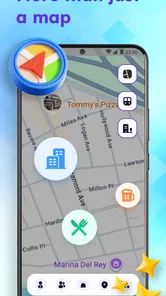
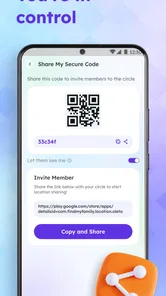
Analysis by Reviewed
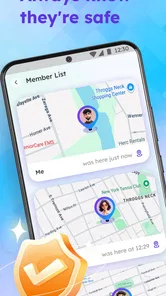
I tried Locaty as a straightforward way to keep selected people informed about where I am, and I came away seeing it as a focused addition to the Maps & Navigation category rather than a replacement for a full navigation suite. Its central appeal is simple: location sharing, safety alerts, and related check-ins are gathered in one place instead of being scattered across conversations and separate map tools. That makes it potentially useful for families, friends meeting in unfamiliar places, and anyone who wants a clearer routine for letting others know they are safe.
Locaty is a free app from XFree Dev Team, with optional in-app purchases priced from $2.99 to $12.99 per item. That distinction matters. I would begin with the free access before spending anything, because the practical value depends less on the app’s presence on your phone and more on whether its sharing and alert workflow fits the people you actually need to contact. It is rated for Everyone, runs on Android 7.0 or later, and its current version is 1.0.10.
How Locaty fits into everyday location sharing
In use, I think of Locaty as a communication layer built around whereabouts. A normal map application is mainly concerned with finding a place, planning a route, or showing traffic. A messaging application is mainly concerned with conversation. Locaty sits between those habits: it is intended to make location updates and safety-related alerts easier to organize when a simple “I’m here” message is not enough.
That focus gives it a different purpose from turn-by-turn navigation. If I am driving somewhere unfamiliar, I would still expect a dedicated navigation service to be better for route guidance. If I am sending a one-time location to a friend, a messaging app may be quicker. Locaty becomes more interesting when location sharing is part of a repeated routine: meeting someone, checking that a family member arrived, or keeping a trusted person informed during an outing.
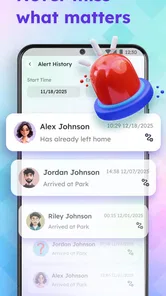
The app’s store summary emphasizes staying connected, sharing location safely, and setting alerts. I would treat those as the main reasons to install it, not as evidence that it replaces every other safety or mapping tool. The most useful question is therefore not “Does it have a map?” but “Will it make my location-sharing habit more deliberate and less easy to forget?”
A realistic day-to-day example
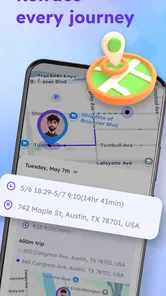
Imagine I am meeting a friend in a busy area. Instead of repeatedly typing updates while walking, I can use a location-sharing workflow designed for that purpose. My friend can focus on finding me rather than interpreting vague messages such as “I’m close.” Later, if I am heading home after an evening out, an alert-based routine can give someone a clearer sense of when to expect me.
The benefit is not dramatic technology; it is reduced friction. Location sharing often fails because people forget to send an update, send one too early, or stop replying while their hands are occupied. An app dedicated to this task can make the routine more visible. I still would not assume that any alert guarantees a response or substitutes for calling emergency services. It is a convenience and coordination tool, not a complete emergency system.
More From Our News Desk

 Weather - By Xiaomi
Weather by Xiaomi Review: Clear at a Glance, Less Clear Up Close
Xiaomi’s weather app makes everyday forecasts quick to scan, but its calm surface can leave useful details and recovery paths harder to find than they should be.

 X
XX Under Pressure: Can It Recover When Posting Goes Wrong?
A resilience-focused review of X, examining setup, mistaken posts, interruptions, weak connections, and the gaps that matter when recovery needs to be dependable.

 Clash of Clans
Clash of Clans Is Won Between the Battles
Its raids are quick; its community is a long-term project of coordination, teaching, rivalry, and shared responsibility—with all the friction that entails.

 Android Auto
Android Auto Makes the Case for Quieter Car Software
The car interface is no longer judged by how much it can do, but by how quietly it helps. Android Auto shows what drivers now expect—and what still gets in the way.

 MobiOffice: Word, Sheets, PDF
MobiOffice: Transforming Mobile Productivity with Seamless Integration
MobiOffice: Word, Sheets, PDF is redefining mobile productivity with a surprising blend of functionality and innovation.

 EA SPORTS FC Soccer Mobile 26
EA SPORTS FC™ Mobile Soccer: Redefining Mobile Sports Gaming
Dive into EA SPORTS FC™ Mobile Soccer, where immersive gameplay and strategic depth transform mobile sports gaming.
Latest News



What I would set up first
My first step would be to keep the initial setup narrow. I would choose only the people who genuinely need access, define the situations in which sharing is useful, and avoid turning every trip into a permanent broadcast. This is an important practical distinction: location tools are easier to trust when they are used intentionally rather than left running without a clear purpose.
I would also explain the routine to the people receiving my updates. They should know whether they are expected to watch for an alert, respond to a message, or simply use the information as reassurance. That small conversation prevents a common problem with safety apps: the sender assumes someone is monitoring, while the recipient assumes the app will handle everything automatically.
Useful workflows beyond a one-time location pin
One less obvious strength of an app like this is the possibility of making location sharing part of a repeatable plan rather than a single manual action. For example, a parent could use it as a reminder-centered arrival routine, while friends on a long outing could coordinate without filling a group chat with location messages. The value comes from consistency, especially for people who are not comfortable managing several separate map links.
A second useful approach is to separate social sharing from safety sharing. I would not give the same level of access to every contact. A close friend might need a temporary update during a journey, while a family member might be the better person for a recurring check-in. Thinking in those categories helps keep the app practical and avoids oversharing.
A third is to use alerts as prompts for communication rather than as silent surveillance. If an alert indicates that someone has reached a place or is expected to be there, I would still treat it as a reason to check in when the situation matters. That mindset makes the feature more useful and more responsible: technology supports the conversation instead of replacing it.
Free access and the question of paid value
Locaty is free to install, which lowers the barrier to testing it with a small group. For me, that is the strongest part of its value proposition. I can judge whether the interface, sharing process, and alerts fit my routine before deciding whether optional purchases are worthwhile. The paid items range from $2.99 to $12.99 each, so I would look carefully at what a purchase changes before paying.
I would not describe the paid value as automatic. A purchase makes sense only if it removes a limitation that affects my regular use or provides a capability I would genuinely use. If I only need occasional location sharing, free access may be enough. If my household depends on the app for repeated coordination, the higher end of the purchase range deserves a more careful comparison with alternatives that already include similar functions.
This is where Locaty needs a little discipline from the user. I would avoid buying simply because the app is useful in its basic form. First, I would run a few ordinary scenarios: sharing during a meeting, using an alert for an arrival, and stopping the routine afterward. If those actions feel clear and dependable, then I would consider whether an optional purchase adds meaningful convenience. If not, staying with the free experience is the sensible choice.
Where it differs from familiar alternatives
Compared with a standard mapping app, Locaty appears more centered on people and alerts than on route discovery. That can make it easier for a user whose main need is “let someone know where I am,” while a conventional map remains the better choice for directions, places, and travel planning.
Compared with a messaging app, the advantage is concentration. A chat can share a location quickly, but the information may disappear into a busy conversation. Locaty is more appealing when I want location-related actions to have their own context. The trade-off is that everyone involved may need to adopt another app, whereas nearly everyone already understands basic messaging.
Compared with a dedicated family-safety service, Locaty may appeal to people who want a lighter, more focused tool. A broader service can be preferable when a household needs a large collection of monitoring, communication, or emergency functions. I would choose Locaty when location sharing and alerts are the main requirement, not when I am looking for an all-in-one family management platform.
Friction I would consider before relying on it
The first limitation is network dependence in the real world. Location sharing is only useful when updates can be sent and received, so I would not build a critical safety plan around any app without a backup method such as a phone call. This is not a criticism unique to Locaty; it is a practical boundary of connected location tools.
The second is participation. A location app works best when the right people install it, understand it, and agree on how it will be used. If my friends prefer sending a normal map pin, asking them to adopt another service may create more friction than it removes. The app’s usefulness therefore grows with a willing, consistent circle rather than with the number of contacts in my phone.
The third is privacy discipline. Sharing a location is sensitive even when the intention is harmless. I would review each sharing decision, stop updates when they are no longer needed, and avoid treating permanent access as the default. The safest workflow is the one that gives the recipient enough information for the situation without creating unnecessary exposure.
I would also pay attention to how alerts fit my habits. Too many notifications can make people ignore the important ones, while vague expectations can leave recipients unsure whether action is required. Starting with one or two clear routines is better than activating every available option immediately. That is a small but meaningful way to keep the app useful instead of noisy.
Who is most likely to get real value
Locaty is a good candidate for people who regularly coordinate meetups, travel in small groups, or want a simple arrival-and-check-in habit with trusted contacts. It may also suit users who find ordinary messaging-based location sharing too temporary or disorganized. The app’s Everyone rating makes it broadly approachable, although the responsibility of sharing location still depends on the user’s judgment and the household’s rules.
I see particular value for a small group that agrees on a few repeatable scenarios. A student walking home, friends separating after an event, or relatives coordinating a visit could all benefit if the app reduces repeated explanations. In each case, the key is not constant tracking; it is having a shared process for specific moments.
It is less suitable for someone who only needs occasional directions, because a normal map will probably be faster. It is also not my first choice for a person seeking advanced navigation, detailed route planning, or a complete emergency-response system. Likewise, if nobody in my circle wants another app, the social cost may outweigh the convenience.
What the current adoption suggests
Locaty has passed 100 thousand installs and holds a 3.8 average from around 228 ratings, with 7 written reviews. Those figures suggest that people are trying it, but I would read the written feedback carefully rather than treating the average as a final verdict. A location-sharing app can feel excellent for one household and unnecessary for another because the surrounding routine matters so much.
The developer is XFree Dev Team, and the app was released on May 8, 2026. Its recent release context makes it sensible to approach it as a focused tool that I would test in low-stakes situations first. I would not make it the only part of a serious safety plan until I had confirmed that the people involved understood the alerts and that the sharing workflow worked for their normal schedules.
My buy-or-skip verdict
I would recommend trying Locaty if the problem I want to solve is repeated, person-to-person location coordination. The free entry point makes that trial reasonable, and the combination of sharing and alerts gives it a clearer identity than simply opening a map and dropping a pin. My advice would be to start with one trusted contact, one ordinary scenario, and one clear expectation about what happens after an alert.
I would skip it if I mainly need navigation, one-off directions, or a broad family-management platform. In those cases, a familiar mapping, messaging, or specialized safety alternative may fit better and require less cooperation. I would also skip any optional purchase until I know precisely which part of my routine it improves; the available purchase range is meaningful only when the added value is concrete.
Overall, Locaty is most convincing as a focused companion for intentional location sharing, not as an all-purpose replacement for the apps people already use. I like the idea of giving arrival updates and safety-oriented communication a dedicated home, but I would use it with sensible privacy boundaries and a backup way to contact someone. My recommendation is to test the free experience first, keep the sharing circle small, and pay only when an optional feature solves a problem you encounter repeatedly.
Locaty - GPS Location Share Frequently Asked Questions
What devices and operating systems can run Locaty?
Locaty is a mobile app for Android and iOS, and the Android version requires Android 7.0 or later. Before downloading, check that your device meets the platform’s requirements and has location services available. Keeping your operating system and app permissions up to date can also help ensure that location sharing works as expected.
Who develops Locaty, and what does it offer?
Locaty is developed by XFree Dev Team and focuses on maps and navigation, with location sharing as its central purpose. Its store summary highlights staying connected, sharing location safely, and setting alerts. The app is free to download, with optional in-app purchases priced from $2.99 to $12.99 per item, so review any purchase details before confirming a transaction.
What is Locaty - GPS Location Share used for?
Locaty - GPS Location Share is designed to help you share your current GPS position with trusted contacts. It can be useful when meeting friends, coordinating with family, checking where someone is during a trip, or sending your location in an emergency. Before downloading, remember that the app’s usefulness depends on your phone having location services enabled and a reliable internet connection for sharing updates.
Does Locaty continuously track my location?
Location behavior depends on the sharing option you choose and the permissions granted to the app. If you send a single location, it generally provides a snapshot of your position rather than ongoing tracking. Live or repeated sharing may require background location access and can continue until you stop it or the session expires. Review the app’s permission settings carefully and avoid sharing your location with people you do not trust.
Is Locaty - GPS Location Share free to download and use?
Locaty is free to download, though optional in-app purchases are available. The app’s purchase options range from $2.99 to $12.99 per item, so check the price shown in the store before buying anything. Also remember that sharing your location uses mobile data unless you are connected to Wi-Fi.
Pros
- Quickly shares your real-time GPS location with selected contacts.
- Useful for coordinating meetups
- trips
- and family check-ins.
- Simple interface makes location sharing easy for most users.
- Location links can help recipients find you without installing the app.
- Helpful safety feature when traveling or meeting in unfamiliar places.
Cons
- Continuous GPS use may noticeably reduce battery life.
- Real-time tracking can raise privacy concerns if sharing is mismanaged.
- Accuracy may drop indoors or in areas with weak GPS signals.
- Some features may depend on an active internet connection.
- Recipients may need compatible map apps to open shared locations.











