

Local Matters: Where You Live
- 43.00
- 4.9
- Installs
- 10.00K
- Price
- Free

Screenshots
Analysis by Reviewed
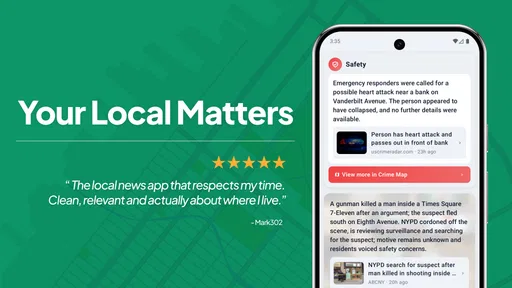
I usually reach for a local news app for one simple reason: I want to know what affects my day without sorting through a national feed first. Local Matters: Where You Live takes that idea and puts safety alerts, nearby news, and weather in the same place. After spending time with it, I found a focused News & Magazines app that feels most useful when it becomes part of a small daily routine rather than something I open only during a crisis.
The app is developed by LifeAgents and is free to use, with an Everyone age rating. It runs on Android 8.0 and later, so it remains accessible on many older phones. Its current version is 1.9.4, and the app has already passed the early discovery stage with over ten thousand installs. That is not the same scale as a major national news service, but it does make the experience feel more deliberately local and less crowded.
How I use Local Matters through a normal day
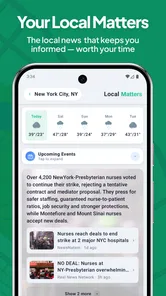
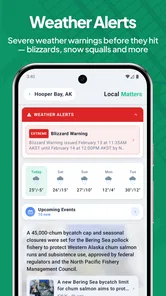
My most practical workflow starts in the morning. Instead of opening several separate apps for the forecast, local headlines, and urgent notices, I check this one first. The value is not that every item is equally important. The value is the quick context: what is happening nearby, whether the weather may change my plans, and whether an alert deserves immediate attention.
I would describe the experience as a local information dashboard rather than a full replacement for every news source. That distinction matters. A broad news app is better when I want national politics, international reporting, business coverage, or a large range of specialist sections. Local Matters is more useful when the question is, “What should I know about my area today?”
The short description, “Local Matters,” is simple, but it captures the app’s strongest idea. Local information is often scattered across municipal pages, weather tools, neighborhood groups, and emergency channels. Bringing those subjects together reduces the number of places I need to check. I still prefer established specialist sources for major stories, but this app gives me a convenient first look.
One realistic example is a weekday when I am planning a commute and an evening appointment. I can check the local forecast before leaving, scan nearby headlines during breakfast, and look at safety information before heading out later. If something changes, the app has a better chance of making me notice it than a generic news feed buried under stories from places I do not live.
That workflow also reveals an important limitation: the app is only as useful as the local information available for the area I care about. People who move frequently, travel constantly, or want a broad national perspective may find the local focus restrictive. For them, a general news reader or a dedicated weather service may be the better primary tool.
More From Our News Desk

 Gmail
GmailGmail in a Busy Inbox: Who Benefits Most?
From first account to crowded workday, Gmail earns its place through dependable search and flexible sorting—but its best fit depends on how much inbox maintenance you can tolerate.

 Prime Video
Switching to Prime Video: What Changes in Your Viewing Routine
Prime Video can make a compelling second home for streaming, but switching means learning a different catalog, rental layer, and route from browsing to playback.

 Universal TV Remote Control
Universal TV Remote Control Works Best as a Reliable Backup
A phone remote earns its place through quick setup and reliable habits. Here is how to get more from Universal TV Remote Control—and where its limits show.

 Weather - By Xiaomi
Weather by Xiaomi Review: Clear at a Glance, Less Clear Up Close
Xiaomi’s weather app makes everyday forecasts quick to scan, but its calm surface can leave useful details and recovery paths harder to find than they should be.

 X
XX Under Pressure: Can It Recover When Posting Goes Wrong?
A resilience-focused review of X, examining setup, mistaken posts, interruptions, weak connections, and the gaps that matter when recovery needs to be dependable.

 Clash of Clans
Clash of Clans Is Won Between the Battles
Its raids are quick; its community is a long-term project of coordination, teaching, rivalry, and shared responsibility—with all the friction that entails.
Latest News



Getting the first setup right
The first useful step is treating personalization as part of the setup, not as something to ignore. Since the app is built around information relevant to where I live, I would take a moment to make sure the selected location reflects the place I actually need to monitor. That might be home, a workplace, or another area where I spend most of my time.
This is especially important for people living near a city boundary. A location that is technically close may still produce a different mix of headlines, weather context, and safety information. I would not assume that the nearest large city automatically gives the most useful results. The best choice is the place whose updates match the decisions I make during the day.
I also recommend opening the app at a calm time rather than waiting for an emergency. Familiarizing myself with the layout when nothing urgent is happening makes it easier to find relevant information when I am rushed. That is a small habit, but it is one of the more valuable ways to use a safety-oriented app responsibly.
Another useful habit is separating “check now” information from “read later” information. Weather and safety alerts are time-sensitive. Local articles may be worth reading when I have a few minutes. Keeping those purposes distinct prevents the app from becoming a stream that I scroll through without noticing the items that actually affect my plans.
Settings I would check before relying on it
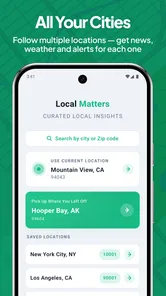
I would begin with any available location or personalization controls and make sure they match my routine. The app’s central promise depends on relevance, so an incorrect area can make the entire experience feel weak even when the underlying idea is sound. If I use it for a second location, such as a family member’s neighborhood, I would check whether the app allows that kind of arrangement before assuming it can monitor several places equally.
Next, I would review alert behavior. Safety notices should be noticeable enough to matter, but not so noisy that I start dismissing everything automatically. A good personal rule is to keep genuinely important alerts visible and avoid turning every possible notification into an interruption. If the app offers different notification controls, I would adjust them after a few days of normal use rather than making a permanent decision during setup.
Weather presentation also deserves a quick check. I like seeing the forecast in the same place as local information, but I do not treat a general forecast as a substitute for specialist weather guidance during severe conditions. For ordinary planning, the convenience is excellent. For dangerous weather, I would cross-check with official emergency communication and a dedicated weather source.
There is a similar distinction with news. Local Matters can help me discover what deserves attention, but discovery is not always the same as verification. When a story involves road closures, public safety, schools, or a rapidly changing event, I would look for the latest official notice before acting. This is not a criticism unique to this app; it is a sensible habit for any aggregator.
The app is free, which removes the most common barrier to trying it. I still judge free apps by the time and attention they save. If the local feed is relevant and the alerts are manageable, the price makes experimenting easy. If my area produces little useful content, free access does not compensate for an experience that I rarely need.
Repeatable shortcuts that make it more useful
The fastest pattern I found is a three-pass check. First, I look for anything urgent. Second, I check weather against my immediate plans. Third, I scan local headlines for subjects that could affect the rest of the day. This takes less effort than opening several unrelated services, and it gives me a clear stopping point instead of encouraging endless scrolling.
I would use the same order every time. Consistency matters because it turns the app into a routine rather than another source of digital noise. On quiet days, the check is brief. On days with unusual weather or local disruption, I naturally spend longer on the relevant section without needing to read everything.
A second pattern is to check before leaving home and once again before a major transition, such as the trip back from work. Local information can change while I am busy, but checking constantly is unnecessary and distracting. Two deliberate moments are often more useful than repeatedly refreshing a feed.
For families, the app can work as a shared conversation starter. One person can notice a local alert, another can verify the practical details, and everyone can adjust plans. I would not make the app the sole authority for an emergency, but it can reduce the chance that a relevant local development goes unnoticed by everyone in the household.
For someone working remotely, the use case is different. The app can provide a sense of place during a day spent indoors, especially when national feeds dominate attention. Local headlines and weather can help me decide whether to take a walk, change an errand, or follow an event in the surrounding community. That is less dramatic than an emergency alert, but it is a genuine everyday benefit.
A third, less obvious tip is to use the app as a filter for what deserves deeper reading elsewhere. Rather than expecting it to contain every detail, I treat it as a local signal detector. If something affects my route, neighborhood, or schedule, I then seek the most authoritative source for the full explanation. This approach combines convenience with healthy skepticism.
Where it stands beside ordinary alternatives
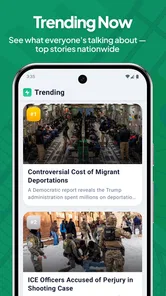
The usual alternative is a general news app. Those services often offer more topics, stronger search tools, and a wider range of publishers. They are the better choice for readers who want a complete news diet or who follow stories outside their immediate area. Their weakness is that local information can be diluted by the sheer volume of national and international content.
A dedicated weather app is another obvious comparison. It may provide more detailed forecasts and specialized weather views, while Local Matters is more convenient for a quick practical check alongside news and safety information. I would choose the dedicated tool when weather is the main reason I am opening my phone. I would choose this app when weather is one part of a broader local check.
Neighborhood social networks can provide very immediate discussions, but they also bring uneven quality and plenty of speculation. Local Matters feels more suitable as a calmer starting point. I prefer a structured local feed when I want orientation, then community discussion when I need firsthand details or local reactions. Neither format completely replaces the other.
Official government and emergency channels remain important alternatives, particularly for instructions during serious incidents. Their information may be more authoritative, but it can be spread across multiple pages or services. The practical advantage here is consolidation: I can begin with one local-focused app, then move to the official source when the situation requires precise action.
Limits experienced users should understand
The biggest trade-off is focus. A local-first app can feel refreshingly relevant, but it cannot satisfy someone who expects a complete magazine-style news library. I would skip it as my main news app if my daily interests are mostly international affairs, entertainment, technology, finance, or national politics.
I would also avoid treating the presence of a safety section as a guarantee that every emergency will appear instantly. Alerts are useful only when they arrive through the relevant information chain, and situations can develop faster than any app can reflect them. During a serious event, I would follow official instructions and use multiple trusted channels rather than waiting for a single feed.
There is a mental cost to combining several information types in one place. A headline, forecast, and safety notice do not deserve the same amount of attention, yet a unified interface can make them look equally scrollable. My solution is to keep the three-pass routine and pause whenever an item affects immediate safety. Convenience should shorten the search, not shorten judgment.
Another trade-off is that personalization can become too narrow if I only monitor one location. That is ideal for daily relevance, but it may leave me unaware of conditions affecting relatives, travel destinations, or a workplace elsewhere. I would use the app for my primary area and add another source when I have a genuine need to monitor somewhere different.
The app’s rating is a strong sign of user satisfaction, with a 4.9 average from hundreds of ratings and dozens of written reviews. I see that as encouraging, not as proof that every location will feel identical. Local usefulness depends heavily on where a person lives and what they expect from a news tool. A high score can support the decision to try it, but personal relevance remains the deciding factor.
Who will get the most from it
I think Local Matters suits people who want a quick local briefing without building their own collection of separate apps. It is particularly appealing to residents who care about nearby changes, commuters who want context before traveling, parents planning around local conditions, and anyone who prefers a focused feed over a noisy national timeline.
It can also help people who are new to an area. A local information routine makes it easier to learn what is happening nearby and notice recurring subjects that a broad news service might bury. I would give it a few regular checks rather than judging it after one opening, because the benefit comes from relevance over time.
People who should skip it are those looking for deep investigative reporting, a complete weather workstation, or a single definitive emergency authority. It is also not the ideal choice for someone who rarely cares about local developments and mainly uses a phone for global news. In those cases, a specialist app will probably provide more depth with less compromise.
Privacy-conscious users may also want to think carefully about how much personalization they are comfortable using. The app’s usefulness is tied to showing information relevant to a place, so I would read the permission prompts and make deliberate choices rather than approving everything automatically. That is good practice with any location-aware service.
My verdict after building a routine around it
What I like most is the app’s practical center of gravity. It does not need to replace every news source to be worthwhile. It only needs to make local awareness easier, and it succeeds when I use it as a first check for nearby news, weather, and safety information.
The best results come from a repeatable workflow: confirm the right location, tune alert behavior, check urgent items first, compare weather with the day’s plans, and use headlines to decide what deserves deeper reading. Those habits make the app more useful than simply opening it and scrolling whenever I remember.
I would recommend Local Matters: Where You Live to anyone who wants a free, local-focused information layer on an Android phone running version 8.0 or later. Its Everyone rating also makes it approachable for a broad household audience. Just keep its role clear: it is a convenient local starting point, not a replacement for official emergency instructions, specialist weather coverage, or a full national news service.
For me, that balance is the reason to keep it installed. It reduces the friction of checking what is happening nearby while leaving room for more authoritative or detailed sources when the situation calls for them. If your daily decisions are shaped by your neighborhood, commute, weather, or local alerts, this is a sensible app to try. If your attention is aimed far beyond your immediate area, its focused design may feel more limiting than helpful.
Local Matters: Where You Live Frequently Asked Questions
Is Local Matters: Where You Live available for my phone?
Local Matters: Where You Live is an app in the News & Magazines category, and it requires Android 8.0 or later. If you use an Android phone, check its operating system version before installing. The app is also described for iOS users, but compatibility depends on the device and the version available through its app store. Keeping your phone’s software up to date can help avoid installation or performance issues.
Who makes Local Matters: Where You Live, and what is it focused on?
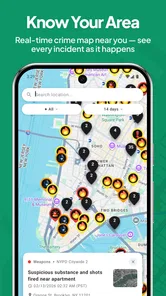
The app is developed by LifeAgents and focuses on information connected to where you live. Its description highlights safety alerts, hyper-local news, and weather personalized to the user. That focus may appeal to people who want neighborhood-level updates alongside broader news, though the usefulness of local coverage can depend on the community and the information available there.
What is Local Matters: Where You Live?
Local Matters: Where You Live is designed to help users stay informed about what is happening in their local community. It may provide access to neighborhood news, local updates, community announcements, events, and other region-specific information. The app is most useful for people who want a convenient way to follow nearby developments instead of relying only on general national news sources.
How does Local Matters determine which local information I see?
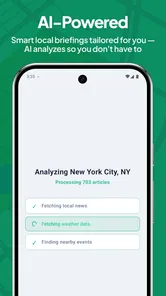
The app generally uses your selected location, community preferences, or device location settings to present relevant local content. Depending on the features available in your area, you may be able to choose a city, neighborhood, or region manually. Before downloading, check the location permissions and review whether the app supports your specific community, since coverage and available information can vary by location.
Does Local Matters: Where You Live require location access?
Location access may be requested to personalize local news, alerts, events, or community updates. You may be able to deny this permission and enter your location manually, although doing so could limit automatic recommendations or location-based notifications. It is worth reviewing the app’s permission settings after installation and allowing access only when you are comfortable with how your location data is used.
Pros
- Highlights nearby businesses
- events
- services
- and community updates.
- Useful for discovering local places that broader social apps may overlook.
- Location-based content can make recommendations feel more relevant.
- Supports stronger connections with neighborhood organizations and residents.
- Can help users find local deals
- activities
- and practical information quickly.
Cons
- Content quality may vary depending on activity in your local area.
- Some features may require location access
- raising privacy concerns.
- Smaller communities may have limited listings or infrequent updates.
- Notifications can become distracting if many local updates are enabled.
- Some information may be outdated if businesses or organizers do not update it.












