

InTown
- 13.00
- 4.6
- Installs
- 10.00K
- Price
- Free

Screenshots
Analysis by Reviewed
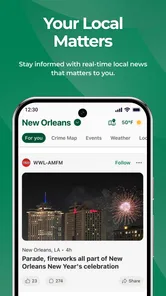
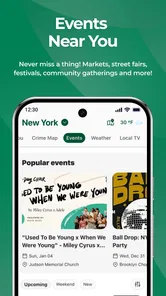
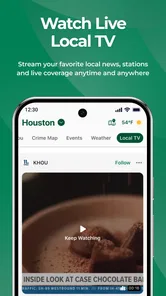
I approached InTown as a practical local-news app rather than another general headline reader. Its focus is narrow in a useful way: nearby news, crime alerts, local television, and events in one place. That makes it most interesting for people who want to understand what is happening close to home without sorting through national stories first. My overall impression is that its value depends less on entertainment and more on whether its local coverage fits your area and daily routine.
LifeAgents, the developer behind the app, has positioned it in the News & Magazines category, and the free price makes trying it fairly easy. It is rated for Everyone, so the presentation is intended for a broad audience. The app has an average rating of 4.6 from around a hundred ratings, with over ten thousand installs, which suggests a modest but real user base rather than a giant mainstream audience.
How InTown fits into a daily news routine
The most useful way to think about InTown is as a local dashboard. Instead of opening a large national news service and then searching for your neighborhood, I would use this app when the question is, “What is happening around me today?” That could mean checking for a developing crime alert before leaving home, looking for a local event at the weekend, or finding out what local television is covering.
That focused approach is also the app’s main trade-off. A broad news app usually gives you international headlines, business coverage, sports, opinion, and a large archive. InTown is more relevant when location matters. If your main interest is global news or detailed specialist reporting, it is unlikely to replace your usual reader. I see it as a companion that shortens the path to local information.
In everyday use, I would keep it for quick check-ins rather than long reading sessions. A short morning visit can help establish what is happening nearby, while an evening check can be useful for events and local television. This workflow is more efficient than repeatedly searching the web, especially when you are trying to compare several kinds of local information at once.
What the local focus changes
Local coverage has a different rhythm from national news. Some days may offer several immediately relevant updates; on quieter days, the app may feel less active. That is not necessarily a flaw, but it affects expectations. I would not judge InTown by how much content it displays at every moment. I would judge it by whether the information that does appear helps with decisions close to home.
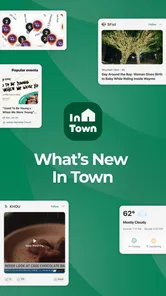
The combination of crime alerts and events is particularly practical because these categories serve opposite needs. Alerts can be urgent and useful for awareness, while event information is something you browse when planning free time. Local television adds another route into the same community picture. Together, they give the app a broader purpose than a simple breaking-news feed.
More From Our News Desk

 Gmail
GmailGmail in a Busy Inbox: Who Benefits Most?
From first account to crowded workday, Gmail earns its place through dependable search and flexible sorting—but its best fit depends on how much inbox maintenance you can tolerate.

 Prime Video
Switching to Prime Video: What Changes in Your Viewing Routine
Prime Video can make a compelling second home for streaming, but switching means learning a different catalog, rental layer, and route from browsing to playback.

 Universal TV Remote Control
Universal TV Remote Control Works Best as a Reliable Backup
A phone remote earns its place through quick setup and reliable habits. Here is how to get more from Universal TV Remote Control—and where its limits show.

 Weather - By Xiaomi
Weather by Xiaomi Review: Clear at a Glance, Less Clear Up Close
Xiaomi’s weather app makes everyday forecasts quick to scan, but its calm surface can leave useful details and recovery paths harder to find than they should be.

 X
XX Under Pressure: Can It Recover When Posting Goes Wrong?
A resilience-focused review of X, examining setup, mistaken posts, interruptions, weak connections, and the gaps that matter when recovery needs to be dependable.

 Clash of Clans
Clash of Clans Is Won Between the Battles
Its raids are quick; its community is a long-term project of coordination, teaching, rivalry, and shared responsibility—with all the friction that entails.
Latest News



A useful habit would be to check the app before relying on a social-media post about a local incident. Social platforms can be fast, but they often mix firsthand comments, speculation, and unrelated material. InTown’s local-news orientation may provide a calmer starting point. I would still treat any urgent situation responsibly and follow official instructions rather than using a news app as a substitute for emergency services.
Speed expectations during quick checks
For this kind of application, perceived speed is mostly about how quickly I can reach relevant local information. The app does not need to feel like a game or a video editor; it needs to get out of the way. A clean, focused news experience is valuable when I am checking my phone for a minute before commuting, collecting children, or deciding whether a local event is worth attending.
I would expect the first visit after installation to feel more dependent on connection and content availability than later check-ins. News applications need to retrieve changing information, so the experience can naturally vary with network conditions and the freshness of local coverage. That is an important distinction: a slow moment does not automatically mean the app itself is inefficient.
InTown’s limited purpose should help it feel more direct than a crowded portal. There are fewer reasons to wander through unrelated sections, and that can make a short session feel faster even when the amount of content is not large. My practical advice is to open it with a specific question in mind—local incidents, television, or events—rather than expecting an endless stream designed to keep you scrolling.
The current version is 25.52.16, and the app was released on January 6, 2026. Those details matter mainly because a recently introduced local app can still be developing its coverage and polish. I would give it a little time in my routine before deciding whether it is fast enough for me, especially if my local area has irregular news activity.
When heavier use can expose friction
InTown is likely to feel most demanding when I move quickly between several content areas, refresh repeatedly during a developing story, or use it while other apps are already busy. Those are the moments when any news app can reveal delays caused by loading fresh material rather than by the reading interface itself.
My preferred heavy-use workflow would be selective. I would scan the local news first, open only the items that affect me, then switch to events or local television when I have more time. Repeatedly refreshing without a clear reason is less useful and can make the experience feel unsettled, particularly when a story has not changed. A deliberate reading pattern gives the app a fairer test and keeps local updates from becoming background noise.
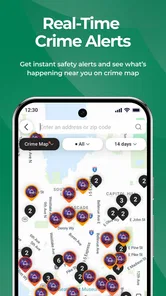
Crime alerts deserve special care here. Their importance can make users refresh more often than they would for ordinary stories, but speed should not be confused with certainty. An initial alert may be brief, and local situations can change. I would read the available context, look for later updates, and avoid spreading an unconfirmed interpretation. InTown can help me notice an issue; it should not encourage impulsive conclusions.
Events create a different kind of workload. When planning a day out, I might compare several listings, check timing, and then return to a news item. This is where a focused local app earns its place: it can support a small planning task without forcing me through national headlines. The limitation is that a local news tool may not replace a dedicated ticketing or calendar service when I need full booking details or personal scheduling.
Reliability, stability, and recovery
For a local-news app, reliability means more than avoiding crashes. I also want the content to remain understandable when I return after a few hours, and I want the app to recover gracefully if a connection drops during a refresh. Since the main purpose is timely information, an interrupted session is more noticeable here than in an app I use only for casual browsing.
I would build trust gradually rather than assuming that every alert is equally important. The strongest routine is to use InTown as an early local signal, then verify serious matters through appropriate official channels when necessary. That is not a criticism unique to this app; it is simply the sensible way to handle fast-moving community information.
Recovery is also part of the experience. If the app pauses while content loads, I would first give it a moment, then retry once instead of repeatedly tapping. If I had been reading a longer item, I would return to the relevant section rather than assuming the interrupted screen represents the whole service. This small habit reduces frustration and prevents a temporary network issue from becoming a reason to abandon the app.
The available audience response is encouraging but still relatively small, so I would describe InTown as promising rather than universally proven. Its average of 4.6 indicates that many raters have responded positively, but a local app can perform differently from one community to another. Coverage relevance, update frequency, and the usefulness of local listings will shape my experience more than the overall rating alone.
Device requirements and practical limits
InTown supports Android devices running version 8.0 or later. That gives it a reasonably broad reach across older and newer phones, although compatibility does not guarantee identical performance on every device. Older hardware may handle a focused reading app comfortably, but network-heavy refreshes and rapid switching can still feel less smooth than on a recent phone.
Because the app is free, I would also consider it a low-risk installation for testing on a secondary device. It is suitable for someone who wants local information without paying for access, and the Everyone rating makes it easier to imagine using it within a household. Still, free access does not automatically make it the best choice for every reader. People who need deep customization, extensive archives, or a single source for worldwide coverage may prefer a larger news platform.
Storage and battery expectations should remain sensible. A news reader is generally used in short sessions, but frequent refreshing, media-rich stories, or prolonged browsing can change that pattern. I would avoid leaving any news app open continuously in the background simply to watch for developments. Opening it when needed is a more controlled approach and makes the phone’s resources work for a clear purpose.
Screen size also affects the experience. On a compact phone, the local focus can be an advantage because there is less content to navigate. On a tablet or larger display, I would expect reading and event planning to feel more comfortable, but the benefit depends on how the app presents its material. Either way, the app’s usefulness comes from relevance, not from turning a small screen into a full newspaper layout.
Three practical ways to get more from it
First, I would separate urgent awareness from casual browsing. Check crime alerts briefly when you need situational awareness, but use the events and television areas when you have time to explore. This prevents the most serious content from being buried in a relaxed scrolling session and gives each part of the app a clear role.
Second, I would use InTown as a verification starting point when local information begins circulating elsewhere. If a neighborhood message raises a concern, opening the app can help me see whether there is related local coverage. I would then distinguish between a reported update and my own assumptions. That workflow is more useful than treating every notification or post as a complete account.
Third, I would check it at decision points rather than on a fixed, constant loop. Before commuting, making weekend plans, or deciding whether to watch local television coverage, a quick visit can be worthwhile. Outside those moments, repeated checking may add little. This is a subtle strength of a focused app: it can be useful without demanding continuous attention.
A fourth tip is to compare the app with the way you already get local information. If your local broadcaster, community website, or municipal channel already covers your needs clearly, InTown may offer convenience rather than a dramatic improvement. If your current routine requires several separate searches, the app’s value rises because it brings related local subjects together.
Who should use it and who should skip it
I would recommend InTown to residents who care about nearby developments, people who want crime alerts alongside ordinary local stories, and anyone who likes discovering events without opening several unrelated services. It also makes sense for readers who find national news overwhelming and want a smaller, more geographically relevant starting point.
It is less suitable for someone seeking a complete news replacement. If I wanted international reporting, specialist analysis, extensive opinion, or a powerful archive, I would choose a broad news service instead. Likewise, if I needed emergency-grade communication, I would rely on official alerts and emergency channels rather than any general news application.
The comparison with social media is equally important. Social feeds may deliver local information quickly, but they can be noisy and inconsistent. InTown’s advantage is its defined local-news purpose. Its disadvantage is that a social feed may contain more firsthand material or community discussion. I would use each for what it does best, while giving greater weight to clearly sourced and relevant updates.
Compared with a local television app, InTown appears more useful as a mixed local hub because it brings news, alerts, television, and events into the same routine. A broadcaster’s app may be better when I want a particular station’s live coverage or personality-driven reporting. InTown is the better fit when I want to scan the wider local picture without committing to one outlet.
My performance verdict
After considering how I would actually use it, I see InTown as a focused and approachable local-news companion. Its performance value is not about spectacular speed or a huge volume of material. It is about reducing the effort needed to check what matters nearby. The free model, broad age rating, and support for Android 8.0 or later make it easy to test on a wide range of phones.
I would keep my expectations realistic. Local content can vary in activity, and a small app with a focused audience may not feel as full as a major national platform. Heavy refreshing, unstable connections, or demanding multitasking can also make any news experience feel less consistent. Those limitations matter most to users who expect constant updates or a complete media ecosystem.
For my own routine, the deciding question would be simple: does InTown save me time when I want local news, crime awareness, television information, or events? If the answer is yes, its focused design is a genuine advantage. If I mostly read global headlines or need deep reporting, I would keep using a broader alternative and skip the extra app.
My recommendation is to try it as a local information shortcut, not as your only news source. Used at the right moments, it can make nearby updates easier to find and help connect everyday awareness with weekend planning. That practical, limited role is where InTown seems strongest, and it is also the fairest way to judge its speed, stability, and usefulness on your own device.
InTown Frequently Asked Questions
Who develops InTown, and what kind of app is it?
InTown is a News & Magazines app developed by LifeAgents. Its focus is local information, including local news, crime alerts, local TV, and events. That makes it a practical option for people who want to keep up with what is happening nearby rather than use it as a general-purpose news reader. The experience centers on information relevant to a community.
Which devices can install InTown, and what age group is it for?
InTown is available for Android devices running version 8.0 or later, so it is worth checking your device’s operating system before downloading. The app is rated Everyone, making its content rating suitable for a broad audience. You can also check the app’s current compatibility and age-rating details in the relevant app store before installing it on a particular device.
What is InTown and what can I use it for?
InTown is designed to help users discover and engage with activities, places, services, or local information in their area, depending on the features available in their region. After installing it, users can typically browse listings, view details, and find options that match their interests. The exact experience may vary by location, so checking local availability is recommended before downloading.
Is InTown free to download and use?
InTown is free to download. Some features, services, bookings, or purchases could involve additional costs. Before confirming any transaction, review the displayed prices, possible service fees, and payment conditions carefully. Availability of paid options can differ depending on the city, provider, or promotion, so check the app’s current terms directly before committing to a purchase.
Does InTown require my location and personal information?
The app may request access to location services so it can show nearby places, activities, or relevant local results. It can also require account details such as an email address, phone number, or profile information. You can usually manage permissions through your device settings, but limiting access may affect location-based features. Review the privacy policy before creating an account.
Pros
- Quickly discover nearby places
- events
- and local activities.
- Useful for finding businesses and services within your community.
- Location-based results make recommendations more relevant.
- Simple interface helps users browse local options with ease.
- Can help support and promote independent local businesses.
Cons
- Coverage may be limited in smaller towns or less active areas.
- Some listings may contain outdated details or missing information.
- Location access is needed for the best experience and results.
- Recommendations can vary depending on how much local data is available.
- The app may offer fewer features than larger city-guide platforms.












