

GPS Satellite Live Earth Map
- 278.00
- 3.1
- Installs
- 10.00M
- Price
- Free

Screenshots
Analysis by Reviewed
Before relying on GPS Satellite Live Earth Map for a trip, I’d treat it as a map-exploration and navigation app to try at home first. A quick test helps you learn how its views and directions behave before you need them on an unfamiliar street. That first test is also a good way to decide whether its visual approach suits you better than the simpler map view you may already use.
What to expect from the app
GPS Satellite Live Earth Map is a free Maps & Navigation app from Sona Apps Studio. It has a 3.6 average from around 11,000 ratings and has been installed over 10 million times. The app is rated for Everyone, and its current version is 3.0.6. Those figures suggest broad interest, but they don’t tell me whether its map presentation will suit your habits; I’d judge that by trying a familiar destination myself. It is designed around finding places, viewing a map, and getting directions, so I’d approach it as a tool to evaluate rather than assume it will replace every navigation app on my phone.
Start with a low-stakes setup
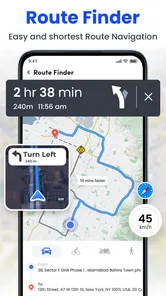
After installing it, I’d begin somewhere I already know, such as my neighborhood or a nearby shop. Search for the place, inspect the map, and then try the direction feature for a short route. This makes it easier to notice whether the screen is showing the view you expected and whether the route is understandable before you depend on it in traffic. If the app asks you to make choices during setup, take a moment to read them rather than tapping through; a calm first look makes it easier to understand what the app is showing.
For that first check, I’d choose a destination with an obvious entrance and a route I can recognize. That helps separate two questions: can I find the place in the app, and do I feel comfortable following the route it presents? If the first search is confusing, try a nearby landmark you know well before moving on to a more complicated address.
Make the first useful trip a short one
A practical first success could be finding a café in another part of town and checking the route before leaving. Compare the suggested streets with your own knowledge, then keep the phone easy to glance at while you travel. For an important appointment, I’d also have a familiar navigation option available as a backup until I know how this app works in my area. A short, ordinary trip is a better test than a long journey where a wrong turn could create unnecessary stress.
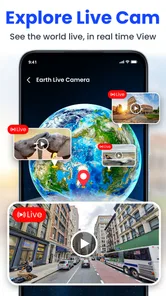
One point worth keeping in mind is the phrase “live satellite.” A satellite-style map view can help you understand the shape and layout of a place, but it should not be treated as proof that you are seeing events unfold at that exact moment. For immediate changes on the ground, current signs, local instructions, and a dedicated navigation alternative are more dependable. I’d think of the satellite view as a way to picture an area, not as a live camera feed or a guarantee that every visible route is currently open.
When a satellite-style view is useful
The visual map can be handy before a visit when an address alone tells you little. For example, if I’m meeting someone near a large building, I can look at the surrounding blocks and get a better sense of where the destination sits in relation to nearby streets. That context may help me recognize the area when I arrive, even if I still use street signs and a trusted route for the actual journey.
More From Our News Desk

 Weather - By Xiaomi
Weather by Xiaomi Review: Clear at a Glance, Less Clear Up Close
Xiaomi’s weather app makes everyday forecasts quick to scan, but its calm surface can leave useful details and recovery paths harder to find than they should be.

 X
XX Under Pressure: Can It Recover When Posting Goes Wrong?
A resilience-focused review of X, examining setup, mistaken posts, interruptions, weak connections, and the gaps that matter when recovery needs to be dependable.

 Clash of Clans
Clash of Clans Is Won Between the Battles
Its raids are quick; its community is a long-term project of coordination, teaching, rivalry, and shared responsibility—with all the friction that entails.

 Android Auto
Android Auto Makes the Case for Quieter Car Software
The car interface is no longer judged by how much it can do, but by how quietly it helps. Android Auto shows what drivers now expect—and what still gets in the way.

 MobiOffice: Word, Sheets, PDF
MobiOffice: Transforming Mobile Productivity with Seamless Integration
MobiOffice: Word, Sheets, PDF is redefining mobile productivity with a surprising blend of functionality and innovation.

 EA SPORTS FC Soccer Mobile 26
EA SPORTS FC™ Mobile Soccer: Redefining Mobile Sports Gaming
Dive into EA SPORTS FC™ Mobile Soccer, where immersive gameplay and strategic depth transform mobile sports gaming.
Latest News



It can also be useful when planning a walk in a neighborhood I have not visited. I’d use the map to form a rough picture of the surroundings, then check the route on the ground as I go. Aerial imagery can make parks, blocks, and open spaces easier to understand at a glance, but it is not a substitute for checking whether a walkway is public, accessible, or suitable for my plans.
What “live” should mean to a first-time user
The wording can set expectations higher than a map can reasonably meet. Satellite imagery is best understood as a visual layer for exploring locations, while directions are a separate practical aid. I would not use the imagery to judge current weather, crowds, road closures, or an event happening at this moment. For those decisions, I’d rely on what I can verify locally and on services built to communicate current conditions.
That distinction matters most when timing is important. If I’m heading to an appointment, I’d check the route before leaving and leave enough time to respond to signs or local changes. If I’m simply curious about the layout of a place, I can explore at a more relaxed pace. Knowing which job I’m asking the app to do makes the experience more useful and keeps a visual feature from being mistaken for real-time confirmation.
Have you ever found yourself lost or just curious about what a specific place looks like in real-time? Well, I've got just the app for you! Let's dive into what makes Live Satellite View, GPS Maps a must-have on your phone.
Exploring the World from Your Couch
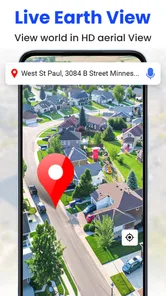
With Live Satellite View, GPS Maps, you can literally explore the world from the comfort of your home. The app offers a unique blend of real-time satellite views, detailed maps, and navigation assistance. Imagine being able to zoom into your favorite city and see what's happening right now! Whether you’re planning a trip or just love virtual exploration, this app feeds the wanderlust in all of us.
Key Features That Stand Out
This app isn’t just about pretty pictures from space. It combines functionality with stunning visuals. The GPS navigation feature is top-notch, providing accurate directions and traffic updates that rival any other app in the market. Plus, the satellite imagery is remarkably clear, offering a bird's eye view of virtually any location you can think of.
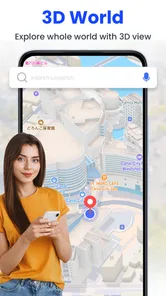
One of my favorite features is the 3D Street View. It's like having a personal tour guide right in your pocket! You can navigate through streets as if you’re actually walking there. It’s super helpful for checking out a neighborhood before visiting or just for fun virtual strolls.
Using it alongside familiar maps
I see the app as an option for visual exploration as well as getting around, rather than an automatic replacement for the map app I already trust. Satellite-style imagery can make a destination’s surroundings easier to picture, while a conventional street map may be quicker when I only need a clear route. If I’m driving somewhere unfamiliar, I’d check the route before setting off instead of trying to study imagery while moving.
There’s also a useful planning habit here: look up the destination before the day of the visit, then note a nearby landmark or cross street. That gives you another way to recognize the area if the map view feels busy or the building itself is hard to pick out. For a walk, I’d use the imagery to get a sense of the neighborhood, but follow real-world signs rather than assuming a visual view confirms that a path is open or accessible.
The usual navigation alternatives tend to be strongest when the only goal is getting from point A to point B with familiar directions. I’d keep one of those at hand if I need a route I already know how to use, or if I’m heading somewhere time-sensitive. This app makes more sense when I want to pair directions with a more visual look around. The trade-off is that exploring the map can take attention away from the simple task of following a route, so I’d do that browsing before travelling rather than while moving.
A realistic way to use it on an ordinary day
Imagine I have to meet a friend at a café in an unfamiliar part of town. At home, I’d search for the café, check the surrounding streets, and pick out a nearby landmark as a visual reference. Before leaving, I’d review the route and decide whether it looks clear enough to follow. When I arrive, I’d use street signs and the actual entrance to confirm I’m in the right place, rather than expecting the map image to answer every last question.
That routine is especially useful when the destination is close to a larger building or a cluster of businesses. A map can help me understand the neighborhood, but it may not make a particular doorway obvious. I’d keep the address or meeting point handy and avoid trying to solve that detail while driving. For a walking arrival, stopping somewhere safe to check the map is a much better choice than staring at the screen as I cross streets.
The User Experience
Let's talk about user experience because, honestly, that's where this app truly shines. Navigating through the interface is a breeze. The developers have done an excellent job at keeping it intuitive and user-friendly. Even if you’re not tech-savvy, you’ll find it easy to search for locations, toggle between different views, and customize your map settings.
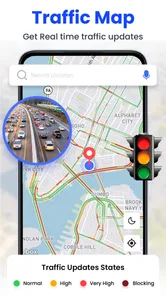
Moreover, the app loads quickly and doesn’t lag, which is crucial when you're trying to navigate or need quick information on the go. The integration of real-time traffic data is seamless, ensuring that you’re always on the best route possible.
Small habits that make the app easier to judge
I wouldn’t judge its directions from a single search. I’d try one short route on familiar streets, then another to a place with a different layout. That gives me a more useful feel for how the map presents routes and whether I can read it comfortably. If the satellite view makes the route harder to follow, I’d switch to a simpler view if available or use my usual navigation app for the trip. The point is to learn which part of the app helps, not to force every task through one screen.
Another practical tip is to separate planning from navigation. Looking around a destination and comparing possible approaches is easier when I’m stationary. Once I’m travelling, I want the route to be easy to glance at and my attention on the road or pavement. This is a small workflow change, but it avoids turning an interesting visual map into a distraction at the moment I need clear directions.
Who is likely to enjoy it, and who should pass
I’d recommend giving it a try if you like examining places before visiting, want a different way to picture a neighborhood, or are curious about combining map views with directions. It may also suit someone who wants to test a secondary navigation option on familiar routes before deciding whether it belongs in their regular routine. Its broad reach suggests many people are willing to try it, but personal comfort with the map and route presentation matters more than popularity.
I’d skip it as my sole navigation choice if I need a dependable, familiar tool for a time-critical drive and have not tested it beforehand. It is also not the right fit if I only want the most direct route display and have no interest in exploring a place visually. In those cases, a dedicated map app I already know may be faster and less distracting. That is not a knock on this app; it is a matter of matching the tool to the job.
Cost and who should consider it
The app is free to download, with optional in-app purchases priced from $1.99 to $7.99 per item. I’d start with the free experience and only consider a purchase if I had already found a specific part useful; there’s little reason to pay before you know whether its map style fits your routine. It suits curious users who like examining places visually and people who want to test another navigation option. If you need a route you can depend on without checking it first, or prefer a straightforward map with no extra exploration, your usual navigation app may be the better choice.
For a first-time user, the sensible next step is simple: install it, search for somewhere familiar, and see whether the map and directions make sense to you. There is no need to plan an ambitious trip just to decide if it is useful. If you do consider one of the optional purchases, first make sure you understand what it offers and that it addresses something you actually want from the app; the free starting point is enough to judge whether the basic approach suits you.
Things I would keep in mind
Maps are aids, not guarantees. A pictured area can help with orientation, but local signs and conditions still take priority, and route instructions deserve a quick review before setting out. I would not make a final decision about an unfamiliar entrance, a restricted path, or a road change from imagery alone. For a traveller who needs precise accessibility details or current local conditions, checking a specialist or local source is a better step than assuming a satellite view contains that information.
It is also worth thinking about how you use the phone itself. Navigation is most helpful when the screen is easy to consult without pulling attention from your surroundings. I’d set up the destination while stationary and avoid switching between views while driving. For walking, I’d pause in a safe place before zooming or searching. Those habits apply particularly well here because the visual exploration angle can tempt you to keep looking around when you should be focused on getting there.
Wrapping It Up
In a world where digital navigation is an everyday necessity, Live Satellite View, GPS Maps stands out as a reliable and enjoyable option. Whether you’re a travel enthusiast, a curious explorer, or someone who just needs efficient navigation, this app has something to offer. It’s like having the world at your fingertips, and who wouldn’t want that?
So, if you haven't already, give it a try. You might find yourself spending hours exploring places you’ve always dreamed of visiting. Happy exploring!
GPS Satellite Live Earth Map Frequently Asked Questions
Is GPS Satellite Live Earth Map suitable for first-time users looking for a simple navigation app?
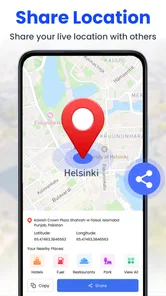
GPS Satellite Live Earth Map is a Maps & Navigation app from Sona Apps Studio, with a focus on satellite views, GPS navigation directions, and live location mapping. Its stated purpose is straightforward, so it may appeal to people who want map and location features in one app. The app is rated for Everyone, though your experience will depend on which features you choose to use.
What is the main functionality of the Live Satellite View, GPS Maps app?
The Live Satellite View, GPS Maps app provides users with real-time satellite imagery and advanced GPS mapping features. It allows users to explore any location worldwide with high-definition satellite views, navigate using precise GPS maps, and access comprehensive location information. This app is ideal for travelers, adventurers, and anyone needing accurate geographical data.
Does the Live Satellite View, GPS Maps app require an internet connection to function?
Yes, the Live Satellite View, GPS Maps app requires an active internet connection to provide real-time satellite images and updated GPS maps. While some GPS features may work offline, the satellite views and real-time data updates necessitate a stable internet connection to ensure accurate and up-to-date information.
Is the Live Satellite View, GPS Maps app available for both Android and iOS devices?
Yes, the Live Satellite View, GPS Maps app is available for download on both Android and iOS platforms. Users can find it on the Google Play Store for Android devices and the Apple App Store for iOS devices, ensuring broad accessibility for various smartphone users seeking reliable mapping services.
Are there any costs associated with using the Live Satellite View, GPS Maps app?
GPS Satellite Live Earth Map is free to download, and it also offers in-app purchases priced from $1.99 to $7.99 per item. You can start with the free app and decide whether any paid options suit your needs. Since purchases are optional, check the available choices in the app before buying so you understand what you are selecting.
Pros
- Real-time satellite imagery access.
- Accurate GPS navigation features.
- User-friendly interface design.
- Offline maps availability.
- Regular updates with new data.
Cons
- Limited free features availability.
- High data consumption on mobile.
- Occasional map loading delays.
- Ads in the free version.
- Battery drain on prolonged use.











