Linktree: Link in bio creator
- 1.03K
- 4.7
- Installs
- 1.00M
- Price
- Free

Screenshots
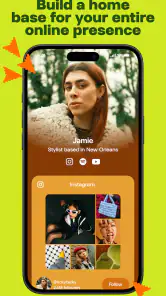
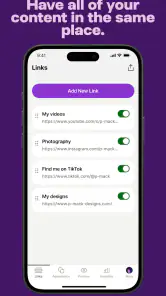
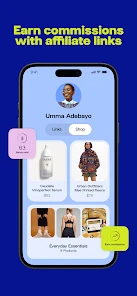

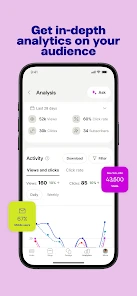

Analysis by Reviewed
In my first week with Linktree, the appeal is easy to understand: it gives a crowded social profile one clear destination. Instead of swapping the bio link whenever I post something new, I can point people toward a small menu of places I want them to visit. That’s useful for a creator with several active channels, though it only helps if the page stays focused and the links lead somewhere current.
A quick start, with a reason to be selective
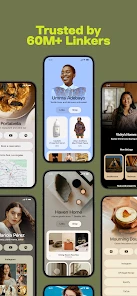
Setting up Linktree is a breeze. Seriously, even if you're not tech-savvy, you can get it up and running in minutes. All you need to do is sign up, add your links, customize the appearance a bit, and boom! You're all set. The customization options are pretty decent too. You can change the colors, add icons, and even integrate some social media platforms directly.
My practical tip is to treat the page like a short navigation menu, not a storage drawer. Put the destination a new visitor is most likely seeking near the top, then group the rest by purpose: for example, work, latest content, and contact. Before sharing the bio link widely, open it as a visitor and check that the labels make sense without extra explanation. That small review can prevent a page full of links from feeling like another chore for followers.
First-week appeal in a real routine
The early benefit is most obvious when I need one bio address to do several jobs. Imagine posting a short video in the morning, answering a question about where to buy something at lunch, and sharing a longer project later that day. Rather than changing the profile each time, I can direct people to one page and make the relevant destination easy to spot. That saves a little repeated admin and avoids sending someone to the wrong platform simply because the bio still points to yesterday’s post.
There is a useful distinction between being comprehensive and being helpful. A visitor who arrives from a specific post usually wants a specific next step, not a tour of everything I have ever made. I would name links in plain language and keep the most timely one near the top, while preserving a few stable choices such as a portfolio or contact route. That balance lets the page work for both people who know me and first-time visitors.
Why Use Linktree?
Alright, picture this: you've got links to your blog, YouTube channel, online store, and maybe even your latest Spotify playlist. Normally, you'd have to choose just one to feature in your social media bio, but with Linktree, you can showcase all of them. It's particularly handy for Instagram and TikTok users where you have limited space for links. I mean, who doesn't want to make their life easier with just a single link?
As a social app from Linktree, it suits people who already share work across more than one platform: independent creators, small shops, musicians, or anyone whose social bio has to serve several purposes. It’s less compelling if you only have one destination, or if your audience already knows exactly where to find you. In those cases, a direct link may be faster and remove an extra tap.
More From Our News Desk

Clash of Clans Is Won Between the Battles

Android Auto Makes the Case for Quieter Car Software

MobiOffice: Transforming Mobile Productivity with Seamless Integration

EA SPORTS FC™ Mobile Soccer: Redefining Mobile Sports Gaming

How Microsoft OneDrive Became a Mobile Productivity Giant

How Google Translate Breaks Language Barriers Effortlessly
Who benefits, and who can skip it
I see the strongest case for someone whose online presence is split across destinations that change in importance: a maker who sells items, posts process videos, and takes commissions; a musician balancing new releases with show information; or a freelancer who needs a portfolio and an easy way to get in touch. For them, a central page can be a practical handoff from social discovery to the action they want a visitor to take.
It is a weaker fit for a person whose profile has one clear purpose and one destination. If all roads lead to a single portfolio, newsletter, or booking page, linking straight there is cleaner. The same goes for an organization that needs detailed service information, structured navigation, or a strong search presence: a bio link page is not a replacement for a proper website. I would use it to route visitors, not to make a compact page carry the weight of a whole online business.
Useful signals, not a substitute for judgment
One of the standout features of Linktree is its analytics. You can see how many people are clicking on each link, which is super useful if you're trying to figure out what content resonates most with your audience. Plus, there are some nifty integration options with apps like Mailchimp and Google Sheets. This is particularly helpful for businesses or influencers trying to collect data or run campaigns.
I’d use those click figures as a comparison tool rather than proof that one project is objectively better. If a link sits below several others, its lower activity may reflect its position, not weak interest. Keep a simple record of when you move or rename links, then compare performance over similar periods. That makes the information more useful while avoiding the temptation to redesign the page every time one number changes.
A less obvious way to get value from the numbers is to test one decision at a time. If I change a link’s wording, position, and destination together, I cannot tell which change helped. I would adjust the label or placement, leave the rest alone for a while, and see whether the pattern shifts. This is not a scientific experiment, but it is more informative than reacting to a brief spike after a popular post.
Integrations can also be worthwhile when they remove a repeated step, but I would not connect tools just because the option exists. A creator who already has a reliable way to handle sign-ups may gain little by adding another route to the same process. Before building a workflow around an integration, I would ask whether it saves time or makes the next action clearer for visitors. A tidy page is more valuable than a complicated setup that nobody uses.
Small updates that keep the page trustworthy
Another cool feature is the ability to add priority links. Say you have a special promotion or a new blog post you want to highlight. You can prioritize it so it stands out more than the other links. It's these little things that make Linktree a step above the rest.
A realistic routine might be checking the page whenever you publish a new video, announce a shop item, or finish a short campaign. Move the timely destination into focus, then remove or demote it when it stops being relevant. The trade-off is that a bio page can quietly become stale if nobody owns those small edits; an outdated offer is more damaging to trust than having fewer links in the first place.
To make that upkeep easier, I would connect the check to a task I already do: publishing the post itself. Before I share, I can ask whether the profile destination still matches the new content and whether any temporary link has expired. For a team, it helps to decide who is responsible for those edits; otherwise, each person may assume someone else has removed the old campaign. A brief, predictable review is more dependable than waiting until a follower points out a broken or irrelevant destination.
Visitors also need enough context to choose confidently. Labels such as “latest” can become unclear once the page changes, while a specific description tells people what they will find. I would avoid making several links sound equally urgent, too. If every item is presented as the main event, the page stops guiding anyone. A clear priority and a few supporting routes make the one-page format easier to use on a quick visit.
Where it fits among the alternatives
Compared with putting one direct destination in a profile, Linktree offers a more flexible handoff when you have several things to share. Compared with building a full website, it is a lighter front door rather than a place to explain your work in depth. I’d choose the simpler direct link for a single call to action, and a full site when visitors need detailed pages, search-friendly information, or a more complete brand experience. The middle ground is where this app makes the most sense.
There is a further trade-off with platform-specific profile tools: they may feel more natural if your audience mainly stays inside one social network, while a single bio page is useful when you want to direct people to several different services from that profile. I would not add an intermediary automatically. Each extra tap is a small request of the visitor, so the page earns that step only when the choice of destinations is genuinely useful.
It also helps to think about what visitors do after they arrive. If the goal is a purchase, booking, or sign-up, the link should lead directly to that action rather than to a broad home page that makes them hunt again. If the goal is discovery, a small set of varied destinations can make more sense. Choosing links by visitor intent, rather than by the order in which I happen to think of them, is one of the simplest ways to make the page feel considered.
There is also a habit question: will you remember to maintain a second page? If your posting rhythm changes often, a few carefully chosen evergreen destinations can reduce upkeep. If every link is tied to a short-lived post, the page demands regular attention. I would decide what belongs there before adding everything, and keep links that still make sense even when you have not posted that day.
Cost, compatibility, and staying power
The app is free to start, and its audience is broad: it has an Everyone age rating, a 4.7 average from around 53,000 ratings, and over 1 million installs. Linktree’s current version is 3.19.0 and requires Android 7.0 or later; optional in-app purchases range from $4.99 to $359.99 per item. I’d begin with the free experience and consider paid options only if a specific extra solves a real need in your workflow, rather than paying simply because the page looks unfinished.
For someone deciding whether to keep it installed after the novelty wears off, the key question is whether that central page saves repeated effort. If you regularly direct people to different projects, a single maintained bio destination can earn its place month after month. If you rarely change what you share, the app may become one more account and page to remember. I like it best when the links have clear jobs and updates happen as part of publishing, not as a separate project.
How to keep the routine lightweight
I would start with a small set of links, then add another only when I can explain its purpose to a visitor. This avoids turning a useful landing point into a scrolling list that asks people to do the sorting themselves. When a temporary link has served its purpose, removing it is often better than leaving it in place “just in case.” The goal is not to show every channel I have, but to make the next useful action obvious.
For a creator who posts in bursts rather than on a steady schedule, evergreen links can carry more of the load: a portfolio, a shop, or a general contact route remains useful between launches. Then a timely destination can take priority while a campaign is active. Someone with frequent releases may prefer a more regular review; someone whose work changes slowly can check less often. The right rhythm depends on how quickly the destinations become outdated, not on a need to keep editing for its own sake.
One question people often have is whether a bio page replaces a website. I would treat them as different tools. The page is convenient for directing social visitors among a few destinations, while a website can explain services, present detailed work, and organize information in depth. Another practical question is whether it makes sense for someone with only one link: usually, I would skip the extra stop unless that single destination changes often enough that a central page genuinely helps.
People also wonder whether they must pay to make the basic idea useful. I would begin with the free option and only consider an in-app purchase after identifying a specific limitation in my current workflow. The available purchase range is broad, so the sensible choice is not to assume that a paid tier is necessary, nor to buy on impulse. First decide what job the page needs to do; then judge any extra against that job.
Long-term verdict
All in all, Linktree is a must-have tool if you're active on social media and want to keep things organized. It simplifies the process of connecting your followers to your various platforms and content. Plus, with its user-friendly interface and useful features, it's hard to find a reason not to use it. So go ahead, give it a try and watch how it transforms your social media game!
My more measured recommendation is to try it when your profile genuinely has several destinations to serve, then judge it by whether people can reach the right one with less confusion. The lasting value is not the novelty of collecting links on one page; it is the small amount of friction removed each time someone visits. If you can keep the page accurate with a quick check tied to your normal publishing routine, it can be a dependable social tool. If maintaining it becomes another recurring task with no clear payoff, a direct link or a fuller website may suit you better.
Linktree: Link in bio creator Frequently Asked Questions
Do I need a Linktree account to create and manage a page?
Linktree is built around creating and managing a page that gathers the links you want to share, so you’ll need to use its account-based service to work on your own page. The mobile app gives you a way to handle that presence from your phone. Before downloading, consider whether you want a dedicated page for your social profiles, website, or other destinations.
Is Linktree available for my phone, and what does it require?
Linktree is a mobile app for social link management, and it is free to download. It supports Android devices running version 7.0 or later. The app is rated for Everyone, so its content rating is suitable for a general audience. Check your device’s operating system before installing, and keep in mind that optional in-app purchases are offered.
Can I use Linktree for a business, creator profile, or personal account?
Linktree can help bring together links for different kinds of online identities, whether you are sharing a personal profile, promoting creative work, or directing visitors to a business presence. Its central idea is the same in each case: make one page that points people toward the places you want them to visit. You can arrange the destinations to suit the audience you are trying to reach.
Can I manage my Linktree page from the mobile app?
Yes. The Linktree app is designed to help you manage your link-in-bio presence from your phone, so you can work on the page you share with followers without relying only on a desktop browser. It is a social app from Linktree, and it is free to download, with in-app purchases available for users who want paid options.
What is Linktree and how does it work?
Linktree is a platform that allows users to create a personalized landing page with multiple links, which can be shared in their social media bios. This is especially useful for platforms like Instagram and TikTok that allow only one clickable link. Users can easily add links to their other social media profiles, websites, or any URL they wish to promote, helping to streamline their online presence.
Pros
- User-friendly interface for easy navigation.
- Customizable link collections to suit needs.
- Supports multiple social media platforms.
- Analytics feature for tracking link performance.
- Free version available with essential features.
Cons
- Limited customization in the free plan.
- Advanced analytics require a paid plan.
- Occasional bugs in mobile app version.
- Limited design options for branding.
- Customer support response can be slow.

- Category
- Social
- Version
- 3.19.0