Light pollution map
- 8.00
- 4.3
- Installs
- 5.00K
- Price
- $5.49
Screenshots
Analysis by Reviewed
When I want to know whether a stargazing trip is worth planning, I find it useful to check the sky conditions at the destination before setting off. Light pollution is the focus of this Maps & Navigation app from Deneb, Jurij Stare, s.p., and its central idea is straightforward: use a map to look for places where artificial light is less likely to wash out the stars. It is a planning aid, not a substitute for checking the weather or deciding whether a location is safe and accessible at night.
Start by choosing the kind of outing you want
I would begin with the practical question of how far I am willing to travel, rather than search for the darkest place I can find anywhere. A distant, very dark area is not automatically the best choice if I only have a short evening free. The more useful comparison is often between a familiar nearby spot and one or two realistic alternatives that fit the time, transport, and company I have.
For a casual look at the Moon or brighter stars, I may not need to make a long drive at all. If I am hoping to see fainter objects, reducing the glow from nearby towns can matter more, so the map can help me decide whether a longer outing is justified. That is a planning judgment, not a promise about what will be visible: the target, season, and sky conditions still shape the result.
What the map is useful for
In practice, I’d use the map to compare possible observing spots rather than treat a promising patch of dark color as a guarantee of a great night. For example, if I had a free evening and was choosing between a familiar suburban lookout and a darker area farther away, I could inspect both on the map first. That helps narrow the choice before spending time and fuel on a drive.
A useful habit is to zoom out before zooming in. The broader view can help you see whether a candidate spot sits within a large darker region or near a bright urban area; the closer view can then help you think about which roads and nearby settlements might affect your plan. I’d still check local access separately, since a map showing low light pollution does not tell me whether a road is open, a site is public, or parking is allowed.
Turn a promising map area into a workable plan
Once I have a candidate, I would treat it as a starting point rather than a pin to follow blindly. I can note the general area, then use a regular navigation app to inspect roads and work out how to reach it. Before leaving, I would confirm that the final approach is usable and that I have a lawful, safe place to stop. This matters especially outside towns, where a dark patch on a map may cover several kinds of land and the nearest road may not lead to a suitable viewing point.
It also helps to choose a fallback before setting out. If the first location turns out to be inaccessible or the sky is cloudier than expected, a second option closer to home can make the evening less of an all-or-nothing gamble. I would compare alternatives at the same map scale where possible, so I am judging their broader surroundings consistently instead of assuming that one tiny dark area tells the whole story.
More From Our News Desk

Weather by Xiaomi Review: Clear at a Glance, Less Clear Up Close

X Under Pressure: Can It Recover When Posting Goes Wrong?

Clash of Clans Is Won Between the Battles

Android Auto Makes the Case for Quieter Car Software

MobiOffice: Transforming Mobile Productivity with Seamless Integration

EA SPORTS FC™ Mobile Soccer: Redefining Mobile Sports Gaming
What the map can’t decide for you
Darkness is only one part of a successful observing session. Clouds, haze, the Moon, the time of night, and what you hope to see all matter too. So I wouldn’t interpret a dark area as a promise of clear skies or a particular view. I’d use the app to choose a plausible destination, then check current conditions with tools suited to weather and astronomy planning.
This distinction is especially useful for beginners. A map can help answer, “Where might the sky be darker?” It does not, by itself, answer, “Will tonight be good for observing?” or “Can I safely get there?” Keeping those questions separate makes the app more useful and avoids an unnecessary late-night trip when clouds or access issues make the location a poor choice.
Choosing whether the dedicated map is worth it
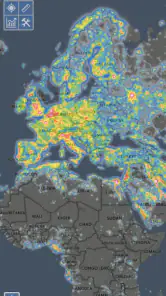
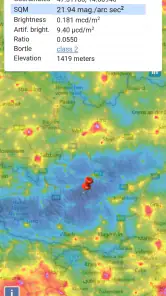
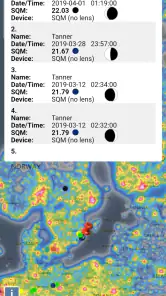
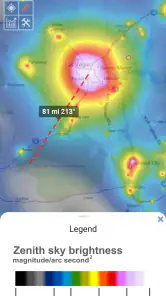
The Light Pollution Map app is like having a personal astronomer right in your pocket. It provides a detailed map showing the levels of light pollution across different regions. The app's interface is user-friendly, with an interactive map that allows you to easily identify areas with minimal light pollution for that perfect stargazing experience.
Features That Shine Bright
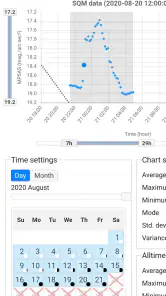
One of the standout features of this app is its comprehensive data. It pulls information from various satellites and ground measurements, offering an accurate depiction of light pollution levels. The app also provides a night mode, emphasizing areas with the least light pollution so you can plan your night out under the stars without a hitch.
Another feature worth mentioning is the community-driven updates. Users can contribute to the map by reporting changes in light pollution in their area, making the data more dynamic and up-to-date. This fosters a sense of community among stargazers and helps everyone find the best spots for viewing the cosmos.
Using the App: As Easy as Pie
Getting started with the Light Pollution Map app is a breeze. Simply download it, allow location access, and you're good to go. The app will pinpoint your current location and show you the light pollution levels in your vicinity. You can also explore other regions by dragging and zooming across the map, making it perfect for planning trips to darker skies.
The app’s settings are quite customizable. You can adjust the map layers to see different kinds of data, such as weather conditions and astronomical events, which can be incredibly useful for avid stargazers. Plus, the app is available for both Android and iOS, ensuring that no one misses out on the stellar views.
What a typical evening might look like
Imagine I finish work with a clear evening ahead and want to try observing from outside my usual neighborhood. I would first use the map to compare a nearby open area with a darker candidate farther out. If the difference looks worth the drive, I would check the forecast and moon conditions separately, confirm the route and access, and decide how late I can realistically stay. That sequence helps me avoid mistaking a promising map view for a complete go-ahead.
For a first visit, I would also keep the plan modest: arrive with enough time to find the spot in daylight if possible, avoid relying on a roadside pull-off without checking whether stopping is permitted, and tell someone where I am going. Those are ordinary outdoor-planning precautions, but they matter more when the goal is a quiet location after dark. The map helps with destination selection; it does not remove the need to plan the outing itself.
Cost and who should consider it
The app costs $5.49, so this is a paid choice rather than a free map to casually open once. That price makes most sense if you expect to use a light-pollution map repeatedly: for planning observing trips, comparing regions before travel, or finding darker alternatives near home. If you only want to look up one destination, you may prefer to start with a free general map or other free resources and decide whether a dedicated app is worth paying for.
It has an average rating of 4.3 from 74 ratings, with 8 written reviews and over 5K installs. Those figures suggest that people are using it, but they don’t tell me whether it fits my particular observing habits. It is rated for Everyone, runs on Android 5.1 or later, and version 1.1.33 is the current release. The app was released on September 5, 2020.
How I’d judge the paid value
I see the purchase as paying for a focused way to explore light pollution, not for a full suite of astronomy or travel tools. That distinction is important: if the map answers a question I ask repeatedly—where should I go to escape nearby skyglow?—a dedicated app may be convenient enough to justify the cost. If I rarely plan observing trips, the same purchase is harder to defend, especially when a free resource can serve for an occasional check.
Before buying, I would ask myself whether I expect to compare locations often and whether I am comfortable using separate apps for the rest of the planning. The map is most valuable when it changes a decision: perhaps it shows that a closer site is adequate, or that a longer drive is likely to make a meaningful difference. If I would choose the same place regardless of what the map shows, I am unlikely to get much practical value from paying for it.
Where it fits among alternatives
Compared with a general-purpose map, this app is aimed at a narrower question: how light pollution varies from place to place. A regular map is better for turn-by-turn routes, road conditions, and checking nearby services; a weather app is better for clouds and forecasts. I’d pair those tools rather than expect one map to handle every part of a night outdoors. The dedicated focus is valuable when choosing a dark-sky destination, but it won’t replace navigation or a forecast.
It may also be the wrong choice if you need a complete observing planner, want real-time travel directions, or rarely go stargazing. For a first outing, I’d use it to shortlist a location, check access and weather elsewhere, and have a backup spot in mind. For regular observers, that simple workflow can save wasted drives and make comparing destinations easier.
Limits that affect the decision
The biggest practical limitation is that a map of light pollution can only answer one part of the question. It cannot tell me whether a site feels comfortable after dark, whether I will find somewhere suitable to stand, or whether the route is sensible for my vehicle. A place that looks attractive in a regional view may still be inconvenient once I consider the final approach, local rules, and how long I want to be away.
I would also avoid treating community reports or map layers as a substitute for my own judgment about changing local conditions. A neighborhood can change over time, and an observation point can be affected by nearby lights that matter from the exact place I stand. The map is useful for narrowing the search, but once I have a favored location, a daylight visit or a careful check of the immediate surroundings can prevent a disappointing first attempt.
Who is likely to get the most from it?
I think it suits people who already go stargazing often enough to compare destinations, especially those who live near urban glow and are willing to travel for darker skies. It can also help a beginner who wants a sensible first shortlist, provided they understand that a dark location is only one ingredient and are ready to check weather, access, and directions elsewhere.
I would skip it if my main need were turn-by-turn navigation, live weather, or a guided astronomy schedule; those are different jobs, and the more suitable dedicated tool will be better for each. I would also hesitate if I only stargaze once in a while and am happy with a nearby familiar spot. In that case, a paid specialist map may not change enough decisions to earn its place on my phone.
Final Thoughts
In a world where city lights often outshine the stars, the Light Pollution Map app is a beacon for those looking to reconnect with the night sky. It’s a must-have tool for astronomy enthusiasts and casual stargazers alike. So, if you're yearning for a celestial escape, download the app, find a dark spot, and let the universe unveil its wonders.
My recommendation is more measured: I’d consider paying for it if I planned to use its map as a regular part of choosing observing locations, but I wouldn’t buy it expecting it to confirm every condition for a successful night. Its value is in helping you compare darkness across places. Combine that with separate checks for weather, access, and directions, and it becomes a more sensible companion for planning a stargazing outing.
Light pollution map Frequently Asked Questions
What is the purpose of the Light Pollution Map app?
The Light Pollution Map app is designed to help users identify areas with varying levels of light pollution. This is particularly useful for astronomers, stargazers, and photographers who desire clear night skies. The app provides real-time data on light pollution, helping users find the best locations for their nighttime activities.
How accurate is the data provided by the Light Pollution Map app?
The app aggregates data from various reliable sources, including satellite imagery and local monitoring stations, to deliver accurate and up-to-date information on light pollution levels. While the app strives for high accuracy, users should note that environmental changes and urban development can affect real-time results.
Is the Light Pollution Map app user-friendly for beginners?
Yes, the Light Pollution Map app is designed with a user-friendly interface that is easy to navigate. It features simple tools and a clean design that allow users of all skill levels to easily access and interpret light pollution data, making it suitable for both novices and experienced users.
Does the Light Pollution Map app require an internet connection to function?
Yes, the app requires an internet connection to fetch real-time data and updates about light pollution levels. However, users can download certain maps for offline use, ensuring they have access to important information even in remote areas without internet connectivity.
Are there any costs associated with using the Light Pollution Map app?
The Light Pollution Map app offers a free version with basic features, but users can opt for a premium subscription to unlock advanced features such as ad-free usage, enhanced data layers, and additional customization options. The premium version is ideal for those seeking more detailed insights and a richer user experience.
Pros
- Provides real-time light pollution data.
- Highly accurate and reliable readings.
- User-friendly interface for easy navigation.
- Customizable map views for specific needs.
- Supports offline access to saved maps.
Cons
- Requires internet for live data updates.
- May drain battery quickly on mobile.
- Limited features in the free version.
- Can be overwhelming for new users.
- Occasional glitches in map loading.
- Category
- Maps & Navigation
- Version
- 1.1.33











