

Lashify
- 208.00
- 4.8
- Installs
- 10.00K
- Price
- Free

Screenshots
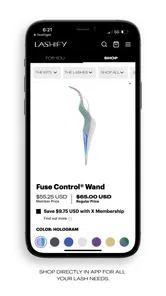
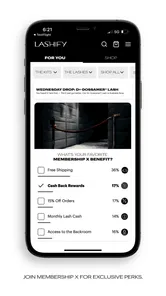
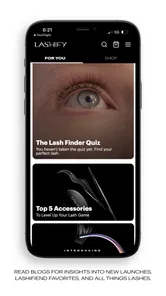
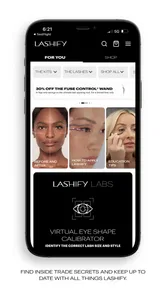
Analysis by Reviewed
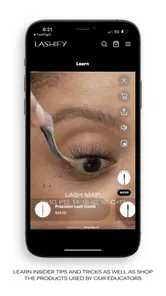
I approached Lashify as a beauty companion rather than just another shopping app. Its focus is DIY luxury lash extensions, and that immediately makes the experience more practical for people who want to understand the Lashify method before committing to an appointment or building a regular routine. The app is free to download, aimed at a Teen audience, and developed by Lashify Inc. My overall impression is that it works best when you treat it as a guided starting point: useful for learning the brand’s approach, checking your next step, and deciding whether at-home lash work fits your habits.
The app has a polished reputation, with a 4.8 average from around one thousand ratings and more than two hundred written reviews. It has also passed ten thousand installs, which gives it a visible user base without making it feel like a general-purpose beauty platform. That distinction matters. You are not opening it for broad makeup inspiration, salon discovery, or a complete skincare routine. You are opening it because lashes are the main event.
Where the experience can become confusing
The first point of friction is expectation. A short store summary can make an app sound like a complete lash solution, but applying extensions still depends on preparation, patience, and careful handling outside the screen. The app can support the process, yet it cannot replace the physical steps involved in working close to the eyes. I found it more helpful as a companion to a calm routine than as a shortcut for someone hoping to get professional-looking results instantly.
New users may also hesitate because lash terminology is unfamiliar. Even when an app presents products or instructions clearly, it is easy to lose track of what comes first, what is optional, and which item is intended for finishing rather than preparation. My advice is to avoid browsing randomly at the beginning. Start by identifying the basic workflow you want to follow, then return to the app with a specific question. That simple change makes the experience feel less like scrolling through beauty content and more like learning a repeatable technique.
Another common sticking point is the difference between visual confidence and practical confidence. A lash look can appear simple on a screen, while the real process requires steady hands and a good view of the lash line. If your first attempt feels slower than expected, that does not necessarily mean the app or the method has failed. It may simply mean that you need a better setup and a less rushed session.
The most useful mindset is to use the app for sequence and preparation, not as a promise of instant perfection. That is especially important for anyone new to DIY extensions. The application can help you understand what you are trying to do, but your result will still depend on lighting, positioning, cleanliness, and how carefully you follow each stage.
Who is likely to enjoy it
I would recommend the app to someone who already likes doing beauty routines at home and wants a more focused lash experience. It suits users who enjoy learning by repeating a process, comparing different looks, and making their own decisions rather than booking every appointment. It can also be useful for a person who is curious about Lashify but wants to explore the method before deciding whether it belongs in their regular routine.
More From Our News Desk

 Gmail
GmailGmail in a Busy Inbox: Who Benefits Most?
From first account to crowded workday, Gmail earns its place through dependable search and flexible sorting—but its best fit depends on how much inbox maintenance you can tolerate.

 Prime Video
Switching to Prime Video: What Changes in Your Viewing Routine
Prime Video can make a compelling second home for streaming, but switching means learning a different catalog, rental layer, and route from browsing to playback.

 Universal TV Remote Control
Universal TV Remote Control Works Best as a Reliable Backup
A phone remote earns its place through quick setup and reliable habits. Here is how to get more from Universal TV Remote Control—and where its limits show.

 Weather - By Xiaomi
Weather by Xiaomi Review: Clear at a Glance, Less Clear Up Close
Xiaomi’s weather app makes everyday forecasts quick to scan, but its calm surface can leave useful details and recovery paths harder to find than they should be.

 X
XX Under Pressure: Can It Recover When Posting Goes Wrong?
A resilience-focused review of X, examining setup, mistaken posts, interruptions, weak connections, and the gaps that matter when recovery needs to be dependable.

 Clash of Clans
Clash of Clans Is Won Between the Battles
Its raids are quick; its community is a long-term project of coordination, teaching, rivalry, and shared responsibility—with all the friction that entails.
Latest News



It is less suitable for someone who dislikes close-up beauty work or expects an app to do most of the decision-making. If you want a quick, low-effort change, mascara or professionally applied extensions may be a better match. Mascara is simpler to remove and usually requires less preparation. A salon appointment, meanwhile, offers hands-on expertise, even though it requires scheduling and can be less flexible than doing the work yourself.
Setup checks that prevent avoidable problems
Before blaming the app for a confusing session, I would check the basics. The current version is 2.0.67, and the app requires Android 8.0 or later. If the application will not install or behaves unexpectedly, confirming the device software is a sensible first step. On a compatible phone, I would also close other demanding apps, reopen Lashify, and make sure the connection is stable before assuming that content is missing.
These checks sound ordinary, but they matter more in a beauty workflow than people expect. If you are trying to follow guidance while holding tools or working near your eyes, interruptions become frustrating quickly. I prefer to open the app before starting, review the relevant material, and keep the phone in a position where I can glance at it without repeatedly touching the screen with product on my fingers.
A second setup check is personal rather than technical. Use a clean, comfortable area with enough light and a mirror that lets you see the lash line without leaning awkwardly. Keep the phone nearby but not in the way. This arrangement reduces the temptation to rush between the app and the mirror. It also makes it easier to pause when you need to review a step instead of improvising.
For a first session, I would avoid experimenting with several different looks at once. Choose one clear goal and use the app to support it. Trying to compare multiple styles while also learning placement creates unnecessary variables. If the result is uneven, you will not know whether the issue came from the chosen look, the order of the steps, your hand position, or simply fatigue.
It is also worth checking that you understand what you are looking at before making a purchase decision. Beauty apps can make products feel visually interchangeable, but small differences in shape or intended use may affect the final effect. I would read the surrounding guidance carefully, pause on unfamiliar terms, and avoid buying based only on a dramatic image. The right choice is the one that matches your comfort level and the amount of time you are willing to spend practicing.
A calmer first-session routine
My preferred approach is to divide the experience into three short phases. First, browse and learn without trying to apply anything. Second, prepare the physical space and decide what you want to achieve. Third, return to the app only for the instructions or product information relevant to that session. This prevents the phone from becoming a distraction and gives you a clearer sense of what you actually need.
That workflow also helps answer a question many new users have: do you need to be experienced with lashes to use the app? No, but you do need to be willing to learn gradually. The app is approachable for a beginner who reads carefully and accepts that the first attempt may be a practice session. It is not a substitute for caution, and it is not ideal for someone who wants to skip the learning curve.
Because the content rating is Teen, the app is positioned for a broad younger audience as well as adults. Still, the age label should not be treated as a replacement for sensible supervision or personal judgment around eye-area products. Anyone with sensitivity concerns should be especially careful and stop if something feels wrong rather than trying to push through for the sake of completing a look.
Recovering when the workflow goes wrong
When an app-based beauty routine breaks down, the most effective response is usually to identify the exact point of failure. Did the app fail to load, or did the instructions load but the physical application become difficult? Did you lose your place because you switched screens, or did the lash placement itself feel uncomfortable? Separating those problems prevents you from reinstalling the app when the real issue is technique or setup.
If the application opens but a page does not behave normally, I would first close and reopen it, then check the internet connection and available device storage. If the problem continues, updating to the latest available version is reasonable, provided the device meets the Android requirement. I would avoid repeatedly tapping buttons or making purchases while a screen appears frozen. Waiting, restarting, and checking the result is safer than accidentally repeating an action.
If you lose your place in a tutorial or product flow, return to the beginning of that specific section rather than guessing the missing step. In a lash routine, sequence matters. Skipping backward for a moment is less frustrating than continuing with uncertainty and later having to remove everything. I found that taking a quick mental note of the current stage before putting the phone down makes recovery much easier.
There is also a practical recovery method for the physical routine: stop, clean up your immediate workspace, and reassess before continuing. Do not try to rescue a rushed application while tired or working in poor light. A short break can reveal that the issue was an uncomfortable angle or an unstable mirror rather than a problem with the lash materials. The app can remain open while you reset, but the decision to continue should come from your comfort and control.
One non-obvious advantage of this approach is that it turns mistakes into useful information. If placement repeatedly feels difficult on one side, change your sitting position or mirror angle next time instead of immediately changing every product. If you keep forgetting the order, prepare a short written sequence before starting. The app gives you the reference point; your own notes can make the routine faster and more personal over time.
When the app is not the cause
It is easy to blame a digital guide when the final result is uneven, but lashes are affected by factors the app cannot control. Natural lash direction, eye shape, lighting, hand steadiness, and the amount of time available can all change the outcome. Two people can follow the same guidance and still need different adjustments. That is why I would judge the app by how well it helps you understand the process, not by whether every attempt looks identical to an example.
Comfort is another important boundary. If your eyes feel irritated, watery, or unusually uncomfortable, stop the routine and remove anything you can safely remove rather than trying to finish. An app cannot assess your eyes through the screen. The same applies if you have a known sensitivity or are unsure whether a product is appropriate for you. In those situations, professional advice is more valuable than another tutorial.
The app is also not the best answer for every beauty goal. If you only want a subtle daily enhancement, a lash curler or mascara may be quicker and easier to maintain. If you want a long-lasting salon finish without practicing at home, a qualified lash professional may suit you better. If you enjoy changing your look frequently, the flexibility of DIY work can be appealing, but that flexibility comes with more responsibility for preparation, application, and removal.
Compared with broad beauty apps, Lashify feels more specialized and therefore more useful when your question is specifically about its lash system. You are less likely to be distracted by unrelated trends, but you also get less value if lashes are only a small part of your beauty interests. Compared with a video platform, the app may feel more focused, while a video platform can offer a wider range of independent techniques and viewpoints. I would choose this app for brand-specific orientation and a structured starting point, not as the only beauty resource I ever use.
Everyday use beyond the first attempt
A realistic use case is getting ready for an event when you want more definition than mascara but do not want to book a last-minute appointment. I would open the app earlier in the day, review the intended look, prepare the workspace, and leave enough time to stop if the result is not comfortable. The important detail is not merely having the app installed; it is using it before the time pressure begins.
Another useful scenario is building a repeatable weekly routine. After a few sessions, you can observe which steps slow you down and which setup choices help. Perhaps you need brighter light, a different mirror height, or a reminder to review the sequence before touching the materials. Those observations are more valuable than endlessly browsing for a new look, because they improve consistency.
I also see value in using the app as a decision filter. Before buying anything, ask whether the look suits your normal schedule, whether you are comfortable with the maintenance involved, and whether you genuinely enjoy the hands-on process. Free access makes that exploration easier, but free does not mean the routine costs no time or effort. The best result comes from choosing a method you will realistically repeat.
For iPhone and iPad users, the main question is simply whether the version available on their device offers the same practical material they need. For Android users, compatibility begins with Android 8.0 or newer. In either case, I would keep the operating system and app current, then evaluate the experience on the actual device you plan to use while getting ready. A larger screen may be easier to consult, while a phone is usually more convenient beside a mirror.
My practical verdict
Lashify is a focused beauty app with a clear audience: people interested in DIY luxury lash extensions and willing to learn a careful routine. I like it most as a preparation and guidance tool. It gives a dedicated place to explore the Lashify approach, and its free price makes it approachable for someone who wants to investigate before making the method part of their beauty habits.
The limitations are equally clear. The app cannot guarantee an effortless application, cannot correct poor lighting or an awkward mirror, and cannot replace professional judgment when eye comfort is involved. Beginners should expect a learning period, while users who want the fastest possible result may prefer mascara or a salon service. Those are not failures of the app; they are trade-offs built into DIY lash work.
My recommendation is to install it if you are curious about Lashify, enjoy hands-on beauty routines, and want a more organized way to approach lash extensions. Begin slowly, check your device compatibility, prepare your space before opening the materials, and treat the first session as practice rather than a test you must pass. If you want broad beauty discovery or a completely effortless result, choose a more general beauty tool or professional service instead.
For the right user, the app’s real strength is not simply showing an attractive lash outcome. It is helping turn an unfamiliar process into a sequence you can understand, pause, and repeat. That makes Lashify worth trying, as long as you bring realistic expectations and let comfort, patience, and good preparation guide the final result.
Lashify Frequently Asked Questions
What devices can run Lashify?
Lashify is a beauty app for people exploring the brand’s DIY lash extensions, and it runs on devices using Android 8.0 or later. Check your device’s operating system before downloading, since an older version may prevent installation or affect how the app works. The app is free to download, so you can explore its features without paying for the download itself.
What is Lashify, and what can I do with the app?
Lashify is a beauty-focused app designed to support users interested in Lashify eyelash extension products and application techniques. Depending on the version and region, it may provide access to tutorials, product information, lash styles, shopping features, educational content, and brand updates. It is especially useful for beginners who want guidance before trying DIY lash extensions, as well as experienced users looking for inspiration and maintenance advice.
Is Lashify free to download and use?
The Lashify app is free to download, but some products, services, or shopping features require payment. The exact availability of free content can vary by country, account status, promotions, and app version. Before making a purchase, users should check product prices and confirm whether shipping, subscriptions, or in-app purchases apply.
Can beginners learn how to apply Lashify lashes through the app?
Yes, the app is intended to help users understand the Lashify system and may include educational material such as application instructions, product explanations, styling suggestions, and care recommendations. However, digital guidance cannot replace professional training or individual advice. Beginners should follow all instructions carefully, use only compatible products, avoid rushing the application, and stop immediately if they experience pain, swelling, redness, or irritation around the eyes.
Is Lashify safe for everyone to use?
Lashify products are not automatically suitable for every user. People with sensitive eyes, known allergies to lash adhesives, existing eye conditions, recent eye surgery, or irritated skin should seek medical advice before using an eyelash extension system. The app can provide product and usage information, but it cannot diagnose reactions or guarantee safety. Always read ingredient labels, follow the manufacturer’s directions, and perform any recommended patch test.
Pros
- Creates salon-style lash looks at home
- Customizable lash lengths
- styles
- and volume
- Lightweight designs feel comfortable when applied correctly
- Helpful tutorials guide beginners through application
- Refills let users maintain their preferred lash style
Cons
- Premium products can be expensive for regular use
- Application requires patience and a steady hand
- Adhesive may irritate sensitive eyes or skin
- Lashes can lift if exposed to oil or moisture
- Removing the system takes care to avoid natural lash damage











