

LaserAway
- 56.00
- 4.7
- Installs
- 10.00K
- Price
- Free

Screenshots
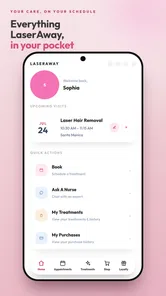
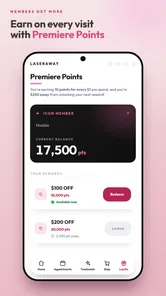
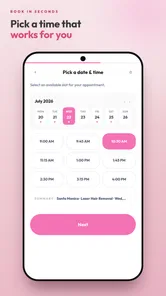
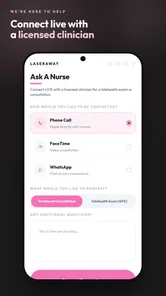
Analysis by Reviewed
I approached LaserAway as a companion for people already considering professional beauty treatments, rather than as a general-purpose beauty app. That distinction matters. Its value is tied to the LaserAway experience and to the practical steps around arranging care, exploring services, and staying connected with the provider. I found it most useful when I wanted a more direct route to a clinic’s services than searching broadly across beauty websites, social networks, and map listings.
The app is free, aimed at everyone, and belongs to the beauty category. It comes from LaserAway Medical Group, INC., so its identity is closely connected to the company rather than to independent skincare education. That makes it easier to understand what the app is for: it is a branded gateway into LaserAway, not a replacement for a dermatologist, a treatment consultation, or a complete routine planner.
What using LaserAway feels like in practice
The first thing I noticed is that the app makes more sense when I have a specific intention. If I am simply browsing beauty ideas, a broad beauty platform gives me more variety. If I am trying to investigate LaserAway’s own services or decide whether to take the next step with that provider, the focused design is more relevant. The app keeps the journey centered on that brand, which reduces the noise but also narrows the experience.
That focused approach is the strongest evidence in its favor. Instead of mixing unrelated product recommendations, influencer content, and advertisements from competing clinics, it gives me a single place to engage with LaserAway. For someone who has already seen a treatment mentioned elsewhere and wants to continue with the same provider, that continuity can be convenient.
I also appreciate the difference between researching a treatment and committing to one. An app like this can help organize the beginning of the process, but beauty procedures still deserve careful questions about suitability, expectations, aftercare, and personal medical circumstances. I would use the app to move toward a conversation with the provider, not to make a health decision based on a few attractive images or short descriptions.
A useful role before making an appointment
My preferred workflow would be to use LaserAway after narrowing down what I actually want to investigate. I would first write down the concern in plain language, such as unwanted hair, skin appearance, or another cosmetic goal, then use the app to explore the relevant LaserAway path. This prevents the common mistake of browsing every treatment category without knowing what question I am trying to answer.
A small but important tip is to keep a short list of questions beside me while using it. I would note whether the treatment is appropriate for my skin or hair characteristics, how much preparation is expected, what recovery might involve, and which results are realistic. The app can support the administrative side of the decision, but the quality of the final choice still depends on asking those questions directly.
More From Our News Desk

 Gmail
GmailGmail in a Busy Inbox: Who Benefits Most?
From first account to crowded workday, Gmail earns its place through dependable search and flexible sorting—but its best fit depends on how much inbox maintenance you can tolerate.

 Prime Video
Switching to Prime Video: What Changes in Your Viewing Routine
Prime Video can make a compelling second home for streaming, but switching means learning a different catalog, rental layer, and route from browsing to playback.

 Universal TV Remote Control
Universal TV Remote Control Works Best as a Reliable Backup
A phone remote earns its place through quick setup and reliable habits. Here is how to get more from Universal TV Remote Control—and where its limits show.

 Weather - By Xiaomi
Weather by Xiaomi Review: Clear at a Glance, Less Clear Up Close
Xiaomi’s weather app makes everyday forecasts quick to scan, but its calm surface can leave useful details and recovery paths harder to find than they should be.

 X
XX Under Pressure: Can It Recover When Posting Goes Wrong?
A resilience-focused review of X, examining setup, mistaken posts, interruptions, weak connections, and the gaps that matter when recovery needs to be dependable.

 Clash of Clans
Clash of Clans Is Won Between the Battles
Its raids are quick; its community is a long-term project of coordination, teaching, rivalry, and shared responsibility—with all the friction that entails.
Latest News



This is also where the app can be more practical than a normal web search. Search results often blend official information with reviews, promotions, old pages, and advice written for different clinics. A dedicated provider app gives me a cleaner starting point for LaserAway-specific information. The trade-off is that I need to remember it represents one company’s services, so I should not treat it as a neutral comparison tool.
Where the focused design helps most
LaserAway is particularly useful for a person who has already interacted with the brand offline or who wants to keep the process in one ecosystem. Returning to a provider’s own app can feel less scattered than switching between a browser, email, phone contacts, and map applications. In an everyday situation, I might be commuting home after deciding to learn more about a treatment. Opening this app gives me a more direct next step than searching the entire internet again.
Another practical use is preparation for a conversation. Rather than arriving with only a vague idea that I want “better skin” or “less hair,” I can use the provider’s material to identify the service area I want to discuss. I would still confirm the details with staff, but entering the appointment with a clearer vocabulary can make the consultation more efficient.
The app’s audience rating of Everyone also makes it approachable from a content-classification standpoint. That should not be confused with medical suitability for every person. Cosmetic treatments can involve individual considerations, and an age label does not replace professional guidance. I see the rating as a sign that the app itself is broadly accessible, not as a recommendation for every treatment to every user.
The main weakness: it is not an independent beauty adviser
The limitation I kept coming back to is the app’s built-in point of view. Because it is made by LaserAway Medical Group, INC., it naturally leads me toward LaserAway rather than helping me compare providers on equal terms. That is not a flaw for a loyal customer, but it is a meaningful weakness for someone still deciding between clinics, salons, home devices, and medical practices.
If I wanted neutral guidance, I would use a different source alongside it. A dermatologist’s advice may be more appropriate for a skin problem, while a broad beauty app may offer more routine ideas and product variety. A map service may be better for comparing locations and public feedback. LaserAway’s app has a narrower job, and expecting it to perform all of those roles would lead to disappointment.
I would also avoid treating convenience as proof of results. A smooth digital path can make a treatment feel simple before I have considered maintenance, cost, discomfort, downtime, or whether the expected outcome matches my priorities. My advice is to use the app to gather provider-specific information, then pause before booking and make sure the practical commitment fits my schedule and budget.
Three ways to get more value from it
First, use the app as a question-building tool rather than a passive brochure. After reading about a service, write down the exact point that remains unclear. For example, ask what preparation is needed, what happens if the result is uneven, or how the provider evaluates progress. This turns browsing into a more useful consultation plan.
Second, separate discovery from decision-making. On the first visit, I would explore only the areas related to my concern. On the second, I would review the information again with my own constraints in mind: available time, comfort with follow-up visits, and willingness to maintain results. This two-step approach reduces the chance of making a quick decision simply because the app makes the next action easy.
Third, compare the provider’s route with at least one realistic alternative before committing. That alternative might be a dermatologist for a medical skin concern, a salon for a less clinical service, or a home option when convenience matters more than professional treatment. The point is not to reject LaserAway automatically; it is to check whether the provider’s model actually matches the problem I want to solve.
These habits are more valuable than simply opening the app repeatedly. A branded beauty app can be most helpful when it supports a deliberate process. Used without a plan, it risks becoming another place to browse attractive treatment information without reaching a well-informed conclusion.
Who should install it
I would recommend LaserAway to existing LaserAway customers, people already considering one of its services, and users who prefer dealing with a provider through a dedicated mobile experience. It is also a sensible choice for someone who wants a single brand-specific starting point instead of collecting information from many disconnected pages.
It may suit a busy person who wants to investigate a treatment during a spare moment and then continue the conversation later. That is especially true when the alternative is losing track of information across search tabs and messages. The app’s free price removes a financial barrier to trying the digital experience, so interested users can judge its usefulness without paying for the app itself.
I would be more cautious about recommending it to someone who is only looking for general skincare education, unbiased clinic comparisons, or a personal routine tracker. Those needs call for broader or more independent tools. I would also suggest that anyone with a specific skin condition begin with qualified medical advice rather than using a beauty-provider app as the main source of guidance.
What its public reception suggests
The app has a 4.7 average from around 266 ratings, with about 56 written reviews, and it has passed 10 thousand installs. Those figures suggest that the experience has found a satisfied audience, while the install count also shows that it remains a relatively focused product rather than a mass-market beauty platform. I read that combination as encouraging but not conclusive: strong user sentiment is useful context, yet it does not tell me whether the app will fit my specific treatment journey.
The current release is version 2.0.81, and the app runs on Android 7.0 or later. For someone using an older phone, checking the operating-system requirement before planning around the app is sensible. The recent version label also makes it worth keeping the app updated, particularly when using it as part of an ongoing provider relationship rather than for a single visit.
I would not choose an app solely because it has a high average rating. In this case, the more important question is whether the reviewers resemble me: are they using LaserAway as an existing customer, researching a treatment, or expecting a general beauty resource? Ratings can confirm that the app is worth trying, but the app’s narrow purpose should remain the deciding factor.
How it compares with ordinary alternatives
Compared with a normal mobile browser, LaserAway offers a more concentrated route into the provider’s world. The browser is better when I want to compare several companies, read independent sources, or investigate a medical question from multiple perspectives. The app is better when I already know that LaserAway is the provider I want to explore.
Compared with a general beauty app, it offers less breadth but more brand consistency. General platforms are useful for routines, product discovery, community opinions, and inspiration across many companies. LaserAway is not trying to be that kind of open marketplace. Its advantage is relevance for LaserAway-related decisions; its disadvantage is that information outside that relationship is not its natural strength.
Compared with contacting a clinic by phone, the app may feel less intrusive during the early research stage. I can look through the provider’s material before speaking with someone, which is helpful if I am still forming basic questions. Phone contact remains better when my situation is complicated, I need clarification, or I want a human response rather than a digital starting point.
Compared with home beauty devices, the app represents a professional-provider route rather than a do-it-yourself purchase decision. That may appeal to users who value guided care, but it also means accepting the provider’s process and the time involved in appointments or follow-up. I would compare not only the headline result but also the level of involvement I am comfortable maintaining.
My final view
LaserAway is a focused beauty app with a clear purpose: helping users connect with LaserAway’s own treatment experience. I like it most as a practical bridge between initial curiosity and a more informed conversation with the provider. Its strongest quality is concentration, while its biggest drawback is that the same concentration prevents it from being a neutral guide to the wider beauty market.
My recommendation is straightforward. Install it if LaserAway is already on your shortlist or if you are an existing customer who wants a dedicated way to continue the process. Use it alongside independent advice when the decision involves medical concerns, and compare alternatives before making a commitment. It works best as a provider-specific companion, not as a complete beauty adviser.
LaserAway Frequently Asked Questions
Who develops the LaserAway app, and is it available on my device?
LaserAway is a beauty app developed by LaserAway Medical Group, INC. It is free to download and is listed for devices running Android 7.0 or later. Before installing, check that your device meets the operating-system requirement and that you are downloading the official app. The app is intended for exploring LaserAway’s services and related clinic options.
What is LaserAway, and what services does it offer?
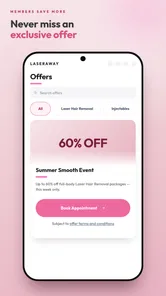
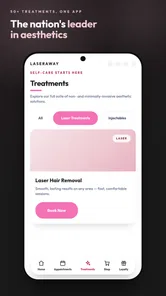
LaserAway is a cosmetic treatment app and service platform associated with LaserAway clinics, where users can explore aesthetic and dermatological treatments such as laser hair removal, skin rejuvenation, tattoo removal, injectables, body contouring, and other procedures. The app is mainly useful for browsing services, finding nearby locations, requesting consultations, managing appointments, and learning about available promotions. Treatment availability may vary by clinic and location.
Can I book a LaserAway appointment directly through the app?
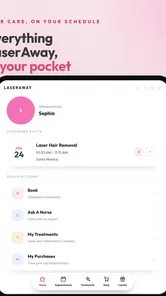
In many cases, the LaserAway app allows users to request or manage appointments, but the exact booking process can depend on the selected clinic, treatment, and local availability. Some procedures may require a consultation before an appointment is confirmed. After choosing a service and location, review the appointment details carefully and check for confirmation messages. It is also a good idea to contact the clinic directly if you need to reschedule or have questions about preparation.
Is LaserAway suitable for everyone?
LaserAway treatments are not automatically suitable for every person, because eligibility can depend on skin type, hair color, medical history, medications, pregnancy status, allergies, and the specific procedure being considered. The app can provide general information, but it cannot replace an evaluation by a qualified professional. Before booking, disclose relevant health information during the consultation and follow the clinic’s instructions about medications, sun exposure, skincare products, and treatment preparation.
How much do LaserAway treatments cost, and are prices shown in the app final?
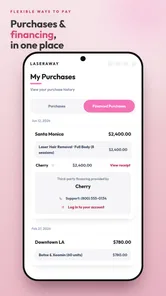
LaserAway pricing can vary considerably according to the treatment area, number of sessions, clinic location, promotional offers, and whether a customized treatment plan is recommended. Prices or financing information displayed in the app may be estimates or promotional terms rather than a final quote. Before agreeing to treatment, confirm the total cost, required sessions, membership or package conditions, cancellation policy, and any financing obligations directly with the clinic.
Pros
- Easy access to laser hair removal and aesthetic treatment information.
- Clinic locations and contact details help users plan appointments.
- Treatment options are presented in a simple
- easy-to-browse format.
- Useful for exploring LaserAway services before speaking with staff.
- Convenient mobile access for existing or prospective clients.
Cons
- The app may have limited value outside areas served by LaserAway clinics.
- Pricing and treatment availability can vary by location.
- Some features may require creating an account or sharing personal details.
- Results and suitability still require consultation with a qualified professional.
- Promotional content may feel more prominent than educational information.











