

Lacquergram: for Nail Polish L
- 86.00
- 4.4
- Installs
- 50.00K
- Price
- Free

Screenshots
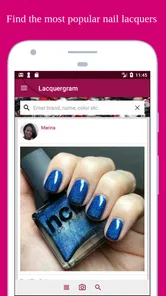
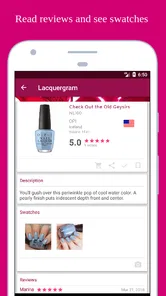
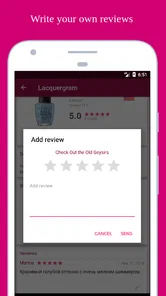
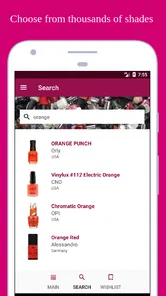
Analysis by Reviewed
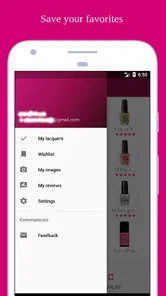
I downloaded Lacquergram because my nail polish collection had become harder to manage than it should have been. Bottles were spread across drawers, older shades were easy to forget, and choosing a color often meant opening several boxes just to remember what I already owned. This beauty app takes a more organized approach: it is built around keeping track of a polish stash and exploring shades in one place. In my experience, that simple focus is its biggest strength, but it also means the app works best for people who are willing to maintain their collection rather than expecting an instant, fully automatic catalog.
Lacquergram is free to install, with optional in-app purchases ranging from $1.99 to $14.99 per item. It is made by Lacquergram and is suitable for Everyone, so the basic idea is approachable whether you are a casual polish buyer, a dedicated collector, or someone trying to stop purchasing near-duplicate colors. The app has a 4.4 average from around 559 ratings and has passed 50K installs, which gives it a modest but meaningful user base for such a focused tool.
Where the real friction appears when using Lacquergram
The first thing I noticed is that an app for organizing nail polish is only as useful as the information you put into it. That sounds obvious, but it affects the whole experience. If you add a bottle quickly without checking its shade, finish, or identifying details, your collection can become difficult to search or browse later. The app is not a magic replacement for looking at the bottle in your hand; it is a structured place to record what you know.
That creates a common sticking point during the first session. A new user may expect to open the app and immediately see a polished personal collection. Instead, the useful part develops gradually as bottles are added. I recommend starting with the polishes you use most often rather than trying to document every bottle in one long sitting. This makes the setup feel manageable and gives you a practical collection to work with quickly.
Another source of friction is remembering whether a color is already in your stash. Nail polish names can be surprisingly similar, and two bottles that look different in a shop may appear almost identical under indoor lighting. Lacquergram helps by giving the collection a dedicated home, but the quality of the result still depends on consistent naming and careful browsing. I found it more helpful as a decision-making aid than as a substitute for visual judgment.
The discovery side can also lead to a small but important problem: finding attractive new shades may encourage more buying when the original goal was to use what you already own. I would treat the discovery area as inspiration, not as a shopping command. Before saving a new idea, I compare it with my existing colors and ask whether it adds a genuinely different finish or simply resembles something already in the drawer.
What to prepare before building a collection
Before entering a large stash, I suggest grouping bottles physically by a simple rule, such as color family or frequency of use. This is not a requirement of the app, but it reduces mistakes while you work. I usually begin with reds, pinks, neutrals, and the shades I reach for during the week. That approach makes it easier to notice duplicates and prevents the first setup session from turning into a tiring inventory project.
More From Our News Desk

 Gmail
GmailGmail in a Busy Inbox: Who Benefits Most?
From first account to crowded workday, Gmail earns its place through dependable search and flexible sorting—but its best fit depends on how much inbox maintenance you can tolerate.

 Prime Video
Switching to Prime Video: What Changes in Your Viewing Routine
Prime Video can make a compelling second home for streaming, but switching means learning a different catalog, rental layer, and route from browsing to playback.

 Universal TV Remote Control
Universal TV Remote Control Works Best as a Reliable Backup
A phone remote earns its place through quick setup and reliable habits. Here is how to get more from Universal TV Remote Control—and where its limits show.

 Weather - By Xiaomi
Weather by Xiaomi Review: Clear at a Glance, Less Clear Up Close
Xiaomi’s weather app makes everyday forecasts quick to scan, but its calm surface can leave useful details and recovery paths harder to find than they should be.

 X
XX Under Pressure: Can It Recover When Posting Goes Wrong?
A resilience-focused review of X, examining setup, mistaken posts, interruptions, weak connections, and the gaps that matter when recovery needs to be dependable.

 Clash of Clans
Clash of Clans Is Won Between the Battles
Its raids are quick; its community is a long-term project of coordination, teaching, rivalry, and shared responsibility—with all the friction that entails.
Latest News



It is also worth deciding how precise you want to be. A casual user may only need a recognizable name and color. A collector may want to record more identifying information so that two similar shades do not become one vague entry in memory. The trade-off is time: more careful records are more useful later, but they take longer to create. Lacquergram rewards consistency, not rushed data entry.
For people who own many polishes, I would not begin by trying to recreate the entire collection in one evening. Add a small group, close the app, and return later. This staged approach gives you a chance to see how you actually use the collection before investing effort in details that may not matter to you. It also makes it easier to spot an entry that needs correcting while you still remember which bottle you were handling.
Setup checks that prevent avoidable problems
Lacquergram runs on Android 7.0 or later, so compatibility is one of the first checks to make before troubleshooting anything else. If the app installs but behaves strangely, I would first confirm that the device is not running an unusually old system and that the operating system has enough free storage for normal app activity. These are ordinary checks, but they eliminate a surprising number of false alarms.
The current version is 2.9. After installing or updating, I would open the app once while connected to a reliable network, then allow the initial screens to finish loading before adding a large number of entries. If a page appears incomplete, repeatedly tapping it is rarely helpful. Waiting a moment, closing and reopening the app, or trying again on a steadier connection is a safer first response than assuming the collection has been lost.
Because this is a collection-management tool, the most important setup check is your own organization method. Decide how you will spell shade names, how you will distinguish finishes, and whether you want to record limited-edition or older bottles separately in your personal notes. Even a simple rule helps. For example, I use the visible product name first and add a short clarifying word only when two bottles could be confused.
Another useful habit is to inspect an entry immediately after saving it. Do not wait until dozens of bottles have been added. Look at the collection view and confirm that the new item appears where you expect it. This catches small input mistakes early and teaches you which parts of the app are most useful for your own stash. The benefit is practical: correcting one entry is easy, while correcting a whole batch is tedious.
The free starting point makes it easy to test this workflow without committing money. Optional purchases are present, but I would use the free experience long enough to understand whether you genuinely need additional functions before paying for anything. A purchase may be worthwhile for a serious collector who uses the app frequently, but it is harder to justify for someone with only a handful of bottles or someone who prefers a handwritten list.
How I recover when the workflow breaks
When something does not appear to save correctly, I avoid immediately re-entering the same bottle several times. First, I return to the collection and check whether the item is present under a slightly different name or position. Duplicate entries can make a temporary display issue look worse and may leave you with more cleanup later.
If the app feels slow or a screen does not refresh, I use a simple recovery sequence: stop the current action, leave the screen, reopen the relevant collection area, and try one small change. I also check the network if the problem involves discovering shades rather than viewing information already stored on the device. This distinction matters because a local collection view and an online discovery experience may not fail for the same reason.
I would also avoid clearing app data as a first troubleshooting step. For an organizer, deleting local information can be far more disruptive than tolerating a temporary display problem. Before taking any destructive action, make sure you understand what information is stored where and whether you have another record of your collection. Even when an app is working properly, a personal backup list or occasional screenshots can provide peace of mind for a valuable stash.
Another recovery trick is to reduce the size of the task. If adding a full drawer causes confusion, add one bottle and test the result. If browsing many shades feels overwhelming, narrow your goal to a single color family. This is not just troubleshooting; it is a better way to use a catalog app. Smaller actions make it easier to identify whether the issue is the app, the device, the connection, or simply an overly ambitious workflow.
For an entry that looks wrong, I prefer editing or replacing the information carefully rather than creating a second version immediately. Consistent records are especially important when comparing similar colors. A collection full of near-duplicates is less useful than a smaller collection whose entries you can recognize at a glance.
When the app is not the cause
Some problems that feel like app failures are really caused by the physical polish collection. A bottle may have changed color with age, a label may be damaged, or the shade may look different under warm household lighting. Lacquergram can help you organize your understanding of the stash, but it cannot make an old formula look exactly like a fresh swatch. When an entry seems inaccurate, I check the bottle itself in daylight before blaming the catalog.
Device behavior can also create misleading symptoms. A nearly full phone, aggressive battery management, an unstable connection, or an outdated operating system can interfere with normal app use. If the issue appears only during discovery or loading, I test another connection and restart the app. If it affects the whole phone, I treat it as a device-maintenance problem first.
There is also a human cause: inconsistent categorization. If I call one shade “berry,” another “dark pink,” and a third “wine,” I may later believe the app is failing to group them sensibly when the real problem is that I entered them differently. The solution is to choose labels that make sense to me and use them repeatedly. This is one of the less obvious lessons of collection apps: organization is partly software and partly personal discipline.
Privacy-conscious users may also want to think about what they are comfortable recording. A nail polish inventory is not sensitive for most people, but a detailed collection can still reveal shopping habits and preferences. I keep entries focused on the products themselves and avoid adding personal information that does not improve the catalog. That keeps the app’s role clear and makes the collection easier to maintain.
How Lacquergram fits everyday nail care
A realistic use case is preparing for a weekend manicure. Before choosing a color, I open the collection and browse what I already have instead of searching online first. I can identify a few candidates, compare them with the clothes or occasion I have in mind, and then check the physical bottles. This takes less time than pulling every polish from a drawer, especially once the collection has been built carefully.
It is also useful after buying a new bottle. Rather than leaving it unrecorded until later, I add it while the packaging is still nearby. I can then avoid buying the same shade again during a future sale. For collectors, this small habit may be more valuable than the discovery function because it turns the app into a buying filter rather than just a source of inspiration.
People who enjoy seasonal rotation may use it differently. At the beginning of a season, I would review colors that match the mood I want and physically move those bottles to an easier-to-reach place. The app does not replace that physical step, but it makes the selection less random. It can also help someone remember neglected shades that deserve another chance before a new purchase is made.
Compared with a notes app, Lacquergram is more focused on the beauty-collection problem and feels less like a blank page. A generic spreadsheet can offer more freedom, custom columns, and powerful sorting, but it requires more design work and maintenance. A photo folder is faster for visual memory, yet photos alone are not as useful when you want to distinguish names or review the collection systematically. A handwritten notebook is pleasant for some users, but it is less convenient when the stash changes often.
The trade-off is that a specialized app may not suit someone who wants complete control over every field. If your collection is small, a simple note may be faster. If you manage products across several beauty categories, a broader inventory tool may be better. Lacquergram makes the most sense when nail polish itself is the center of the collection and you want discovery connected to organization.
I would recommend it particularly to users who repeatedly forget what they own, buy similar shades, or enjoy planning manicures around a visible catalog. It is less suitable for someone who dislikes entering information, expects automatic recognition of every bottle, or wants a fully customized inventory system. The app can reduce clutter, but it cannot remove the small responsibility of keeping records accurate.
Small habits that make the catalog more useful
My strongest practical tip is to record a bottle at the moment it enters the collection. Delaying that step creates a pile of “temporary” bottles that are easy to forget. My second tip is to review before shopping, not after. The app has more value when it changes a purchase decision than when it merely documents one.
A third tip is to use physical checks alongside the digital record. When two shades look close, hold the bottles together and compare them under the same light. Then adjust your personal organization if necessary. This prevents the app from becoming a source of false confidence and turns it into one part of a more reliable decision process.
Finally, I would keep the collection deliberately clean. Remove or mark bottles you no longer own instead of allowing the catalog to become a historical archive by accident. An accurate smaller stash is easier to browse than an impressive but outdated one. This is where the app’s usefulness depends most on regular attention.
My practical verdict after using the app
Lacquergram is a focused beauty app with a clear purpose: helping nail polish users organize a stash while discovering shades worth considering. I like that it addresses a real everyday annoyance rather than trying to become a general beauty platform. Once a collection is established, it can make choosing a manicure and checking a potential purchase noticeably easier.
Its main weakness is also clear. The first useful result requires effort, and users who do not enjoy cataloging may lose interest before the collection becomes valuable. Setup can feel slow if you try to enter everything at once, and inconsistent naming can reduce the benefit of browsing later. Those are not reasons to reject the app, but they are important expectations to set before installing it.
The app has been available since March 23, 2018, and version 2.9 is the release I reviewed. Its Everyone age rating and free entry point make it easy to try, while the optional purchases mean frequent users should decide carefully which extras genuinely improve their routine. I would start without paying, add a manageable group of bottles, and judge the experience by one question: does it help me make better use of the polish I already own?
For me, the answer is yes, provided I keep the records tidy. The best reason to use Lacquergram is not simply collecting colors; it is reducing repeated purchases and making forgotten shades visible again. If that matches your goal, this is a practical tool worth trying. If you want effortless automatic inventory, deep customization, or a general organizer for every beauty product, a different option will probably fit better.
Lacquergram: for Nail Polish L Frequently Asked Questions
Does Lacquergram work offline, or do I need an internet connection?
Lacquergram is built around discovering nail polish shades and engaging with product and community content, so an internet connection is useful for browsing and accessing current information. If you want to check your collection while offline, what remains available may depend on how the app stores your saved details and the features you use. Consider opening the app with a connection before relying on it while away from the internet.
Is Lacquergram suitable for beginners as well as experienced nail polish collectors?
Yes. The app’s focus on organizing a polish stash and discovering shades can be useful whether you are just starting to collect nail polish or already have many bottles. Beginners can use it to explore colors and keep track of products they like, while experienced collectors may appreciate having collection details and future purchases organized in one place. Its usefulness depends on how much you want to catalog and explore.
What is Lacquergram: for Nail Polish L, and what can I use it for?
Lacquergram: for Nail Polish L is designed for nail polish enthusiasts who want to organize, discover, and keep track of their collections. You can use it to browse polish-related content, record products you own, save shades you like, and explore information shared by other members. It is especially useful if you have a large collection and want an easier way to remember colors, brands, finishes, and future purchases.
Can I catalog my personal nail polish collection in Lacquergram?
Yes, the app is intended to help users manage their nail polish collections digitally. Depending on the available product information, you can add polishes to your personal records and review details such as brand, shade, finish, and collection. This makes it easier to identify duplicates, plan manicures, create wish lists, and keep your collection organized without having to search through physical bottles every time.
Does Lacquergram include nail polish reviews, swatches, or community content?
Lacquergram focuses on discovery and community interaction around nail polish, so users may find product information, color references, swatches, ratings, and opinions from fellow enthusiasts. The amount and quality of content can vary between products because it depends on community contributions. Photos may also look different from the real polish because lighting, camera settings, and screen calibration affect color accuracy.
Pros
- Tracks your nail polish collection in one convenient place.
- Makes it easier to remember shades you already own.
- Useful for organizing polishes by brand
- color
- or finish.
- Can help inspire new manicure combinations and purchases.
- A practical companion for dedicated nail polish collectors.
Cons
- Cataloging a large collection may take considerable time.
- Shade colors can look different across phone screens.
- Some brands or products may be missing from the database.
- Requires regular updates when you buy or finish a polish.
- Less useful if you only own a small number of nail polishes.











