knitCompanion
- 296.00
- 3.4
- Installs
- 100.00K
- Price
- Free

Screenshots
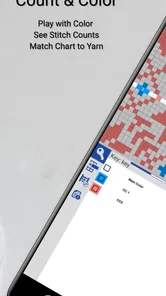
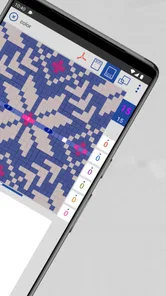
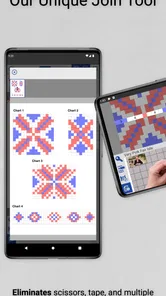
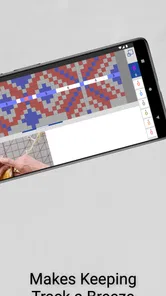
Analysis by Reviewed
If you knit from printed patterns, PDFs, or charts, knitCompanion is designed to make the practical side of the hobby less fiddly. I approached it as a first-time user would: looking for a pattern, trying to keep my place, and checking whether the app actually helps during a real knitting session rather than simply looking useful in a store preview. Its central promise is simple: spend more time knitting and less time losing your row.
This is a free lifestyle app from Create2Thrive Inc, aimed at knitters who want a more focused way to work with patterns on a mobile device. It has an Everyone content rating, so there is nothing about the presentation that feels restricted or unsuitable for a general audience. The app has been available since August 19, 2016, and its current version is 3.0.14 for devices running Android 8.0 or later. That long presence matters because this is not a novelty built around a single trend; it is a specialized tool for a particular, recurring problem.
The store presents it with the short description “knitCompanion,” while the broader summary is “Knit More, Frog Less.” In my experience, that second phrase captures the intended benefit better than a long feature list would. The app is not trying to teach someone how to cast on, replace a knitting teacher, or turn a basic project into a social network. Its value appears when you already have a pattern and need help managing the visual and mental work of following it.
What to expect when you open the app
The first thing to understand is that this is a pattern companion, not a general-purpose note-taking app with a knitting theme. A normal PDF viewer can display a pattern, but it usually leaves you to solve the difficult parts yourself: marking the current row, tracking repeats, switching between pages, and remembering where you stopped. A paper copy gives you freedom and familiarity, but it can become messy once you add pencil marks, sticky notes, counters, and corrections.
knitCompanion sits between those approaches. It is most useful when your project has enough structure to make losing your place costly. A simple scarf with one repeated stitch may not justify learning a dedicated app. A sweater with shaping instructions, multiple charts, or several sections is a much better match. I would also consider it for colorwork, lace, and any project where one missed line can create a long stretch of undoing.
The app’s audience is therefore narrower than the word “lifestyle” might suggest. It is for knitters who are comfortable obtaining or creating a digital pattern and who want a working surface around that pattern. Someone looking for beginner lessons, yarn shopping, project inspiration, or a community feed should look elsewhere. The focused scope is a strength during a project, but it also means the app will not replace every knitting tool you may already use.
Its average rating is 3.4 from around 937 ratings, with roughly 296 written reviews. I read that as a useful warning against expecting a completely frictionless experience. A specialized app can be genuinely valuable and still require patience, especially when it handles patterns created in many different formats. The right question is not whether every knitter will love it, but whether your own workflow includes the exact problem it is built to reduce.
More From Our News Desk

Weather by Xiaomi Review: Clear at a Glance, Less Clear Up Close

X Under Pressure: Can It Recover When Posting Goes Wrong?

Clash of Clans Is Won Between the Battles

Android Auto Makes the Case for Quieter Car Software

MobiOffice: Transforming Mobile Productivity with Seamless Integration

EA SPORTS FC™ Mobile Soccer: Redefining Mobile Sports Gaming
Who gets the most from it
I would recommend trying it if you regularly knit from digital patterns, move between projects, or find yourself placing temporary marks on paper because you cannot trust your memory after a break. It is particularly appealing to knitters who want a repeatable routine: open the project, identify the active row or section, work through it, and leave the project in a state that makes sense when you return later.
It is less convincing for someone who dislikes screens while knitting. A phone or tablet can be bright, distracting, or awkward beside a yarn bowl. If your paper method already feels effortless, changing to an app creates a learning cost without guaranteeing a better result. I would also hesitate to suggest it to a person who expects the app to interpret every pattern automatically. Digital assistance can organize your attention, but you still need to understand the pattern’s abbreviations and instructions.
Another practical consideration is device age. The app requires Android 8.0 or later, so anyone using an older phone or tablet should check compatibility before building a project workflow around it. For supported devices, the current release is 3.0.14. The app is free to install, while in-app purchases are listed at $29.99 per item. That makes it sensible to begin with a small, low-pressure test rather than assuming every useful part of the experience will be available without additional cost.
Getting from installation to a usable project
My advice for a first session is not to begin with the most complicated project in your queue. Choose a pattern you already understand and a section that is short enough to verify. The purpose of the first attempt is to learn how the app behaves with your pattern, not to solve a difficult chart while also learning new controls.
After installing it, start by preparing the pattern itself. If you normally keep patterns scattered across email, cloud storage, screenshots, and paper, take a moment to decide which copy is the one you will actually follow. A clean source makes every later step easier. If you import one version and then continue checking another version on paper, differences in page breaks or edits can make the app appear unreliable when the real problem is that two copies are being mixed.
For a first meaningful test, use a pattern with a clear beginning and a visible stopping point. Open it, locate the section you intend to knit, and make sure the text or chart is comfortable to read on your device. This is where I would avoid rushing. A pattern that looks acceptable in a quick glance may become tiring after several minutes, especially if you need to zoom repeatedly or move between instructions and a chart.
Once the pattern is in front of you, establish a simple rule for your project: one place in the app is the source of truth for your progress. Do not keep a paper row count “just in case” unless you are deliberately using it as a backup. Two independent counts can drift apart, and then the app becomes another thing to reconcile. A quick photo of your work can be a better backup because it records the physical state of the project without creating a second running tally.
The first successful action
The first success should be modest but concrete: complete a short section, leave your position clearly marked, close the app, and return to the same place later. That test tells you much more than simply opening a pattern. It checks whether the reading view suits your eyes, whether your progress is easy to recognize, and whether the app fits the way you pause and resume a real project.
For example, imagine that I am knitting a sleeve after dinner. I have enough time for a few rows but not the whole section. Instead of folding a printed page and hoping the fold still means something tomorrow, I use the project view to identify the active instruction, work the rows, and stop at a deliberate boundary. Before putting the needles down, I check the physical stitches against the pattern. The next evening, I do not begin by guessing; I first confirm the last completed row and then continue.
That final check is important. An app can help you remember where you intended to stop, but it cannot prove that every stitch was worked correctly. I found the most reliable habit was to treat digital marking as a navigation aid, not as an automatic knitting referee. If the stitch count looks wrong, trust the knitting in your hands and investigate the instruction rather than blindly following the highlighted position.
A useful technique is to mark progress at natural checkpoints rather than after every tiny action. End of a repeat, end of a shaping row, or end of a chart section are easier to verify than arbitrary pauses. This also reduces the chance of tapping around unnecessarily while your hands are holding needles. The less you interrupt the physical rhythm of knitting, the more helpful the digital layer becomes.
Why pattern preparation matters more than it seems
Many problems that look like app problems actually begin with a difficult source pattern. A scanned page may be blurry, a chart may be surrounded by unrelated instructions, or the relevant section may span pages in an inconvenient order. Before blaming the workflow, inspect the pattern as a document. If it is hard to read in a normal viewer, it will not become clear merely because it is inside a knitting-focused app.
I also recommend naming projects in a way that will still make sense later. “New project” tells you nothing when you have several works in progress. A name based on the garment and pattern section is more useful, especially if you take a break for a few weeks. This is a small organizational choice, but it directly addresses one of the most common frustrations in knitting: returning to a project and spending more time reconstructing your place than actually knitting.
For charts, keep a physical note of any personal decisions that are not obvious from the original pattern. If you changed a needle size, substituted yarn, or adjusted a repeat, the app can preserve your reading workflow but may not automatically explain those choices when you return. A short note alongside the project prevents the digital pattern from becoming an incomplete record of what you are making.
Common confusion and the limits of a digital knitting companion
The biggest source of confusion for newcomers is expecting the app to remove the need for interpretation. Knitting patterns are compact by design. They assume that you understand abbreviations, know how repeats are written, and can recognize when a row instruction applies only to a particular size. knitCompanion can make the pattern easier to follow, but it does not turn a complex pattern into a guided lesson.
That distinction affects who should skip it. If your main difficulty is understanding what “work even,” “repeat from,” or a shaping abbreviation means, a tutorial, class, or clearer pattern may help more. The app becomes valuable after the instructions make sense and the remaining problem is staying oriented. I would not buy into the idea that a tracking tool alone can compensate for a pattern that is beyond your current skill level.
Another point of friction is screen management. A phone is portable, but its smaller display can make charts feel cramped. A tablet is generally more comfortable for detailed patterns, although the larger device may be less convenient beside a small knitting space. This is a genuine trade-off rather than a flaw that can be solved with one setting. Before committing to a long project, test the exact device you plan to use, in the lighting where you normally knit.
There is also the question of interruptions. Notifications, incoming messages, and low battery can break concentration in a way that paper does not. I would use a quiet mode while working and keep a simple fallback note for the current row or section. That does not undermine the app; it acknowledges that a digital workflow has different failure points from a paper one.
Some users may also be unsure about the purchase model. The app itself is free, but in-app purchases are listed at $29.99 per item. Because that is a meaningful amount for a knitting utility, I would explore the free experience with a familiar pattern before paying for anything. Ask yourself whether the app is solving a repeated problem across several projects, not merely offering an interesting experiment. If you only knit occasionally from one printed pattern, the purchase may be difficult to justify.
The store reports over 100K installs, which suggests that the app has reached a substantial audience for such a specialized tool. Still, popularity does not remove the need to check your own workflow. A knitter who loves paper may find the app slower at first. A knitter who already uses a general PDF reader with handwritten notes may see fewer benefits than someone starting from a pile of loose pages. The best comparison is not against an ideal app, but against the mistakes and interruptions your current method actually causes.
How it compares with the usual alternatives
Paper remains the most immediate alternative. It is cheap, visible, easy to annotate, and independent of battery life. It is also easy to lose, crease, spill on, or leave behind. Paper works especially well for one-off patterns and knitters who prefer a tactile workspace. knitCompanion has an advantage when you want the same project available in a consistent digital place and when returning to a marked position is more important than writing freely in the margins.
A standard PDF reader is another obvious option. It may already be installed, and it can handle many documents without asking you to learn a specialized system. The weakness is that it treats a knitting pattern like any other document. You may be able to highlight text, but the reader is not centered on the repeated, row-by-row attention that knitting requires. If your current PDF routine already includes reliable notes and a clear stopping method, the dedicated app may not change much. If you repeatedly lose track of rows, its knitting-specific focus is more compelling.
Handwritten notebooks and row counters are excellent for knitters who like to record modifications. They make it easy to write “increase here,” “used the alternate sleeve,” or “changed yarn.” Their weakness is that they separate notes from the pattern unless you are disciplined about keeping everything together. My preferred approach for a complicated project would be a hybrid: use the app to navigate the source pattern and a small physical note for personal changes that should not be forgotten.
General note-taking apps can also be flexible, but flexibility often means more setup. You have to design your own system for pages, counters, highlights, and project names. knitCompanion is more attractive when you want the knitting context to shape the workflow for you. The trade-off is that a general notebook may be better for extensive journaling, sketches, yarn inventories, or detailed modification records.
Building a routine that stays dependable
Once the first test works, the next step is to make the routine repeatable. Start every session by identifying the project, the pattern section, and the last completed checkpoint. Then check the physical work before continuing. This three-part pause takes little time and prevents a surprisingly common mistake: resuming from the place you meant to reach rather than the place you actually reached.
For long rows, divide the work into meaningful portions. A repeat, motif, or shaping segment is easier to verify than a vague instruction to “keep going.” If the pattern has several sizes, keep your chosen size visually obvious in your own notes. The app can display the document, but it cannot know which number you intended to follow unless your workflow makes that choice clear.
For charts, I would avoid changing several navigation habits at once. First learn to locate the active row. Then add a method for tracking repeats. Only after that should you experiment with a more ambitious organization system. This staged approach makes it easier to identify what is helping and what is creating extra taps. A complicated setup can look impressive while slowing down the actual knitting.
When traveling, the app’s digital format can be more convenient than carrying a folder of printed pages, but I would still prepare before leaving. Open the project, confirm that the pattern is available in the way you expect, and record your current physical progress. Travel is a poor time to discover that your preferred pattern copy is somewhere else or that your device is not comfortable for extended reading.
For gifts and deadline projects, the strongest benefit is not speed in the narrow sense. It is reduced uncertainty. Knowing exactly where you stopped makes it easier to fit five minutes of knitting into a busy day. That can matter more than completing a row faster. The app is at its best when it lowers the mental cost of returning to work.
Who should pay attention to the trade-offs
Experienced knitters may appreciate the organization but dislike the feeling of being managed by a screen. Beginners may appreciate the structure but expect more teaching than the app provides. Both reactions are reasonable. I would describe this as a companion for pattern execution, not a complete learning environment.
If you knit mostly from books, magazines, or patterns that are not available in a convenient digital form, the setup may outweigh the benefit. If you regularly annotate, resize, or rewrite patterns by hand, a notebook could remain the better central tool. And if your projects are simple enough that you never lose your place, there may be no problem here for the app to solve.
On the other hand, knitters with several works in progress have a clear reason to test it. The more often you pause, switch projects, or return after a gap, the more valuable a consistent digital checkpoint becomes. The same is true if you have experienced the particular frustration of discovering that a pencil mark moved, a page folded back, or a row count was interrupted by conversation.
My recommendation after using it as a first-time companion
I see knitCompanion as a focused tool with a sensible purpose and a learning curve that should be taken seriously. It is not the kind of app I would recommend to every person who owns knitting needles. I would recommend it to someone whose patterns are becoming more complex, whose projects are often interrupted, or whose current system depends on remembering too much.
The smartest way to begin is to install it on a supported device, choose a familiar pattern, and test one short section from start to finish. Do not begin by importing your entire pattern library or paying for the most advanced workflow you imagine needing. First find out whether the reading experience is comfortable, whether your place is easy to recover, and whether the app reduces rather than adds interruptions.
After that trial, make the decision based on repetition. If you keep returning to the same problems—lost rows, scattered pages, uncertain stopping points, or confusion between project sections—the app has a practical role in your knitting life. If your paper method is already calm and dependable, staying with paper is not a failure. It may simply be the better tool for you.
My final view is cautiously positive. The free entry point makes experimentation reasonable, the app is clearly aimed at a real knitting frustration, and its specialized focus separates it from an ordinary document viewer. The 3.4 average rating also reminds me not to present it as effortless for everyone. Its success depends on matching the app to the way you already read patterns. For the right knitter, that match can make interrupted projects easier to resume and complicated instructions less intimidating; for the wrong one, it may feel like another layer between the pattern and the needles.
knitCompanion Frequently Asked Questions
What devices and operating systems can run knitCompanion?
Before downloading, check that your phone or tablet meets the app’s operating-system requirement. knitCompanion is available for Android and iOS, and its minimum OS requirement is version 8.0. Keeping your device’s software up to date can also help you get the best experience with an app designed to open and track digital patterns.
Who makes knitCompanion, and is it intended for a particular kind of user?
knitCompanion is a Lifestyle app from Create2Thrive Inc, intended for people who knit and want help following digital patterns. It can be useful whether you are working through a simple project or keeping track of detailed instructions, but its main purpose is pattern reading and project tracking rather than teaching knitting from scratch. The app is rated for Everyone.
What is knitCompanion, and what can I use it for?
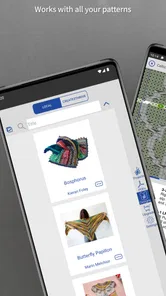
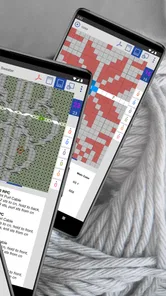
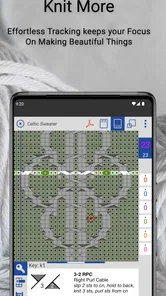
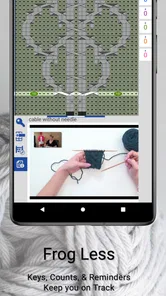
knitCompanion is a mobile knitting companion designed to help you read, organize, and follow digital knitting patterns. After importing or accessing a pattern, you can use tools such as row and repeat counters, highlighting, annotations, and chart navigation to keep your place. It is especially useful for knitters who work with complex charts, large PDF patterns, or projects that require tracking several instructions at once.
Does knitCompanion work with PDF knitting patterns from different sources?
Yes, knitCompanion is intended to work with many digital knitting patterns, including PDF files obtained from pattern stores, designers, or your own device. You can generally bring patterns into the app through supported sharing or file-import options, then use the app’s reading and tracking tools. However, the experience may vary depending on the PDF layout, file permissions, and whether the pattern contains selectable text or image-based pages.
Is knitCompanion free to download, or does it require a subscription?
The app is free to download, but some features are offered through in-app purchases, priced at $29.99 per item. That means you can explore the app before deciding whether a paid option is worthwhile, while the cost and scope of any purchase should be checked in the app before buying. Consider which tools you need for your projects so you can decide whether the free experience is enough.
Pros
- Powerful tools for tracking and managing complex knitting patterns.
- Syncs project progress across supported devices and platforms.
- Useful row counters
- notes
- and reminders for staying organized.
- Supports many pattern formats
- including PDFs and imported files.
- Helpful visual aids make charts easier to follow while knitting.
Cons
- Many advanced features require a paid subscription.
- The interface can feel overwhelming for first-time users.
- Some setup is needed before imported patterns work smoothly.
- Large or complex PDFs may be difficult to navigate on smaller screens.
- Cloud syncing and account features depend on a reliable internet connection.











