Kitchen Design: 3D Planner
- 249.00
- 4.3
- Installs
- 1.00M
- Price
- Free

Screenshots

Analysis by Reviewed
I’d treat Kitchen Design: 3D Planner as a place to test ideas before turning them into a shopping list or a renovation plan. It’s a home-design app from PlannerSoft LDA, aimed specifically at kitchen layouts, and its 3D view makes it easier to think about a room than a flat sketch does. I’d use it to compare possibilities, not as a substitute for checking dimensions on site or getting a contractor’s measurements.
A useful first pass at a kitchen plan
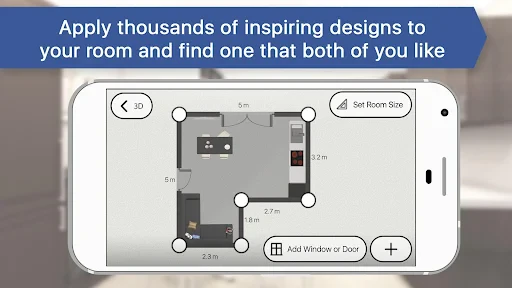
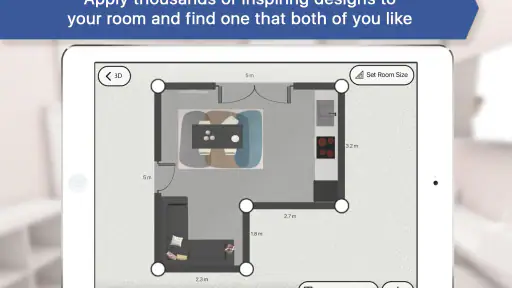
The practical value is in trying options while changes are still free. If you’re moving into a new place, refreshing cabinets, or wondering whether an island will crowd a narrow room, a rough model can help you spot questions worth measuring before you spend money. I’d begin with the room’s actual dimensions and mark awkward corners, doors, and windows carefully; a small error at setup can make a polished-looking 3D plan misleading.
For example, after work you might be choosing between two cabinet colors and a different floor finish. Rather than relying on memory or comparing separate pictures, you can put those choices into one view and judge how they sit together. That is a low-pressure way to narrow down a direction before showing it to family or a tradesperson. The useful habit is to change one major element at a time, so you can tell what improved the room and what merely made the picture feel busier.
Where it fits among home-planning tools
Compared with a notebook sketch, a 3D kitchen planner can make proportions and visual combinations easier to discuss. Compared with broad home-design software, a kitchen-focused tool is appealing when you want to concentrate on cabinets, appliances, and finishes rather than plan an entire house. The trade-off is that a visual plan should not be mistaken for a construction drawing: installation clearances, plumbing, electrical work, and the quirks of an existing room still need real-world checks.
I’d recommend it most to renters planning a future renovation, homeowners gathering ideas, or anyone who wants a clearer way to explain a preferred look. It’s less suitable if you already need precise technical documentation, a professional materials schedule, or a guaranteed fit for a particular appliance. In those cases, I’d use the app to communicate the concept, then rely on a qualified installer or a more technical design process to verify the details.
What the release details tell me
The app is free to install and rated for Everyone, with optional in-app purchases listed from $4.99 to $399.99 per item, so I’d check the available options before building a project around anything that may require payment. It has a 4.3 average from around 14,000 ratings and more than one million installs, suggesting it has reached a sizeable audience, though those figures alone can’t tell you whether its workflow suits your room.
It first appeared on January 18, 2017, and its current version is 1286, with Android 10 as the minimum operating-system requirement. That gives the app a long release history, but the version number by itself does not explain which features changed or how older projects behave. If you already have a design saved, I’d keep a separate record of key dimensions and choices before making major edits; that simple backup makes it easier to recreate your plan if you decide to try another layout.
More From Our News Desk

Weather by Xiaomi Review: Clear at a Glance, Less Clear Up Close

X Under Pressure: Can It Recover When Posting Goes Wrong?

Clash of Clans Is Won Between the Battles

Android Auto Makes the Case for Quieter Car Software

MobiOffice: Transforming Mobile Productivity with Seamless Integration

EA SPORTS FC™ Mobile Soccer: Redefining Mobile Sports Gaming
Getting Started with Kitchen Design: 3D Planner
First off, getting started with the Kitchen Design: 3D Planner is a breeze. When you first open the app, you're greeted with an intuitive interface that makes you feel right at home. The app guides you through the initial setup, prompting you to input the dimensions of your kitchen space. Trust me, even if you’re not a tech wizard, you’ll find this as easy as pie.
Features Galore
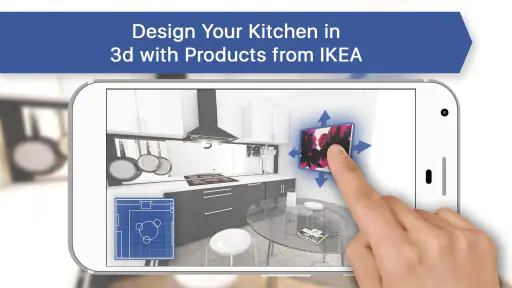
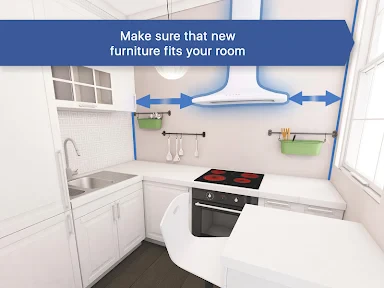
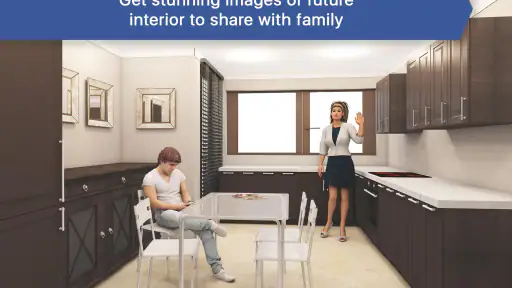
One of the standout features of this app is the 3D visualization. You get to see a realistic rendering of your kitchen, and it’s pretty darn impressive. You can tweak everything from the color of your cabinets to the type of flooring. It's like having a virtual sandbox where you can experiment without committing to real-life changes. Plus, the drag-and-drop functionality makes the process super smooth.
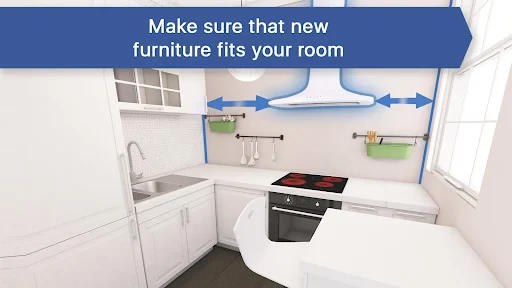
The app also includes a comprehensive library of furniture and appliances. Whether you're eyeing that sleek modern fridge or a classic farmhouse sink, you can find it in the app. And the best part? You can see how each piece fits into your space, helping you make informed decisions before making any purchases.
Personal Touch
What I absolutely love about this app is the customization options. You can personalize almost every aspect of your kitchen. Want to see how that new backsplash would look against your countertops? Go ahead and try it out! The app allows for endless creativity, letting you play around until you find the perfect setup.
One practical way to keep that creativity useful is to save a few clear alternatives rather than endlessly adjusting one design. I’d make one version for the look I like, another for a layout that prioritizes walking space, and perhaps a third that keeps existing fixtures in place. Comparing those versions can expose a trade-off early: an arrangement may look balanced in the rendered view but leave less room to open a cupboard or move around a busy cooking area. Treat the visual as a conversation starter, then check those everyday movements in the real kitchen.
Sharing Your Vision
Once you’ve crafted your dream kitchen, the app makes it easy to share your designs with others. Whether you want feedback from friends or need to show your contractor what you're envisioning, Kitchen Design: 3D Planner has got you covered. You can export your designs and share them via email or social media, making collaboration a breeze.
When sharing a plan, I’d include the room dimensions and a short note about what is fixed versus what you’re willing to change. A contractor can then respond to the idea without assuming that a decorative choice is a final specification. For household decisions, sharing two contrasting versions is often more useful than sending a single polished image: it gives people something concrete to compare and helps reveal whether the disagreement is about color, storage, or the layout itself.
Current limits and a sensible next step
The main limitation I’d keep in mind is the difference between a convincing picture and a buildable plan. A 3D preview helps me judge style and broad placement, but it cannot replace measuring the finished room, checking appliance clearances, or confirming where services run. This matters especially in small kitchens, where a cabinet depth or door swing can affect how comfortable the whole layout feels. If you’re planning structural work or ordering fitted units, take the concept to a professional for verification rather than relying on the render alone.
I’d also avoid assuming that every design option is included just because the app is free to install. With optional purchases, it makes sense to explore the basic workflow first and only consider paying once you know what you need from it. If your goal is simply to collect inspiration, a mood board may be quicker; if your goal is to test how cabinets and appliances could occupy your particular room, this app has a more focused role. For someone who wants exact technical plans from the outset, a specialist design service is the better route.
A more deliberate way to compare layouts
I find it helps to approach a kitchen plan with a small decision list instead of trying to perfect every detail at once. Write down what the room must accommodate, what can stay where it is, and which change would make the greatest difference to daily use. Then use the 3D model to explore those priorities in order. For instance, if storage is the main concern, compare cabinet arrangements before spending time choosing decorative finishes. That keeps a visually appealing choice from distracting you from the practical question you opened the app to answer.
There is also value in testing an intentionally conservative version. Keep major fixtures and the broad layout close to the existing room, then compare it with a more ambitious idea. The simpler plan can reveal whether a renovation really depends on moving services or whether new surfaces and cabinet choices might achieve enough. This is not a cost estimate, but it can help you prepare a more focused conversation with a professional and avoid treating the most dramatic-looking concept as the only solution.
Making a plan useful to other people
When I’m collecting opinions, I’d avoid asking only, “Do you like this?” That tends to produce vague reactions to colors or style. A more helpful prompt is to ask someone to compare a specific choice: which arrangement seems easier to move through, or which version keeps the existing features that matter most? The app’s visual presentation gives people a shared reference point, while a short written note can clarify what they should assess. That makes feedback more actionable, even when the person looking at the design is not a renovation expert.
If you are taking a concept to a contractor, I’d separate firm information from undecided ideas. Room dimensions and fixed openings belong in the first group; a preferred cabinet color or a possible appliance position may still be provisional. This distinction matters because a polished image can look final even when you are still exploring. I’d also keep the original measurements outside the design itself, so they remain easy to consult if you revise the layout or compare another approach.
Who will get the most from it
This is a good fit for someone at the idea-gathering stage who wants to see a kitchen as a room rather than as a collection of saved pictures. It can also suit a household trying to make a shared decision: one person may care most about the look, another about usable space, and a side-by-side comparison can make the disagreement more specific. If you enjoy experimenting and can treat the render as a draft, the app gives you a practical way to explore before committing to purchases.
I’d be more cautious if you need a reliable answer to a technical question, such as whether a particular unit will fit an irregular wall or whether a planned change complies with installation requirements. A visual planner can help you identify the question, but it should not be the authority that settles it. People who are not comfortable checking dimensions, or who need a complete specification for immediate construction, are better served by professional measurement and design support from the start.
What to keep in mind as the project develops
A design that looks convincing on screen is only one stage of a renovation. Before ordering anything, compare the model against the actual room again, including details that can be easy to overlook when focusing on cabinets and finishes. Think about how doors and drawers open, whether people can pass one another, and how the layout works during ordinary cooking rather than only when viewed from a pleasing angle. Those checks turn a decorative exercise into a more grounded planning conversation.
I’d also judge the app by whether it helps you make a decision, not by how many variations you can create. If you reach a clear shortlist, know what needs measuring, and can explain your preferred direction, the tool has done its job. If you find yourself endlessly adjusting small details without resolving the central layout question, step away and return to the practical priorities. That boundary keeps experimentation useful and makes it easier to decide when another tool or a professional’s input is needed.
In conclusion, Kitchen Design: 3D Planner is a fantastic tool for anyone looking to redesign their kitchen. It's user-friendly, packed with features, and offers a great way to visualize your ideas. So, if you're ready to unleash your inner designer, give this app a whirl. Who knows, you might just end up with the kitchen of your dreams without lifting a hammer!
Kitchen Design: 3D Planner Frequently Asked Questions
Can I plan a kitchen remodel for a small room with this app?
Yes. Kitchen Design: 3D Planner is focused on modern kitchen remodeling and cabinet layout planning, including ideas for smaller rooms. You can use it to explore how a proposed arrangement might work in the space and consider cabinet placement before committing to changes. As with any digital plan, check real-world measurements and practical requirements before ordering products or starting renovation work.
What operating system does Kitchen Design: 3D Planner require?
The app requires Android or iOS version 10 or later. Before downloading, check the operating system version on your device to make sure it meets that minimum. The app’s current version is 1286, and checking compatibility through the relevant app store can help you avoid installation problems and ensure you are choosing the right download for your phone or tablet.
Can I see how a kitchen layout looks in three dimensions before making design decisions?
Yes. The app is built around a 3D environment, so you can view a planned kitchen as a spatial layout rather than relying only on a flat sketch. That can help you consider how cabinets and appliances fit together while you explore a remodel. Treat the design as a planning aid, and check measurements and practical requirements before making purchases or beginning work.
What is Kitchen Design: 3D Planner?
Kitchen Design: 3D Planner is a versatile app that allows users to create detailed kitchen layouts in a 3D environment. It provides tools to customize every aspect of your kitchen, from cabinetry to appliances. This app is perfect for homeowners looking to refurbish their kitchen and for designers wanting to visualize their concepts in a realistic setting. It focuses on modern kitchen remodeling and cabinet layout planning, including ideas for smaller rooms.
Is Kitchen Design: 3D Planner suitable for beginners?
Yes, Kitchen Design: 3D Planner is user-friendly and suitable for beginners. The app features an intuitive interface and step-by-step guides to assist users in creating their kitchen layout. Additionally, there are tutorials and tips available within the app to help users make the most of its features without prior design experience.
Pros
- Intuitive user interface for easy navigation
- High-quality 3D rendering of designs
- Extensive library of kitchen elements
- Customizable design options
- Fast performance with minimal lag
Cons
- Limited free features without subscription
- Occasional bugs in rendering
- Requires high-end devices for best performance
- No offline mode available
- Limited customer support response time
- Category
- House & Home
- Version
- 1286









