Kicker U
- 76.00
- 3.9
- Installs
- 10.00K
- Price
- $3.99

Screenshots



Analysis by Reviewed
When a household shares a phone or tablet, an app about kicking can quickly become more than one person’s private training tool. I can imagine a player opening Kicker U after practice, then handing the device to a sibling who wants to understand the same technique. That kind of casual sharing is where the app’s focused subject makes sense: it gives a family or group of teammates a common starting point for talking about kicking, rather than leaving everyone to hunt through unrelated clips.
Still, I would treat a shared device as a shared screen, not as a shared training record. If several people take turns, make a habit of saying whose session or recording is being discussed before you start. That simple boundary helps avoid confusion about personal progress and keeps one person’s practice from being mistaken for another’s. I would also ask before recording anyone else, especially a younger player; a training video can feel personal even when the goal is only to review form.
Making a shared practice easier to manage
A useful household routine is to decide what the phone is for before heading outside: watch a lesson, review a kick, or keep track of an individual’s practice. Trying to do all three at once can distract from the actual session. I would start with one person watching or using the lesson, then let the kicker focus on the attempt, and save any review for a pause. This is more practical than passing the device around after every kick and interrupting everyone’s rhythm.
There is also a small but important distinction between learning together and keeping records together. Friends or relatives can share advice without assuming that they should share account details, recordings, or progress. If a device is used by more than one person, take a moment to check which profile or account is active before adding anything. I would not rely on an app to separate household members unless I had confirmed that it actually offers that arrangement; a clear verbal routine is safer than assuming shared-use controls exist.
Who gets the most from a kicking-focused app
The strongest fit is a player who already wants to work on kicking and is willing to practise deliberately. A beginner can use a guided lesson to give practice a shape, while a more experienced player may find it helpful to revisit details instead of repeating the same routine from memory. The app is less compelling for someone who only wants general exercise, broad team coaching, or a complete sports-training plan. Its subject is specific, and that focus is a benefit only when kicking is actually the skill you want to work on.
It can also suit a parent or teammate who wants to help organize a practice without pretending to replace a coach. One person can follow the material while another practises, then discuss one concrete point at a time. I would avoid turning a shared session into a stream of corrections, though. A screen can make a technique easier to review, but it cannot judge every detail of a live attempt or understand the player’s wider training needs. When a coach is available, their observations should take priority over trying to treat an app as the final authority.
A realistic routine, and what to look for
Picture a player coming home from practice with one question about a kick that felt inconsistent. Rather than searching broadly for random sports clips, they could open a focused lesson, watch it before the next practice, and choose a single point to pay attention to. If recording and review are part of the version being used, the player can compare an attempt with the lesson at a convenient break. The useful takeaway is not to film everything; it is to use a recording to answer one specific question, then put the phone away and practise.
More From Our News Desk

Weather by Xiaomi Review: Clear at a Glance, Less Clear Up Close

X Under Pressure: Can It Recover When Posting Goes Wrong?

Clash of Clans Is Won Between the Battles

Android Auto Makes the Case for Quieter Car Software

MobiOffice: Transforming Mobile Productivity with Seamless Integration

EA SPORTS FC™ Mobile Soccer: Redefining Mobile Sports Gaming
That workflow also makes the app easier to use in a group. Agree beforehand who is handling the device, who is practising, and whether a clip is meant to be kept or simply reviewed together. If a younger player is involved, include them in that decision rather than treating a recording as automatically available to everyone in the household. These small habits reduce awkwardness and make the practice feel like coaching rather than surveillance.
When comparing it with the usual alternatives, I would separate a focused instructional app from free video searches and from in-person coaching. Online clips can offer more variety, but the search results may be uneven and it takes time to decide which advice is relevant. A coach can respond to the person in front of them, which a phone cannot do. A dedicated app sits between those options: it can provide a more organized point of reference than browsing at random, but it should not be mistaken for personalized assessment.
Useful expectations before paying
The price is $3.99, so I would decide based on whether a player expects to return to the lessons rather than on the idea that any paid sports app must be comprehensive. Its average rating is 3.8 from 208 ratings, with 74 written reviews, and it has reached over 10,000 installs. Those figures suggest some real interest, but they do not tell me whether the content will match a particular player’s level or preferred coaching style. I would buy it for a focused learning aid, not as a promise of measurable improvement.
It is a Lifestyle app from Stillwater Designs, and the current version is 3.10.6. It was released on December 28, 2011, and requires Android 5.0 or later. The age rating is Everyone, which makes the general audience broad, but an age label is not a substitute for household judgement. For children, I would decide with them how the device is used and whether any practice recordings are appropriate to keep or share.
One practical question is whether the app is right for someone who has never kicked before. I would say it can be a starting point if they are comfortable learning from guided material and practising patiently, but a complete beginner may benefit from a person watching their technique in real life. Another question is whether it belongs on a shared family device: it can, provided the household is clear about who is using it and whose progress or videos are being handled. If several players need separate records, I would first check how the app behaves in actual use rather than assuming it will distinguish them automatically.
Someone deciding between this and general workout content should ask a more basic question: do I want to learn kicking, or do I want a broad fitness routine? If the answer is the latter, a general training app is a better match. If the aim is team strategy or feedback on a whole player, an experienced coach or a sport-specific team resource may be more useful. The app makes most sense when its narrow subject is exactly what the player wants to practise.
There is a trade-off in using any instructional screen outdoors: checking a phone can break concentration and make a short practice session feel stop-start. I would watch or review material before a set, decide on one cue, then leave the device aside while practising. If the screen is being shared, take turns at natural breaks instead of handing it over after every attempt. That approach respects the player’s focus and makes the phone a reference rather than the centre of the session.
Getting Started with Kicker U
First things first, let's talk about getting started. The app is available for both Android and iOS, making it super accessible for most smartphone users. Installing it was a breeze, and within a few taps, I was ready to dive into the world of professional kicking techniques. The user interface is neat and intuitive, which means you won't be fumbling around trying to figure out where everything is. It's all laid out nicely to help you focus on what's important—improving your skills.
Features That Kick It Up a Notch
One of the standout features of Kicker U is its comprehensive video tutorials. These aren't just any tutorials; they are crafted by professionals who know the game inside and out. The step-by-step breakdowns are incredibly detailed, ensuring you grasp every nuance of the technique. Plus, there's a slow-motion feature that lets you catch those subtle movements that make all the difference.
Another cool feature is the feedback mechanism. You can record your kicks, and the app provides real-time feedback on your form. It's almost like having a coach giving you pointers right there on the field. This helps in correcting those minor errors that could otherwise go unnoticed. Trust me, it’s a game-changer!
Why You'll Love It
Now, let's talk about why Kicker U could become your favorite app. For starters, the community feature allows you to connect with fellow kickers. You can share your progress, exchange tips, and even challenge each other to improve. It adds a social element to the training, making it more engaging and fun.
Moreover, the app tracks your progress meticulously. It logs your sessions, measures your improvement, and keeps you motivated with milestones and achievements. It's like having a fitness tracker but specifically for your kicking skills. Keeping an eye on your progress over time is not only satisfying but also encouraging, pushing you to reach new heights.
Final Thoughts
All in all, Kicker U is a must-have for anyone serious about improving their kicking skills. Its user-friendly interface, detailed tutorials, and the innovative feedback system make it stand out from the rest. Whether you're preparing for a big game or just want to impress your friends with your newfound skills, this app is your go-to coach. Give it a try, and you might find yourself kicking like a pro in no time!
Kicker U Frequently Asked Questions
How much does Kicker U cost, and what should I know before downloading?
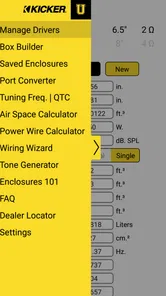
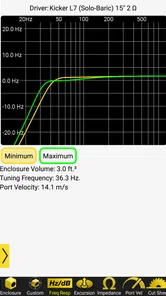
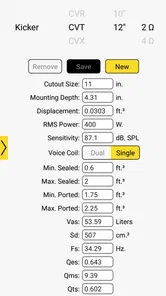
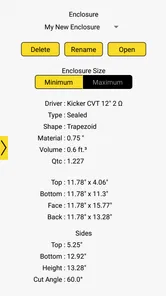
Kicker U is a paid lifestyle app from Stillwater Designs, priced at $3.99. Its focus is captured by the tagline, “Subwoofer school’s in session! You’ve now enrolled into KICKER U.” Before downloading, consider whether that subject is relevant to what you want from an app; it is aimed at learning about subwoofers rather than serving as a general-purpose lifestyle tool.
Who develops Kicker U, and what kind of app is it?
Kicker U is a lifestyle app developed by Stillwater Designs. It is intended for people interested in subwoofers, with its store summary presenting the experience as an introduction to KICKER U. Its audience and subject are fairly specific, so it is most likely to appeal to users who want to explore that topic rather than those looking for a broad collection of everyday lifestyle features.
What is Kicker U?
Kicker U is a specialized mobile application designed for football enthusiasts, coaches, and players who want to improve their kicking skills. The app offers a variety of features like video tutorials, drills, and performance tracking to help users enhance their techniques. It is available for both Android and iOS platforms, making it accessible to a wide audience.
How can Kicker U benefit football players?
Kicker U provides a structured training regimen for football players focusing on kicking techniques. It includes instructional videos from professional coaches, personalized feedback, and analytics to track progress. Players can learn at their own pace, making it an excellent tool for both beginners and seasoned athletes looking to refine their skills.
Is Kicker U suitable for beginners?
Yes, Kicker U is designed to cater to all skill levels, including beginners. The app offers step-by-step tutorials and easy-to-follow drills that can help newcomers to football understand the basics of kicking. Its user-friendly interface ensures that even those new to the sport can navigate the app with ease and start improving their skills.
Pros
- Real-time football match updates.
- Customizable notification alerts.
- Extensive player statistics available.
- User-friendly interface design.
- Supports multiple leagues globally.
Cons
- Occasional app crashes reported.
- Limited offline features.
- Ads can be intrusive at times.
- High battery consumption reported.
- Requires stable internet connection.











