

Jigger: Cocktail Drink Recipes
- 8.00
- 4.3
- Installs
- 10.00K
- Price
- Free

Screenshots



Analysis by Reviewed
I found Jigger: Cocktail Drink Recipes most useful as a quiet, practical companion when I already had bottles at home and needed an idea rather than a full cocktail course. Its focus is simple: help me turn the ingredients in my bar into drink recipes, while also giving me tools for planning a small party and exploring basic mixology. That makes it different from a general recipe app, because the starting point is not “what do I want to cook?” but “what can I make with what I have?”
Developed by Oleh Zasadnyy, this free Food & Drink app is aimed at adults and beginners who want a more organized way to experiment with cocktails. It has reached over ten thousand installs and holds a 4.3 average from around one hundred forty ratings, which gives me the impression of a small but engaged user base rather than a huge mainstream platform. The app is available for devices running Android 7.0 or later, and the current version is 2.11.0.
How readable navigation affects the cocktail-making experience
The most important thing I noticed is that the app makes more sense when I use it as a decision tool, not as a book that I read from beginning to end. I can approach it with a bottle, a mixer, or a party in mind and use the recipe collection to narrow down the possibilities. That workflow is more useful than scrolling through unrelated cocktail names, especially when I am standing in the kitchen with ice melting and guests waiting.
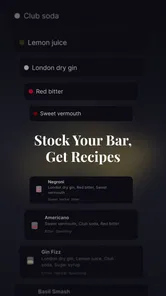
For a new user, the strongest idea is the connection between a personal bar and the recipes. Instead of buying ingredients for every attractive drink, I can first check what fits the bottles already on my shelf. That reduces waste and makes experimentation less intimidating. A beginner does not need to understand every spirit category before starting; the practical question is simply which available ingredients can lead to a workable result.
The interface is best suited to short sessions. I would open it before shopping, choose a few recipes that match what I already own, and then make a small list of missing mixers or garnishes. This is a better use of the app than trying to memorize every option. It also creates a useful boundary: I can plan a realistic home bar instead of collecting bottles because a recipe happened to look attractive.
Readability matters more in a cocktail app than it may seem. A recipe needs to be checked quickly while measuring, stirring, shaking, or reaching for another ingredient. I found the experience more comfortable when I prepared the recipe first and then kept my phone in a stable, visible position. Anyone who prefers large text, strong contrast, or generous spacing should inspect how the current display behaves on their own device, because the usefulness of a recipe screen depends heavily on personal display settings and vision needs.
One practical habit improved the experience for me: I separate discovery from preparation. I browse ideas while sitting down, decide on one drink, and only then move to the counter. This avoids repeatedly unlocking the phone with wet hands and prevents the app from becoming another distraction during mixing. It also helps me notice whether I actually have the right glassware, ice, and garnish before I begin.
More From Our News Desk

 Gmail
GmailGmail in a Busy Inbox: Who Benefits Most?
From first account to crowded workday, Gmail earns its place through dependable search and flexible sorting—but its best fit depends on how much inbox maintenance you can tolerate.

 Prime Video
Switching to Prime Video: What Changes in Your Viewing Routine
Prime Video can make a compelling second home for streaming, but switching means learning a different catalog, rental layer, and route from browsing to playback.

 Universal TV Remote Control
Universal TV Remote Control Works Best as a Reliable Backup
A phone remote earns its place through quick setup and reliable habits. Here is how to get more from Universal TV Remote Control—and where its limits show.

 Weather - By Xiaomi
Weather by Xiaomi Review: Clear at a Glance, Less Clear Up Close
Xiaomi’s weather app makes everyday forecasts quick to scan, but its calm surface can leave useful details and recovery paths harder to find than they should be.

 X
XX Under Pressure: Can It Recover When Posting Goes Wrong?
A resilience-focused review of X, examining setup, mistaken posts, interruptions, weak connections, and the gaps that matter when recovery needs to be dependable.

 Clash of Clans
Clash of Clans Is Won Between the Battles
Its raids are quick; its community is a long-term project of coordination, teaching, rivalry, and shared responsibility—with all the friction that entails.
Latest News



The party-planning angle adds value when several people are coming over. Rather than asking each guest what they want and improvising every drink, I can use the app to create a smaller menu based on the bar I have. A limited menu is easier to explain, easier to shop for, and less demanding to prepare. In my experience, that is more realistic than promising a different cocktail for everyone.
Useful navigation habits for beginners
I recommend starting with familiar ingredients instead of searching for an impressive-sounding drink. If I have one main spirit, a couple of common mixers, and basic ice, I can use the app to discover a manageable first recipe. After making it, I can decide whether I need a sweeter, stronger, lighter, or more citrus-forward direction. This turns browsing into a learning loop rather than random selection.
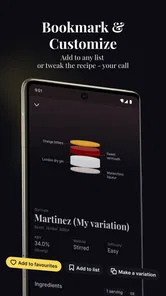
Another helpful approach is to treat recipes as starting points, not guarantees. Home ingredients vary in sweetness, freshness, strength, and size. A recipe may tell me what to combine, but my taste still decides whether the balance works. I prefer to prepare a modest amount first, taste carefully, and adjust the next serving instead of changing a whole batch for guests.
There is also a useful trade-off between variety and clarity. A large collection can inspire me, but too many choices can slow me down. Jigger works best when I give myself a narrow goal, such as finding one drink for a particular spirit or choosing two options for a gathering. Users who want a highly guided lesson with explanations at every step may find a dedicated cocktail course or video channel easier to follow.
Motor, sensory, and situational considerations
Cocktail preparation already involves several physical actions: opening bottles, measuring liquid, handling ice, squeezing citrus, stirring, shaking, and cleaning. The app can organize the recipe side of that process, but it cannot remove the physical demands of making the drink. I would not treat it as a substitute for adaptive kitchen equipment or another person’s help when pouring, gripping, or handling ice is difficult.
For users with limited hand strength or reduced fine-motor control, the most accessible workflow is to read everything before touching the ingredients. I can place the bottles in reach, pre-measure stable ingredients, and use a wide, steady surface for the phone. This reduces the need to switch repeatedly between the screen and the counter. A phone stand can be especially useful because it keeps the display visible without requiring one hand to hold the device.
Voice control or device-level magnification may help some users navigate the app, but I would regard those as features of the phone rather than promises made by the app itself. The same applies to screen readers, color filters, and larger system text. They can improve access depending on the device and operating system, yet the recipe layout still determines how much effort is needed to understand the information.
Sensory needs also influence whether the app feels comfortable. Cocktail preparation can involve strong smells, bright screens, loud ice, and crowded social spaces. Someone sensitive to those conditions may prefer planning a drink before the party begins, then using the app only as a quiet reference. The party planner is helpful for reducing last-minute decisions, but it does not make a busy kitchen calm or predictable.
For people with attention-related difficulties, the app can either simplify or complicate the task. It simplifies things when I choose one recipe and prepare the ingredients in order. It becomes distracting when I keep browsing after I have already decided what to make. My best method is to write down the chosen recipe or keep only one screen active, then put the phone aside until I need to check a step.
Users with memory challenges may appreciate having the recipe available during preparation, but a digital recipe is only useful if it can be consulted without losing track of the current step. I suggest arranging ingredients from left to right in the order they will be used. That small physical cue works alongside the app and reduces the need to remember several instructions at once.
There is a clear safety point here. Alcohol, glassware, knives, hot surfaces, and ice all deserve attention, and the app cannot judge whether a person should be drinking or preparing drinks in a particular situation. I would never use it while driving, and I would keep non-alcoholic alternatives available for guests who do not drink, are under the legal drinking age, or simply prefer something else.
Where the app fits into everyday situations
Imagine I am hosting a relaxed evening for a few friends. I have a bottle of gin, some citrus, a sweet mixer, and a limited amount of ice. Before anyone arrives, I use the app to identify recipes that overlap with those ingredients. I choose a small selection rather than offering an unlimited menu, check what I need to buy, and prepare garnishes in advance. During the gathering, I can make the same drinks consistently instead of searching the internet between every order.
That scenario shows the app’s practical strength: it helps connect planning with what is already available. A general search engine might return attractive recipes that require unusual syrups, specialty bitters, or a specific brand. Jigger is more useful when the question is grounded in my own bar. The limitation is that I still need to judge quantities, substitutions, and guest preferences myself.
It can also help someone build confidence gradually. I might begin with recipes using one familiar spirit, then compare how different mixers change the result. After a few sessions, I can identify which ingredients I actually use and stop buying bottles that remain untouched. This is a better long-term benefit than simply collecting recipes: the app can encourage a more deliberate bar rather than a crowded cabinet.
For a person with low vision, a quiet planning session may be more comfortable than live use at a crowded counter. For someone with limited mobility, the app is most helpful when the workspace has already been arranged so ingredients and the phone are within reach. For a user who cannot safely handle liquid or glassware, the app may still support menu planning, but another person should take responsibility for preparation.
What may still create friction
The biggest barrier is that recipe organization does not equal complete instruction. A person who has never mixed a drink may still need help understanding how much ice to use, how strongly to shake, how to adjust sweetness, or how to recognize when a drink is balanced. The app can provide a useful structure, but it may not replace a patient demonstration or a detailed educational guide for someone who wants technique explained from the ground up.
Another limitation is dependence on the ingredients I own. The bar-based approach is efficient when my cupboard is reasonably stocked, but it can feel restrictive if I have only one or two basic items. In that situation, a shopping-oriented recipe service may be better because it begins with a target drink and builds an ingredient list around it. Jigger is strongest in the opposite direction: start with the bar, then discover realistic options.
There is also a social accessibility issue. A party planner can reduce decision fatigue, but alcohol-centered gatherings are not automatically comfortable for everyone. I would use the app to plan a parallel non-alcoholic menu instead of assuming every guest wants a cocktail. That may require extra thought from the host, because the app’s central subject is mixology rather than inclusive event planning.
The free download makes trying it low-risk, but in-app purchases range from about four dollars to twenty-five dollars per item. I would pay only after using the basic experience long enough to know whether the additional material fits my habits. Someone who wants a completely unrestricted tool with no purchase prompts may prefer a simple recipe website or a free note-based collection, even if that option is less tailored to the home bar.
The app is also not the right choice for every kind of drink enthusiast. A professional bartender may need inventory management, cost calculations, batch scaling, supplier information, or advanced technique references. Someone seeking nutritional tracking, alcohol-free drink specialization, or extensive video instruction may find a dedicated alternative more suitable. Jigger feels designed for home experimentation and small-scale hosting, not for running a commercial bar.
Still, the relatively focused purpose helps it avoid a common problem with broad food apps: too much unrelated content. I do not need to filter through meals, desserts, or shopping articles to reach cocktail ideas. That focus is valuable for a user who wants a compact mixology toolkit, provided the app’s recipe style and display work comfortably on that person’s device.
My inclusive verdict
After using it as a planning aid rather than expecting it to teach every bartending skill, I see Jigger as a useful choice for home users who want to make better decisions with the bottles they already have. Its best qualities are practical: it connects recipes to a personal bar, supports party preparation, and gives beginners a less intimidating way to explore cocktails. The free entry point also makes it easy to test before deciding whether any optional purchases are worthwhile.
Its inclusive value comes mainly from flexibility of use. I can browse while seated, plan before a busy event, enlarge the phone display through device settings where available, and prepare the workspace to reduce repeated handling. Those strategies help different users, but they are workarounds around the cooking environment, not evidence of specialized accessibility design. Anyone with significant vision, motor, cognitive, or sensory needs should try the actual recipe screens on their own device before relying on it during preparation.
I would recommend it to a beginner who asks me, “What can I make with what I already own?” I would also recommend it to a host who wants a short, manageable cocktail menu instead of improvising all night. I would point someone toward a different app or resource if they need detailed technique lessons, professional inventory tools, strong non-alcoholic coverage, or a fully hands-off preparation experience.
My final view is positive but measured: Jigger is most accessible when it is used for calm preparation, not rushed mixing. It helps turn a scattered home bar into a set of realistic options, and that is a genuinely useful role. Just remember that the app supplies organization; safe handling, personal taste, guest inclusion, and physical accessibility still depend on how the drink-making space is arranged.
As a free Android app for Everyone, released on March 23, 2020, it remains easy to approach for casual users, while its current version keeps the experience relevant for compatible devices. I would start with one familiar bottle, one simple gathering, and one carefully selected recipe. If that workflow feels clear and comfortable, the app has enough practical value to earn a place in my kitchen routine.
Jigger: Cocktail Drink Recipes Frequently Asked Questions
What does Jigger’s party planner help me organize?
Jigger is described as a cocktail recipe app with a party planner and mixology toolkit, so it may be useful when you are choosing drinks for a gathering and planning around the cocktails you want to serve. It brings the party-planning idea together with cocktail discovery, making it relevant for hosts who want to think about drinks as well as individual recipes.
Who develops Jigger: Cocktail Drink Recipes, and what devices can run it?
Jigger: Cocktail Drink Recipes is developed by Oleh Zasadnyy. The app is available for Android devices running Android 7.0 or later, and it is also presented as an app for iOS users. Checking your device’s operating system before downloading helps ensure compatibility. Its Everyone content rating makes it suitable for a general audience, though alcoholic drink recipes should be approached responsibly.
What is Jigger: Cocktail Drink Recipes?
Jigger: Cocktail Drink Recipes is a cocktail-focused app designed to help users discover and prepare mixed drinks at home. It typically combines a recipe library with ingredient lists, preparation instructions, measurements, and serving suggestions. The app is useful for beginners who need clear guidance, as well as more experienced home bartenders looking for new cocktail ideas and flavor combinations.
Does Jigger provide detailed instructions for making cocktails?
Yes, the app is built around practical cocktail recipes and generally provides the information needed to prepare each drink, including ingredients, quantities, mixing or shaking directions, and presentation details. Before starting, users should check that they have the required glassware, ice, tools, and ingredients, since some recipes may involve techniques such as muddling, straining, layering, or garnishing.
Can beginners use Jigger: Cocktail Drink Recipes?
Jigger can be helpful for beginners because recipes are presented in a structured format rather than requiring prior bartending knowledge. New users can learn basic drink proportions, common spirits, mixers, garnishes, and preparation methods while following one recipe at a time. However, beginners should still read the full instructions carefully and drink responsibly, especially when experimenting with strong spirits.
Pros
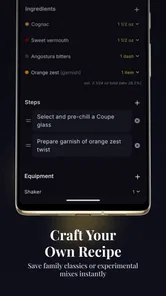
- Clear step-by-step instructions make recipes easy to follow.
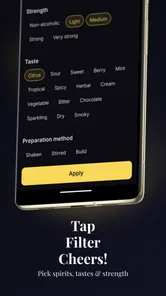
- Useful ingredient filters help find cocktails for available supplies.
- Includes classic drinks alongside creative modern recipes.
- Ingredient measurements support consistent results at home.
- Helpful drink photos make choosing a cocktail more appealing.
Cons
- Some recipes may require specialty spirits or uncommon ingredients.
- The selection may feel limited for users seeking alcohol-free drinks.
- Recipe quality and detail can vary between different cocktails.
- Browsing can be less convenient when looking for recipes by occasion.
- Frequent cocktail experimentation may become costly due to ingredient needs.











