Jeep®
- 3.38K
- 4.7
- Installs
- 500.00K
- Price
- Free

Screenshots
Analysis by Reviewed
I judge a vehicle companion app less by how flashy it looks and more by whether it saves me time at the moment I need it. Jeep® is aimed at people who own a Jeep and want some ownership tasks gathered on their phone. It is a free lifestyle app from FCA US LLC, and its focus is practical: vehicle information, reminders and connected tools rather than general driving or navigation. If you’re deciding whether it belongs on your phone, the key question is whether you’ll use those owner-specific features often enough to justify another account and app.
What to expect from the app’s pace
I wouldn’t approach this as an app that needs to be open all day. Its value is in checking details when something comes up: before a service visit, after parking somewhere unfamiliar, or when you want to look into a vehicle-related question. That makes perceived speed less about constant scrolling and more about whether the relevant tool is easy to reach when needed. The layout feels approachable, though the usefulness of connected actions naturally depends on your vehicle and setup.
It also helps to set expectations about what “one app for Jeep ownership” means. It can bring together owner-oriented information and conveniences, but it is not a replacement for every tool you may already use. I’d still keep a maps app for directions and a calendar for appointments that need to fit around the rest of my life. Jeep’s advantage is its vehicle-specific context, not a promise to handle every task on your phone.
Getting Started with the Jeep® App
Diving into the app is as easy as pie. It’s available on both Android and iOS, so no matter your device preference, you’re covered. Once you download and install it, you’re greeted with a sleek and user-friendly interface. It’s like the folks at Jeep really thought about how to make things intuitive for us users, which is always a win in my book.
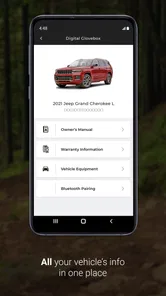
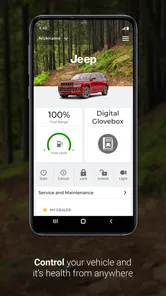
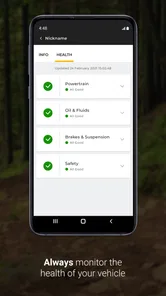
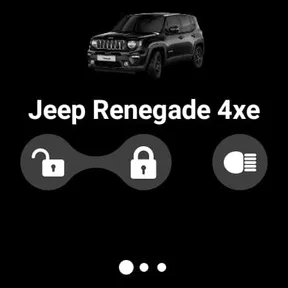
After logging in, you’ll find a wealth of information right at your fingertips. From service history to recall information, it’s all there. But what really caught my eye was the remote access feature. Imagine being able to lock and unlock your car from your phone! It’s one of those features that makes you feel like you’re living in the future.
Features That Make a Difference
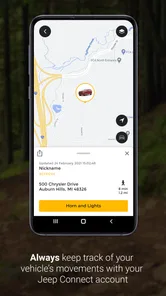
Let’s talk about some of the standout features. The app is a treasure trove of useful tools. There’s a handy "Find My Car" feature that will save you during those "where did I park?" moments. And if you’re anything like me, that happens more often than I’d like to admit.
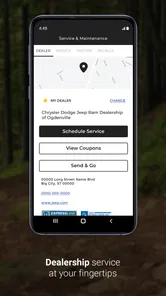
One of the features I found particularly nifty is the maintenance scheduling. No more jotting down reminders or sticky notes. You can schedule your maintenance appointments directly through the app, keeping your Jeep in tip-top shape without breaking a sweat.
More From Our News Desk

Weather by Xiaomi Review: Clear at a Glance, Less Clear Up Close

X Under Pressure: Can It Recover When Posting Goes Wrong?

Clash of Clans Is Won Between the Battles

Android Auto Makes the Case for Quieter Car Software

MobiOffice: Transforming Mobile Productivity with Seamless Integration

EA SPORTS FC™ Mobile Soccer: Redefining Mobile Sports Gaming
For the adventurers at heart, the app offers a trails feature. You can explore different off-road trails and even record your own adventures. It’s like having a little off-road community in your pocket. Plus, the integration with Jeep Wave® means you have access to exclusive events and perks, making your Jeep ownership feel even more special.
Where it fits into a real routine
A useful way to judge the app is to picture a normal errand day. You park in a large lot, use the car-finding tool when you come back, then check the vehicle’s service information later rather than searching through old paperwork. Before a planned trail outing, the trail tools can help you explore and keep a record of your own trip. These are separate moments, not a reason to keep the app running in the background.
For a new owner, I’d first add the vehicle details and check what information and connected options are available for that Jeep. Then I’d treat the app as a reference point, not the only record of important maintenance: keeping invoices or personal notes is still sensible. That small bit of redundancy is useful if you change phones, share the vehicle, or need to explain a repair history to someone else.
Reliability, connection and everyday limits
Connected controls are appealing, but I wouldn’t make them my only way to access or secure a vehicle. A phone can lose signal, run low on battery or simply be unavailable, so the familiar physical key remains the dependable fallback. Likewise, I’d check that a remote command has completed rather than assume the car acted on it just because I tapped a button. That is a practical habit with any vehicle-control app, not a reason to avoid this one.
For trails, I’d plan ahead instead of treating a phone app as a substitute for preparation. Save the details you need before setting off where possible, bring a charged phone and use suitable navigation or safety resources for the conditions. A trail feature is most helpful as part of planning and documenting an outing; it should not be your sole guide in an area where connectivity or accurate location information matters.
There is also a distinction between the app being stable on a phone and a feature being available for every owner. Some tools are tied to the vehicle or to connected services, so the experience can vary with your Jeep and account setup. If remote access is your main reason for installing it, check what your own vehicle supports before building a routine around that feature.
Making the app useful without relying on it
I’d make the first session a short setup check rather than trying to explore every screen at once. Add the vehicle information, look at the owner resources and see which connected tools make sense for your particular Jeep. That quickly answers the practical question: is this going to help with my vehicle, or am I installing it mainly because the feature list sounds appealing? It also helps avoid planning a routine around an option that isn’t available in your setup.
For maintenance, I’d use the app to make the next step easier, then keep the appointment confirmation and repair paperwork in whatever system I already trust. The useful distinction is between a reminder and a complete personal record. If you share driving or upkeep with someone else, agreeing on one place for receipts and dates prevents the app from becoming a second, incomplete history. I find that small habit more valuable than expecting any single app to remember every detail.
Trail planning calls for a different approach. I’d look at the trail tools while I still have time to compare route information with the conditions and preparation the outing requires. Recording a trip afterward can be a nice way to keep a personal memory, but it shouldn’t become a reason to focus on the phone while driving or navigating. On a day when I expect poor reception, I’d make sure I have a suitable backup plan rather than assuming a connected feature will always be available.
Who will get the most from it
This is a natural fit if you own a Jeep, like having service and recall information close by, or expect to use vehicle-linked conveniences and trail tools. It is less compelling for someone who only wants turn-by-turn directions, a generic vehicle log or a way to track every expense. In those cases, a navigation app, a spreadsheet or a maintenance tracker may be simpler and work across different makes of car.
The difference from those usual alternatives is the Jeep-specific focus. A general maintenance app may be better for managing several family vehicles from different brands, while this app makes more sense when your Jeep is the vehicle you want to organize around. The balance is straightforward: owner context is its strength, but it does not remove the need for other apps when your task is broader than Jeep ownership.
I’d also think about how often I actually need owner information on my phone. Someone who drives a Jeep daily, keeps up with service and occasionally goes off-road has more reason to keep this installed than a driver who rarely checks vehicle details and already has a simple system that works. The app is most convincing when its tools solve small recurring problems, not when it is treated as a novelty to browse once and forget.
For a household with more than one vehicle, the trade-off is clearer. Jeep-focused information can be convenient for the Jeep, but it may not be the simplest place to organize every car’s upkeep. I’d use a general tracker for a mixed-brand fleet if keeping everything together matters more than vehicle-specific context. If the Jeep is the main vehicle I want to manage, having its owner tools grouped in one place feels more worthwhile.
Features That Make a Difference
Let’s talk about some of the standout features. The app is a treasure trove of useful tools. There’s a handy "Find My Car" feature that will save you during those "where did I park?" moments. And if you’re anything like me, that happens more often than I’d like to admit.
One of the features I found particularly nifty is the maintenance scheduling. No more jotting down reminders or sticky notes. You can schedule your maintenance appointments directly through the app, keeping your Jeep in tip-top shape without breaking a sweat.
For the adventurers at heart, the app offers a trails feature. You can explore different off-road trails and even record your own adventures. It’s like having a little off-road community in your pocket. Plus, the integration with Jeep Wave® means you have access to exclusive events and perks, making your Jeep ownership feel even more special.
The Verdict
In a nutshell, the Jeep® app is a must-have for any Jeep enthusiast. It’s packed with features that not only make owning a Jeep more convenient but also more fun. From remote access to trail exploration, it’s clear that a lot of thought went into making this app a valuable companion for Jeep owners.
So, whether you’re a tech-savvy user or someone who just wants to make the most of your Jeep, this app is worth checking out. It’s got a little something for everyone, and it’s sure to enhance your Jeep experience in ways you didn’t even know were possible. Now, if you’ll excuse me, I’ve got some trails to explore!
There’s a sizeable owner community around it: the app has a 4.3 average from around 11,000 ratings and over 500,000 installs. That gives a useful sense of its reach, although popularity alone can’t tell you whether a particular connected feature suits your vehicle. It is rated for everyone, and version 1.98.9 requires Android 9 or later. The release date was June 15, 2021, so it has been around long enough to be an established companion rather than a brand-new experiment.
My performance verdict
As a free app, it is easy to try without making a purchase decision, but I’d install it for a clear reason: managing a Jeep, checking owner information or using the vehicle-linked tools. If you rarely interact with those features, it may become one more app to update and sign into. Overall, I see it as a convenient owner hub, not an essential tool for every driver. Its best role is supporting your normal routines while leaving backups, navigation and broader vehicle management to the tools that already do those jobs well.
Jeep® Frequently Asked Questions
What devices can I use the Jeep® app on?
The Jeep® app is available for mobile devices, and it requires Android 9 or later on Android. Before downloading, check that your phone’s operating system meets this requirement and that you are using the official app from FCA US LLC. The app is listed as a Lifestyle app, and its store description identifies it as the Jeep® Brand Vehicle Owner’s App.
Who develops the Jeep® app, and what is it intended for?
The app is developed by FCA US LLC and is intended for Jeep® vehicle owners. Its purpose is to support the ownership experience through vehicle-related tools and information. The Jeep® Brand Vehicle Owner’s App is free to download, although access to some connected features may involve separate service requirements. Its content rating is Everyone.
What features does the Jeep® app offer for vehicle owners?
The Jeep® app provides an array of features designed to enhance the ownership experience. Users can remotely start their vehicle, lock and unlock doors, and locate their Jeep® in a crowded parking lot. Additionally, the app offers maintenance reminders, service history tracking, and real-time diagnostics to ensure your vehicle remains in optimal condition.
Is the Jeep® app compatible with all Jeep® models?
The Jeep® app is compatible with most newer Jeep® models equipped with the necessary connected services. However, compatibility may vary based on the specific model and year of manufacture. It's recommended to check the app's official website or your vehicle's manual to confirm compatibility before downloading.
How secure is the Jeep® app in protecting user data?
Security is a top priority for the Jeep® app. It uses advanced encryption methods to protect user data and ensure privacy. The app requires authentication through a secure login process, and sensitive operations such as remote start are protected with additional security layers. Regular updates are provided to address any security vulnerabilities.
Pros
- User-friendly interface for easy navigation
- Comprehensive vehicle information and specs
- Integrated GPS for off-road adventures
- Seamless connectivity with Jeep vehicles
- Regular updates with new features
Cons
- Limited compatibility with older models
- Requires stable internet connection
- Some features may be region-specific
- Occasional bugs in the app
- Battery consumption can be high












