

Japan Travel–Trip & Shinkansen
- 330.00
- 4.3
- Installs
- 1.00M
- Price
- Free

Screenshots


Analysis by Reviewed
When I decide whether to rely on a travel app, I look beyond the route line: I want to know what it helps me do, where I still need a backup, and how much I can choose for myself. Japan Travel – Route,Map,Guide is a free maps and navigation app from NAVITIME JAPAN CO., LTD., focused on getting around Japan. Its 4.6 average from around 13,000 ratings and over a million installs suggest it has found an audience, but popularity alone would not make me trust it with every part of a trip.
What I would check before depending on it
I would treat it as a practical travel companion rather than a single source of truth. Before leaving, I’d enter a couple of routes I expect to use, check that the suggested journey suits my timing and destination, and keep the station names or addresses somewhere separately accessible. That small bit of preparation matters most when a connection changes or I need to ask someone for help.
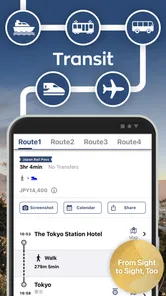
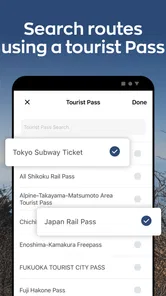
For a Japan itinerary involving rail and Shinkansen travel, the app’s focus is more relevant than a general-purpose map’s broad coverage. It is designed around the kind of trip where the hard part is often choosing a useful sequence of transit legs, not simply locating a place on a street map. The JR Pass support is a reason for pass holders to investigate it, though I would still check whether a particular suggested journey fits my own pass and plans.
Choices, costs, and sensible boundaries
The app is free to install, rated for Everyone, and its current version is 10.12.4; it has been available since September 30, 2013. Optional in-app purchases range from $7.49 to $109.99 per item, so I’d look carefully at what an upgrade includes before paying. If I only need occasional directions, I’d start with the free experience and decide from actual use rather than assuming I need a purchase.
For privacy-minded travelers, I would review the app’s permission prompts and available privacy information on the device and in the store before entering anything personal. I wouldn’t assume that map use requires an account or that particular data is collected or not collected without checking those controls myself. The useful habit is to grant only permissions that make sense for the task at hand, and to avoid putting sensitive personal details into travel notes unless needed.
Unpacking the Essentials
Let’s dive right into what makes Japan Travel – Route,Map,Guide a must-have for your travels. The app is like your personal tour guide, except it fits right in your pocket and doesn’t expect a tip. It covers everything from planning your routes, navigating through bustling cities, and even suggesting must-see attractions.
A Map That Doesn’t Miss a Beat
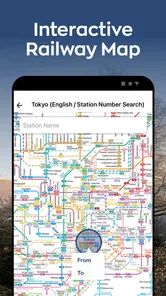
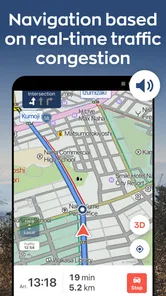
One of the standout features of this app is its detailed map. I mean, who doesn’t like a good map, right? It’s super detailed and makes getting lost nearly impossible. The offline mode is a lifesaver, especially when you're deep in the countryside or in a subway, where Wi-Fi isn’t your best friend. This feature ensures you’re never disconnected from your itinerary.
More From Our News Desk

 Weather - By Xiaomi
Weather by Xiaomi Review: Clear at a Glance, Less Clear Up Close
Xiaomi’s weather app makes everyday forecasts quick to scan, but its calm surface can leave useful details and recovery paths harder to find than they should be.

 X
XX Under Pressure: Can It Recover When Posting Goes Wrong?
A resilience-focused review of X, examining setup, mistaken posts, interruptions, weak connections, and the gaps that matter when recovery needs to be dependable.

 Clash of Clans
Clash of Clans Is Won Between the Battles
Its raids are quick; its community is a long-term project of coordination, teaching, rivalry, and shared responsibility—with all the friction that entails.

 Android Auto
Android Auto Makes the Case for Quieter Car Software
The car interface is no longer judged by how much it can do, but by how quietly it helps. Android Auto shows what drivers now expect—and what still gets in the way.

 MobiOffice: Word, Sheets, PDF
MobiOffice: Transforming Mobile Productivity with Seamless Integration
MobiOffice: Word, Sheets, PDF is redefining mobile productivity with a surprising blend of functionality and innovation.

 EA SPORTS FC Soccer Mobile 26
EA SPORTS FC™ Mobile Soccer: Redefining Mobile Sports Gaming
Dive into EA SPORTS FC™ Mobile Soccer, where immersive gameplay and strategic depth transform mobile sports gaming.
Latest News



For a cautious traveler, I’d distinguish between having a map available and having every part of a journey work without a connection. I’d check the specific areas and route information I need before travel, then keep the important station names in a separate note. That way, the map can be useful without becoming my only fallback if a signal drops or I need to change plans quickly.
Planning Made Easy
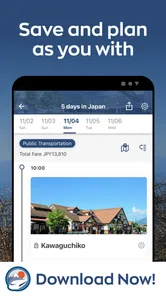
Planning a trip can sometimes feel like solving a jigsaw puzzle. But with this app, it’s more like putting together a LEGO set, fun and straightforward. The route planner is intuitive; just pop in your start and end points, and voilà, you’ve got a plan! It even suggests alternate routes, which is great if you’re looking to explore off the beaten path.
A realistic way I’d use that planner is to compare the outward journey with the return before committing to a day trip. The quickest-looking route is not automatically the best fit if it involves a station change that feels awkward with luggage or leaves little room for a missed connection. I’d save enough time to review the options calmly, then use the app for navigation while keeping my key destination details handy.
Your Personal Guide
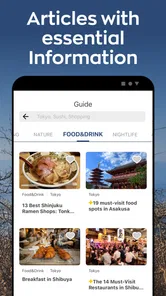
Besides maps and routes, the app also acts as a guidebook. It offers insights and tips on local attractions, dining spots, and cultural sites. The recommendations are spot-on, and I found myself venturing into places I wouldn’t have discovered otherwise. It’s like having a local friend who knows all the hidden gems.
This guidebook angle makes it more useful for visitors who want to balance famous sights with a little wandering. I would use its suggestions to build a shortlist, not a rigid schedule: choose one or two nearby stops, then leave space for a meal or a detour. That approach makes the app’s discovery role complement its route planning instead of turning every hour into another navigation task.
Language Isn’t a Barrier
Language barriers can be daunting, but this app helps bridge that gap. It provides essential phrases and even translates signs and menus. You can order your sushi in Japanese, and how cool is that? This feature alone can significantly enhance your travel experience, making interactions smoother and more enjoyable.
For anything important—such as confirming a destination or understanding a travel notice—I’d avoid treating a quick translation as the final word. I’d cross-check details when the meaning affects where I’m going or what I’m agreeing to. The app can help me get started, but it is sensible to use a dedicated translation option or ask for clarification when nuance matters.
Compared with a general map app, this one is most compelling when the question is how to connect places by Japanese transit and rail. A standard map may be the better choice for everyday street directions in a familiar city, while a dedicated translation tool may be more dependable when a sign or menu needs careful interpretation. I’d use each for the task it handles best rather than expect one travel app to replace every tool.
Making a day trip manageable
Picture a day when I’m staying in Tokyo and want to visit a destination farther out, with a Shinkansen leg and local transit at the other end. I’d look up the journey before breakfast, compare the available route choices, and check the return while I still have time to adjust the plan. Once I’m on the move, I’d use the app for the next leg rather than trying to follow a full-day schedule minute by minute.
The useful trade-off is that planning one connection at a time keeps the day flexible, while checking the return early can stop me from discovering too late that the last part of the trip needs more attention. I’d keep the destination written in a form I can show someone, along with my hotel address, and leave a little margin for finding the right platform. That’s not a feature of the app; it’s a practical way to use any route planner without letting a screen dictate the pace of the day.
What I would test before a busy travel day
I’d start by entering a route between two places I already know, then try a less familiar trip that includes a transfer. This lets me see whether the route presentation is clear to me before I have to make a decision in a crowded station. I’d also check how I move between the map, route results, and guide information, since the app is most useful when those pieces fit naturally into my own planning routine.
If I’m traveling with someone else, I’d agree on a simple meeting point before splitting up rather than relying on both people to interpret a changing route in the same way. For a group, the app can help compare a transit plan, but it does not remove the need to settle practical details such as where to regroup. I’d use its suggestions to inform the plan, then make the plan understandable to everyone in the group.
Who will get the most from it
I’d recommend trying it if you’re planning a first visit, expect to use trains frequently, or want route planning and travel suggestions in one place. It also makes sense for someone with a JR Pass who wants to explore transit options before heading out. If your trip is mostly a single neighborhood, you already have a navigation routine you trust, or you prefer to plan every transfer manually, it may add more than you need.
It is especially appealing to travelers who find Japan’s rail choices more intimidating than its street map: people comparing a few possible connections, visitors trying to fit sightseeing around transit, and pass holders who want to investigate route options in advance. It is less compelling if I only need a pin for one restaurant, if I already depend on a different route tool that suits me, or if I want a single app to handle every language and travel decision without cross-checking.
That distinction matters because a feature-rich travel companion can make a trip feel easier while still asking the traveler to make the final call. I’d use it to narrow down choices, not to assume every suggested route is automatically the right one for my luggage, timing, mobility, or pass. When those personal constraints matter, I would compare the options and choose the one that feels workable, even if it is not the shortest-looking route.
Small habits that make the app more useful
One useful habit is to search for a destination by a clear name and keep its address or station name separately, especially if several places have similar names. Before heading out, I’d confirm that the route result points to the location I actually intend to visit. This quick check helps avoid a common travel mistake: navigating efficiently to the wrong branch, entrance, or nearby place.
I’d also avoid packing too many stops into one route search. Breaking a complex day into a few manageable legs makes it easier to see where a transfer or detour affects the rest of the plan. If something changes, I can then revisit only the next part rather than untangling an itinerary that was planned as one long chain.
For travelers watching costs, I’d treat the paid options as something to assess after trying the free app for the tasks I actually have. Since in-app purchase prices vary substantially, I would read the purchase details carefully and decide whether the specific benefit solves a real problem for my trip. A short visit with a few familiar journeys may not justify paying; frequent transit planning could make a paid option worth considering if its terms match what I need.
For a busy day, I’d check the route from my hotel to the first stop over breakfast, note the destination name, and then look up the next leg after arriving rather than repeatedly rebuilding the whole day. That gives me a useful balance: the app helps me adapt, while a short offline note provides a fallback if I’m distracted or have poor reception. I’d also test the map and route workflow before relying on it in an unfamiliar station.
A cautious final take
As a navigation app built around travel in Japan, this is a focused option rather than a universal replacement for maps, transit information, and translation tools. I like the combination of route planning, rail relevance, and travel-guide material, but I would keep my expectations practical: suggestions still need to be checked against my own destination, timing, and travel needs. Its strongest case is for someone preparing to move around Japan by public transport, not for someone who only needs occasional local directions.
On trust and control, my approach would stay simple: check the permissions the app requests, read the privacy information available to me, and make choices deliberately before sharing personal details. I would not treat a popular rating or a long history of availability as a substitute for reviewing those choices. The app can earn a place in my travel toolkit while I keep a separate fallback for essential addresses and important plans.
In conclusion, if you’re heading to Japan, Japan Travel – Route,Map,Guide should be on your download list. It’s comprehensive, user-friendly, and packed with features that will make your trip unforgettable. So why wait? Download it now and start your adventure. Trust me, you’ll thank me later!
Japan Travel–Trip & Shinkansen Frequently Asked Questions
Does Japan Travel – Route, Map, Guide support English-speaking travelers?
Japan Travel – Route, Map, Guide is aimed at helping visitors plan journeys around Japan, and its travel-planning focus may be useful if you are unfamiliar with local routes. The app includes guidance for transit and Shinkansen trips, with support for JR Pass holders. If you are downloading it for a trip, consider whether its route-planning tools fit the way you expect to travel and the destinations on your itinerary.
Can I use Japan Travel – Route, Map, Guide to plan a Shinkansen journey with a JR Pass?
Yes, planning transit and Shinkansen trips with JR Pass support is central to the app’s stated purpose. That makes it relevant for travelers organizing rail journeys across Japan, especially those who want to consider their pass while planning routes. The app is a navigation and travel-planning tool rather than simply a general destination guide, so its rail-planning focus is worth keeping in mind before downloading.
Is Japan Travel – Route, Map, Guide free to download, and does it include paid features?
Japan Travel – Route, Map, Guide is free to download, so you can try its travel-planning tools without an upfront purchase. It also offers in-app purchases, which may matter if you want access to additional features or services. The app is a Maps & Navigation tool from NAVITIME JAPAN CO., LTD., and its focus is helping travelers plan transit and Shinkansen trips in Japan, including support for JR Pass holders.
What is the primary purpose of Japan Travel – Route, Map, Guide app?
The Japan Travel – Route, Map, Guide app is designed to assist travelers in navigating Japan with ease. It provides detailed maps, route planning features, and comprehensive guides to popular destinations across Japan. Whether you're using public transport or exploring on foot, the app aims to enhance your travel experience by offering up-to-date information and personalized travel tips. Its store summary emphasizes transit and Shinkansen trip planning, with JR Pass support, making it especially relevant for visitors organizing rail journeys.
How user-friendly is the Japan Travel app for first-time visitors to Japan?
The app is especially user-friendly for first-time visitors to Japan. It includes intuitive navigation, easy-to-understand instructions, and a user interface that accommodates multiple languages. The app also offers offline maps and guides, which are invaluable for travelers without constant internet access. Users can quickly find routes and attractions, making the app an essential tool for newcomers. Its general-audience age rating also makes it suitable for a broad range of travelers.
Pros
- Comprehensive travel guide features.
- Offline maps for easy navigation.
- Customizable itineraries.
- Real-time train updates.
- User-friendly interface.
Cons
- Limited language options.
- Ads can be intrusive.
- Requires regular updates.
- Battery consumption is high.
- Offline features are limited.











