Jacquie Lawson Ecards
- 2.72K
- 4.7
- Installs
- 500.00K
- Price
- Free

Screenshots
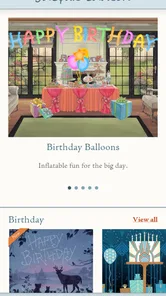
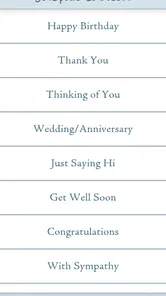
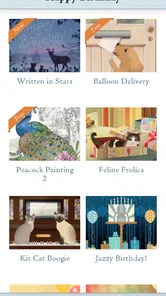

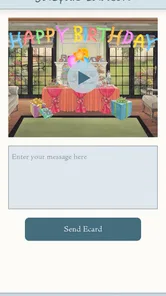
Analysis by Reviewed
Sending a thoughtful card is still one of the simplest ways to make someone feel remembered, but finding the time, choosing the right design, and dealing with postage can turn a small gesture into a chore. Jacquie Lawson Ecards takes a more polished route: it gives me animated digital cards that I can browse and send from a phone or tablet. After spending time with it, I see the appeal immediately, especially for birthdays, thank-you messages, seasonal greetings, and those occasions when a plain text message feels too casual.
The important question, though, is whether the app remains useful after the first burst of attractive animations wears off. My answer is qualified but positive. It works best as a ready-to-use source of elegant greetings, not as a complete replacement for handwritten cards or personal messages. The strongest value comes from reducing the effort between remembering an occasion and actually sending something that feels deliberate.
What the first week feels like
The first thing I noticed was how quickly the app communicates its purpose. It is a Lifestyle app from Microcourt Limited, and the experience is centered on browsing animated ecards rather than making me learn a complicated editing system. That focus is helpful. I can look through the available designs, consider the mood, and move toward sending without getting lost in unrelated tools.
The animation gives these cards more presence than a static image. A traditional digital greeting can sometimes feel like a picture attached to a message, while an animated ecard creates a small moment of presentation. That difference matters when I am sending a greeting to someone who appreciates visual detail or enjoys classic illustration. The designs feel more like finished cards than blank templates waiting for me to do creative work.
I particularly like the app for situations where the relationship matters but I do not have a long message to write. A birthday greeting for a distant relative, a quick note to an older friend, or a seasonal message to several people can all benefit from a card that carries some of the emotional weight. I still add my own words, but I do not have to build the entire atmosphere from scratch.
There is also a practical advantage over searching the web for a random animated greeting. General image searches often lead to inconsistent quality, awkward formatting, or pages that are difficult to use on a phone. Here, the browsing experience is designed around sending cards. That makes the decision process more contained and less distracting.
My advice during the first session is not to choose the first attractive design automatically. I would browse with the recipient in mind: formal or playful, warm or understated, seasonal or suitable for an ordinary thank-you. The animation can be charming, but the wrong tone still feels wrong. A beautiful card that does not match the person is less effective than a simpler one selected thoughtfully.
More From Our News Desk

Weather by Xiaomi Review: Clear at a Glance, Less Clear Up Close

X Under Pressure: Can It Recover When Posting Goes Wrong?

Clash of Clans Is Won Between the Battles

Android Auto Makes the Case for Quieter Car Software

MobiOffice: Transforming Mobile Productivity with Seamless Integration

EA SPORTS FC™ Mobile Soccer: Redefining Mobile Sports Gaming
The app is free to install and is suitable for Everyone, which makes it easy to try without committing money immediately. Its current version is 1.2.0 and it works on operating systems starting with version 9. That broad compatibility is useful if I am sending cards from an older device rather than a recent flagship phone.
Why the presentation matters
Animation is not just decoration here. It changes the rhythm of receiving the card. Instead of seeing everything at once, the recipient gets a small visual sequence, which can make the greeting feel more like an event. That is the main reason I would choose this app over a standard image attachment.
At the same time, animation is also the first point where personal taste becomes important. Some people love an elaborate greeting; others prefer a short message that appears instantly. If the recipient usually ignores decorative content or has limited patience for opening a card, a normal text message may be the better choice.
One useful workflow is to separate selection from sending. I can browse when I have a quiet moment, identify a few designs that fit different types of occasions, and then return when a real birthday or celebration arrives. This avoids making a rushed choice while I am already thinking about a deadline. It also helps me avoid sending a card that looks attractive but says very little about the person receiving it.
Does it earn a place month after month?
The first-week appeal is easy to understand, but recurring value depends on whether the app becomes part of a real habit. In my experience, it has a reasonable chance of doing that for people who regularly send greetings to family, friends, colleagues, or clients. It is less compelling for someone who sends only one card every few years.
The app has reached over 500 thousand installs, with an average rating of 4.7 from around 23 thousand ratings. Those figures suggest that the basic idea connects with a substantial audience, although popularity alone does not guarantee that every design will suit every recipient. I would treat the app as a dependable card cupboard rather than an unlimited source of perfectly personal messages.
Its recurring value comes from convenience with a little visual polish. I do not need to remember where I found a particular greeting online, resize an image, or wonder whether it will display properly as a card. When an occasion appears on my calendar, the app gives me a focused place to start.
A realistic example is a busy week in which three people have birthdays close together. I might not have time to shop for physical cards, write separate long letters, and visit a post office. With this app, I can choose a different animated design for each person, write a short personal note, and send the greetings while the dates are still fresh in my mind. The convenience does not replace thoughtfulness; it makes acting on that thought more likely.
Another good use is maintaining contact across distance. A family member living in another country may receive messages through several services already, but a dedicated ecard can feel more intentional than another chat notification. For people who are not comfortable with elaborate digital tools, a card-based experience is also easier to understand than a social-media post or a shared photo album.
There is a trade-off when comparing it with ordinary alternatives. Messaging apps are faster and better for back-and-forth conversation. Email is more flexible when I need to include a long update, documents, or several photos. Physical cards remain stronger when the recipient values something they can hold onto. Jacquie Lawson Ecards sits between these options: more expressive than a plain message, less tangible than paper, and more focused than a general communication app.
That middle position is its strength and its limitation. I would keep it available if I often need polished greetings, but I would not rely on it for every kind of personal communication. The app earns recurring space when it solves a repeated problem, not simply because the animations look pleasant during the first session.
Where paid choices fit
The app itself is free, while in-app purchases range from $7.99 to $35.99 per item. That makes the initial decision straightforward: I can explore the experience before deciding whether paid content fits my habits. Still, the purchase model deserves attention because the value depends on how often I send cards and how much variety I expect.
For someone who sends many greetings throughout the year, paying for designs may feel more reasonable than repeatedly buying physical cards. For someone who sends only occasional messages, free access may be enough, or the purchase may feel unnecessary beside a normal text. I would judge the cost by the number of occasions I genuinely use it for, not by the novelty of having more designs available.
A practical way to avoid buyer’s remorse is to identify the occasions that actually recur in my life. If I mainly need birthday and holiday greetings, I should assess whether the available style matches those recipients before spending. If my contacts prefer casual jokes, minimalist notes, or highly personal photographs, a paid animated collection may not provide the right kind of variety.
I also would not purchase simply to solve a last-minute panic. The best result comes from choosing a card that fits the person, and rushed browsing can reduce that advantage. The app is most useful when it supports a small communication routine rather than becoming another digital impulse purchase.
The maintenance burden is low, but not zero
One reason I can imagine keeping this app installed is that it does not demand daily attention. It is not a social network that expects regular posting, and it does not need to become a major part of my schedule. Its maintenance is mostly mental: remembering to use it before an occasion passes.
That sounds minor, but timing is central to the experience. A card sent late can still be appreciated, yet the app cannot create the habit for me. I get more value when I connect it with a calendar, a contacts list, or a monthly reminder. The useful routine is simple: check upcoming occasions, choose a card early enough to think about the wording, and send it before the day becomes crowded.
My preferred approach would be to keep a small personal note outside the app about the tone each recipient likes. One person may enjoy elaborate animation, while another may respond better to a restrained greeting. This is a non-obvious but important limitation of any card library: it can offer presentation, but I still have to supply knowledge of the relationship.
Another maintenance issue is keeping expectations realistic. An animated ecard can make a message look finished, but it should not become a substitute for writing anything personal. Even a sentence referring to a shared memory, a recent conversation, or a specific reason for appreciation makes the card feel less generic. The app saves time on design; it does not remove the need for a human thought.
Because the app supports older operating systems from version 9 onward, it may be a practical option for households with mixed devices. I would still make sure the sender and recipient are comfortable opening animated content, particularly when the recipient is less familiar with app-based greetings. The experience is only successful if the card is easy for both sides to enjoy.
Small frictions that affect regular use
The focused design can feel limiting if I want to create something from the ground up. I do not approach this as a graphic-design editor, scrapbook tool, or photo-collage maker. If my goal is to combine personal images, record a voice message, or control every visual detail, another app will likely suit me better.
Browsing can also create decision fatigue. A collection of attractive cards is helpful until every option begins to look equally suitable. I find it easier to decide when I start with the recipient and occasion instead of scrolling without a purpose. A short list of criteria—warm, formal, funny, seasonal, or appreciative—turns browsing into a quicker task.
The animated format may also be less convenient in situations where the recipient has limited connectivity or prefers immediate text. A simple message has fewer steps and is easier to revisit in a conversation thread. This app is at its best when the recipient is willing to pause for a greeting rather than skim it between other notifications.
The number of reviews, around 2.7 thousand, indicates that plenty of users have taken the time to discuss their experience, but I would still make my decision based on my own communication style. A strong average rating can reflect broad satisfaction with the concept while hiding a personal mismatch with the designs or payment approach.
Who should use it, and who should skip it?
I would recommend Jacquie Lawson Ecards to people who want their digital greetings to feel more considered than a copied image or a one-line text. It is especially suitable for users who send cards repeatedly, appreciate illustrated presentation, and prefer selecting a finished design rather than learning creative software.
It is also a good fit for someone who often remembers occasions at the last practical moment. The app cannot fix poor planning completely, but it shortens the path from “I should send something” to an actual card. That can be valuable for long-distance relationships, extended families, and people who want to acknowledge occasions without buying and storing physical stationery.
I would suggest skipping it if your priority is maximum personalization. A photo card made with your own images, a handwritten note, or a carefully written email will communicate more individual detail. I would also skip it if you dislike animated greetings, rarely send cards, or want one app to handle conversations, reminders, photo sharing, and event planning together.
For professional use, I would be selective. A polished card may be suitable for a warm thank-you or a seasonal message to a small group, but the tone should match the relationship. It is not automatically appropriate for every workplace situation, and a concise email may be clearer when the message includes practical information.
My long-term verdict
After the novelty fades, this app still has a defensible role because it solves a specific recurring problem: sending a digital greeting that feels more like a card than a notification. Its lasting value is not the animation alone. It is the combination of a focused browsing experience, ready-made presentation, and enough convenience to help me follow through on occasions I might otherwise overlook.
I would keep it installed if I had a regular circle of people to remember and a genuine preference for illustrated ecards. I would use it alongside messaging and physical cards, not instead of them. The most effective routine is to plan ahead lightly, choose for the recipient rather than for myself, and add a personal sentence before sending.
The free entry point makes trying it easy, while the paid items require a more deliberate decision. The main weaknesses are equally clear: limited creative control, possible browsing fatigue, and a format that will not suit everyone. Those are not deal-breakers, but they mean the app should earn its place through actual use rather than staying installed as a novelty.
My final view is that Jacquie Lawson Ecards is worthwhile for people who want a dependable source of elegant animated greetings and who send them often enough to build a habit. It is less convincing for occasional users or anyone seeking deeply personal, handmade communication. Used with a little planning and a genuinely personal note, it gives ordinary digital greetings more warmth without turning the act of sending them into a project.
Jacquie Lawson Ecards Frequently Asked Questions
Can I browse the cards before paying for Jacquie Lawson Ecards?
The app is free to download, and you can browse its animated ecard collection to see the styles and occasions available. Access to the complete collection generally depends on the subscription or purchase options offered in your region, so viewing cards does not necessarily mean every design is available to send at no cost. Check the options shown in the app before choosing a card.
What kinds of occasions and card designs can I find in the app?
Jacquie Lawson Ecards features illustrated, animated greetings for occasions such as birthdays, anniversaries, holidays, thank-you messages, and weddings, as well as other moments worth marking. Many cards include music, interactive scenes, and an artistic presentation. The collection is intended for people who want a greeting with more visual personality than a plain text message or a static image.
Does Jacquie Lawson Ecards work on my phone or tablet?
Jacquie Lawson Ecards is available for Android and iOS devices, and its minimum operating-system requirement is version 9. Before downloading, check your device’s software version and make sure the app is offered for your device in its app store. Keeping your operating system up to date can also help with compatibility and provide a smoother experience when browsing animated cards.
Who makes Jacquie Lawson Ecards, and what kind of app is it?
Jacquie Lawson Ecards is a Lifestyle app developed by Microcourt Limited. It is intended for browsing and sending animated ecards, with illustrated designs for a range of occasions. The app has an Everyone age rating, making it suitable for a broad audience. Its focus is on offering a more expressive digital greeting than a plain text message.
What is Jacquie Lawson Ecards?
Jacquie Lawson Ecards is a digital greeting card app and service featuring illustrated, animated cards for birthdays, anniversaries, holidays, thank-you messages, weddings, and other occasions. Many cards include music, interactive scenes, and a polished artistic style associated with the Jacquie Lawson brand. It is designed for sending more personal digital greetings than a basic text message or static image.
Pros
- Beautifully animated cards with polished artwork and music.
- Large catalog covering birthdays
- holidays
- and special occasions.
- Personalized messages make cards feel more thoughtful.
- Scheduled delivery helps you plan greetings in advance.
- Works well for sending cards internationally without postage.
Cons
- A paid membership is required for the full card collection.
- Some animations may take time to load on slower connections.
- The app offers limited options for creating fully custom designs.
- Recipients may need a modern device for the best visual experience.
- Subscription renewal terms should be checked before starting a trial.












