

iParkit Garage Parking
- 451.00
- 4.4
- Installs
- 100.00K
- Price
- Free

Screenshots
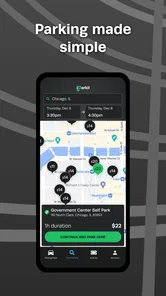
Analysis by Reviewed
Finding a parking garage in an unfamiliar downtown area can turn a simple trip into a frustrating loop around crowded streets. I tried iParkit Garage Parking with that exact problem in mind: I wanted something focused on parking rather than a general map packed with restaurants, traffic layers, and unrelated recommendations. My overall impression is that this is a practical Maps & Navigation app for people who already know they are heading into a busy area and want parking to be part of the plan instead of an afterthought.
The app is free, aimed at everyone, and developed by InterPark. It has reached more than 100 thousand installs, with an average rating of 4.4 from roughly 3.5 thousand ratings. Those figures suggest that it has found a useful place among drivers looking for a more direct parking experience. I would not describe it as a complete replacement for every navigation tool, but it can make the parking stage of a downtown journey feel more deliberate and less improvised.
What to expect before you rely on it
The first thing to understand is the app’s narrow purpose. It is not presented as a broad travel planner or a general-purpose map service. Its value is in helping you think about garage parking before you arrive at the most congested part of a trip. That focus is welcome, especially when a normal map app gives you a long list of businesses and roads but does not make parking the central task.
In everyday use, I would open it before leaving home, while planning a visit to a downtown office, or shortly before entering an area where street parking is likely to be inconvenient. The useful habit is to treat the app as a parking-planning step, not something to launch only after I am already circling the block. That small change makes the experience calmer because I can consider the parking destination before traffic and one-way streets start competing for my attention.
The name also sets a sensible expectation: this is about garage parking. If you specifically want a free curbside space, a detailed street-by-street parking rule guide, or a broad route planner that handles every part of a journey, another app may be a better primary tool. I see this app working best alongside the navigation service I already use, with iParkit handling the parking decision and the other service handling the drive itself.
That distinction matters for first-time users. A parking-focused app does not need to solve every transportation problem to be useful. Its job is smaller: help me move from “I need to park downtown” to “I have a garage option worth considering.” When I judge it by that standard, the focused approach makes more sense than expecting it to behave like a full travel platform.
Who will get the most from it
I think the strongest audience is a driver visiting a busy central area for work, shopping, an appointment, or an evening out. It is particularly helpful when the destination is familiar but the parking situation is not. I may know the building I want, yet still have no idea where I should leave the car. A dedicated parking tool reduces that mental gap.
More From Our News Desk

 Weather - By Xiaomi
Weather by Xiaomi Review: Clear at a Glance, Less Clear Up Close
Xiaomi’s weather app makes everyday forecasts quick to scan, but its calm surface can leave useful details and recovery paths harder to find than they should be.

 X
XX Under Pressure: Can It Recover When Posting Goes Wrong?
A resilience-focused review of X, examining setup, mistaken posts, interruptions, weak connections, and the gaps that matter when recovery needs to be dependable.

 Clash of Clans
Clash of Clans Is Won Between the Battles
Its raids are quick; its community is a long-term project of coordination, teaching, rivalry, and shared responsibility—with all the friction that entails.

 Android Auto
Android Auto Makes the Case for Quieter Car Software
The car interface is no longer judged by how much it can do, but by how quietly it helps. Android Auto shows what drivers now expect—and what still gets in the way.

 MobiOffice: Word, Sheets, PDF
MobiOffice: Transforming Mobile Productivity with Seamless Integration
MobiOffice: Word, Sheets, PDF is redefining mobile productivity with a surprising blend of functionality and innovation.

 EA SPORTS FC Soccer Mobile 26
EA SPORTS FC™ Mobile Soccer: Redefining Mobile Sports Gaming
Dive into EA SPORTS FC™ Mobile Soccer, where immersive gameplay and strategic depth transform mobile sports gaming.
Latest News



It can also suit occasional visitors who dislike making decisions while driving. Preparing a parking choice in advance means I can keep my attention on the road rather than searching manually at the last moment. For a friend visiting downtown for the first time, I would recommend checking the app before departure and noting the garage that appears most practical for the destination.
On the other hand, I would not make it my only app for a long road trip, rural travel, or a journey where parking is incidental. Someone who mainly needs turn-by-turn directions may find a conventional navigation app more convenient. Likewise, a person who always uses a known private garage may gain little from installing another parking tool. The benefit appears when the parking choice itself is the uncertain part of the trip.
From installation to the first useful result
The app has been available since March 31, 2016, and the current version is 4.3.20. It supports devices running Android 7.0 or later. That makes the first check straightforward: before expecting anything from the app, I would confirm that the phone meets the minimum operating-system requirement and that the device has a reliable connection when I plan to search.
Because it is free, there is no purchase decision blocking the first test. I would install it before a planned downtown visit rather than waiting until I am parked at the curb with limited time. The best first session is not a random experiment; it is tied to a real destination I already intend to visit. That gives the app a fair test and lets me judge whether the parking result is genuinely useful for my route.
After opening it, I would begin with the simplest possible goal: identify the area where I need to park. I would avoid trying to explore every screen immediately. A first-time user usually learns more by entering one real destination and checking whether the available parking options make sense for the visit. If the result is useful, I can then compare alternatives instead of becoming distracted by settings or secondary information.
A small but important preparation tip is to think about the walking endpoint, not only the driving endpoint. A garage can be convenient for the car but awkward for the actual appointment if it leaves me far from the building or on the wrong side of a large downtown block. I would use the app to create a shortlist, then consider which option best matches where I will finish the trip on foot.
How I would handle the first parking search
My recommended first workflow is simple. I choose the destination area, review the garage options, select the one that appears most practical, and then use my usual navigation app for the drive if I need detailed route guidance. This division of labor avoids forcing one app to do everything. iParkit helps answer the parking question; my established navigation tool remains responsible for the road journey.
For a realistic example, imagine I am driving downtown for an appointment during a busy weekday. Before leaving, I open the app and look for a garage close enough to the destination that the final walk will be manageable. I compare the available choices instead of automatically selecting the first one. Once I have a preferred garage, I switch to my normal route planner and keep the parking decision in mind while driving.
The first meaningful success is not merely seeing a garage on a screen. It is reaching the point where I know which parking option I am aiming for and no longer need to improvise as soon as I enter downtown. That is the practical payoff I would look for. If the app helps me make that decision early, it has already done something valuable even before I arrive.
I also recommend checking the result while stationary. Searching before departure or after pulling over is safer and more comfortable than trying to compare options while moving. This sounds obvious, but parking searches often happen under pressure, when a driver is already surrounded by traffic. Planning ahead turns the app from a distraction into a useful preparation tool.
Three details that improve the workflow
First, I would not judge a garage only by its apparent proximity. The closest option may not be the easiest one to reach because downtown streets can involve one-way systems, restricted turns, or entrances that are not on the side I expect. I use the app to identify candidates, then let the driving route and the final walking direction influence the decision. This two-stage check is more reliable than treating the map position as the whole answer.
Second, I would prepare a backup before starting the drive. A parking choice can become inconvenient if the entrance is difficult to find or the surrounding streets are congested. Having a second candidate in mind means I can adapt without starting the entire search again. The app is more useful when it supports a small plan rather than a single all-or-nothing guess.
Third, I would use it early enough to compare parking with the purpose of the trip. For a short appointment, walking distance may matter more than choosing the most central-looking garage. For a longer visit, a slightly less direct option could be acceptable if it makes the approach easier. The app cannot make that personal trade-off for me, but it gives me a focused set of parking possibilities to evaluate.
Where first-time users may hesitate
The biggest possible confusion is expecting the app to function exactly like a full navigation service. A parking application can help locate or consider garage parking, but I would still want a familiar route tool for detailed driving instructions. Keeping those roles separate makes the experience clearer and prevents disappointment if the parking screen is not designed to replace every navigation feature.
Another point of friction is the difference between finding a garage and knowing every practical detail about the visit. The app can help with the parking choice, but I would still use common sense about entrance location, walking distance, traffic, and the time needed to reach the final destination. I would not assume that the visually nearest option is automatically the fastest or most convenient one in real life.
New users may also wonder whether they should search while already downtown. I think that is the less comfortable approach. If I wait until I am driving slowly through unfamiliar streets, I have less time to compare options and more pressure to accept the first result. My advice is to use the app during trip preparation, then keep a preferred and backup garage in mind before setting off.
The app’s focused design can itself feel limiting if I want a broader travel picture. Someone planning public transport, walking connections, restaurant stops, or a multi-part itinerary may prefer a general map service as the main tool. I would keep iParkit in the toolkit when parking is the difficult piece, not expect it to become the only app on my phone for an entire day downtown.
Questions I would answer before recommending it
If you are wondering whether it costs anything to start, the app is free. That makes it easy to test on one planned journey without committing money first. I would still evaluate it on a real trip rather than installing it only to browse, because the usefulness depends on whether its parking-focused approach fits the places you actually drive.
If you are asking whether it is suitable for a family member or a first-time smartphone user, the Everyone content rating is reassuring. The more important practical consideration is comfort with switching between a parking app and a normal navigation app. I would show a new user the process before the trip: choose the parking option while stationary, then begin the drive with the preferred navigation tool.
If you want to know whether it replaces your usual map app, my answer is no, not for most drivers. I see it as a companion with a narrower purpose. A general map app is usually better for complete directions and broader place searches, while this app is more relevant when the central question is where to put the car near a downtown destination.
If you are unsure whether it is worth keeping installed, I would base that decision on your driving pattern. Frequent downtown visitors, occasional city drivers, and people who dislike searching for garages at the last minute are the most likely to benefit. If you rarely drive into dense areas or already have a dependable parking routine, the app may not become part of your regular habits.
Finally, if the first result does not immediately solve the trip, I would not abandon the app after one rushed attempt. I would repeat the search before another visit, compare the result with the walking endpoint, and prepare an alternative. The most useful experience comes from treating the app as a planning aid rather than a guarantee that every parking decision will be effortless.
My next-step recommendation
After the first successful search, I would make the app part of a repeatable departure routine. Before driving downtown, I check the destination, identify a preferred garage, consider a backup, and then open my normal navigation tool for the road portion. That takes less mental effort than searching from scratch after arriving and gives me a clearer idea of what I am trying to accomplish.
I would also review the app after the trip, while the experience is still fresh. Did the selected garage fit the walking route? Was the approach easy to understand? Did I need the backup? These questions help me decide whether the app is genuinely improving my parking choices. They also prevent me from assuming that the closest-looking result will always be best for a particular destination.
Compared with relying only on a general map, the main advantage here is attention. The app keeps parking at the center of the task, which is exactly what I want when the road destination is easy to name but difficult to park near. Compared with searching manually on the web, it offers a more direct starting point for a parking decision. The trade-off is that I may still need another tool for complete directions and broader trip planning.
InterPark’s app is therefore a sensible choice for a specific kind of driver: someone heading into a downtown area who wants to reduce parking uncertainty before arrival. It is not the right answer for every journey, and I would not use it as my only navigation solution. But for the first-time user who plans ahead, checks the parking options while stationary, and keeps a backup in mind, the most useful habit is choosing the garage before the pressure of downtown driving begins.
My final view is positive but measured. The free price and focused purpose make it easy to try, while the established user base and 4.4 average rating give it a credible starting point. I would recommend it to a friend who regularly faces downtown parking decisions, especially if that friend already has a preferred app for turn-by-turn directions. Used in that supporting role, iParkit Garage Parking can turn the most uncertain part of a city drive into a planned step rather than a last-minute search.
iParkit Garage Parking Frequently Asked Questions
Is iParkit Garage Parking free to download, and what devices can run it?
iParkit Garage Parking is free to download and is rated for everyone. It is an app in the Maps & Navigation category, developed by InterPark. Check your device’s operating system before installing: the app requires version 7.0 or later. Once installed, you can explore its parking features and see which participating facilities are available in your area.
What is iParkit Garage Parking, and how does it work?
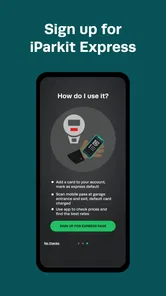
iParkit Garage Parking is a mobile parking app designed to help drivers find and use participating parking garages and lots. After opening the app, you can search for available locations, review garage information, and in some areas reserve or pay for parking digitally. The exact features, availability, and booking process may vary depending on the city and participating facility.
Can I reserve a parking space in advance with iParkit Garage Parking?
In supported locations, iParkit Garage Parking may allow you to reserve a space before arriving at a participating garage. This can be useful during busy periods, events, or commuting hours when parking availability is limited. Before confirming a reservation, carefully check the date, entry and exit instructions, cancellation terms, operating hours, and any restrictions shown for the selected facility.
How do payments work in iParkit Garage Parking?
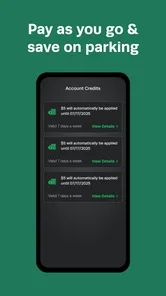
The app may let you pay for parking through a stored payment method, depending on the garage and local service availability. Users should review the displayed price, service fees, taxes, and payment conditions before completing a transaction. Keep in mind that rates can vary by location, duration, time of day, special events, and whether you reserve in advance or pay on arrival.
Does iParkit Garage Parking provide directions and information about each garage?
iParkit Garage Parking can help you locate participating parking facilities and may provide useful details such as the address, operating hours, pricing, availability, entrance information, and navigation options. However, information can change, and some garages may have height limits, vehicle restrictions, or separate entrances for reservations. Always verify the garage details before beginning your trip.
Pros
- Lets you reserve parking before arriving at busy locations.
- Shows garage availability and pricing in one place.
- Digital reservations can reduce time spent searching for a space.
- Useful for event venues
- airports
- and downtown parking areas.
- Mobile booking keeps parking details accessible while traveling.
Cons
- Coverage may be limited to participating garages and cities.
- Displayed availability can change before you reach the garage.
- Reservation fees may increase the total parking cost.
- Some bookings may have strict cancellation or refund policies.
- Garage entrances and directions may still be confusing in heavy traffic.











